Ecommerce SEO Checklist: 15 Fixes Before You Scale
Ecommerce SEO checklist: review crawlability, collections, product pages, content, internal links, and measurement before investing in growth.
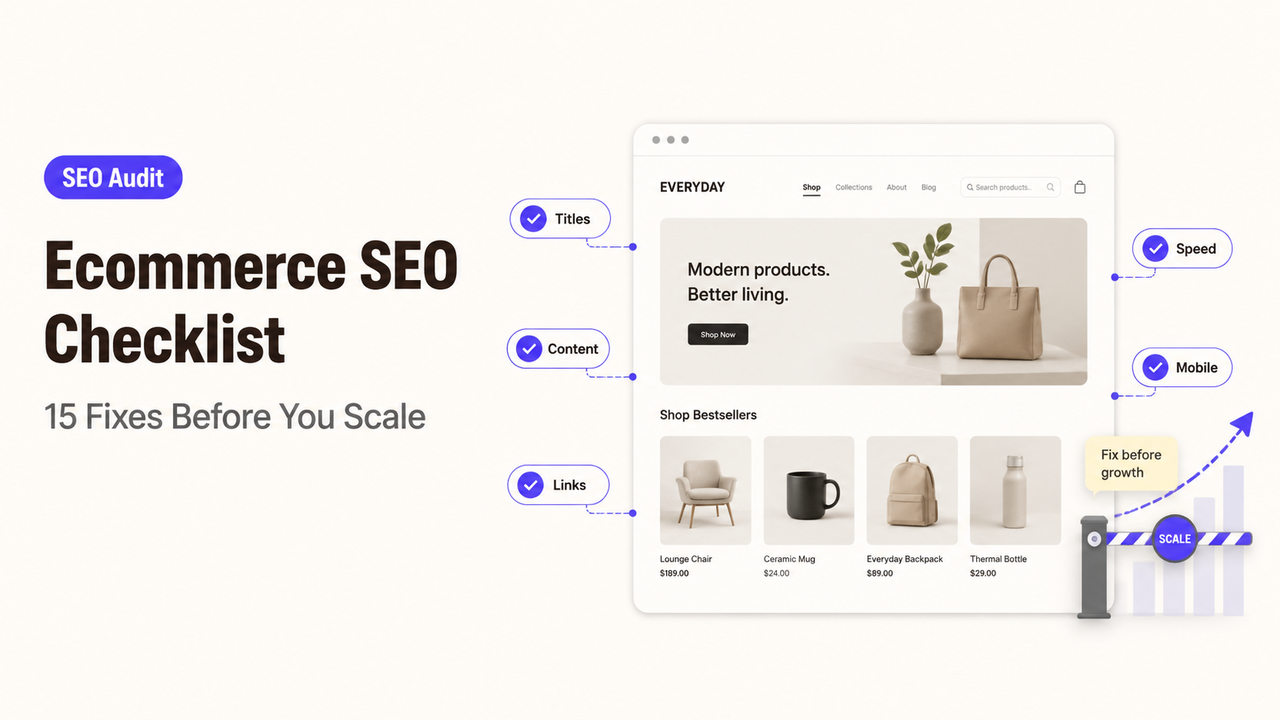
A merchandising team can remove an unavailable product from its collection while Search Console still shows that URL earning impressions. The replacement may sit deeper in the catalog, with no internal link from the category that matters. This ecommerce SEO checklist helps a lean team reconcile those states, then sort 15 checks into blockers, page-quality repairs, and growth work. I’m Alex; I’ll keep each check tied to a warning sign, a next action, and the person who should approve it.
Quick Audit: 15 Ecommerce SEO Checks
Sample the home page, major collections, high-value products, a variant family, an out-of-stock item, and several filtered URLs. Record every result in one sheet.
# | Check | Priority layer | Warning signal | Next action |
1 | Robots and | Blocking | Live inventory is blocked | Confirm intent; remove accidental blocks |
2 | HTTP status codes | Blocking | Errors, soft 404s, or redirect chains | Assign the correct response |
3 | Canonicals and sitemaps | Blocking | Submitted and canonical URLs differ | Align the preferred URL |
4 | Navigation path | Blocking | A product needs site search to be found | Add a crawlable category link |
5 | Faceted URLs | Blocking | Filters create duplicate URL sets | Set crawl and index rules |
6 | Collection intent | Page quality | A category has no distinct purpose | Match one shopping need |
7 | Product information | Page quality | Details are thin or duplicated | Add accurate decision information |
8 | Discontinued products | Page quality | Retired items create dead journeys | Set a retirement rule |
9 | Titles and headings | Page quality | Templates repeat vague labels | Write descriptive titles and H1s |
10 | Internal links | Page quality | Priority products lack relevant links | Add contextual paths |
11 | Variants and duplicates | Page quality | Variant URLs compete without purpose | Set one variant policy |
12 | Product structured data | Growth | Markup conflicts with price or stock | Correct data; retest |
13 | Mobile purchase path | Growth | Filters or options fail | Test the full journey |
14 | Page experience | Growth | Shared assets slow key templates | Diagnose the responsible element |
15 | Measurement and ownership | Growth | Changes lack a URL record or owner | Log owner, change, and date |
Blocking issues can prevent inventory from being discovered or indexed. Page-quality fixes improve what shoppers find. Growth work follows once those layers are stable.
Crawlability, Indexation, and Site Architecture
Open the live robots file, inspect representative URLs, and compare the rendered page with the intended state. A crawl block, noindex, canonical, and redirect perform different jobs. If they disagree, record the URL, observed response, intended state, and owner.
Compare the XML sitemap with canonicals and server responses. A submitted product that redirects, errors, or canonicals elsewhere sends mixed instructions. Correct the inventory or template rule, not isolated URLs. Search Console shows an observed state, not a ranking promise.
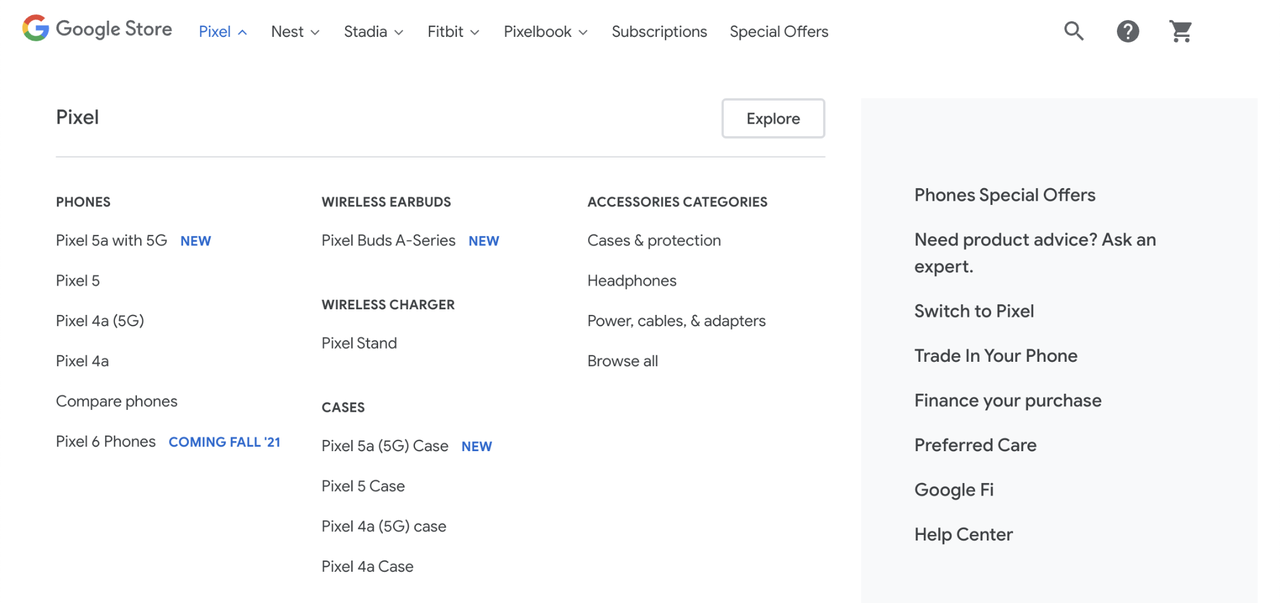
Store architecture also needs a click path. Google’s guidance on crawler-friendly ecommerce navigation recommends linking from menus to categories, from categories to subcategories, and onward to products. If an item can be found only through the store’s search box, do not assume a crawler will submit that search. Give index-worthy products real links, then use a sitemap or product feed as supporting discovery rather than a replacement for usable navigation.
An online store SEO checklist must reconcile search with catalog behavior: permanent collections, seasonal products, pagination, and stock changes.
Category and Product Page Quality
A collection should serve a recognizable shopping task. Give it a descriptive title, useful product set, and enough context to explain the category. If two collections target the same need with nearly identical inventory, decide whether both should exist before rewriting them.
For product page SEO, review the buyer’s decision information: name, images, specifications, price, availability, options, shipping, and returns where applicable. Repeated manufacturer copy adds little store-specific value. Add maintainable details such as fit guidance, compatible uses, original media, or recurring pre-purchase answers.
One template error can duplicate titles, omit product names, or publish stale stock language across many URLs. Test several product types and edge states. The accepted fix should name the template, affected segment, and sample URLs that passed.
Treat unavailable inventory according to duration and replacement quality. A temporary out-of-stock page can remain useful when accurate and paired with a sensible next step. A discontinued item needs a decision based on demand, links, substitutes, and customer value.
Internal Links, Facets, and Duplicate Content
Use navigation, breadcrumbs, collection copy, guides, and related-product modules to reflect merchandising priorities. When a priority item lacks an inbound path outside its collection, the merchandising owner and SEO reviewer should agree where it belongs.
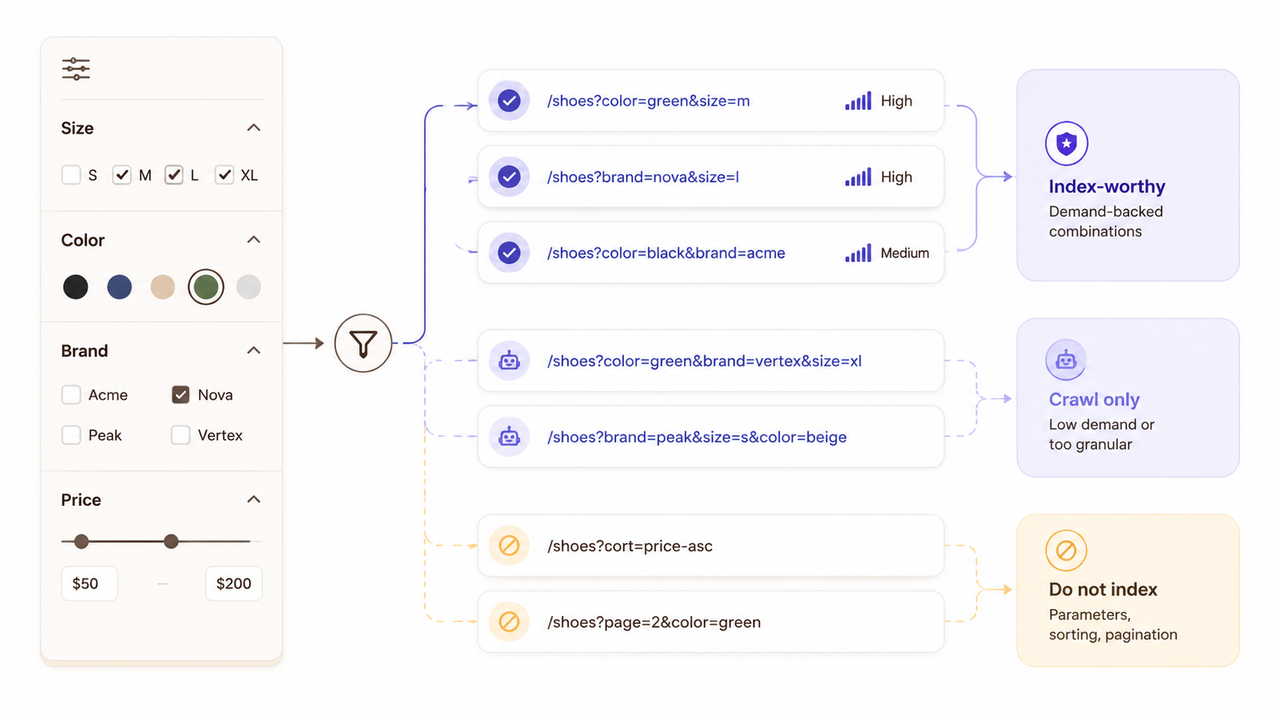
Facets need a written policy. Size, color, brand, price, and availability filters can produce a useful shopping experience while generating a vast number of parameter combinations. Google warns that faceted navigation can create effectively infinite URL spaces, which may consume crawl resources and slow discovery of useful pages.
Index-worthy filtered combinations need search demand, stable inventory, consistent URLs, useful content, internal links, and an owner. Other combinations should not drift into the index because the platform can generate them. Empty combinations need a correct response.
Separate variant URLs can make sense when demand, imagery, availability, or merchandising value differs. Otherwise, one primary product experience may be clearer. Document how links, canonicals, sitemaps, and structured data represent that choice.
Structured Data, UX, and Conversion Signals
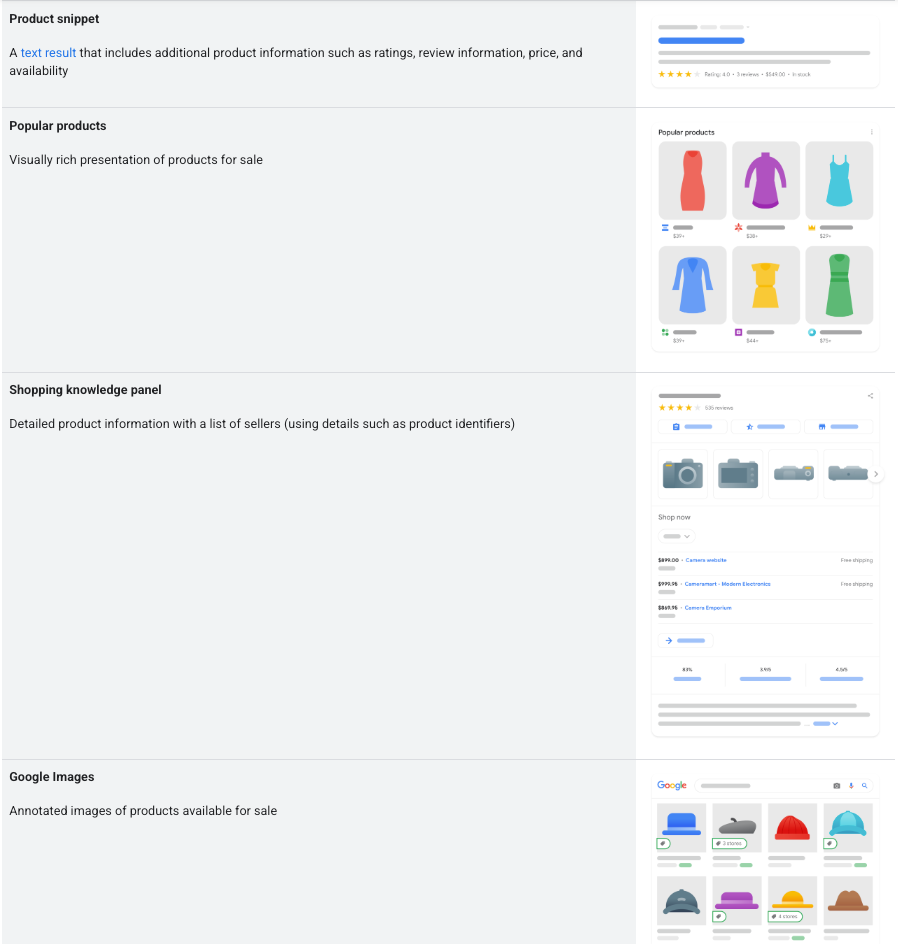
Structured data should repeat visible, accurate product information in a machine-readable form. Google distinguishes product snippets from merchant listings and documents support for product variants in its current Product structured data guidance. Choose the markup that fits the page, include the required properties, and keep price and availability synchronized with what a shopper sees.
Pass the template through the Rich Results Test, then monitor deployed pages. A valid result means the markup can be processed; it does not guarantee a rich appearance or a ranking gain. If the feed says “in stock,” the page says “sold out,” and the markup carries a stale price, the issue belongs with the product-data handoff, not only the SEO ticket.
Follow an actual mobile purchase path: open a category, filter, choose a variant, add the item, and continue toward checkout. Record failures by template and device. Performance work should identify the responsible image, script, app, or component rather than deliver one lab score.
Track impressions, clicks, landing pages, product views, add-to-cart events, and orders as separate stages. A page can attract relevant searches yet lose buyers when the size selector fails; another can convert existing visitors while remaining hard to discover.
Prioritize Fixes and Decide When to Hire Help
Give each finding a URL pattern, evidence, consequence, dependency, owner, and validation step. Then choose its queue:
Queue | Examples | Release condition |
Blocking | Accidental | Intended pages can be crawled and their signals agree |
Page quality | Duplicate collection purpose, thin product details, weak internal path | A shopper can understand the page and reach the next relevant step |
Growth | Structured data expansion, template performance, new indexable collections | Baseline blockers are closed and measurement is working |
A lean team can handle contained fixes when it understands the catalog rules and one person can validate the path. Consider an ecommerce SEO audit for large faceted catalogs, JavaScript dependencies, regional storefronts, migrations, or traffic drops crossing several teams.
The scope should name catalog size, platforms, markets, access, templates, incidents, deliverables, and implementation owner. Require URL- and template-level evidence, prioritized tickets, dependencies, and acceptance criteria. A general audit may miss product feeds, variant logic, inventory states, and merchandising approvals.
When the fixes span catalog, development, and merchandising, compare packaged ecommerce services against one shared brief on SpringBrand.
FAQ
How should discontinued products be handled?
Keep the URL live when it still helps shoppers and can accurately explain the status, suggest close alternatives, or support a planned return. Use a permanent redirect only when there is a genuinely equivalent replacement. If the product is gone and no useful substitute exists, a proper 404 or 410 may be clearer than sending every retired item to a category or home page.
What changes after an ecommerce platform migration?
Rebuild the audit baseline. Preserve an old-to-new URL map, test server-side redirects, update internal links and canonicals, submit current sitemaps, and confirm that staging crawl blocks did not reach production. Google’s site-move guidance also recommends monitoring both old and new properties. Compare catalog templates, analytics events, feeds, and indexation before declaring the migration complete.
Who should approve SEO changes that affect merchandising?
Name one business approver, then require input from the SEO reviewer and merchandising owner. Changes to category labels, product grouping, inventory treatment, internal promotion, or discontinued-item rules can alter both search behavior and the shopping experience. The approval record should state the affected templates or URL groups, the intended outcome, and the rollback condition.
How should international stores handle regional product availability?
Use distinct, accessible regional URLs when price, currency, stock, shipping, or legal availability differs. Keep the visible page, structured data, feed, and regional inventory aligned. Google recommends explicitly connecting localized variants with reciprocal hreflang annotations. Do not send every visitor elsewhere based only on an assumed location; preserve a usable selector and fallback path.
Who should investigate an organic traffic drop after a platform update?
Assign an incident owner who can coordinate SEO, engineering, analytics, and merchandising. Start with the release record, affected landing-page groups, crawl and indexation changes, template responses, internal links, tracking continuity, and catalog-feed status. If the team cannot reproduce the old and new states, keep the incident open; do not let several departments make unlogged fixes at once.
Conclusion
Run this ecommerce SEO checklist before adding more products, content, or acquisition spend, but close it only when each blocking finding has an owner and repeatable validation. Page-quality work can proceed in a controlled queue, and growth tests can follow once the store’s crawl, catalog, and measurement states agree.