- Developer preview
- MIT licensed
- Built on Cordis
 Developer preview
What is DeepSeek Harness (dsh)?Not a new model. The agent runtime around one.
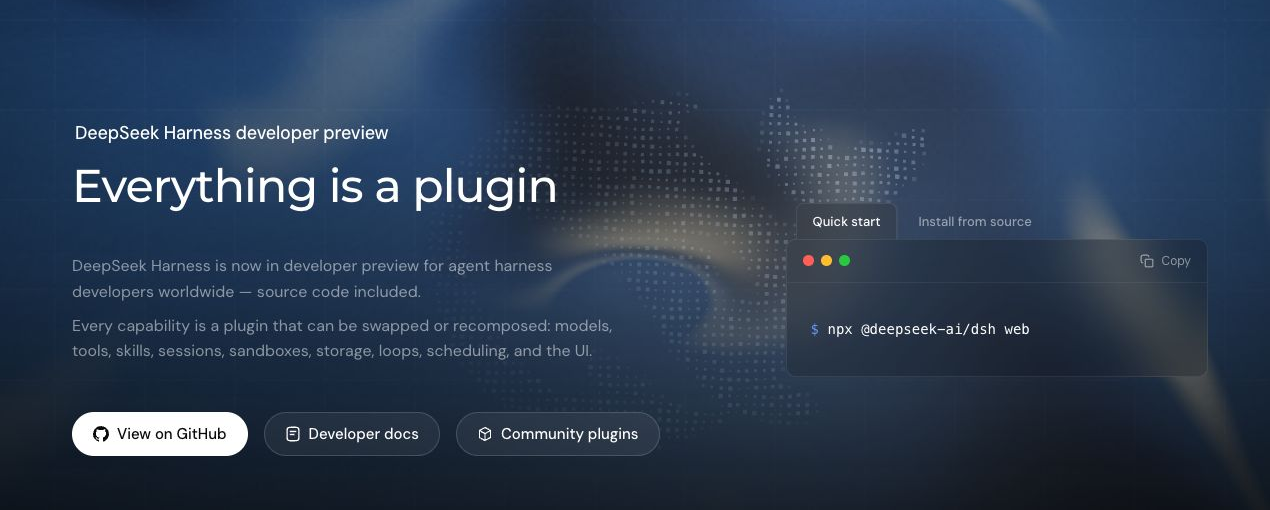
DeepSeek Harness (dsh) is not a new DeepSeek model. It is the open-source agent runtime that sits around a model: the layer that reads your workspace, calls tools, and keeps a run going. Built by DeepSeek AI on the Cordis kernel, every capability inside it, from models and tools to sessions, sandboxes and the agent loop itself, is a replaceable plugin.
npx @deepseek-ai/dsh web
- No beta invite, waitlist or internal testing pass. It is MIT licensed and public, and one command starts it.
- It runs on your own machine at http://127.0.0.1:3080, not on a DeepSeek server.
- The whole prerequisite list is Node.js and one model API key.
Verified 14 August 2026 against dsh 0.1.0-rc.6.
Cordis sits under dsh and does one job: mount plugins, unmount them, and track dependencies. Every product capability — models, tools, sessions, sandboxes, the agent loop — lives in a plugin above it.
You extend dsh by adding a plugin, not by changing a core. Unload the plugin and its registrations go with it. One swap can move a whole capability, such as pointing the filesystem and subprocess at a remote sandbox.
At a glance
- Developer
- DeepSeek AI
- License
- MIT
- Latest npm version
- 0.1.0-rc.6
- Status
- Developer preview
- Kernel
- Cordis
- Language
- TypeScript
- Runtime
- Node.js 22.19+ or 24+
- Repository
- deepseek-ai/deepseek-harness
Model vs harness vs kernel
Model, harness, Cordis: what DeepSeek Harness actually does
Three things get confused here. The model generates text and decides what to do next. The harness, which is what DeepSeek Harness or dsh is, gives that model a workspace, tools, permissions and a memory of the run. Cordis is the plugin kernel underneath dsh that lets any of those parts be mounted, unmounted and swapped.
- 01
The model
Does
Generates the next token, reasons about the task, and decides which tool it wants to call.
Does not
Cannot open a file, run a command, or remember the previous turn on its own. It only emits text.
- 02
The harness (DeepSeek Harness, dsh)
Does
Gives the model a workspace, a tool registry, sandbox and approval policy, an append-only session log, and a loop that keeps the work moving.
Does not
Does not train, host or replace a model. It ships no weights and calls whichever provider you configure.
- 03
The kernel (Cordis)
Does
Mounts, unmounts and reconnects the plugins a running dsh instance is made of, so registrations unwind when their plugin unloads.
Does not
Is not specific to DeepSeek or even to agents. Cordis is a general plugin framework that dsh happens to build on.
Definition
What DeepSeek Harness is
DeepSeek Harness is a framework for building agent harnesses, not a finished coding agent product. It ships a working Web UI and a headless runner, but its real surface is the plugin tree: you pick a profile, stack bundles, and patch individual rows in configuration. It is currently in developer preview, with compatibility-breaking changes expected.
Good for
- Teams that want to own their agent runtime instead of consuming a closed one
- Plugin authors building and publishing capabilities under the dsh-plugin topic
- Model evaluation that needs a stable, minimal tool surface across runs
- Internal platforms embedding an inspectable agent loop behind their own UI
- Anyone who needs to swap a model adapter, sandbox, or storage backend by configuration
Not for
- Production deployments that need API stability today, since core plugins and APIs are still changing
- Serving the Web UI to a network, because the CLI rejects --host 0.0.0.0 and exits with a usage error
- Teams looking for a hosted or managed service rather than software they run themselves
- Users who want a fixed feature set and no configuration surface to reason about
Name collision
Two projects are called DeepSeek Harness. Which dsh do you want?
Two unrelated projects use the name DeepSeek Harness, and both ship a command called dsh. This page covers the official one from DeepSeek AI: TypeScript, installed with npx, serving a local Web UI on port 3080. The other is a community Python client for the DeepSeek V4 API, installed with pip.
The two are unrelated. Different authors, different source trees, different languages, different problem domains. Neither is a rename, a fork, a predecessor or a successor of the other. The community project reached 0.2.0 three months before the official project published 0.1.0, and the two version lines have nothing to do with each other.
DeepSeek Harness (dsh)
deepseek-ai/deepseek-harness
deepseek-ai/deepseek-harnessdeepseek-harness (Python)
HenryZ838978/deepseek-harness
HenryZ838978/deepseek-harness| Attribute | DeepSeek Harness (dsh) | deepseek-harness (Python) |
|---|---|---|
| What it is | An agent harness and runtime, built on the Cordis plugin kernel | A protocol-aware client library for the DeepSeek V4-Pro and V4-Flash APIs |
| Published by | DeepSeek AI, the deepseek-ai GitHub organisation | An independent developer, not DeepSeek AI |
| Language | TypeScript, running on Node.js | Python |
| Install | npx @deepseek-ai/dsh web | pip install deepseek-harness |
| Where it runs | A local Web UI at http://127.0.0.1:3080 | Inside your Python process, as a library plus a CLI |
| Version | 0.1.0-rc.6 | 0.2.0 |
| Repository created | 13 August 2026 | 9 May 2026 |
| License | MIT | MIT |
| Stars | About 33,500, read from the GitHub API on 14 August 2026 | 32, read from the GitHub API on 14 August 2026 |
Everything after this section, including installation, plugins, runtime modes and requirements, describes the official DeepSeek AI project only.
Everything is a plugin
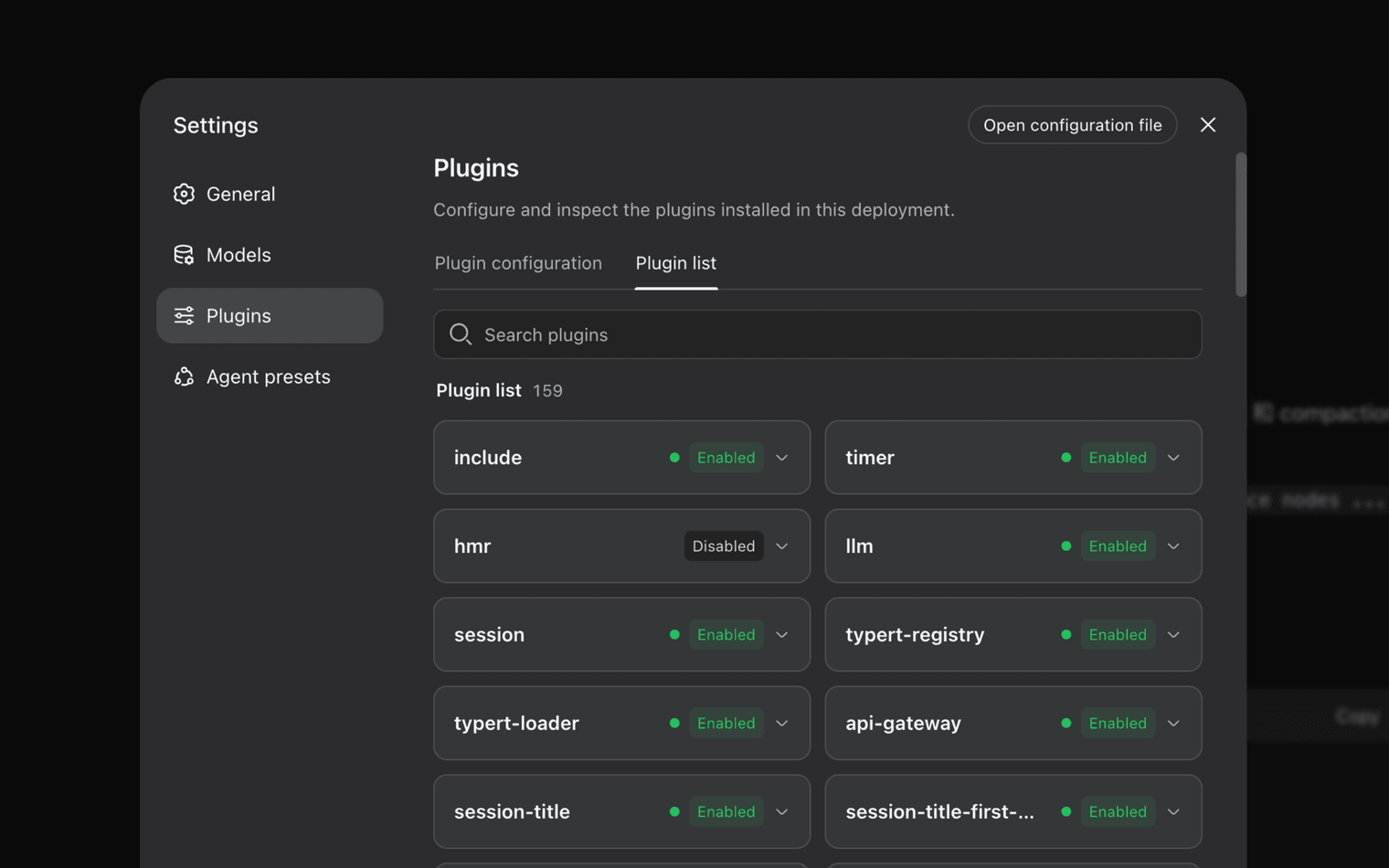
How a DeepSeek Harness runtime is composed
A running dsh instance is a plugin tree composed at boot from ordered layers. Bundle patches apply first in the order the profile lists them, then the profile's own patch file, then the machine-level patch, then any command-line overlay. Later layers win per row, and a patch replaces a row's whole config value rather than deep-merging keys.
Cordis is the framework underneath dsh: plugins contribute services, typed events, and reversible effects to a shared context. The model adapter, tool registry, session log, and the agent loop itself are all plugins, so every part is replaceable from configuration and no privileged core needs patching.
Capabilities are organised as seams. A seam has three roles: a Service Definition that owns the interface, one or more Service Providers that implement it, and Consumers that inject it. Because filesystem and subprocess providers share one execution world, replacing them moves Bash, PTY, and LSP together without forking any consumer.
You can print the tree your own machine boots with dsh web --dump-config, then replace any row it prints with a patch of your own.
- Cordis kernel
- Manages plugin mounting, unmounting, and dependencies, and dispatches the typed events plugins use to collaborate.
- Bundles
- Distribution format for Cordis config rows and the code they mount. dsh-base ships model adapters, tools, persistence, sandbox and approval policy, settings, credentials, and telemetry; dsh-web-app adds the browser application; dsh-headless adds a one-shot runner with no server.
- Profiles
- A named composition stored in the Harness home that lists the bundles it stacks and holds any out-of-tree plugins it installs. The web and headless profiles auto-initialize from shipped templates on first use.
- Patch layers
- The profile's cordis.patch.yml, then the home-level patch shared by every profile, then each --patch overlay in argv order. A patch targets a row by id and replaces its whole config, or inserts new rows.
- Capability seams
- Service Definition, Service Provider, and Consumer roles that make a capability swappable. Adding a capability means designing all three; one role alone is not a seam.
How it works
How DeepSeek Harness runs a task, step by step
Work moves through turns and steps. A step is one model request plus the tools it calls; a turn is zero or more steps, opening when input is claimed and closing once nothing is owed. Prompt sections and tool schemas are assembled per step from what plugins registered, and every model-visible fact is appended to the session log.
A composable path from intent to execution, with every decision captured in the same event stream.
- 01
Describe the outcome
Give the agent a goal, workspace, and operating constraints.
- 02
Compose the runtime
Load the models, tools, skills, sandbox, storage, and scheduling plugins the job needs.
- 03
Trace, fork, and reuse
Inspect the trajectory, branch from any point, and keep successful setups as reusable presets.
Plugin ecosystem
The nine plugin categories inside DeepSeek Harness
Plugins provide every agent capability in DeepSeek Harness: models, tools, skills, sessions, sandboxes, storage, loops, scheduling, and the UI. Cordis services and events let them work together, so developers select, swap, or extend any category in configuration without changing harness source. Community plugins are discoverable through the dsh-plugin topic on GitHub.
Models
Adapters registered on ctx.llm. DeepSeek, catalog providers such as Anthropic and OpenAI, and custom OpenAI-compatible endpoints all arrive the same way.
Tools
The scoped tool registry and its guarded execution pipeline. A registered tool's schema joins prompt assembly automatically.
Skills
Reusable instruction packages an agent can load, shipped alongside presets or installed from a plugin.
Sessions
The append-only SessionEvent log and in-memory store behind resume, fork, search, replay, and projections.
Sandboxes
File-effect confinement for spawned processes, with read-only, workspace-write, and danger-full-access modes across Linux, macOS, and Windows backends.
Storage
Persistence and spill backends that decide where session data and large payloads actually live.
Agent loops
The driver implementing the Agent interface. The default loop is a plugin, so a different turn policy is a different mount.
Scheduling
Background jobs, scheduled reminders, and subagent delegation registered through their own services.
User interface
The browser client, HTTP server, and client modules ship as bundles, so another front end is a bundle swap rather than a fork.
Ecosystem
Community dsh plugins you can install today
The dsh-plugin topic on GitHub already carries 421 public repositories one day after launch. Fifteen are listed below, grouped by what they do rather than by name: tools, browser control, Web UI and terminal front ends, agent loops and sandboxing. Star counts and package availability were read from the GitHub and npm APIs on 14 August 2026.
Data captured 2026-08-14
Community plugins, published by third parties and audited by nobody. Neither DeepSeek nor SpringBrand has reviewed this code for security. Read the source before installing one into a profile that can reach your files.
Tools and capabilities
4 pluginsPlugins that add something the model can call during a run.
liustack/modlens
The first vision plugin for DeepSeek Harness, and the vision bridge for every text-only coding agent. Paste an image, get structured JSON evidence (OCR, layout, semantics).
665 GitHub starsMIT licensedsh plugin add @liustack/modlens
taxueseek/argo
A search tool built for agents, with multilingual coverage across general web, academic, code, shopping, finance, news and encyclopedia sources.
55 GitHub starsMIT licensedsh plugin add argo-search
omdsh-dev/dsh-at-file
Codex-style @file mentions for DeepSeek Harness: search workspace files in the composer and attach their contents to prompts.
23 GitHub starsMIT licenseNo published package — install from source.
omdsh-dev/dsh-notification
Desktop notifications for DeepSeek Harness turn completions, with per-outcome controls and include/exclude keyword rules.
21 GitHub starsMIT licenseNo published package — install from source.
Browser integration
1 pluginsPlugins that let a dsh agent drive a real browser session.
Lum1104/dsh-browser
dsh plugin: Chrome sidebar extension that lets DSH operate your browser directly—no vision capabilities required.
22 GitHub starsBSD-3-Clause licensedsh plugin add dsh-browser
Web UI and editors
4 pluginsPlugins that change what the local Web UI on port 3080 looks like and can do.
zhu1090093659/dsh-web-ui
Plugin and skin collection for DeepSeek Harness (DSH) Web UI - task board, git graph, right-side panel, remote mobile UI, pet, live token stats, and skin center.
390 GitHub starsNot specified licenseNo published package — install from source.
omdsh-dev/DSH-better-sidebar
A full sidebar workbench for DSH: third-party extensions can register new tabs, with built-in file rendering and editing, a terminal, Git and subagents.
87 GitHub starsMIT licensedsh plugin add dsh-better-sidebar
omdsh-dev/dsh-open-in-vscode
Open DeepSeek Harness workspace directories in VS Code directly from the web GUI.
33 GitHub starsMIT licenseNo published package — install from source.
ZSeven-W/dsh-openpencil
OpenPencil design preview and editing plugin for DSH.
23 GitHub starsMIT licensedsh plugin add @zseven-w/dsh-openpencil
Terminal and desktop front ends
3 pluginsFor the people who expected a CLI and found a web app. dsh ships no official TUI, so the community built several.
ccch1mneyyy/dsh-cc-tui
A Claude Code-style full-screen terminal front end for dsh, filling the gap left by the absence of an official TUI: pixel-whale header bar, live work status line, streaming reasoning, double-Esc rollback, a context progress bar and a tokens-per-second gauge.
141 GitHub starsBSD-3-Clause licensedsh plugin add dsh-cc-tui
huiliyi37/dsh-tianshu-tui
dsh-tianshu-tui — a DeepSeek Harness terminal UI.
66 GitHub starsApache-2.0 licensedsh plugin add @huiliyi37/dsh-tianshu-tui
hust-open-atom-club/oh-dsh-desktop
Extensible macOS workbench for DeepSeek Harness with a native PTY, workspace tools, live bilingual plugins, and an isolated-preview plugin marketplace.
55 GitHub starsBSD-3-Clause licenseNo published package — install from source.
Agent loops and workflows
2 pluginsThe turn policy is itself a plugin, so replacing the loop is a mount rather than a fork.
NanmiCoder/dsh-agent-teams
AgentTeams plugin for DeepSeek Harness.
49 GitHub starsNot specified licenseNo published package — install from source.
btspoony/mstar-harness
A skill-driven harness and loop engineering workflow agent plugin.
39 GitHub starsMIT licenseNo published package — install from source.
Sandboxing and permissions
1 pluginsWhere the agent is allowed to run, and what it is allowed to touch while it runs there.
cofy-x/axern
Open-source sandboxes for AI agents, untrusted code execution, and durable services.
243 GitHub starsApache-2.0 licenseNo published package — install from source.
Composable runtime
Four DeepSeek Harness modes on one plugin core
DeepSeek Harness ships four agent presets. Standard gives the full toolset, Code exposes those tools through the Code Mode SDK so the model orchestrates them in TypeScript, Minimal keeps only persistent bash and a file editor for benchmarking, and Creator adds runtime inspection and preset-authoring guidance. All four run on the same plugin core.
- 01
Standard mode
A full coding agent with file editing, shell, file and web search, skills, planning, goals, subagents, and workflows.
- 02
Code mode
All Standard mode capabilities, with tools exposed through the Code Mode SDK so the model can combine multi-step operations in one TypeScript program.
- 03
Minimal mode
A two-tool coding agent with persistent bash and str_replace_editor, for benchmarking models in a minimal environment.
- 04
Creator mode
Built for creating custom agent presets: all Standard mode capabilities plus runtime inspection, in-memory plugin experiments, and preset-authoring guidance.
Which mode should you pick?
| Your goal | Mode | Trade-off |
|---|---|---|
| Everyday coding work in a real repository | Standard | The widest tool surface, and the largest prompt footprint that comes with it |
| Combine many tool calls into one program | Code | Depends on the model writing TypeScript through the Code Mode SDK |
| Compare models against a stable environment | Minimal | Only persistent bash and str_replace_editor; no search, skills, or subagents |
| Author a new preset or test a Cordis plugin | Creator | Adds inspection on top of Standard, so it is not a lighter runtime |
Everyday coding work in a real repository
- Mode:
- Standard
- Trade-off:
- The widest tool surface, and the largest prompt footprint that comes with it
Combine many tool calls into one program
- Mode:
- Code
- Trade-off:
- Depends on the model writing TypeScript through the Code Mode SDK
Compare models against a stable environment
- Mode:
- Minimal
- Trade-off:
- Only persistent bash and str_replace_editor; no search, skills, or subagents
Author a new preset or test a Cordis plugin
- Mode:
- Creator
- Trade-off:
- Adds inspection on top of Standard, so it is not a lighter runtime
Every run is traceable
One append-only log behind every dsh view
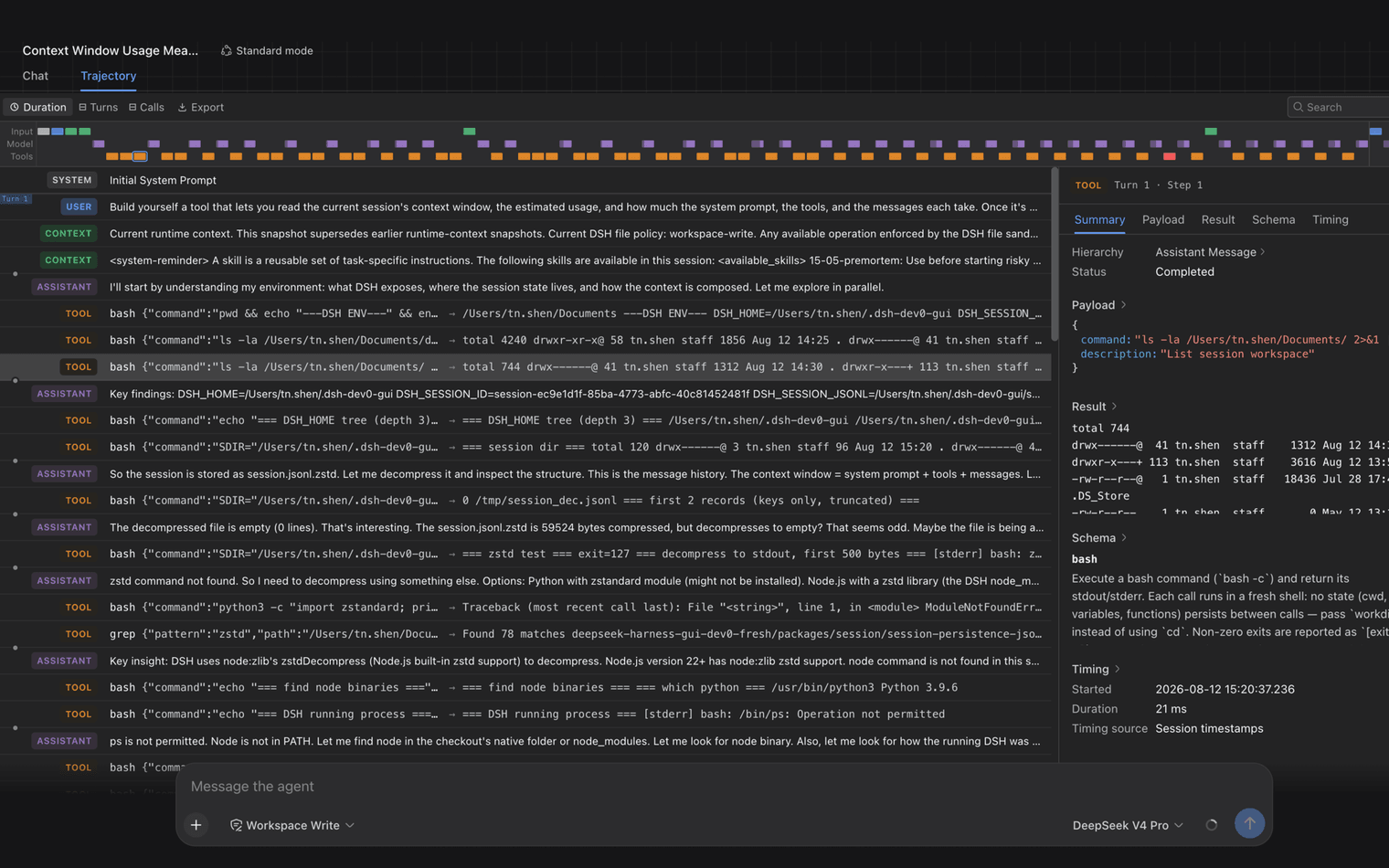
Everything the model sees is recorded in an append-only session log: system prompts, reasoning, tool calls and results, subagent scheduling, and every context injection. The Trajectory view lets you inspect those records by source, and resume, fork, search, and replay all operate on the same event stream rather than a separate history.
The session log is the source of the context the model sees. Model history is projected from it, and raw assistant chunk events are preserved so replay and UI rendering stay faithful to what actually happened. Fork, resume, transcripts, telemetry, and persistence all derive from this one stream.
The rule the runtime enforces is simple: model-visible means logged. Anything that reaches a model request must be reconstructable from the log, which is why adding a new model-visible input means adding a new session event rather than a side channel.
Quick start
Install DeepSeek Harness and run it in three commands
Install Node.js 22.19+ or 24+, then run npx @deepseek-ai/dsh web. The command starts the Web UI, served at http://127.0.0.1:3080 by default. Open Settings, add a model key, choose a workspace directory, and start a session. Running from source instead requires a clone, a pnpm install, and a build.
- 01
Start the Web UI
The Web UI is served at http://127.0.0.1:3080 by default. Open Settings then Models, enter a DeepSeek API key and save it; the model route becomes usable immediately without restarting. Then choose a workspace directory, because the session composer stays unavailable until one is selected.
npx @deepseek-ai/dsh web - 02
Or run from a source checkout
Clone the repository, then run pnpm install, pnpm run build, and pnpm dsh web from the repository root. Production runs need the built package and frontend artifacts, so the build step is not optional.
git clone https://github.com/deepseek-ai/deepseek-harness - 03
Inspect and extend the plugin tree
Print the composed tree your machine actually boots, then replace any row with a patch of your own. Install out-of-tree plugins into a profile with dsh plugin, which forwards pnpm verbs to the profile directory.
dsh web --dump-config
Requirements
What you need to run DeepSeek Harness
DeepSeek Harness needs Node.js 22.19 or newer, or 24 and above. Running the published CLI needs nothing else; building from a source checkout also needs Corepack-enabled pnpm 11.7.0 and Git 2.26 or newer. Sandbox backends exist for Linux, macOS, and Windows, and at least one model provider must be configured.
| Requirement | Supported | Notes |
|---|---|---|
| Node.js | 22.19+ or 24+ | The repository declares engines ^22.19.0 || >=24.0.0; CI covers 22.19, 24, and 26. |
| Package manager | pnpm 11.7.0 via Corepack | Source checkouts only. The version is pinned in package.json; run corepack enable if pnpm does not resolve through Corepack. |
| Git | 2.26 or newer | Source checkouts only. Hook setup relies on Git's worktree-specific configuration extension. |
| Web UI address | http://127.0.0.1:3080 | The default for dsh web. --host and --port are accepted, but --host 0.0.0.0 is intentionally not supported yet. |
| Operating systems | Linux, macOS, Windows | Sandbox backends are Linux bwrap/Landlock, macOS Seatbelt, and a Windows ACL restricted-token runner. |
| Model access | One configured provider | A DeepSeek API key, a catalog provider, or a custom OpenAI-compatible endpoint. Bedrock, Vertex, Azure, and Codex need their native credentials rather than an API-key field. |
| License | MIT | Third-party dependencies and their licenses are disclosed in THIRD_PARTY_NOTICES.md. |
Troubleshooting
The dsh errors you are most likely to hit first
Most first-run problems come from three places: a model provider that is not fully configured, a workspace that has not been selected yet, or a profile that was never created. Each surfaces as a specific, documented message rather than a silent failure, and each has a single documented fix.
MISSING_CREDENTIAL
- Cause
- The provider has no stored key, or the environment variable its credential reference points at is not set.
- Fix
- Store the provider key through the Models page, or supply the referenced environment variable before starting dsh.
UNKNOWN_MODEL
- Cause
- The request names a model that is not part of any configured provider.
- Fix
- Select a configured model, or add the missing model to the custom provider's model list.
Fetching available models returns 401
- Cause
- Model discovery calls the OpenAI-compatible GET /models endpoint, and the key was rejected.
- Fix
- Check the key. For endpoints that do not expose that route, enter the models manually instead.
The session composer stays unavailable
- Cause
- A fresh Web UI has no selected workspace, even though dsh defaults its filesystem location to the invoking directory.
- Fix
- Click Choose workspace, add the project directory you started dsh in, and select it.
A profile fails to boot with a hint about dsh plugin
- Cause
- Only web and headless auto-initialize from shipped templates; any other profile must be created first.
- Fix
- Run dsh plugin --profile <name> add <package> to create the profile and install its plugins.
A Git-hosted plugin fails on its first install
- Cause
- The plugin builds through a prepare script, which pnpm 10 and above blocks until the consumer allows it.
- Fix
- Copy the printed allowBuilds key into the profile's pnpm-workspace.yaml and run the add command again.
Built to be remixed
Capabilities that work together
The capabilities that matter here are structural rather than cosmetic: one extension model across every layer, four agent presets on a single core, an append-only trajectory behind resume and fork, Cordis services and events for plugin collaboration, per-call sandbox policy, and a Creator preset for testing plugin combinations in memory.
Each capability is useful alone and more powerful when composed through the same plugin runtime.
Plugin system
Replace any layer
Models, tools, skills, sandboxes, sessions, storage, loops, scheduling, and UI share one extension model.
Runtime profiles
Four modes, one core
Move between Standard, Code, Minimal, and Creator without maintaining separate harnesses.
Trajectory
Replay the whole run
Prompts, tool results, context injections, and subagent events stay in one append-only history.
Cordis services
Compose through events
Plugins collaborate through services and events while configuration controls the final assembly.
Sandbox boundaries
Control where work runs
Choose the execution environment and permission model without coupling it to the rest of the agent.
Developer preview
Inspect the runtime itself
Creator mode turns the harness into a workbench for testing new plugin combinations in memory.
Agent landscape
DeepSeek Harness vs Claude Code and Codex
DeepSeek Harness, Codex, and Claude Code all offer tools, skills, subagents, and extensibility, but they draw different product boundaries. DSH ships a framework for composing the harness itself; Codex and Claude Code ship ready coding agents with their own extension surfaces. This is a positioning comparison drawn from public documentation, not a performance benchmark.
DeepSeek Harness, Codex, and Claude Code overlap in tools, skills, subagents, and extensibility, but they start from different product boundaries. This is a positioning comparison based on public product documentation, not a performance benchmark.
Build and recompose the harness itself
An MIT-licensed agent harness framework built on Cordis, where models, tools, skills, sessions, sandboxes, storage, loops, scheduling, and UI are all plugins.
Teams building their own agent runtime, preset system, or plugin ecosystem.
DeepSeek Harness overviewUse a ready coding agent across local and cloud work
OpenAI's coding agent spans desktop, CLI, IDE, and cloud workflows, with repository guidance, skills, plugins, MCP, subagents, hooks, sandboxing, and SDK surfaces.
Developers who want an integrated coding agent that can understand a codebase, make changes, verify work, and operate across interfaces.
Official Codex documentationRun an extensible coding loop from the terminal outward
Anthropic's agentic coding assistant combines built-in file, search, execution, and web tools with optional code-intelligence plugins, plus CLAUDE.md, skills, MCP, hooks, subagents, and plugins.
Developers who want a terminal-first coding agent with strong lifecycle automation and project-level customization.
Claude Code architecturePrimary product boundary
DeepSeek Harness
A framework for composing the entire agent harness
Codex
A ready coding agent plus SDK and automation surfaces
Claude Code
A ready coding agent with terminal, IDE, desktop, web, and CI interfaces
Extension model
DeepSeek Harness
Cordis plugins for every agent capability
Codex
AGENTS.md, skills, plugins, MCP, subagents, hooks, rules, and SDKs
Claude Code
CLAUDE.md, skills, plugins, MCP, subagents, agent teams, and hooks
Runtime choices
DeepSeek Harness
Standard, Code, Minimal, and Creator modes
Codex
Local and cloud environments, sandbox controls, CLI, IDE, desktop, and remote workflows
Claude Code
Local, cloud, and remote-control execution with terminal, IDE, desktop, web, Slack, and CI interfaces
Session model
DeepSeek Harness
Append-only event stream powers trajectory, resume, fork, search, and replay
Codex
Task history, repository context, worktrees, and record/replay capabilities vary by interface
Claude Code
Local JSONL sessions support resume and fork; file checkpoints support reverting code changes
Choose it when
DeepSeek Harness
You need to own and replace the harness architecture itself
Codex
You want a broad coding agent experience with OpenAI-integrated workflows
Claude Code
You want a terminal-centered coding agent with deterministic lifecycle hooks
Where it fits
One harness, different jobs
Four groups get value from a plugin-first harness. Product teams assemble a repository-specific coding agent, model researchers hold the harness constant while models change, platform teams wire tools and approvals into internal automation, and plugin authors prototype a Cordis plugin before publishing it under the dsh-plugin topic.
Use the same core to serve product teams, model researchers, platform engineers, and plugin authors.
01
Product engineering
Coding agent runtime
Combine repository tools, workspace policies, skills, and model routing into a team-specific coding agent.
A reusable engineering preset
02
Model research
Controlled benchmarks
Use Minimal mode to compare models with the same shell and editing surface.
Cleaner evaluation signals
03
Internal platforms
Operational automation
Assemble tools, approval steps, storage, and schedules for repeatable internal workflows.
Operations that stay inspectable
04
Plugin authors
Runtime experiments
Prototype a Cordis plugin in Creator mode before publishing it as part of a shared preset.
A shorter path from idea to plugin
Implementation patterns
Patterns teams can adopt now
Three patterns follow directly from the architecture. Package a trusted baseline as a profile and let each repository patch only the rows it needs; hold the harness constant in Minimal mode while models change; and treat the append-only session log as the operational record you debug, resume, and fork from.
A plugin-first harness makes the runtime itself reusable. These patterns turn that architecture into practical operating choices.
01
Repository presets
Keep a trusted baseline, customize at the project edge
Package the default model, tool, skill, sandbox, and storage choices as a preset, then let each repository replace only the capabilities it needs.
Shared governance without a frozen stack
02
Model evaluation
Hold the harness constant while models change
Minimal mode narrows the runtime to persistent bash and a file editor, making it easier to compare model behavior against a stable tool surface.
Cleaner, inspectable benchmark runs
03
Trace-first operations
Treat the event stream as the operational record
Use the append-only session log to inspect context, tool results, subagent scheduling, and every injected instruction before resuming, forking, or replaying a run.
One source for debugging and recovery
Who builds it
Who is behind DeepSeek Harness, and will it still exist in six months?
DeepSeek Harness is published by the deepseek-ai GitHub organisation under the MIT license. The repository went public on 13 August 2026, keeps Issues closed and routes feedback to Discussions, and its README warns in capitals that breaking changes are coming. Those are the verifiable facts; this page publishes no team size, roles or hiring claims.
- Published by
- deepseek-ai on GitHub
- The same organisation that publishes the DeepSeek model repositories.
- Repository created
- 13 August 2026
- Read from the GitHub API on 14 August 2026. dsh is days old, not years old, and should be judged on that timeline.
- Where feedback goes
- Discussions, not Issues
- The repository has its issue tracker disabled and points bug reports and feedback at GitHub Discussions instead.
- Stated maturity
- Developer preview
- The README states the project is in developer preview and iterating rapidly.
- Launch-day posture
- Feedback asked for in public
- DeepSeek announced dsh publicly, and a project team member posted the same day that 0.1.0 is still incomplete and invited community feedback. Quoted as posture, not as a roadmap commitment.
THERE WILL BE COMPATIBILITY-BREAKING CHANGES.
DeepSeek has published no headcount, no open roles and no compensation information for the Harness team, so none is listed here. If that is what you came for, the honest answer today is that the public record contains the repository, the license, the discussions and nothing else.
Here because you want to work on AI agents?
The skill that reads a plugin kernel is the same skill store owners pay for. SpringBrand is the marketplace side of that: sellers who can build, and the shop owners who need it built.
Capabilities and reactions
What it actually ships, and what developers said about it
Each card below is either one documented capability or one developer's published take on it. Open a capability to read the problem it solves, what it provides, and the constraint that makes it hold — with the outside voice that talked about it shown alongside. Open a take to see which capability it is describing.
Capability rows were read from the deepseek-ai/deepseek-harness repository and its docs on 2026-08-14, against version 0.1.0-rc.6. Paths are given so every row can be checked at source.
amazing release. it's a web UI with multiple harnesses inside it, you can spawn claude code and codex agent through their SDK "deepseek harness" supports different "modes" by default (which are harnesses): code mode with programmatic tool calling (in typescript), bash+edit Show more

🧩 DeepSeek Harness v0.1 is now available in Developer Preview! 🔹 We’re opening it up to developers building agent harnesses worldwide and open-sourcing the codebase in MIT license. 🔹 Powered by the Cordis meta-framework, DeepSeek Harness is an agent harness built around one
Architecture
Reads the release as a runtime rather than a product: several harness modes on one core, cache-aware design, the trajectory view, and traces of agent-first development left in the repository itself.
DeepSeek Harness v0.1’s Cordis-powered design is probably one of the cleanest expressions of agent architecture I’ve seen: every capability - model adapters, tool registries, session logs, sandboxes, orchestration loops, and even the UI a is a 1st class plugin w typed services, Show more
🧩 DeepSeek Harness v0.1 is now available in Developer Preview! 🔹 We’re opening it up to developers building agent harnesses worldwide and open-sourcing the codebase in MIT license. 🔹 Powered by the Cordis meta-framework, DeepSeek Harness is an agent harness built around one
Architecture
Focuses on Cordis: typed services, reversible effects, and the absence of a privileged core, which is what turns extension into a mount rather than a fork.
deepseek releases a new paper along with their harness. not sure if i have ever read someone say adaptive synthesis/formalization like this before. it proposes a programming model where components explicitly declare both what they need and what they change. the runtime then Show more
Cordis paper
Reads the Cordis paper as a claim about components declaring what they need and what they change, so that every modification carries its own reversal.
Most agent tools give you a polished product with a fixed loop. DeepSeek Harness does the opposite. It’s built on one stubborn idea: everything is a plugin. The model adapter, the tools, the sandbox, the agent loop itself, even the UI — all of them are Cordis plugins. You Show more
🧩 DeepSeek Harness v0.1 is now available in Developer Preview! 🔹 We’re opening it up to developers building agent harnesses worldwide and open-sourcing the codebase in MIT license. 🔹 Powered by the Cordis meta-framework, DeepSeek Harness is an agent harness built around one
Positioning
Contrasts dsh with fixed-loop agent products, arguing that the event stream, the trajectory view and replayability are what make it infrastructure rather than an application.
Tested & read through DeepSeek Harness (dsh) source. Two things stood out: ① Everything's a plugin: Agent Loop, tools, storage, even the UI are swappable. Very extensible. ② Sessions are an append-only event log (file/SQLite); model context is reassembled from it each time, Show more
Source read
Combines a source read with a hands-on run, pointing at the append-only session log, resume and fork, and cache-hit behaviour as the parts that matter in practice.
gave deepseek-v4-flash the exact same task in deepseek harness, reasonix, and codex: build a three.js sandboarding game. first up: v4 flash in deepseek harness. very little to complain about here. the player starts sliding immediately, the core gameplay is followed cleanly, Show more
🧩 DeepSeek Harness v0.1 is now available in Developer Preview! 🔹 We’re opening it up to developers building agent harnesses worldwide and open-sourcing the codebase in MIT license. 🔹 Powered by the Cordis meta-framework, DeepSeek Harness is an agent harness built around one
Hands-on comparison
Ran one Three.js task through dsh, Reasonix and Codex to see how much of the outcome comes from the harness rather than the model. This is a single hands-on comparison, not a benchmark.
DeepSeek Harness just dropped its developer preview — and it’s open source. I got it running locally, and the setup is surprisingly simple: one command and you’re in. The wildest part isn’t that it’s another coding agent. It’s that everything is a plugin. Models, tools, Show more
First run
Started it locally with a single command and described the result as a modular operating system for agents rather than one application.
A Programming Paradigm for Spatiotemporal Composability DeepSeek goes deep into delving what directly shapes the design philosophy behind DHS (DeepSeek Harness) by tackling one of the hardest problems in agent infrastructure: how to let agents safely evolve themselves without Show more
Cordis paper
Reads temporal and spatial composability as a safety property: an agent able to change its own runtime needs those changes to be reversible before the ability is worth having.
DeepSeek open-sourced its Harness today. One of the first things I did was build dsh-browser — a sidebar plugin that lives in your browser and lets dsh read and operate the page you already have open. Same session. Same cookies. No screenshots. github.com/dsh-external/d…
Plugin author
Built dsh-browser on launch day, a plugin that reuses an existing browser session and its cookies instead of driving a fresh browser.
Hello, X 👋 We’re OpenMAIC—an open-source project for building AI-native, multi-agent classrooms. We were thrilled to join the DeepSeek Harness private beta. Since everything in dsh is a plugin, we built dsh-openmaic—turning DeepSeek Harness into an OpenMAIC teacher. Say: Show more
Plugin author
Reshaped dsh into a multi-agent teaching setup, using the plugin surface to change what the harness produces rather than how it reasons.


Quoted posts are third-party opinion published by their authors, not statements from DeepSeek and not endorsements by SpringBrand. Single hands-on runs are not benchmarks. Every outbound link is nofollow, and quotes are reproduced verbatim.
Glossary
The DeepSeek Harness vocabulary the docs assume
DeepSeek Harness uses one canonical term per concept, and the docs assume them. The terms below cover the composition model (profile, bundle, patch layer), the capability model (seam, scope, preset), and the execution model (turn, step, session log). Learning these ten makes the reference documentation readable end to end.
- Harness
- The part of an agent that is not the model: it lets the agent understand its environment, use tools, and keep working in real-world settings.
- Cordis
- The plugin framework underneath dsh. Plugins contribute services, typed events, and reversible effects to a shared context, and the kernel handles mounting, unmounting, and dependencies.
- Profile
- A named composition stored in the Harness home. It lists the bundles it stacks, holds any out-of-tree plugins it installs, and keeps the user's own cordis.patch.yml.
- Bundle
- A distribution format for Cordis config rows and the code they mount, declared in package.json under a dsh.bundle field, so whatever it inserts stays patchable by the layers above it.
- Patch layer
- A configuration overlay that targets a row by id and replaces its whole config value, or inserts new rows. Later layers win per row.
- Capability seam
- A swappable capability with three roles: a Service Definition declaring the interface, one or more Service Providers implementing it, and Consumers that inject it. One role alone is not a seam.
- Session log
- The append-only SessionEvent stream that is the source of the context the model sees. Fork, resume, transcripts, telemetry, and persistence all derive from it.
- Turn
- One drain of admitted input in a session, ending after the model and its tools stop or a terminal policy intervenes. A turn contains zero or more steps.
- Step
- One model request plus the tool executions caused by its response.
- Scope
- The unit of per-agent registration. A contribution such as a tool, prompt section, variable, restriction, or listener is either global or owned by exactly one scope key.
FAQ
Frequently asked questions about DeepSeek Harness
A concise starting point for teams evaluating the developer preview.
- MIT-licensed source
- Composable plugin runtime
- Append-only session history
Yes. DeepSeek Harness is released under the MIT license and its full source is published in the deepseek-ai/deepseek-harness repository. Third-party dependencies and their licenses are disclosed separately in THIRD_PARTY_NOTICES.md.




Change tracking
dsh is at v0.1. It will break.
We re-check this page against each release, so you do not have to re-read the changelog.
DeepSeek Harness is a developer preview, and its own README says in capitals that there will be compatibility-breaking changes. Every command, config key and version on this page is accurate for dsh 0.1.0-rc.6 as checked on 14 August 2026. When a flag is renamed, a setting moves, or a plugin API changes shape, we update this page and send one note about it. Nothing weekly, nothing else.