AI Agents Integration Guide for Business Workflows

Written by
Springbrand Editor Team
Editorial team
Springbrand Editor Team creates and maintains blog guides on AI tools, automation, marketing, and agent workflows.

Reviewed by
Springbrand Audit Team
Editorial review team
Springbrand Audit Team supports editorial quality through source checking, clarity, and consistency across the blog.
Updated
Published
AI agents integration planning defines data access, tool actions, credentials, failure handling, and review before a workflow reaches production.
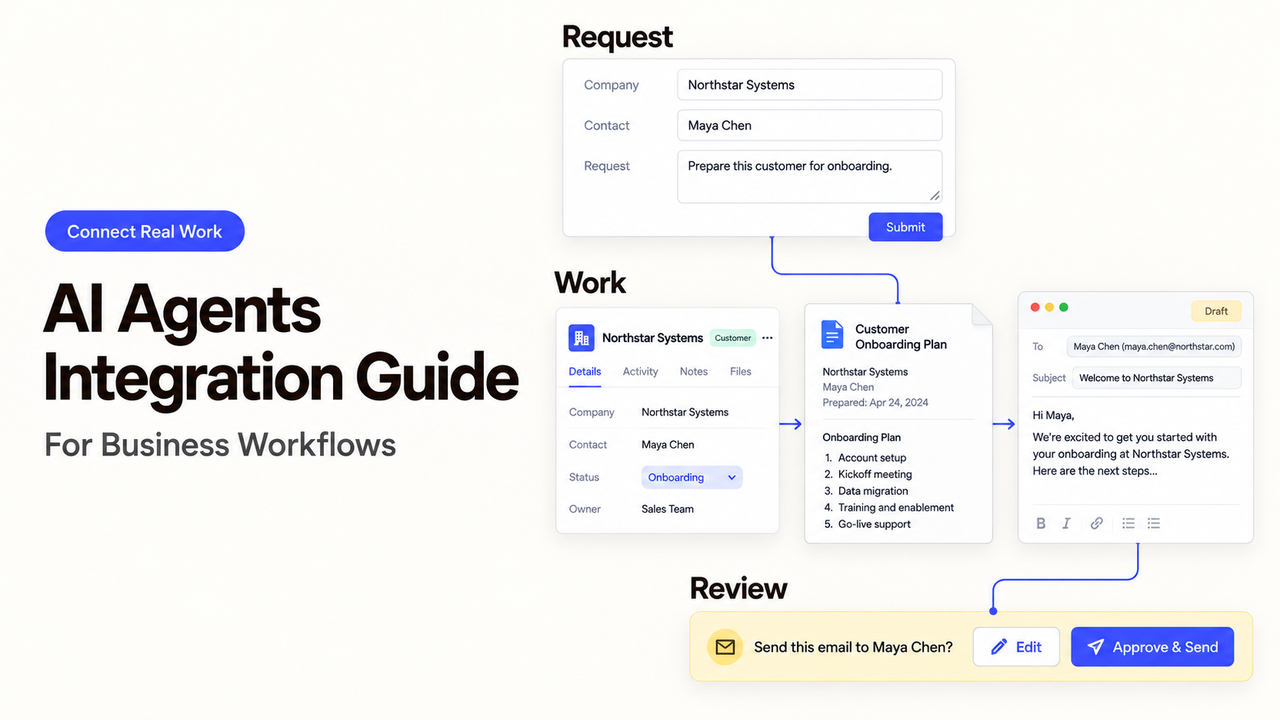
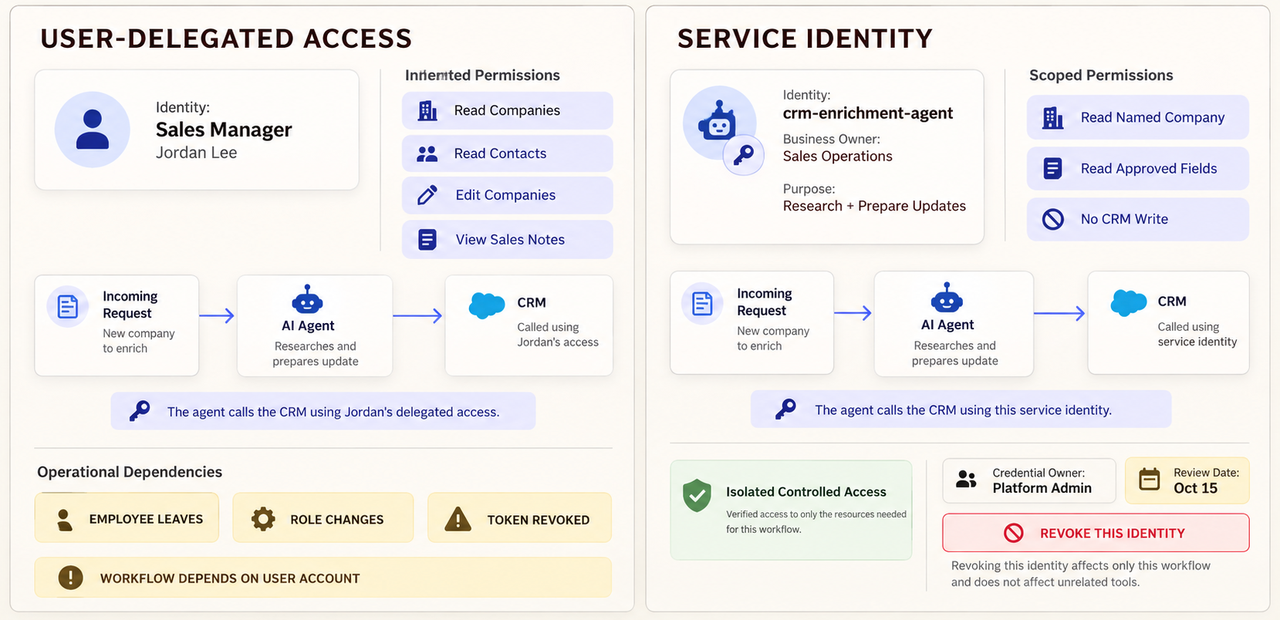
Should a lead-research agent use the sales manager’s account or its own service identity? That choice affects what the tool can see, whose authority follows each call, and how the team shuts it off.
I’m Alex. This AI agents integration guide turns that decision into a practical contract for one CRM enrichment task. The agent may read a company record and propose sourced updates. A sales representative approves any change.
What an Agent Integration Connects
An agent integration connects a defined task to data or an action outside the model. It might use an API, an MCP server, or a platform connector. The interface does not grant business authority.
Data Sources, Business Applications, and External Tools
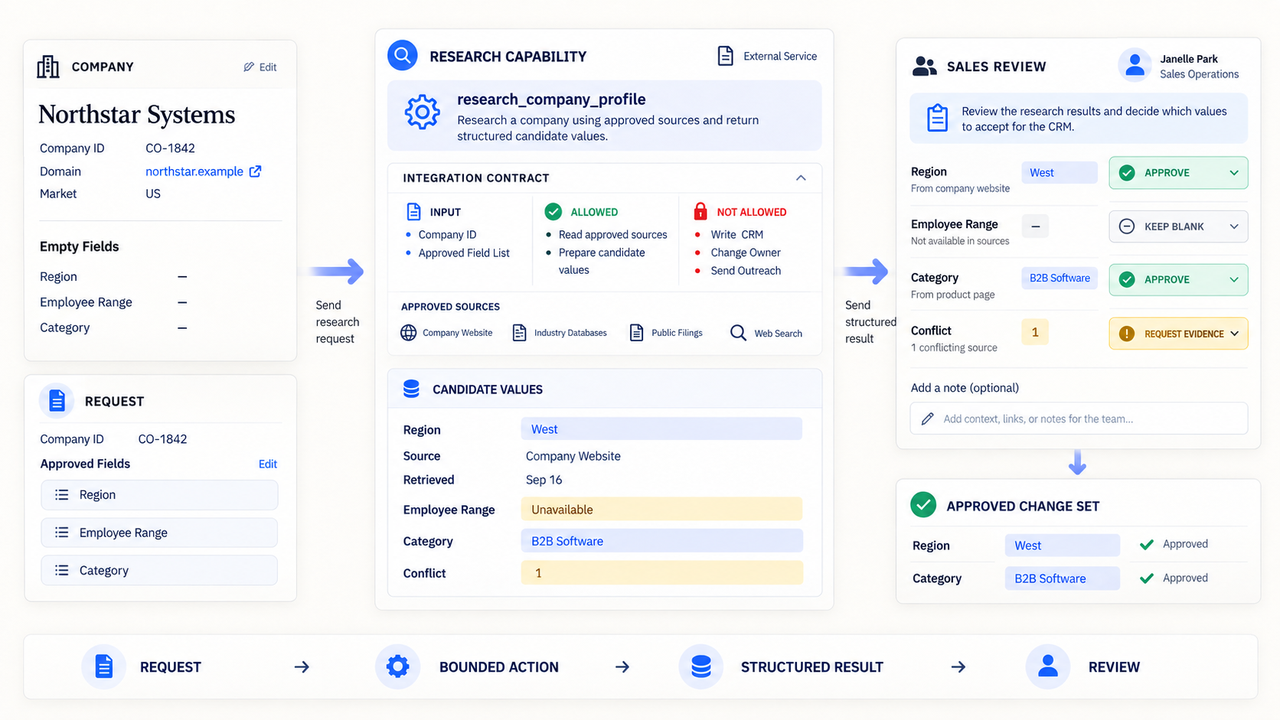
For this example, the CRM supplies a company ID, domain, market, and empty enrichment fields. An approved research tool returns candidate facts with sources and timestamps. The CRM remains the system that holds the accepted record.
The data source provides context. The business application holds the record, while the external tool performs a bounded lookup or update.
MCP can standardize how a client discovers and invokes tools. The MCP 2026-07-28 specification update also strengthened authorization and added clearer request metadata. It does not decide which CRM fields your sales process permits the agent to change.
Treat an MCP integration as one interface option, not the business contract itself.
Read Access, Write Access, and Irreversible Actions
Separate reading from writing before granting credentials. Reading one company record does not authorize an account export or field update.
Classify each action by consequence:
- Read: retrieve the named record and approved fields.
- Prepare: return sourced suggestions without changing the CRM.
- Write: save reviewed values to allowed fields.
- Irreversible or costly: delete, send, reassign, or spend.
Keep the first pilot at read and prepare. Put later writes behind explicit review, with separate controls for irreversible actions.
Define the Integration Contract
An integration contract states what one call accepts, may do, returns, and does when it cannot finish safely.
Here is a compact contract for the CRM enrichment task. It is a working design example, not an industry standard.
Contract field | Example boundary |
Request | One CRM company ID and an approved field list |
Allowed reads | Company name, domain, market, and currently empty target fields |
Allowed action | Research and prepare candidate values; no automatic CRM write |
Required result | Candidate value, source URL, source date, confidence note, and unresolved conflict |
Failure result | Typed error plus the last safe state; no guessed value |
Approval | Named sales representative accepts or rejects each proposed change |
Specify Inputs, Outputs, and Validation Rules
Define required fields, formats, size limits, and allowed values. Reject a missing company ID before calling the research tool.
Define the result just as carefully. The current MCP tools specification supports input schemas and optional output schemas. It says clients should validate structured results when an output schema exists.
Validation must cover meaning as well as shape. A valid URL may identify the wrong company. Route conflicts to review instead of forcing a value.
Limit Each Tool to the Actions the Workflow Needs
Give each tool a narrow verb and object. research_company_profile communicates a smaller surface than manage_crm. If one adapter contains several methods, expose only those required by this workflow.
Do not rely on “never delete records” when the credential can delete them. Enforce the boundary with scopes, roles, adapter logic, and approvals.
Keep credentials outside prompts and model-visible context. The model may request an allowed action; a controlled execution layer should validate and authorize the call.
Choose an Identity and Permission Model
The identity model determines whose authority an agent tool integration uses. Choose it for the task, then document ownership, rotation, and revocation.
Separate User-Delegated Access From Service Identities
User-delegated access follows one person’s permissions and consent. It can also tie the workflow to that person’s account and employment status.
A service identity belongs to the workload rather than an employee. Google Cloud, for example, defines a service account as an account typically used by an application or compute workload. Its service-account guidance also recommends granting only the permissions required for its goal.
Not every vendor supports service accounts. Confirm the provider’s identity model, ownership, audit trail, and offboarding behavior.
Minimize Scopes and Protect Credentials
Restrict a token to the relevant resources and actions. The OAuth 2.0 Security Best Current Practice recommends audience-restricted access tokens and privilege restriction through scopes or authorization details.
Keep secrets outside prompts, source files, and run logs. Prefer short-lived credentials when supported, and name the person who can rotate or revoke them.
Test the boundary directly. A read-only pilot should fail when it tries to update a field or retrieve an unrelated record.
This is technical planning information, not a security, legal, or compliance determination. Your system owner must assess the actual provider, data, and obligations.
Design for Failure Before Production
A useful agent API integration exposes failure without leaving an uncertain business state. Decide which errors may retry and which require review.
Detect Unavailable or Invalid Tool Responses
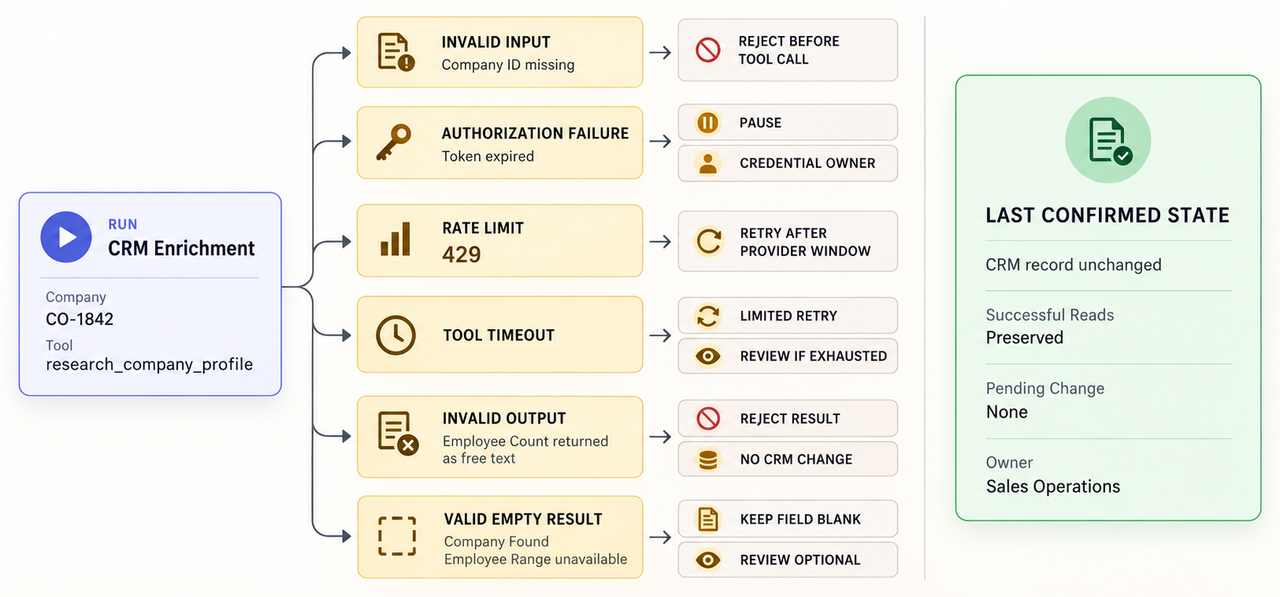
Distinguish transport failure, authorization failure, rate limits, invalid input, invalid output, and a valid empty result. “No company found” must not share the same state as a timed-out request.
Set a timeout and validate responses before they reach the CRM. Log the request ID, tool version, timestamp, and error category, but no secrets.
Limit retries and follow provider timing. Make writes idempotent where supported, or a late response may create duplicate changes.
Route Failed Actions to a Safe Recovery Path
A failed preparation step should enter review with the original record unchanged. Show the last confirmed state and whether an external action may have succeeded.
Provide a targeted stop mechanism. OAuth providers may expose token revocation; RFC 7009 defines a revocation request to an HTTPS endpoint. Actual propagation and related-token behavior still depend on the provider.
Let the reviewer retry only the failed lookup, replace an expired credential, or reject the change without repeating successful reads.
Test the Integration With Realistic Exceptions
Test the contract with ordinary and awkward cases before production. A clean demo proves little about permissions, stale records, or uncertain responses.
Use one sandbox company record and try these cases:
- the company ID is missing;
- the domain belongs to a different company;
- the token has expired;
- the tool returns a required field in the wrong type;
- the provider returns a rate limit;
- the reviewer rejects one field but accepts another;
- the same approved write request arrives twice.
For each case, record the expected state, message, retry, and owner. Passing means the record remains understandable after failure.
Use a Sandbox and Review Every External Action
Use test credentials and non-customer records where the provider offers a sandbox. If it does not, restrict the pilot to read-only access and a disposable record approved for testing.
Review the request and returned fields, not just the summary. Before a write, confirm the record, field changes, reviewer, and rollback route.
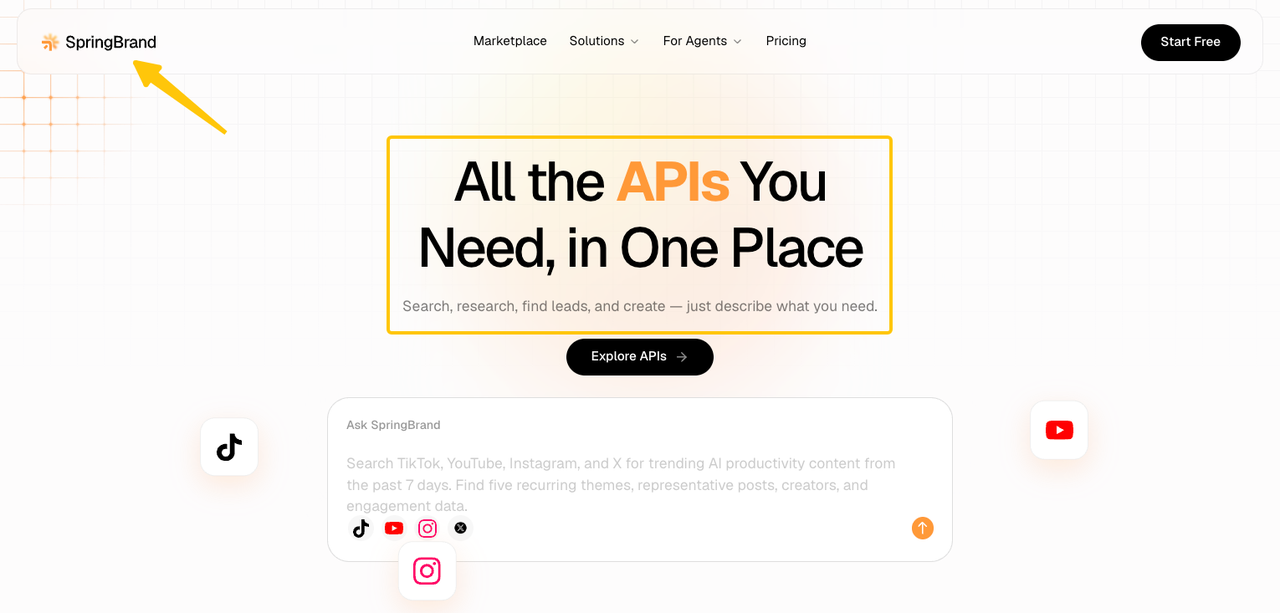
SpringBrand publishes this guide. Its API catalog, checked September 16, 2026, presents capabilities for use with an existing AI assistant. That page does not establish a specific CRM connector, account model, or recovery behavior.
Before using one in production, review SpringBrand’s current API catalog and verify the exact action, authentication method, returned fields, and failure behavior.
FAQ
Can one integration use different service accounts for separate workflows?
Yes, if the provider supports separate service identities. Map each identity to one workflow and test that it cannot reach the other workflow’s resources. “Multiple accounts” does not necessarily mean isolation.
How can a team revoke one integration without stopping other agent capabilities?
Use a credential dedicated to that integration, then revoke only that credential. First confirm the provider’s treatment of related tokens, sessions, and pending jobs. Test that unrelated agent tools remain available.
What happens when an integration provider retires an API version?
The adapter may fail or change behavior unless the team migrates before the deadline. Track its version and assign an owner to release notices. MCP’s July 2026 specification does not govern every API behind an MCP server, so retest the provider’s replacement version.
Can tool schemas be updated without changing agent instructions?
Sometimes. An optional field may not affect instructions, but a renamed action or new required field can change the call. Version schemas separately from prompts. Refresh tool definitions and retest any breaking input, output, or action change.
How do regional data-residency restrictions affect an integration?
They can limit the endpoint, project, tool, storage location, or processor. Check every system in the path, not only the agent platform’s region.
OpenAI’s current API data-control documentation illustrates the distinction: regional storage does not always imply regional processing, and third-party MCP servers follow their own policies. That is one provider’s documented behavior, not a universal rule or compliance conclusion.
Conclusion
Good AI agents integration planning begins with one external action and a written contract. Define the allowed data, tool behavior, identity, validation, failure state, and reviewer before connecting production records.
Start with read and prepare. Prove that forbidden actions fail, incomplete results stop, and one credential can be revoked cleanly. Expand the workflow integration only when the team can explain every external call and recover without guessing what changed.
Recommended Reads
Explore SpringBrand
Turn ideas into working workflows
Connect agents, APIs and tools in one workspace. Start with a task you want to get done.
Get started free
One account. 10,000+ APIs & capabilities
Give your agent APIs and plugins without separate keys or integrations for every provider.
Explore APIs
No tool expertise needed
Describe your GTM task. SpringBrand chooses the right APIs and plugins for your agent automatically.
Find tools for your task
Run tasks 24/7
Connect your agent to SpringBrand to keep tasks running automatically, day and night.
Connect your agent