Workflow Optimization Before Adding AI

Written by
Springbrand Editor Team
Editorial team
Springbrand Editor Team creates and maintains blog guides on AI tools, automation, marketing, and agent workflows.

Reviewed by
Springbrand Audit Team
Editorial review team
Springbrand Audit Team supports editorial quality through source checking, clarity, and consistency across the blog.
Updated
Published
Workflow optimization helps small teams find bottlenecks, remove unnecessary steps, test one change, and avoid automating a broken process.
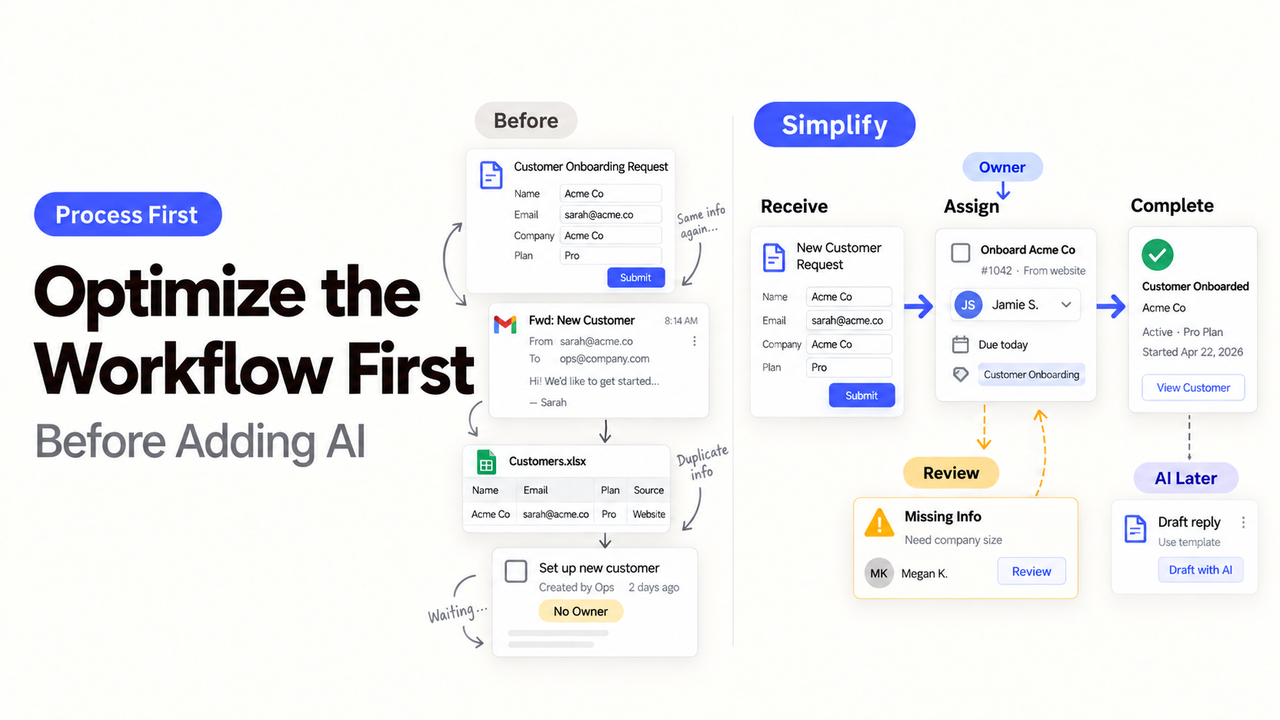
Where does the work actually slow down? If the answer is still “somewhere between sales and operations,” the team is not ready to choose an AI tool.
I’m Alex. I’d follow a few recent cases from start to finish before changing the software. A missing form field, a crowded manager’s inbox, and a genuine staffing shortage need different fixes.
That is the point of workflow optimization. Find the delay, remove work that serves no purpose, and then decide whether the remaining task suits rules, AI assistance, or a person.
Define the Outcome and Baseline
Pick one process and describe what finished work leaves behind. “Handle leads faster” is hard to verify. “Assign each complete website inquiry to a salesperson, with its source and requested service attached” has a visible ending.
Use the same start and finish for every case. A sales team might measure from form submission to salesperson assignment. Support might measure from ticket creation to a recorded resolution. If the boundaries change, the comparison means little.
Measure Time, Rework, Errors, and Waiting
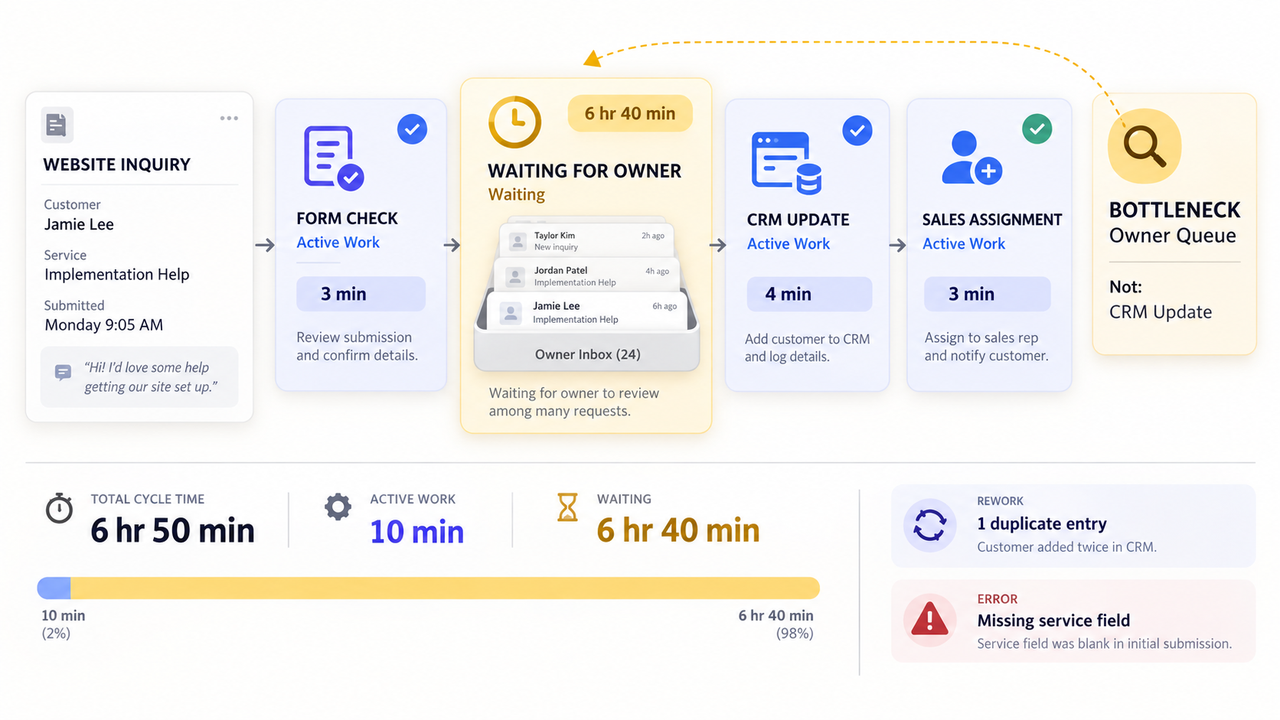
Separate working time from waiting. Someone may spend ten minutes processing a request after it has sat unopened for a day. Automating those ten minutes will barely touch the customer’s delay.
Track only what helps explain the problem:
- total time from the agreed start to finish;
- active work and waiting time;
- corrections or repeated data entry;
- missing or incorrect results; and
- cases that needed someone to step in.
Keep quality beside speed. A shorter cycle is not an improvement if employees spend the next morning repairing customer records.
Find the Real Bottleneck
A bottleneck limits the whole process. It may be a queue, rule, system, or piece of information that arrives too late.
Look for work piling up, then ask what the next person needs.
Trace Delays Across Handoffs
Follow several cases through each transfer. Note when the work changed hands, what information traveled with it, and why it stopped.
A delay blamed on sales may begin with an incomplete marketing form. An operations queue may grow because managers approve ordinary exceptions one at a time. The first visible delay is not always where the problem began.
Unofficial fixes count too. A private spreadsheet or copied Slack message may be carrying information that the official digital workflow never records.
Separate Capacity Problems From Process Problems
A process problem repeats during normal demand. Duplicate entry, unclear routing, and approvals without a backup fall into this group.
A capacity problem appears when valid work arrives faster than the team can handle it. Removing waste may help, but process changes cannot create unlimited capacity.
Compare demand, available staff, and queue growth over the same period. If failure appears only during a predictable seasonal peak, the practical answer may be temporary coverage rather than AI.
Simplify Before You Automate
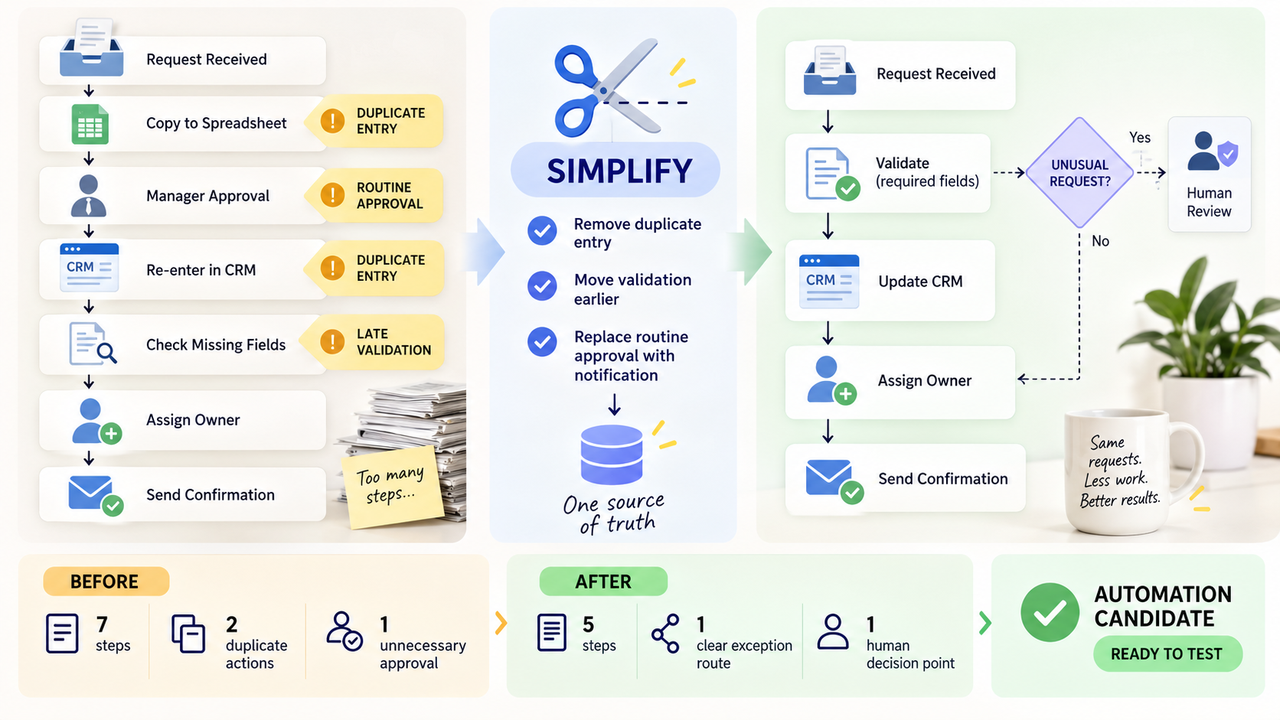
Once the process bottleneck is visible, ask whether the delayed step should exist at all. Digital workflow automation can preserve unnecessary work just as faithfully as useful work.
Remove Unnecessary Approvals and Duplicate Entry
Every approval should protect something specific. Keep it when a person is committing money, changing sensitive data, accepting unusual terms, or contacting a customer about a serious issue. Routine visibility may need a notification instead.
For copied fields, decide which system holds the current value. Do not remove a slow approval until the team understands why it exists.
Standardize Inputs and Exception Rules
The main queue needs a clear entry condition. Show employees a valid submission and name the fields that cannot be missing.
Then list the cases that must leave the normal route. An unknown customer, missing consent, unusual contract term, or out-of-area request may need a person.
Each exception needs a real destination. “Manual review” is only useful when the team knows which queue receives it and who checks that queue.
Test One Change
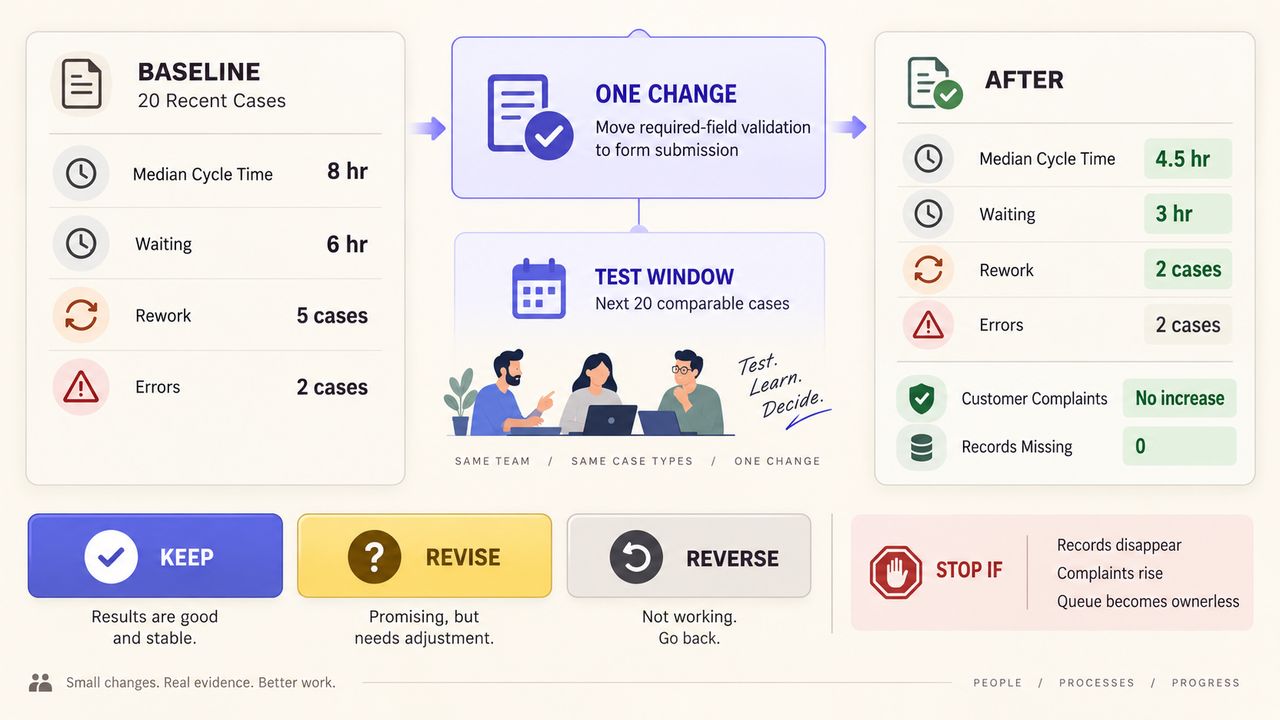
Change one part at a time. Otherwise, a better result will not reveal what made the difference.
Set a Baseline and Review Window
Use the same boundaries and measures before and after the change. Include ordinary work plus the exceptions most likely to affect the decision.
Low-volume teams may need a longer calendar window. The goal is not a magic sample size; it is enough comparable work to reveal whether the same delay keeps returning.
Write down a stop condition. Restore the earlier process if records disappear, customer complaints rise, or work lands in a queue nobody checks.
Compare Results Without Ignoring Quality
Read individual cases as well as the summary. Check whether waiting moved to another desk, employees created a workaround, or the output became less reliable.
A short test can support another round, not prove a lasting efficiency gain. Record whether to keep, revise, or reverse the change.
Choose Software, Process Help, or Both
The next purchase depends on what remains after workflow improvement. Use this screening table before selecting a platform or plugin:
| What remains | Better next step | Example |
|---|---|---|
Stable trigger, fixed rule, predictable result | Rules-based automation | Copy an approved form field into the CRM |
Repeated judgment with source material and a reviewable draft | AI-assisted step with human review | Classify inquiries or summarize weekly support themes |
Changing goal, missing data, or disputed route | More process work | Decide which team owns partnership requests |
Sensitive or hard-to-reverse decision | Keep human approval | Change a contract, refund, or customer commitment |
This is an editorial screening model, not a product guarantee. A task is a stronger automation candidate when inputs repeat, success is visible, mistakes can be caught, and someone can recover the work.
SpringBrand should enter after the team reaches that level of clarity. Its homepage, checked September 13, 2026, presents agent-ready plugins and APIs for GTM work. Those capabilities can support a defined step; they do not diagnose the business process for you.
When one task has a stable input, a reviewable result, and a named reviewer, explore an agent-ready capability for that step.

FAQ
Can process-mining tools work without desktop monitoring?
Yes. Process mining can use event logs from business systems instead of recording screens. Microsoft’s process and task mining overview distinguishes that approach from task mining, which records desktop actions. Check what data is collected and how employees are informed. Workplace and privacy duties vary, so seek qualified guidance when needed.
How should seasonal demand be separated from normal cycle-time data?
Tag cases by season, campaign, holiday, or staffing level, then compare similar periods. The U.S. Census Bureau explains that seasonal adjustment addresses recurring changes at similar times each year. A predictable peak should not automatically become the normal baseline.
What sample size is useful for a low-volume workflow?
There is no universal number. NIST’s sample-size guidance ties the decision to variability, the difference being detected, and acceptable error. Review every available case in a defined window and report the count. High-stakes decisions may need statistical help.
How can teams compare workflows when case complexity differs?
Define complexity before reading the results. Group cases by factors that genuinely change the work, such as required systems, approval level, or exception type. Microsoft’s process-mining data guidance explains how case-level attributes add context to event data.
How should audit history be preserved after retiring a workflow?
Before closing the old system, export its process definition, change history, run records, exception notes, and access list. Keep a readable copy beside native exports and test retrieval. NIST’s log-management guidance covers practices for storing, accessing, and disposing of log records. Retention periods depend on the organization’s policies, contracts, systems, and applicable rules.
Conclusion
Workflow optimization should leave the team with a smaller, clearer task. Stable rules can move into ordinary automation. Repeated analysis may suit an AI-assisted step when someone can review the result.
Keep changing goals, disputed routes, and hard-to-reverse decisions with people. Choose a tool only after the remaining task fits one of those paths.
Recommended Reads
Explore SpringBrand
Turn ideas into working workflows
Connect agents, APIs and tools in one workspace. Start with a task you want to get done.
Get started free
One account. 10,000+ APIs & capabilities
Give your agent APIs and plugins without separate keys or integrations for every provider.
Explore APIs
No tool expertise needed
Describe your GTM task. SpringBrand chooses the right APIs and plugins for your agent automatically.
Find tools for your task
Run tasks 24/7
Connect your agent to SpringBrand to keep tasks running automatically, day and night.
Connect your agent