Exa MCP: Add Web Research to an AI Agent Workflow
Exa MCP can add web research tools to an AI agent. Define one research job, configure access, constrain queries, and review sourced outputs.

Giving an agent web search does not give it research judgment. It can still retrieve the wrong company, cite an undated page, or turn a vendor claim into an unsupported conclusion.
Exa MCP adds search and page-reading tools to an MCP-compatible agent. The useful implementation is narrower: one research job, a small tool set, constrained queries, and a review step that keeps sources attached to claims.
This guide uses a supplier-risk Brief as the example. It is based on Exa's official product, repository, API, pricing, privacy, and security materials checked on September 21, 2026. It does not claim a hands-on performance test or a SpringBrand integration.
What Does Exa MCP Add to an Agent?
Exa MCP gives a compatible client a standard way to call Exa's web-research capabilities. The current official Exa MCP page lists Claude, Cursor, VS Code, Codex, and other clients, while providing the hosted endpoint https://mcp.exa.ai/mcp.

The official Exa MCP server repository currently exposes two default tools:
web_search_exasearches the web and returns usable content.web_fetch_exareads one or more webpages as clean Markdown.
Optional tools include web_search_advanced_exa for filters, domains, dates, highlights, summaries, and subpage crawling. agent_run supports multi-step research and structured output. Enabling optional tools replaces the default list, so include every tool the workflow still needs.
That makes Exa one possible web search API for LLM applications. MCP supplies the tool interface; Exa supplies the search service; the client decides when to call it; and your workflow decides whether the result is acceptable.
Choose One Bounded Research Task
Start with a task whose output a person can verify. For example: “Prepare a supplier-risk Brief using official sources published or updated within the last 12 months.”
Define the required output before connecting the tool:
- supplier name and confirmed website;
- claim, source URL, publisher, and publication or update date;
- source type, such as company, regulator, court, or established news outlet;
- a short explanation of what the source supports;
- conflicts, missing evidence, and questions for human review.
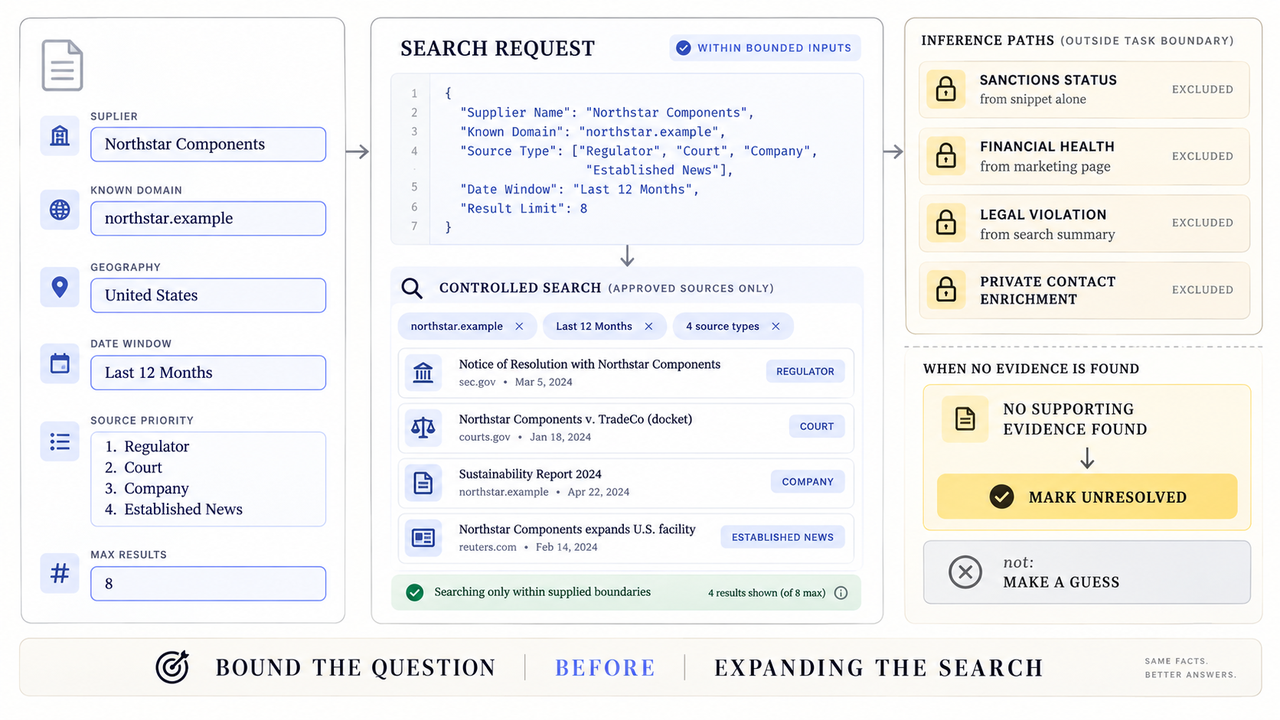
Set explicit exclusions. The agent should not infer legal violations, financial health, ownership, or sanctions status from a search snippet. It should not use personal contact enrichment or private data for this job.
Give the reviewer a decision, not a pile of links. A useful Brief separates verified facts, vendor statements, third-party reporting, and unresolved claims. It also records the query date because web results change.
Configure the Connection and Tool Scope
Connect only the tools required for the chosen task. More search modes increase cost and variability without automatically improving the Brief.
Add Exa MCP to the Selected Client
Use the client's current MCP settings and Exa's current instructions. A generic Streamable HTTP configuration looks like this:
{
  "mcpServers": {
    "exa": {
      "type": "streamable-http",
      "url": "https://mcp.exa.ai/mcp"
    }
  }
}
Exa says the hosted endpoint can work anonymously with rate limits. Its repository currently recommends OAuth for higher limits and shared connectors. An API key can also be supplied through an Authorization: Bearer or x-api-key header.
Restart or reconnect the client, inspect the discovered tool list, and run a harmless public query. Do not assume a successful connection proves that every optional tool is enabled.
Limit the Tools and Query Inputs
For example Brief, begin with web_search_exa and web_fetch_exa. Add web_search_advanced_exa only when the team needs domain or date filters that the basic route cannot express.
Constrain the request with a named supplier, known domain, geography, date window, preferred source types, and maximum result count. Exa's current Search API reference documents fields including included and excluded domains, publication dates, result count, search type, and content options. The precise MCP schema can differ, so use the schema shown by the connected client.
Do not let retrieved page text rewrite the job or request new permissions. Web content is untrusted input. Instructions found inside a page should remain source material, not become agent commands.
Protect API Credentials and Sensitive Context
Prefer OAuth or a secret store that injects a header at runtime. Do not paste a real key into a prompt, source file, screenshot, shared config, query string, or support ticket.
Give the integration its own credential when possible. Record an owner, intended environment, spending boundary, and revocation process. Exa also publishes a security-reporting policy. Its pricing page describes usage-based API pricing, plan-level query rates, and enterprise options. Check current costs and limits before deployment.

Search queries may disclose business interests, customer names, unreleased products, or investigation targets. Exa's privacy policy describes information supplied to and generated through its services, while business-customer processing may depend on separate agreements. Remove confidential context unless the approved contract and internal policy allow it.
Validate the Research Output
Treat the agent's response as a research draft. Tool success only proves that a call returned, not that its claims are current or correct.
Check Sources, Dates, and Unsupported Claims
Open each consequential source. Confirm the URL resolves, the named entity matches, and the publication date is actually attached to the relevant claim. Distinguish an original announcement from an article repeating it.
Use a compact review table:
Claim | Source | Date | Evidence type | Reviewer decision |
Supplier announced a new region | Official announcement | Stated date | First-party claim | Accept as company statement |
Supplier faces a named proceeding | Regulator or court record | Filing date | Primary public record | Escalate for qualified review |
Do not cite the search summary when the underlying page is available. If a source supports only part of a sentence, narrow the sentence. “No result found” means the search did not retrieve evidence; it does not prove the event never happened.
Handle Empty Results, Errors, and Retries
Separate no matches, invalid inputs, authentication failures, rate limits, timeouts, and unavailable pages. Each condition needs a different response.
For an empty result, simplify the query once and try an approved alternative source type. For a rate limit, respect the returned delay rather than multiplying requests. The current hosted server code returns an HTTP 429 with a JSON-RPC error and Retry-After header for free-tier limits, but intentionally does not reveal which limit was reached.
Cap retries and stops after repeated failure. Save the query, enabled tool, timestamp, error class, and final disposition without logging credentials or unnecessary sensitive text. Send unresolved gaps to the reviewer instead of filling them from model memory.
Where Does Exa MCP Fit in the Workflow?
Exa MCP fits between an approved research request and a human-reviewed Brief. It can search, fetch pages, and return source material; it should not own the business decision that follows.
A practical route is:
- A person defines the supplier, scope, date window, and allowed sources.
- The agent calls the limited Exa tools and records queries and URLs.
- The agent drafts claim-to-source rows and flags conflicts or missing evidence.
- A reviewer opens consequential sources and accepts, narrows, or rejects each claim.
- The approved Brief moves to procurement, operations, or another named destination.

This pattern also applies to other AI agent integrations and AI agent APIs. SpringBrand may discuss how MCP capabilities fit into reviewed workflows, but this article does not claim that SpringBrand ships or manages Exa MCP.
Conclusion
Exa MCP can give an agent useful web search and page-reading capabilities. It does not remove the need to define the research job, restrict tools, protect credentials, inspect sources, and handle failure visibly.
Start with one reviewable Brief and the two default tools. Expand only when the missing capability is clear. The durable output is not the agent's summary; it is the dated connection between each accepted claim and the source a person checked.
FAQ
Does Exa provide organization-level usage reporting for MCP calls?
Exa documents API-key usage endpoints and enterprise unified billing, but the reviewed public pages do not define a dedicated organization-level MCP call report. Confirm dashboard attribution, OAuth identity, anonymous traffic, export fields, and retention with Exa before relying on them for chargeback or audit.
How are API limits reported to an MCP client?
The current hosted implementation can return HTTP 429, a JSON-RPC error, and a Retry-After header for anonymous free-tier limits. Client interfaces may display that information differently. Test the selected client and preserve the error class rather than parsing only message text.
Can a team self-host the Exa MCP server?
The server source is public under the MIT license and includes source, package, and runtime/deployment files. A team can therefore investigate operating its own MCP server layer, subject to the Exa service dependencies and applicable terms. Searches still call Exa's service and remain subject to its credentials, terms, limits, and pricing. Review the repository and license at the intended commit.
What request data is sent when an agent invokes an Exa tool?
The selected MCP tool receives the parameters defined by its tool schema, such as a query, URLs, filters, or content options. Authentication and transport metadata may also be processed. The public privacy policy does not specify every MCP-specific log field, so inspect client logs and obtain contractual details before sending sensitive context.
Does Exa preserve result identifiers across repeated searches?
Exa search responses can include result identifiers, but the reviewed documentation does not promise that repeated searches will return the same set or stable ordering. Save the URL, title, date, query, and retrieval time with any identifier. Do not use an identifier alone as permanent evidence.
Recommended Reads
- AI Agent Use Cases: Rank Value Against Review Risk
- Sales Automation: A Research-to-CRM Workflow
- AI Agent Development Services: A Buyer’s Guide
- AI Content Trust: In-House Review or Expert Support?