ZCode Plugin Development: Build with Skills and MCP
ZCode plugin development starts with a manifest, focused components, and safe MCP configuration. Build, test, and package one bounded plugin workflow.
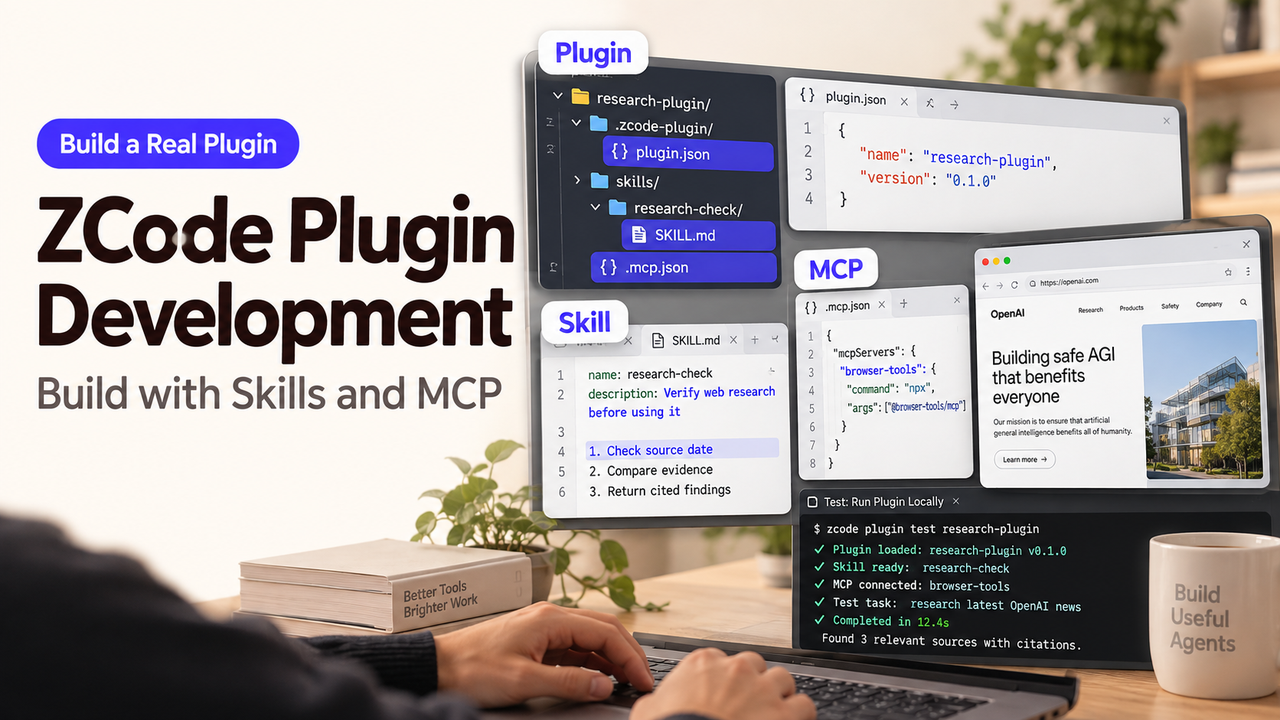
A release-note plugin should summarize a sample changelog before it connects to an account. In this ZCode plugin development example, first make a Skill work on a harmless fixture; add MCP only when a read-only test server is ready. The steps follow ZCode's plugin documentation, checked September 29, 2026. This is a documented build path, not a completed install.
Define One Plugin Job Before You Build
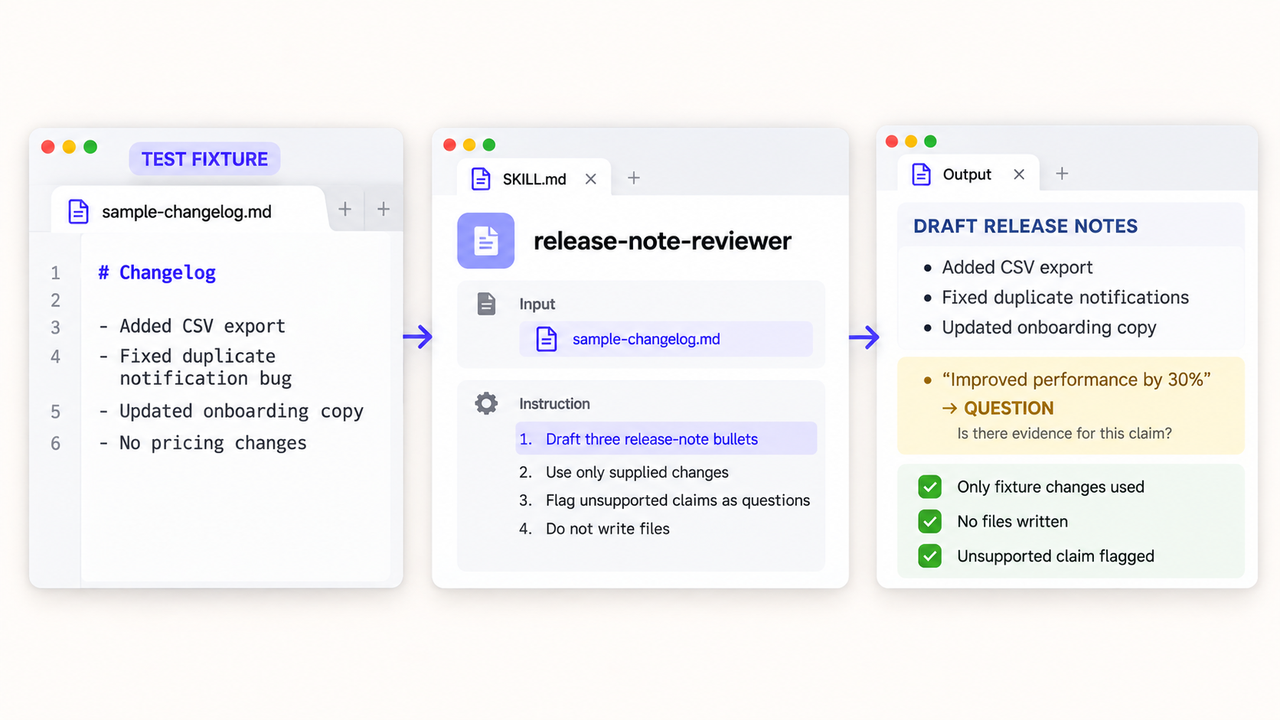
Give the plugin one input: a sample changelog in a disposable workspace. Its output is a proposed summary and claims for human review. It should not publish notes, edit production code, or call an external service yet.
The first pass criterion is simple: the Skill appears under the plugin source and summarizes only changes present in the fixture. Save that fixture and expected checks as your test plan.
Create the Minimum ZCode Plugin Structure
Add the Required Plugin Manifest
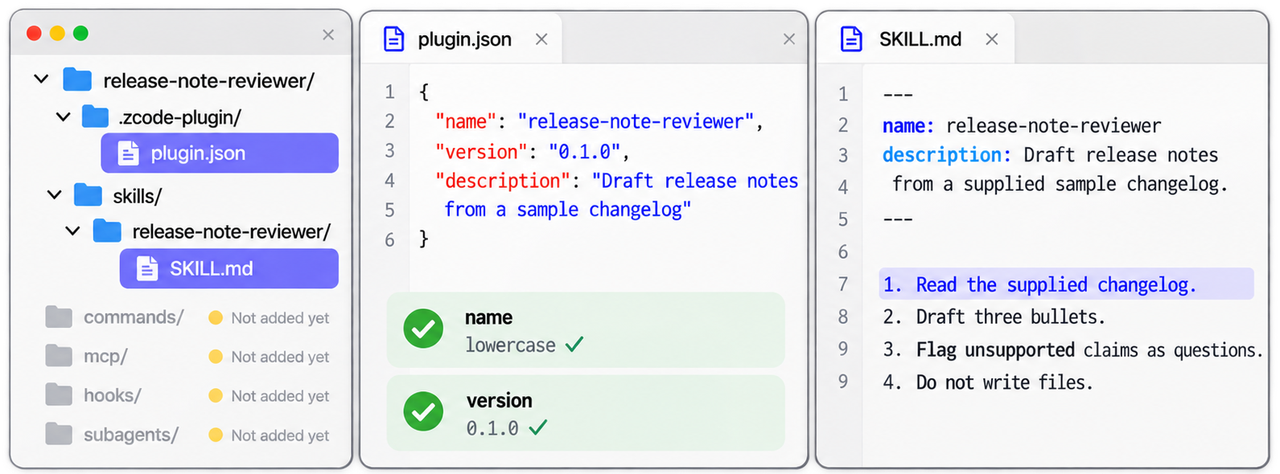
In zcode plugin development, configure the plugin.json manifest and SKILL.md files to define your agent instructions.
Create release-note-reviewer/.zcode-plugin/plugin.json and release-note-reviewer/skills/release-note-reviewer/SKILL.md. The .zcode-plugin manifest takes priority over a Claude-compatible one. Only name is required; version and description identify the installed copy.
{"name":"release-note-reviewer","version":"0.1.0","description":"Draft release notes from a sample changelog"}
The ZCode plugin field reference defines the lowercase name pattern. Unsupported fields such as channels or lspServers produce diagnostics rather than working components.
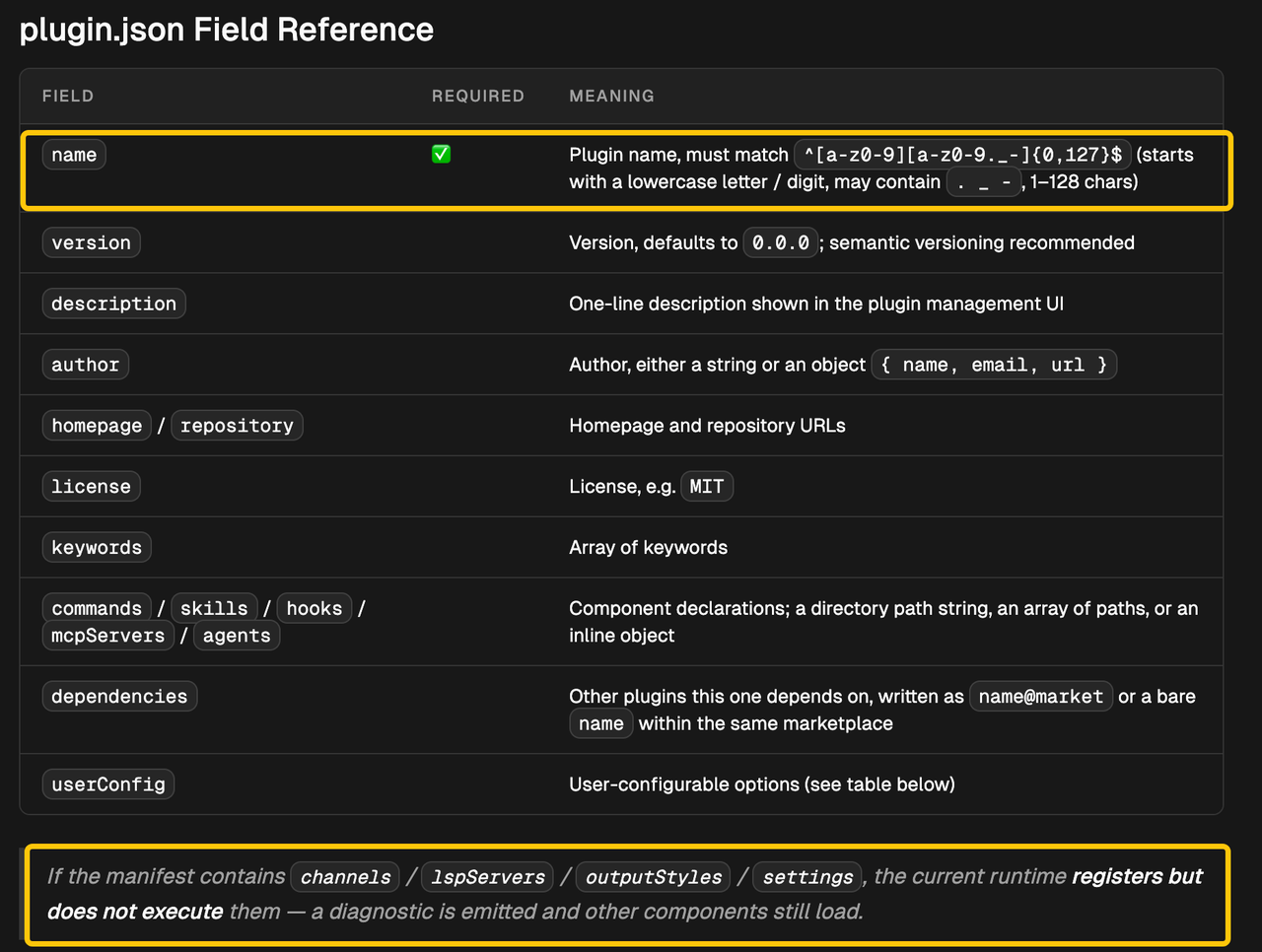
Add One Skill or Command First
Give the Skill precise name and description frontmatter. Its body should use only the supplied changelog and flag claims needing review. Missing fields or an oversized description can make ZCode ignore it; check diagnostics before revising prompts. Add a slash command later if the team needs a fixed invocation. ZCode's Skill guide explains discovery.
--- name: release-note-reviewer description: Draft release notes from a supplied sample changelog. --- Read the supplied changelog. Draft three bullets. Flag unsupported claims as questions. Do not write files.
Add Agent and MCP Components Safely
Include a Subagent or Hook Only When the Workflow Needs It
This task needs neither a subagent nor a Hook while the Skill only drafts text. Add a subagent for a distinct review job. Add a Hook only for a defined event; it can execute scripts, and plugin Hooks join new sessions. The Hooks reference says project-level Hook settings are currently ignored.
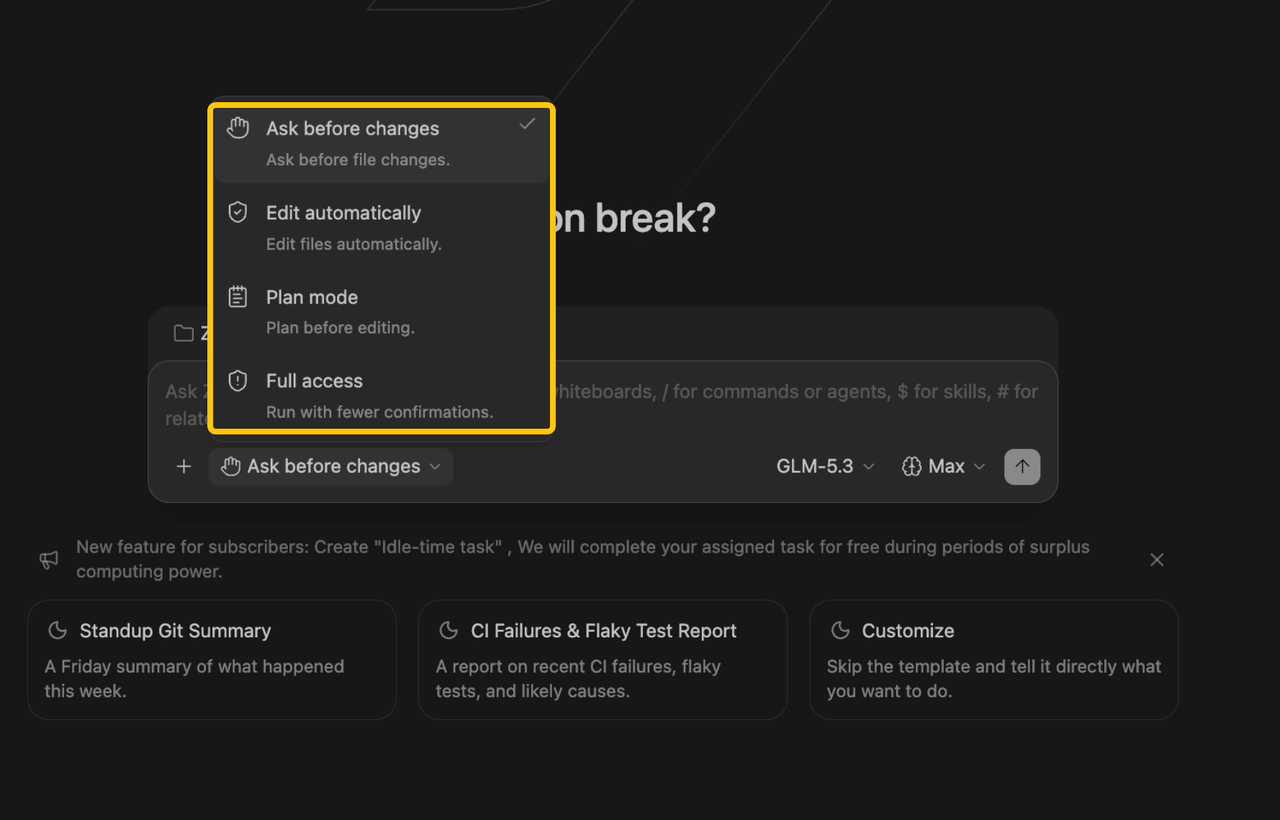
ZCode says enabled plugin code can run local processes and read inherited Agent environment variables. Evaluate in a non-production workspace using “Ask before changes,” which prompts before edits and commands. Review scripts and proposed actions; confirmation is not a security guarantee. ZCode's Safety Confirmation guide describes the modes.
Reference MCP Credentials Without Embedding Secrets
When the reviewer needs external data, add root .mcp.json or manifest mcpServers. ZCode supports stdio, http, and sse, and namespaces plugin server names. Connect only to a read-only test endpoint with a sample-data credential. Keep real tokens out of the manifest, repository, screenshots, and command history.
The plugin MCP reference permits ${user_config.key} but says sensitive userConfig values cannot currently be entered in the UI. Leave that route unenabled until you configure the key at the system level following the plugin's instructions. Never replace the template with a literal token. The MCP guide covers transport and scope.
Test the Plugin in a Local Workspace
Add a Local Marketplace Source
Place marketplace.json beside plugins/release-note-reviewer. Give its plugins entry source: "./plugins/release-note-reviewer" and version 0.1.0. In a disposable workspace, use Settings → Plugins → Create → Add marketplace and select the local directory. ZCode validates it before listing it in Personal.
{"name":"local-review","plugins":[{"name":"release-note-reviewer","source":"./plugins/release-note-reviewer","version":"0.1.0"}]}
Install the Plugin and Inspect Its Diagnostics
Install and enable it. Check the detail view and Settings → Skills for the named Skill. Invoke it on the fixture; compare each claim with the sample file. If absent, inspect frontmatter diagnostics. After adding MCP, check Plugin MCP servers for only the expected test connection. Stop connection failure rather than substituting production credentials. ZCode documents this local client test flow; this example has not been run.
Package the Plugin for Team Distribution
Version the Plugin and Marketplace Entry Together
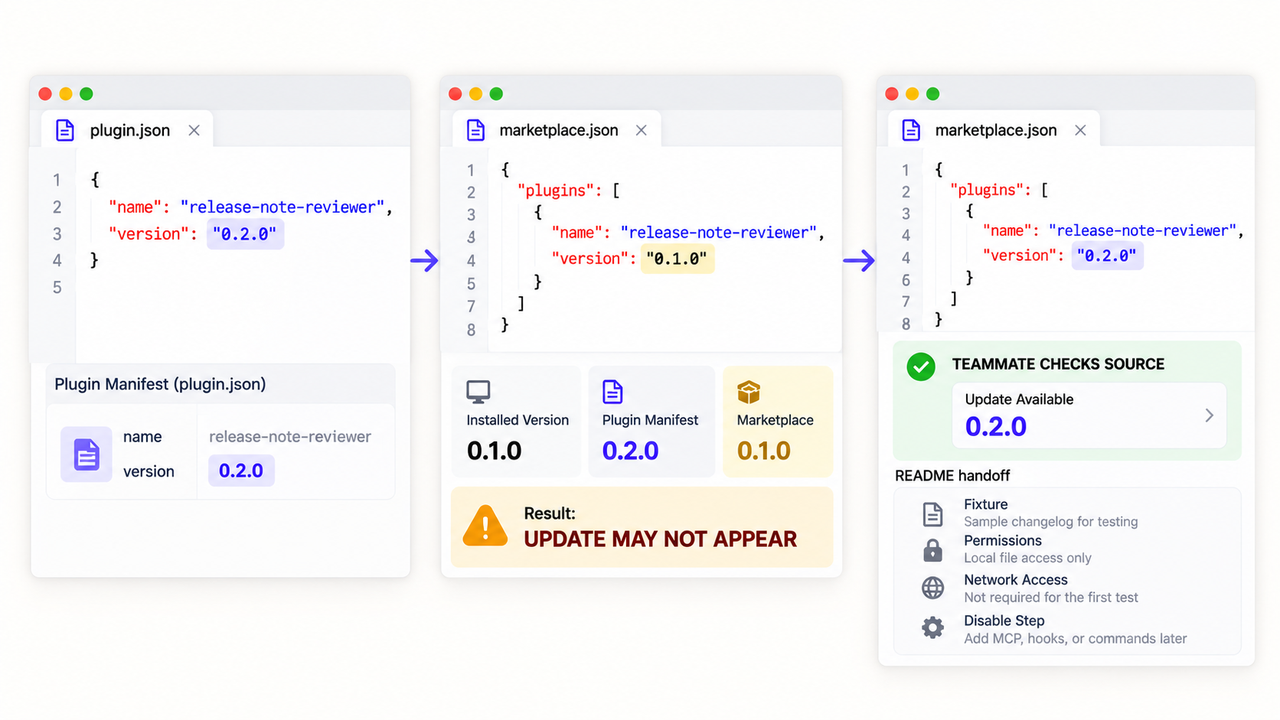
Publish the repository with plugins/ and root marketplace.json; teammates can add that source. Match its entry's name and version to plugin.json. ZCode reads the installed version from the manifest but checks updates against the marketplace version. Without that bump, no update may appear. Document the fixture, permissions, network access, and disable step in the README. ZCode's referenced pages do not establish signing, sandboxing, or automatic migration.
Conclusion
Ship the Skill-only version once the sample changelog produces a summary reviewers can assess. Add MCP only after the test credential and read-only endpoint have a repeatable setup path. Leave Hooks out until a specific event calls for them. If the plugin later feeds a GTM process, map its testing, approval, and rollback handoffs in a workflow diagram before putting its output to work. SpringBrand materials on workflow mapping are one external reference only and do not replace ZCode's plugin development model.
FAQ
Can component paths point outside the ZCode plugin root?
The plugin reference shows relative component paths and several marketplace source forms, including absolute local directories. It does not state a general rule for component paths escaping the plugin root. Keep components inside the plugin for a portable package; test any unusual path against the current validator rather than assuming it is supported or blocked.
Which template variables are available inside a plugin MCP configuration?
ZCode lists ${CLAUDE_PLUGIN_ROOT} (also ${ZCODE_PLUGIN_ROOT}), ${CLAUDE_PLUGIN_DATA}, ${CLAUDE_PROJECT_DIR}, and ${user_config.key}. The first two refer to plugin locations, the third to the working directory, and the last to a matching configuration entry. Check the official variable table before adding an unlisted placeholder.
Can plugin configuration show file and directory pickers?
Yes. The ZCode userConfig field reference includes file and directory types alongside string, number, and boolean. Those types make path selection available in the plugin configuration area. They do not grant access to every selected file or solve the separate sensitive-value UI limitation.
How are cross-marketplace plugin dependencies allow-listed?
Use name@market for a dependency outside the current marketplace, and list the allowed marketplace name under allowCrossMarketplaceDependenciesOn in marketplace.json. A bare name refers to a dependency in the same marketplace. Check the ZCode marketplace fields before publishing; do not assume an installed dependency is automatically allowed.
Which hook events does ZCode currently support?
The current Hooks reference lists seven: SessionStart, UserPromptSubmit, PreToolUse, PermissionRequest, PostToolUse, PostToolUseFailure, and Stop. Plugin Hooks are executable code and follow the plugin's enabled state. Review any Hook that can affect tool input or permissions; the event list is not a security guarantee.