Workflow Orchestration: Coordinate Tools With Control

Written by
Springbrand Editor Team
Editorial team
Springbrand Editor Team creates and maintains blog guides on AI tools, automation, marketing, and agent workflows.

Reviewed by
Springbrand Audit Team
Editorial review team
Springbrand Audit Team supports editorial quality through source checking, clarity, and consistency across the blog.
Updated
Published
Workflow orchestration coordinates tools, people, and agentic steps while preserving state, ownership, recovery, and human control.
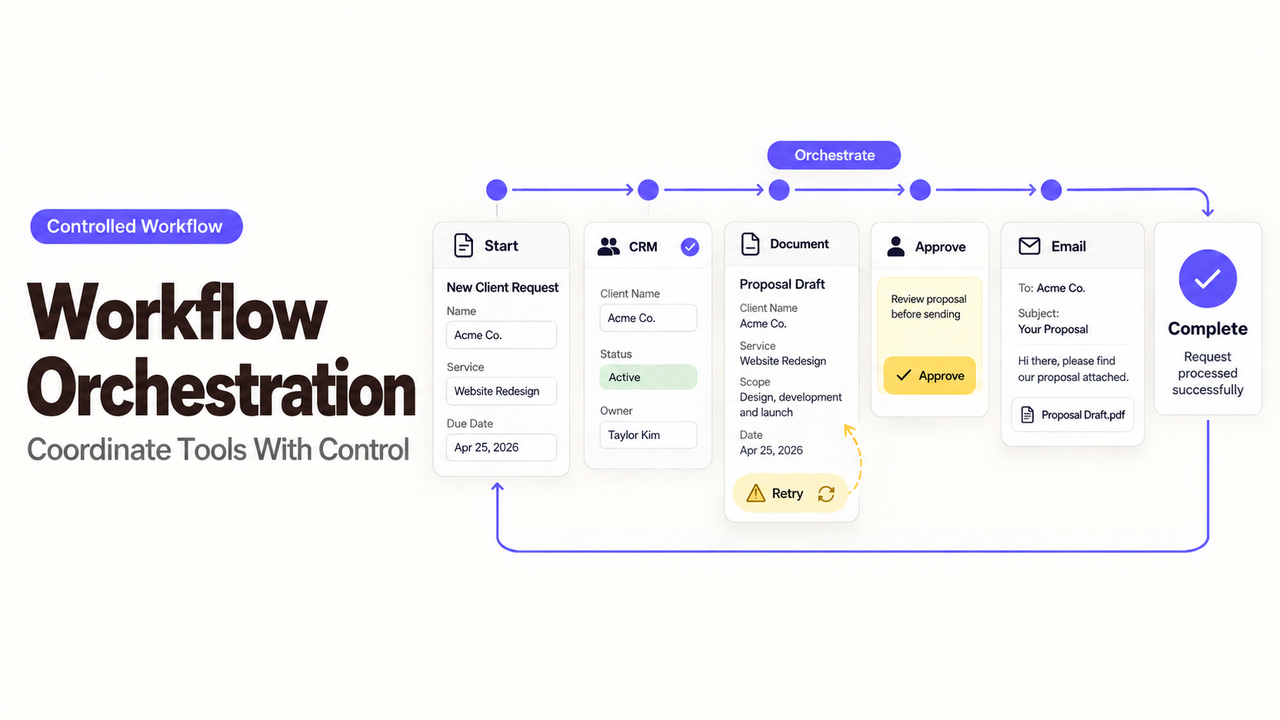
The awkward part of a multi-tool workflow is rarely the first step. Trouble begins when one system is waiting, another has moved ahead, and a person cannot tell which result is current.
I’m Alex, and that is where I draw the line between automation and orchestration. Automation completes a defined action. Workflow orchestration keeps the whole job in order while tools, people, and agentic steps work at different speeds.
What Workflow Orchestration Coordinates
Workflow orchestration manages a job that crosses several steps. It knows what has finished, what is waiting, what can run next, and what needs attention.
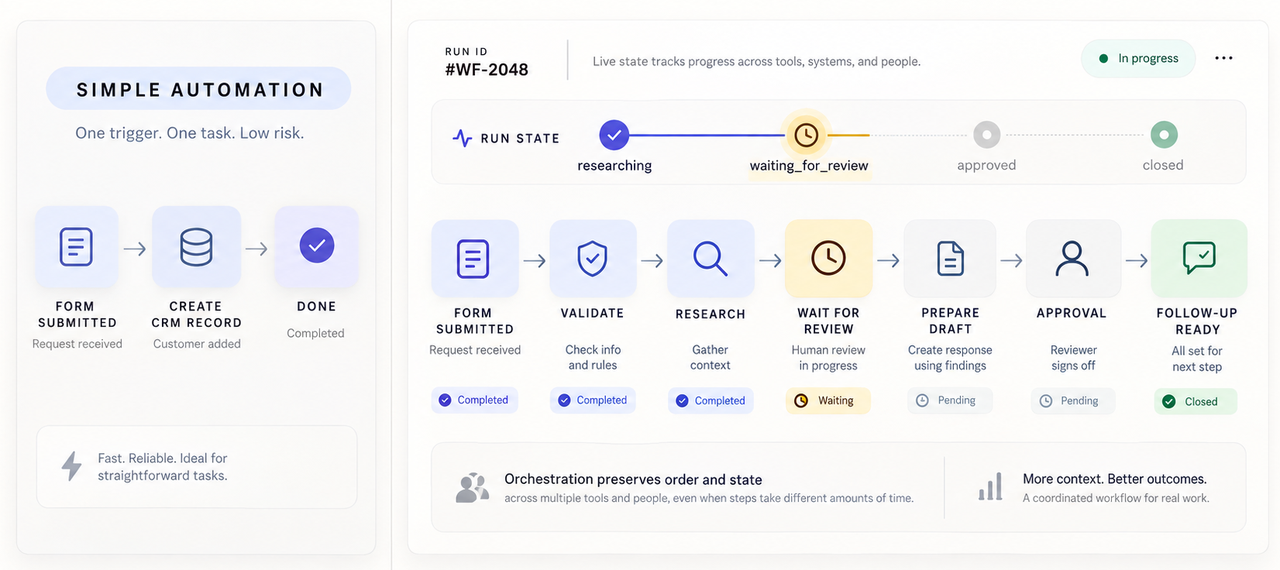
A simple automation might copy a form response into a CRM. An orchestration could check the record, request enrichment, wait for review, and then release an approved follow-up.
Dependencies, State, and Shared Context
A dependency says that one step cannot proceed until another condition is satisfied. The follow-up cannot be prepared until the account is identified. It cannot be sent until someone approves the wording.
State records where the current run stands. Useful states might include researching, waiting_for_review, approved, failed, and closed. A timestamp alone is not enough when it does not explain what the process is waiting for.
Shared context is the information later steps need. Pass the account ID, approved offer, sources, and review result rather than an entire chat history.
Systems, People, and Agentic Steps
Different work belongs in different places. Deterministic steps can validate fields, transform data, or route a record. An agentic step may summarize research or draft language when several acceptable outputs are possible.
People should retain decisions that carry business judgment or external consequences. They may reject a claim, change the next action, or stop the run entirely. The orchestration must recognize that decision as a real state change, not as a comment hidden in another tool.
This distinction also clarifies the technology. A connector gives the workflow access to an application. A Plugin, API, Tool, or MCP server can provide a capability. The orchestration decides when that capability may run and what follows.
When Simple Automation Is No Longer Enough
Simple automation remains the better choice when one trigger leads to one low-risk action. Orchestration becomes useful when timing, dependencies, or interruptions can change the outcome.
The warning sign is how many ways the systems can disagree about whether the job is ready to continue.
Multiple Dependencies and Long-Running Work
A campaign launch may need approved copy, a final image, a tracking link, and a date. Starting publication after only three arrive creates a plausible-looking failure.
Conditions also change while a run is open. A credential expires, an offer changes, or the approver goes on leave. The process needs a durable status.
Use multi-step workflow orchestration when the job must wait without losing its place. The system should preserve the completed work while making the missing dependency visible.
Exceptions That Need an Owner
An error message does not resolve an exception. Someone needs to know whether to retry, correct the input, choose another route, or cancel the work.
Name the person or team that receives each class of exception. A rate limit may go to the automation operator. A disputed customer record may belong with sales operations. A rejected public claim should return to the content owner.
Avoid sending every problem to one general channel. That creates a queue with no useful priority and makes a technically visible failure operationally invisible.
Design an Orchestration That Can Recover
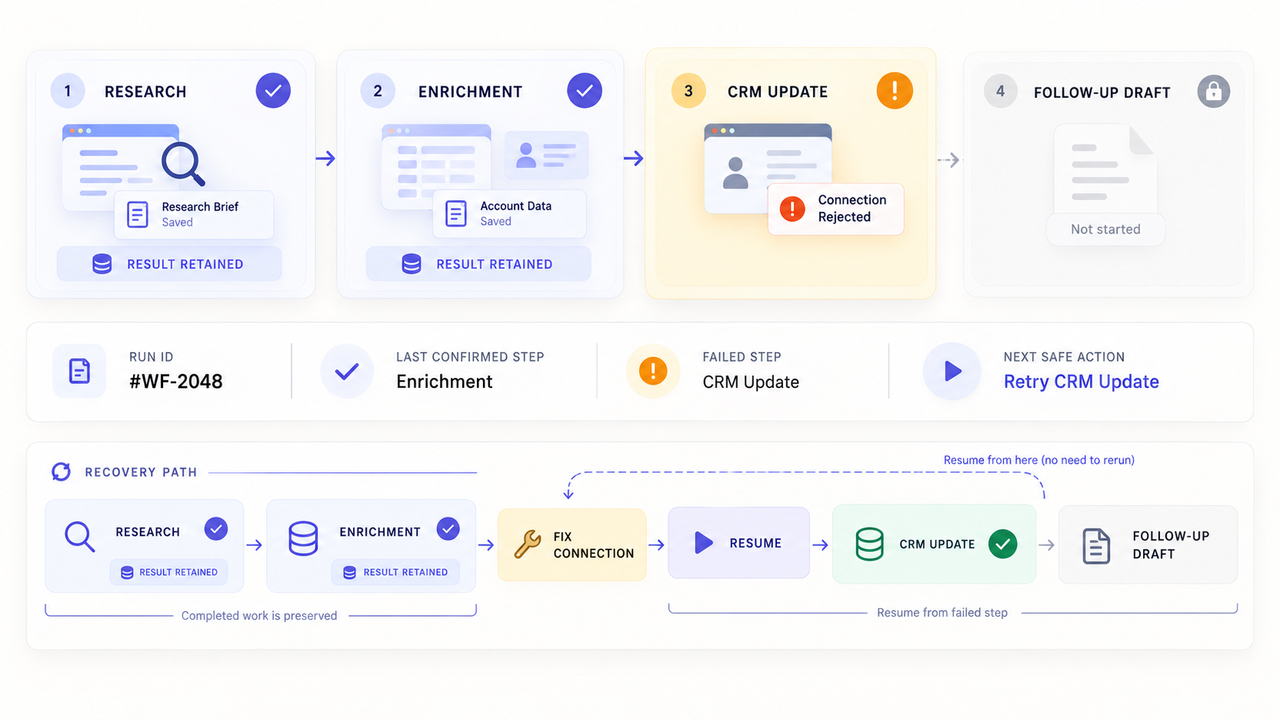
Recovery begins before anything fails. The workflow needs enough state to resume safely and enough history to explain which actions have already occurred.
For a first design, record the last confirmed step, pending step, next permitted action, and person who can intervene. This is an editorial model, not a platform standard.
Define State, Timeouts, and Safe Handoffs
Each meaningful step should end in a recognizable state. Record the input version, result, time, and destination. Use a stable run ID across systems.
Timeouts need a business meaning. A research request that times out may be retried. An approval that remains open for two days may need reassignment instead. Treating both as the same technical failure produces poor workflow coordination.
A safe handoff confirms receipt before the prior step closes. If the CRM rejects an update, keep the research result. A rejected approval should return to a named step.
Separate Reversible Actions From High-Risk Changes
The easiest steps to automate are also the easiest to undo. Reading a record, preparing a draft, or adding an internal label usually carries less risk than sending a message or changing access.
Place a review point before external, financial, destructive, or permission-changing actions. The reviewer needs the proposed action, relevant context, and a clear choice to approve or reject it.
Retries deserve the same caution. Retrying a read is often harmless. Retrying a charge, invitation, or outbound message may create duplicates unless the receiving system supports idempotency.
Observe and Improve the Workflow
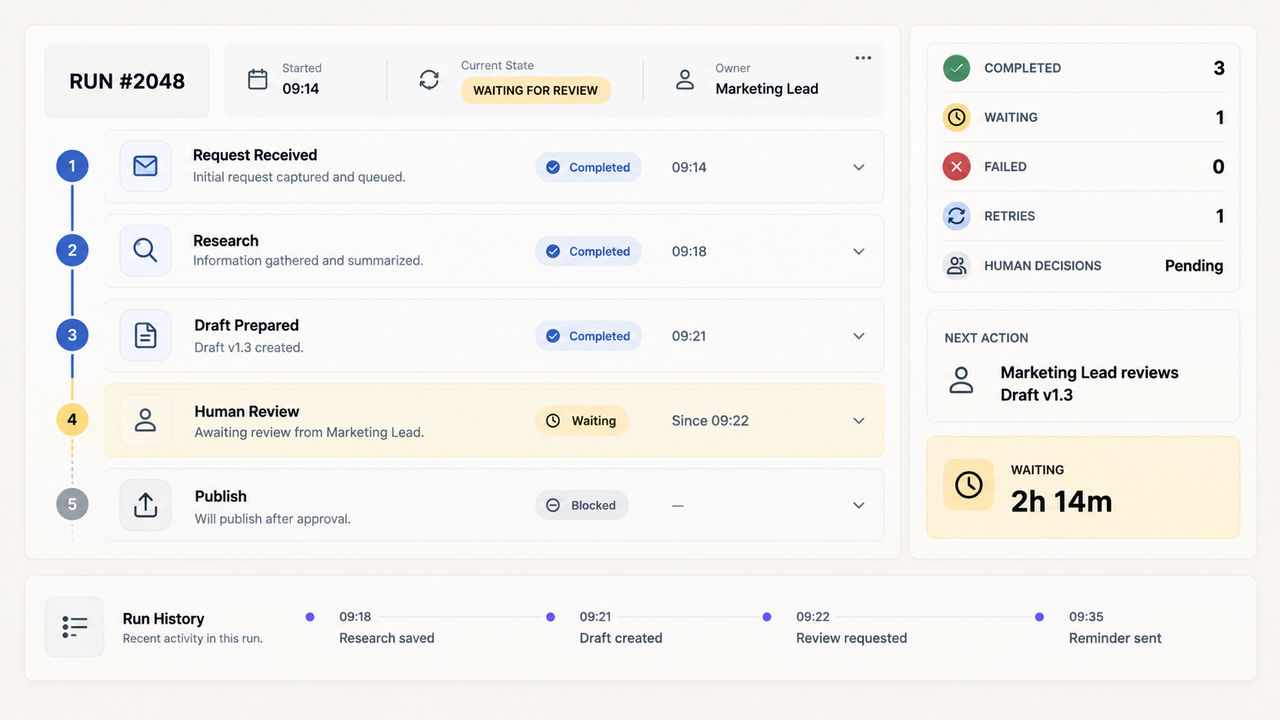
Good workflow control answers a simple question: where is this run now? If the answer requires three dashboards and a Slack search, the orchestration layer is not doing enough.
Keep a run view that shows completed steps, pending dependencies, attempts, decisions, and the outcome. Retain enough detail to investigate a failure.
Track Failures, Delays, and Manual Interventions
Count failed runs, but read the reasons behind them. Ten rate-limit retries point to a different problem than ten rejected drafts. One needs connection or pacing work; the other may need better inputs.
Measure waiting separately from processing. A tool call may finish quickly while approval sits untouched. That is not a computing problem.
Manual intervention is not automatically a defect. It may be the intended control for an unusual case. Track why a person stepped in and whether the same exception now deserves a clearer rule.
Choose the Right Level of Orchestration
Use the lightest design that preserves order. A trigger with one reversible action may need ordinary automation. Several applications may require shared status and exception routing. Long-running work may justify durable execution and replay support.
Do not choose among workflow orchestration tools by counting connectors alone. Ask whether the platform can hold the state your job needs, pause before a risky action, expose a failed step, and resume without repeating completed work.
SpringBrand does not settle the orchestration choice. Its current site presents a plugin marketplace that gives existing agents access to GTM Plugins, APIs, and MCP-connected capabilities. That is a capability layer. It does not by itself establish how the wider workflow handles sequence, approval, or recovery.
If an existing agent needs a currently listed GTM capability inside that design, explore SpringBrand Plugins before building another connection from scratch.
FAQ
The examples below reflect official product documentation checked on September 14, 2026. They illustrate specific implementations, not universal orchestration behavior.
How do scheduled orchestrations handle daylight-saving time changes?
It depends on the scheduler and the time expression. Amazon EventBridge Scheduler adjusts named time zones for daylight saving time. Its schedule behavior skips a nonexistent spring-forward time and runs a repeated fall-back time only once.
UTC schedules do not make that local-time adjustment. Test both clock changes and record the intended business time before relying on a yearly schedule.
Can a run resume after a connector reaches its rate limit?
Yes, if the platform keeps the run state and the failed request is safe to retry. A 429 response alone does not guarantee resumption.
AWS Step Functions supports configurable retry intervals, maximum attempts, backoff, and jitter. The workflow still needs to recognize the connector’s error and avoid duplicating a non-idempotent action.
What happens to in-flight runs when a workflow version is published?
The answer is platform-specific. Some systems keep an open run on its original worker version, while others require compatible changes or explicit migration logic.
Temporal’s Worker Versioning can pin an execution to the deployment version where it started. Auto-upgrade workflows behave differently and must remain replay-safe. Check the exact deployment mode before publishing.
Can nested workflows be versioned independently?
They can be, but a separate child execution does not automatically create an independent release policy. The parent still needs a stable contract for inputs, outputs, errors, and close behavior.
Temporal records a Child Workflow as its own execution and exposes parent-close policies. Its code version still depends on the worker deployment and versioning choices. Test parent and child changes together.
Can one failed branch be replayed without rerunning successful branches?
Some platforms support it under defined conditions. AWS Step Functions can redrive an unsuccessful Standard Workflow from the failed step while preserving successful results.
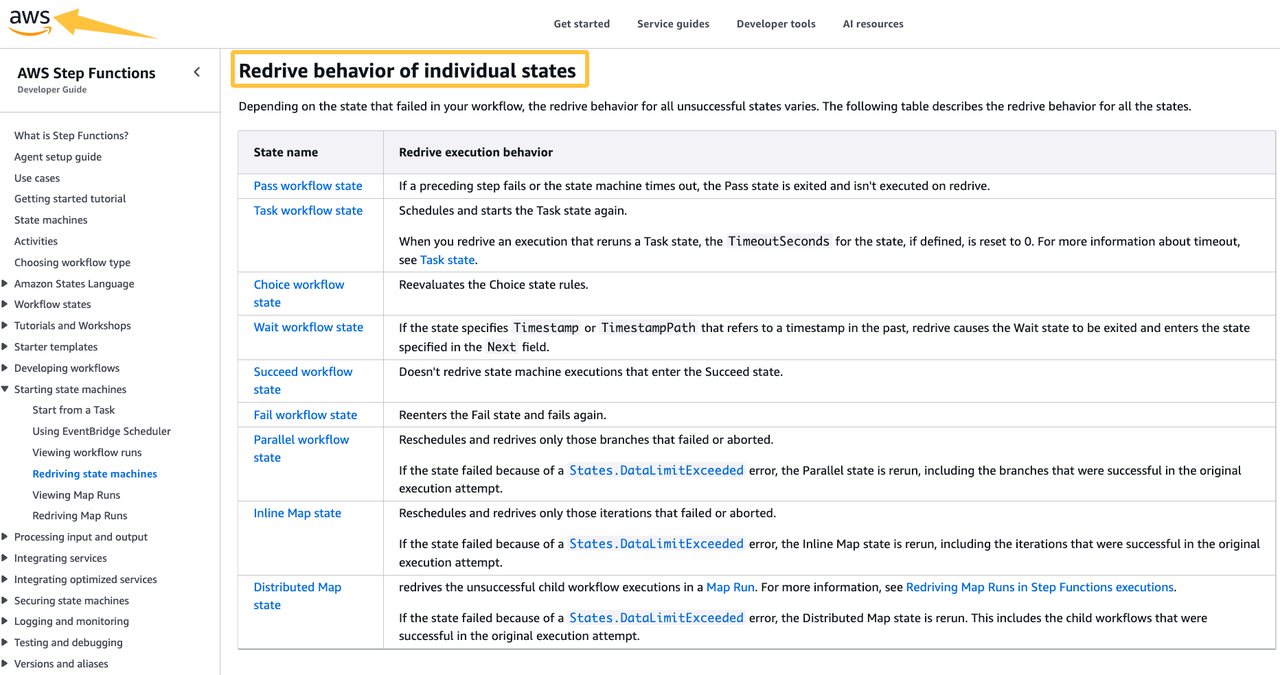
For Parallel states, it normally redrives only failed or aborted branches. AWS documents exceptions, including States.DataLimitExceeded, that can rerun successful branches. Confirm eligibility before treating branch replay as a recovery guarantee.
Conclusion
Workflow orchestration earns its place when a job must stay coherent across tools, waiting periods, approvals, and failures. It should show what happened, what is pending, and what can safely happen next.
Keep the design simple until one missing capability would cause lost state, duplicated action, or an ownerless exception. At that point, stronger orchestration is no longer architectural decoration. It is how the team keeps the work trustworthy while the parts move independently.
Recommended Reads
Explore SpringBrand
Turn ideas into working workflows
Connect agents, APIs and tools in one workspace. Start with a task you want to get done.
Get started free
One account. 10,000+ APIs & capabilities
Give your agent APIs and plugins without separate keys or integrations for every provider.
Explore APIs
No tool expertise needed
Describe your GTM task. SpringBrand chooses the right APIs and plugins for your agent automatically.
Find tools for your task
Run tasks 24/7
Connect your agent to SpringBrand to keep tasks running automatically, day and night.
Connect your agent