Walk into a meeting prepared
Combine account research with the context you provide.
What to ask forA concise meeting brief with sources and questions.
Give your dot fresh data for the work it keeps moving. Use SpringBrand for market research, account preparation and content opportunities in your ongoing conversation.
https://connector.springbrand.ai/mcpChoose a task, copy the request and try it in your connected agent. The outputs below describe what to ask for.
Combine account research with the context you provide.
What to ask forA concise meeting brief with sources and questions.
Collect evidence you can return to in the same conversation.
What to ask forAn evidence table connecting complaints to research questions.
Ground content suggestions in search data.
What to ask forA prioritized content shortlist grounded in retrieved data.
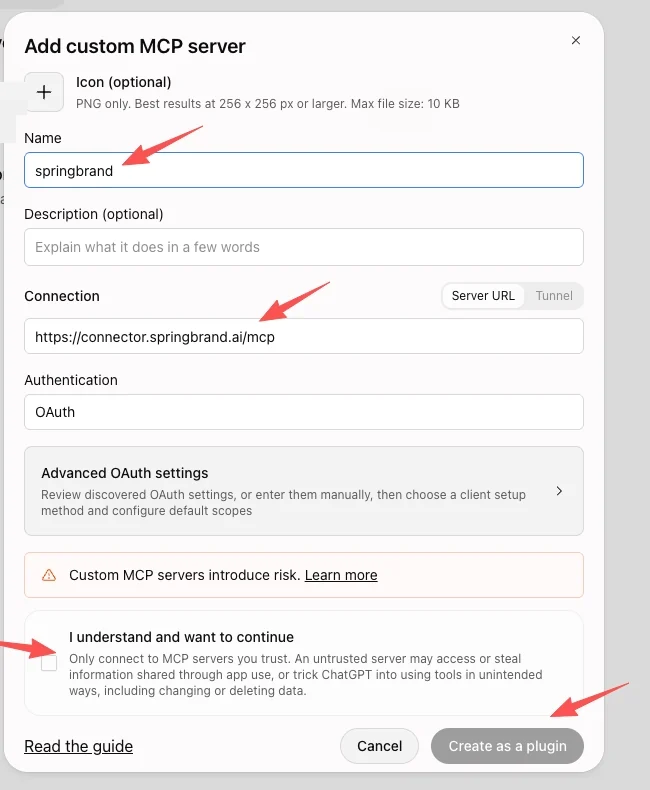
Set Name to springbrand. Under Connection, select Server URL and paste https://connector.springbrand.ai/mcp. Set Authentication to OAuth. Icon and Description are optional. Review and check “I understand and want to continue”, then select Create as a plugin.

Complete the SpringBrand sign-in and OAuth authorization shown by ChatGPT. Confirm that the new plugin is connected and enabled for your account. Then return to your dot and ask it to list the available SpringBrand tools.
The SpringBrand MCP server follows a discover-then-run pattern. Your agent searches the catalog for an operation that matches the task, reads its input contract, then runs it and reads the result.
Discovery and schema lookups never execute anything, so your agent can explore safely before it commits to a run. Some operations ask you to connect a third-party account the first time; the agent tells you which one is missing.
| Tool | What it does |
|---|---|
| search_tools | Find operations that match a task description |
| get_tool_schemas | Read the input and output contract of an operation |
| execute_tools | Run one or more operations |
| get_execution | Read the status and saved result of a run |
| manage_connections | List the third-party accounts an operation needs and check their status |
No. Add the custom MCP server manually in ChatGPT Plugins, using https://connector.springbrand.ai/mcp and OAuth. After creating the plugin and completing authorization, ask your dot to verify its access to SpringBrand tools.
No. This page covers your dot and the supported plugins connected to your ChatGPT account. The ChatGPT Desktop (Codex) page describes a separate local setup.
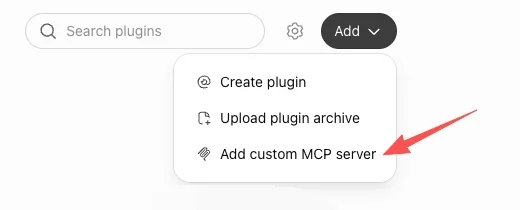
Open Plugins → Personal → Add → Add custom MCP server. Use springbrand as the name, https://connector.springbrand.ai/mcp as the Server URL and OAuth as the authentication method. Create the plugin, complete authorization and check that it is enabled for your dot.
Connecting a plugin only makes its permitted tools available. Give your dot the responsibility, timing and approval instructions you want; check what your account supports before relying on recurring work.
SpringBrand tool usage draws from your SpringBrand Credits balance. Your host agent’s subscription and usage are billed separately. Check the operation and current price before running a paid task.
No. These are example task requests and expected deliverables. Copy one into your connected agent to run it; no tool call or charge happens when you copy it.
Connect your SpringBrand account, choose a small task and review the result.