Spreadsheets
Build and repair workbooks with reusable formulas, clean data and reviewable charts.
Install Spreadsheets
Register Anthropic’s marketplace and install the document-skills plugin in Claude Code.
Register the marketplace
/plugin marketplace add anthropics/skillsInstall the plugin
/plugin install document-skills@anthropic-agent-skillsThese commands install the corresponding skill set. Copying them does not install it; run them in Claude Code and confirm the plugin is enabled.
What this skill helps with
Anthropic’s XLSX skill covers spreadsheet creation, editing and analysis. Its guidance distinguishes formula and formatting work in openpyxl from bulk tabular processing in pandas, and requires a spreadsheet file as the deliverable.
When to use it
Use it to clean a CSV, repair an existing workbook, add formulas, create a financial model or produce charts. Preserve the structure and conventions of a workbook supplied by the user.
What to bring
Provide the workbook or source tables, exact sheet and column names, the formulas you need and the assumptions behind the numbers. Identify cells that can be edited and formulas that must be retained.
What to expect
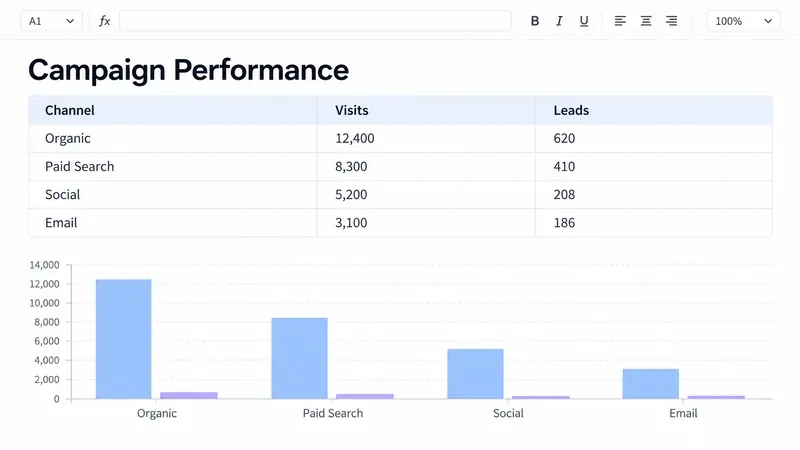
Expect a workbook with editable inputs, formulas, formatting and appropriate charts. Formula recalculation and checks for errors are part of the source workflow. The campaign workbook shown here is an illustrative output.
How the skill works
Understand the existing model
Read formulas and cached values separately when needed. Keep the user’s tab names, input conventions and workbook structure.
Keep calculations reusable
Write spreadsheet formulas for calculated values and document assumptions beside the relevant cells. Avoid replacing existing formulas with fixed totals.
Recalculate and check
The source includes a recalculation helper and requires formula errors to be resolved. Review the saved workbook and its charts before handing it over.
Complete SKILL.md
Files and source history come from Anthropic’s public GitHub repository. Overview summaries were reviewed against the published SKILL.md on 6 October 2026.
skills/xlsx/SKILL.md
Checking public source…
Files
Checking public source…
Changes
Change details are unavailable. Open the original commit to review them.
Source history
The history below lists source commits, not independently verified release versions.
The source reader is unavailable. You can still open the original file on GitHub.
Spreadsheets skill questions
Does writing a formula calculate its value?
No. The source explains that openpyxl writes the formula without a cached result. Recalculate in a spreadsheet engine before relying on displayed values.
Does this replace a Google Sheets integration?
This skill is intended for spreadsheet files. Its source explicitly separates that task from a Google Sheets API integration.
Find the next skill for your workflow
Explore more task-specific skills, compare their requirements and review their original sources.