What Is a Workflow? Triggers, Decisions, and Handoffs
What is a workflow? Learn how triggers, steps, decisions, owners, handoffs, outcomes, and feedback turn recurring work into a manageable system.
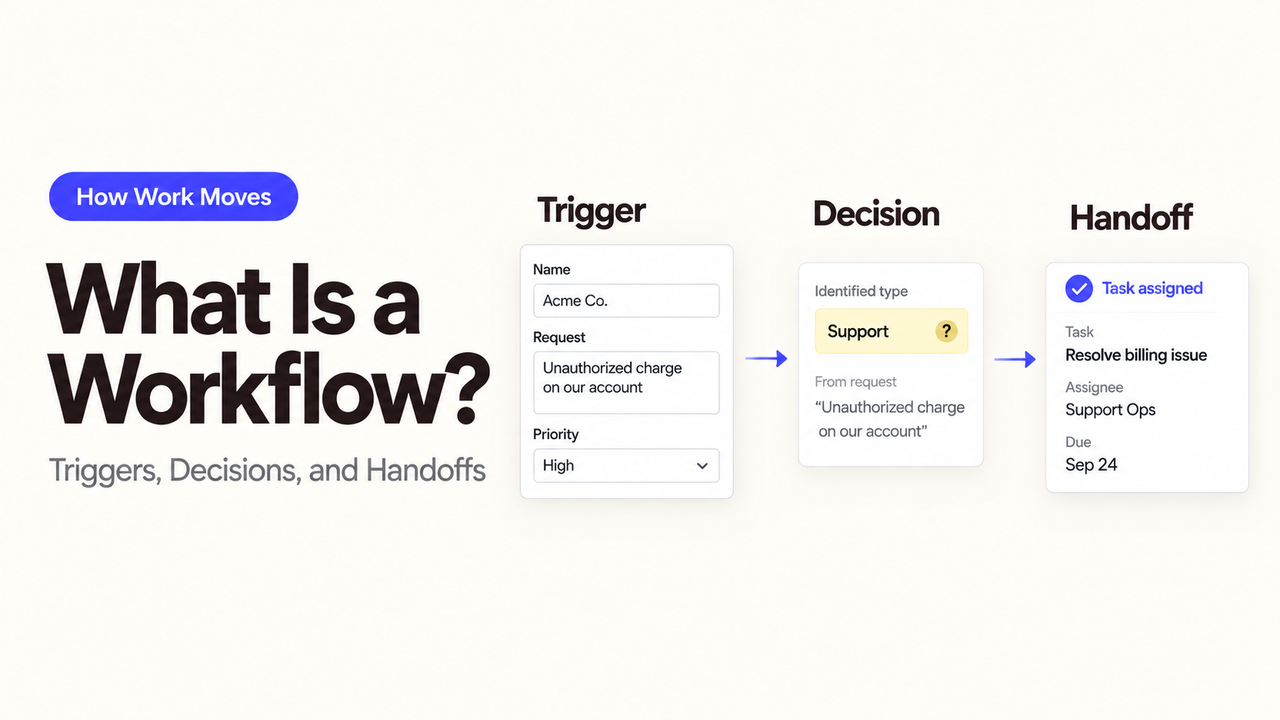
A workflow is the repeatable path a piece of work follows from a starting event to a finished result. For example, a website inquiry arrives. Marketing can see it, but sales and support are unsure who should respond.
I’m Alex. In this example, the workflow settles that question. It shows who checks the inquiry, where it goes, and how the next team confirms receipt.
This guide answers what is a workflow through that one example, without turning the topic into a diagramming lesson or software list.
What Is a Workflow?
A workflow connects a starting event, a sequence of steps, and a clear finish. People, systems, or both may complete the steps.
A useful workflow definition also names the information needed, the decisions that change the route, and the person responsible at each step. Without those details, “review inquiry, assign lead, follow up” leaves the difficult questions unresolved.
Here, one website inquiry moves through the workflow—not the whole sales operation. It ends when sales or support accepts responsibility, or the inquiry reaches a named exception queue.
The Building Blocks of a Workflow
You do not need special notation. At each stage, ask where the inquiry is, who has it, what moves it forward, and what happens if it gets stuck.
Triggers and Inputs
A workflow trigger is the event that creates a new piece of work. Here, it is a submitted website form. “Someone checks the inbox” is not the trigger; it is a later step.
Inputs are the information needed to begin. The inquiry may need a name, contact method, message, requested service, and consent record. If a required field is missing, the workflow should enter an incomplete-input state instead of pretending the next owner has enough information.
Steps and Decisions
Steps are actions: validate the form, check for an existing account, or create a review task. Decisions change the route. “Does this concern an existing customer?” can send the inquiry to support or continue toward sales.
Write a decision as a question with answers the owner can apply consistently. “Is this a good lead?” hides several judgments. Location, requested service, existing relationship, and missing details can each become a clearer rule.
Owners and Handoffs
An owner is responsible for the work in its current state. The role may be Marketing Coordinator, Sales Representative, Support Queue, or Intake System. Use roles rather than employee names so the workflow survives staffing changes.
A workflow handoff occurs when responsibility changes. It is complete only when the next owner can see the item, has the required context, and knows what to do. Sending an email notification is not enough if the destination queue never records acceptance.
Outputs and Feedback
The output is the verifiable result: a sales task with an owner and due date, a support ticket with customer context, or an exception assigned for manual review.
Feedback tells the team whether the route worked. Track returned assignments, missing fields, misroutes, and waiting time. That evidence can justify a focused rule change.
A short work card keeps those facts together:
Record | Question it answers |
Current step | Where is the inquiry now? |
Next person or team | Who must act next? |
Reason for routing | Why did it come here? |
Completion check | How will we know this step is done? |
If blocked | Who handles it when it cannot move forward? |
How Does a Workflow Differ from a Process or Automation?
A process covers a broader business goal. Customer acquisition, for example, includes campaigns, inquiry handling, sales qualification, and onboarding.
The workflow is how one website inquiry moves from submission to the right team. A task is one action within it, such as a sales rep reviewing the inquiry. A procedure explains how that rep performs the review.
Automation is software completing a step, such as creating the review task. The workflow can exist on paper and still be useful. Automating an unclear route only makes unclear decisions happen faster.
How Does a Simple Workflow Work in Practice?
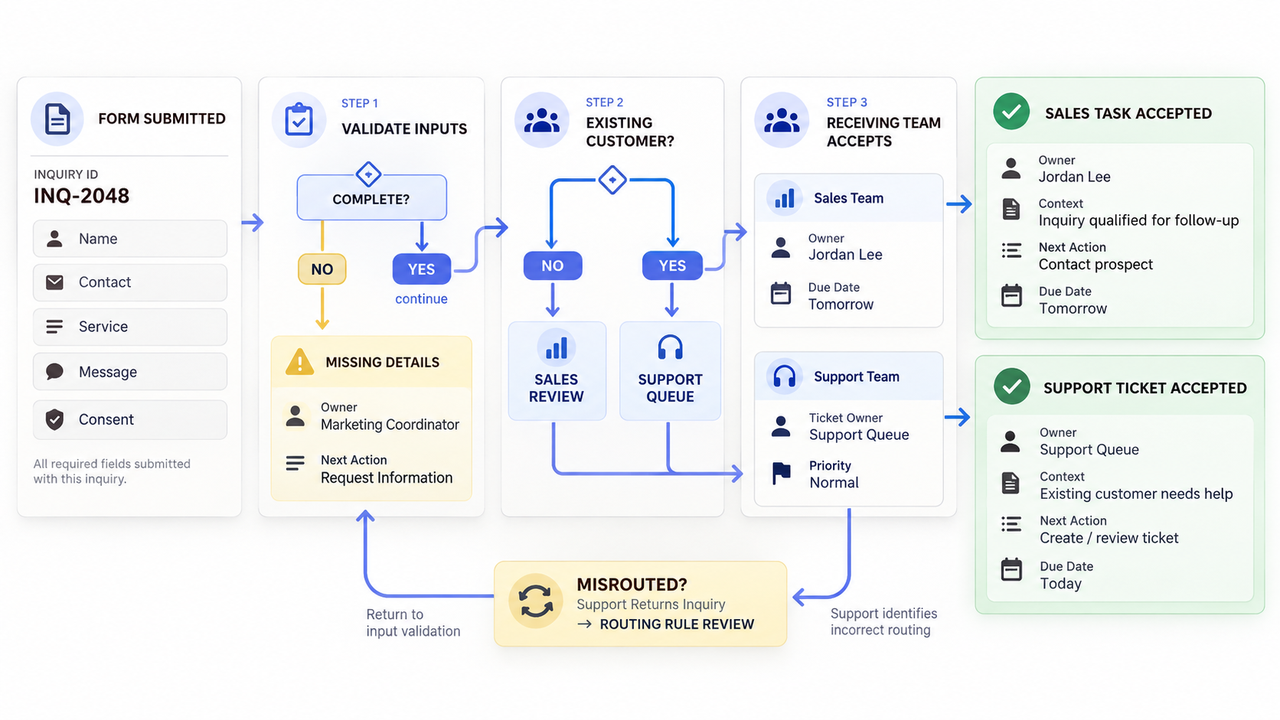
Follow one inquiry through five steps:
- Submit: A visitor sends the website form. The system records the fields and creates an inquiry ID.
- Check: Marketing checks required information. An incomplete form goes to its exception queue.
- Decide: A complete inquiry from an existing customer goes to support; other inquiries go to sales review.
- Accept: The receiving team confirms it has the item and assigns an owner and due date.
- Record: The accepted task or ticket becomes the output. If it was sent to the wrong team, that correction informs the routing rule.
This is a business workflow because the route connects a trigger, data, decisions, people, systems, and a finished business state. No AI is required to make it a workflow.
Where Can a Workflow Get Stuck, and How Can You Fix It?
Look for items waiting without an owner, steps that depend on private knowledge, and handoffs confirmed only in chat. Check whether different employees give the same answer at each decision.
Exceptions deserve names. “Handle manually” does not reveal who handles the work or when. Use states such as Missing contact details, Possible duplicate, or Service fit unclear, each with an owner and next action.
Also find false endings. “Notification sent” describes an action, while “Sales task accepted with a due date” describes an outcome. The second is easier to manage.
Which Steps Should You Automate or Use AI For?
Use deterministic automation for stable actions such as creating an inquiry ID, checking required fields, or placing a complete item in a queue. These steps have clear inputs and outcomes.
AI may help when wording varies, such as proposing whether a free-text message concerns sales or support. Give it bounded categories, a low-confidence route, and examples. A person should review unclear classifications before the inquiry changes teams or triggers an external response.
If the defined route later needs an Agent or connected capability, check SpringBrand’s current plugin marketplace for a verified fit. Confirm the exact action and data boundary; this article does not establish support for a particular system.
Conclusion
A workflow turns recurring work into a route the team can observe and improve. It names the trigger, inputs, steps, decisions, owners, handoffs, output, feedback, and exception path.
Start with one unit of work and a verifiable finish. When those parts are clear, the team can decide whether software or AI should execute any of them.
FAQ
What happens to in-progress work when a workflow version changes?
Do not assume an in-progress item automatically adopts the new version. Let it finish on the version that started it, or use an explicit, tested migration rule. Temporal’s current workflow-versioning documentation illustrates one approach in which old executions can continue on old code paths while new executions use an update.
Does approval waiting time count toward workflow cycle time?
Yes, when cycle time is measured from the agreed trigger to the finished outcome. Report active work and waiting separately so an approval queue does not disappear inside one average. Use the same boundaries before and after a change.
Can teams compare two workflow versions before replacing the current one?
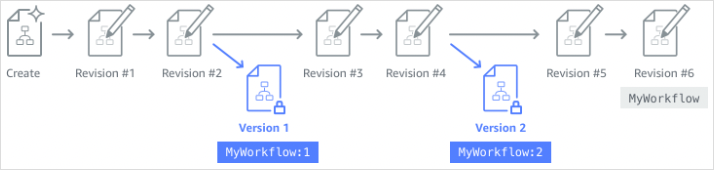
Yes, if they preserve versioned definitions and test inputs. Compare steps, decisions, permissions, outputs, and exception paths—not only the visual layout. AWS Step Functions, for example, documents immutable numbered versions that can be invoked separately.
How should a workflow handle duplicate trigger events?
Give each business event an idempotency key and check it before creating a second item or external action. Platform guarantees differ: AWS documents StartExecution as idempotent for Standard workflows, but not for Express workflows. Design the business action to tolerate a repeated event.
When should workflow run records be archived or deleted?
Use an approved retention schedule based on operational recovery, contracts, privacy obligations, storage needs, and applicable rules. Do not choose a universal number from a tutorial. NIST’s log-management guidance provides a planning reference, but the organization must define what it retains and why. This is general information, not legal or compliance advice.