DeepSeek Search Competitor Monitoring: One Market
Written by
Alex
Springbrand Researcher

Reviewed by
Springbrand Audit Team
Editorial review team
Springbrand Audit Team supports editorial quality through source checking, clarity, and consistency across the blog.
Updated
Published
Design a DeepSeek Search competitor monitoring task with sources, change checks and one brief.
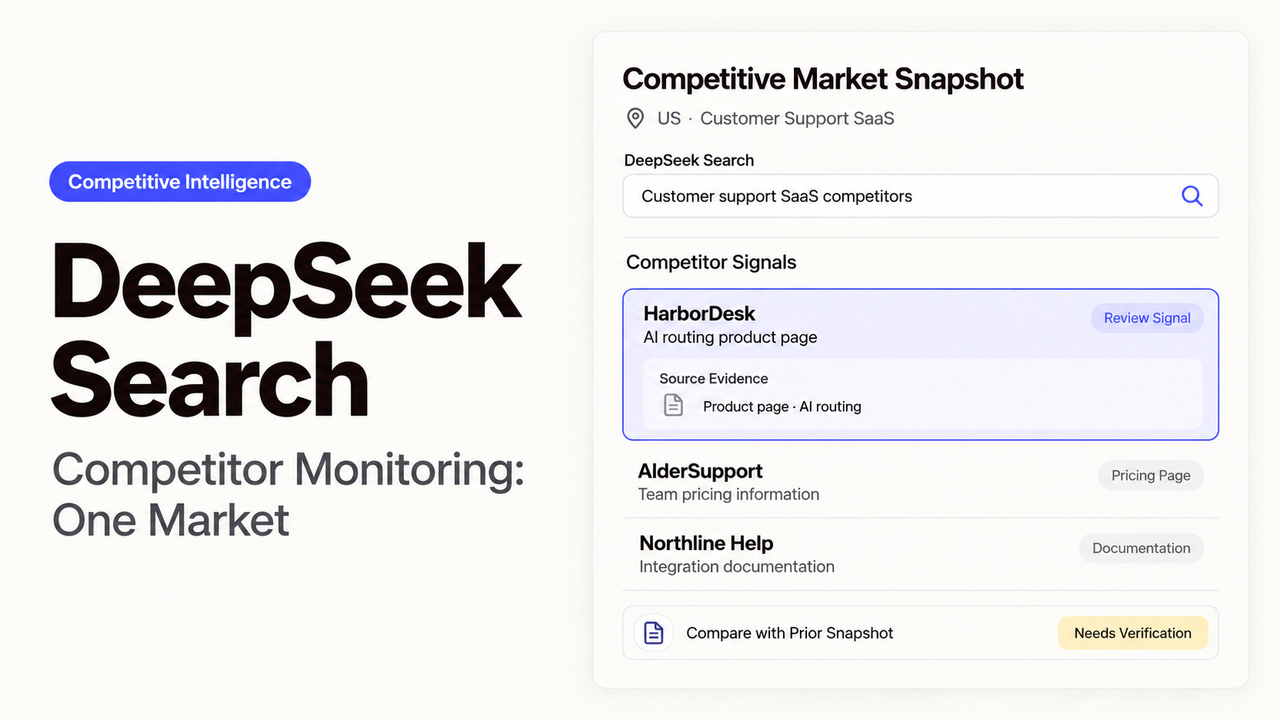
Which competitor update would change what your sales team says on its next call? For a team selling appointment-scheduling software in the United States, a new booking limit or a paid integration may matter. A rewritten homepage slogan can usually wait.
I’d begin this DeepSeek Search competitor monitoring task with three competitors and those buying questions. DeepSeek opened its Search and Fetch APIs on October 17, 2026. They handle finding pages and retrieving their contents. Your team schedules the repeat checks, keeps earlier observations, and decides which differences deserve a place in the brief.

Which Competitor Changes Matter?
The watchlist should reflect what buyers compare in this market. For scheduling software, start with plan prices, booking allowances, and integrations restricted to a particular tier. Keep the country, currency, and billing period consistent so sales can use the comparison.
The research lead chooses each competitor’s pricing page, relevant product pages, and release notes. The first pass records what those pages say now. If there is no earlier observation, call the finding newly discovered; finding it today does not establish that the vendor changed it today.
Review weekly, with urgent findings such as a confirmed integration removal escalated sooner. Use authorized public sources. Customer names and confidential sales notes stay out of the queries.
How Should Search Queries Capture Evidence?
Keep each query focused on a competitor’s own domain, then follow the result to the relevant page. DeepSeek’s Search API returns structured results for a query. Save the query, returned URL, and retrieval time with any finding you keep.
These examples use a placeholder domain. Replace it with one competitor’s official site:
pricing site:vendor.example lang:en
"booking limit" site:vendor.example
integration site:vendor.example after:2026-10-01
The date filter can miss an edit to an older page. Keep a separate list of known pricing URLs to revisit, even when they do not appear in a fresh search.
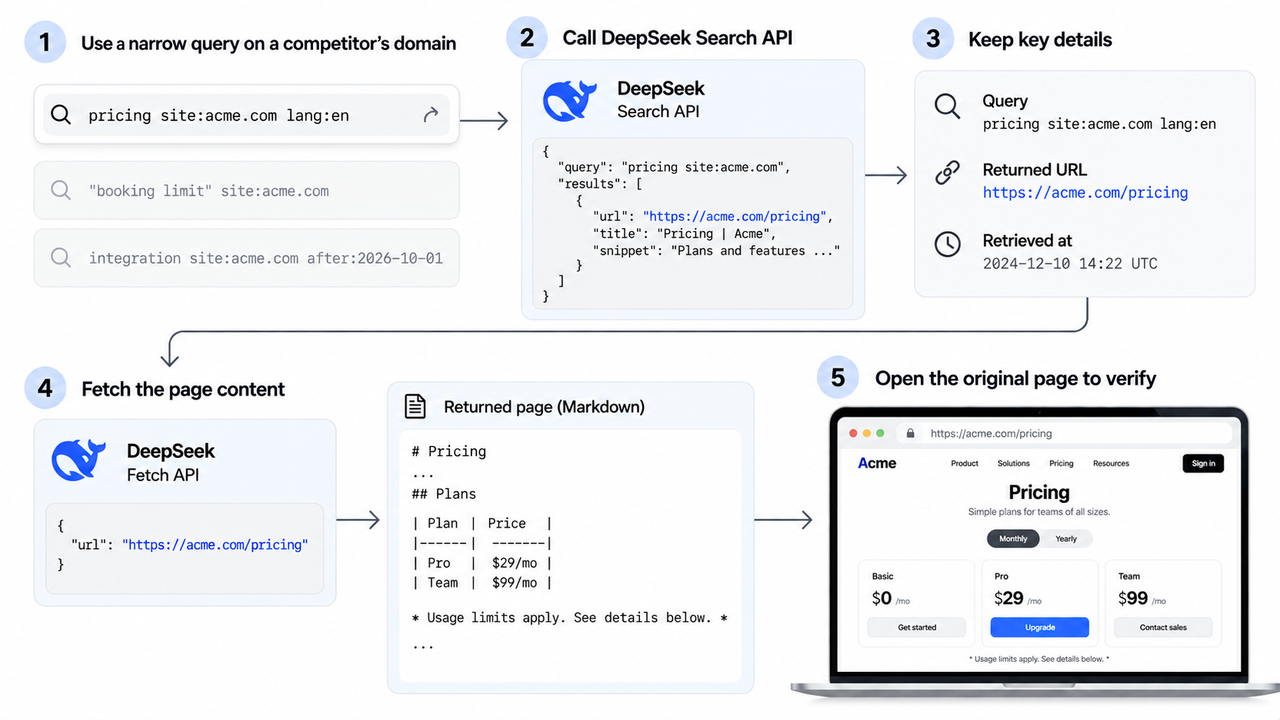
Search summaries can help locate the passage, but they may leave out a footnote that qualifies the offer. The Fetch API retrieves a supplied URL as Markdown for a closer read. When a billing toggle, image, or page layout affects the meaning, open the original page as well.
How Do You Separate Changes from Noise?
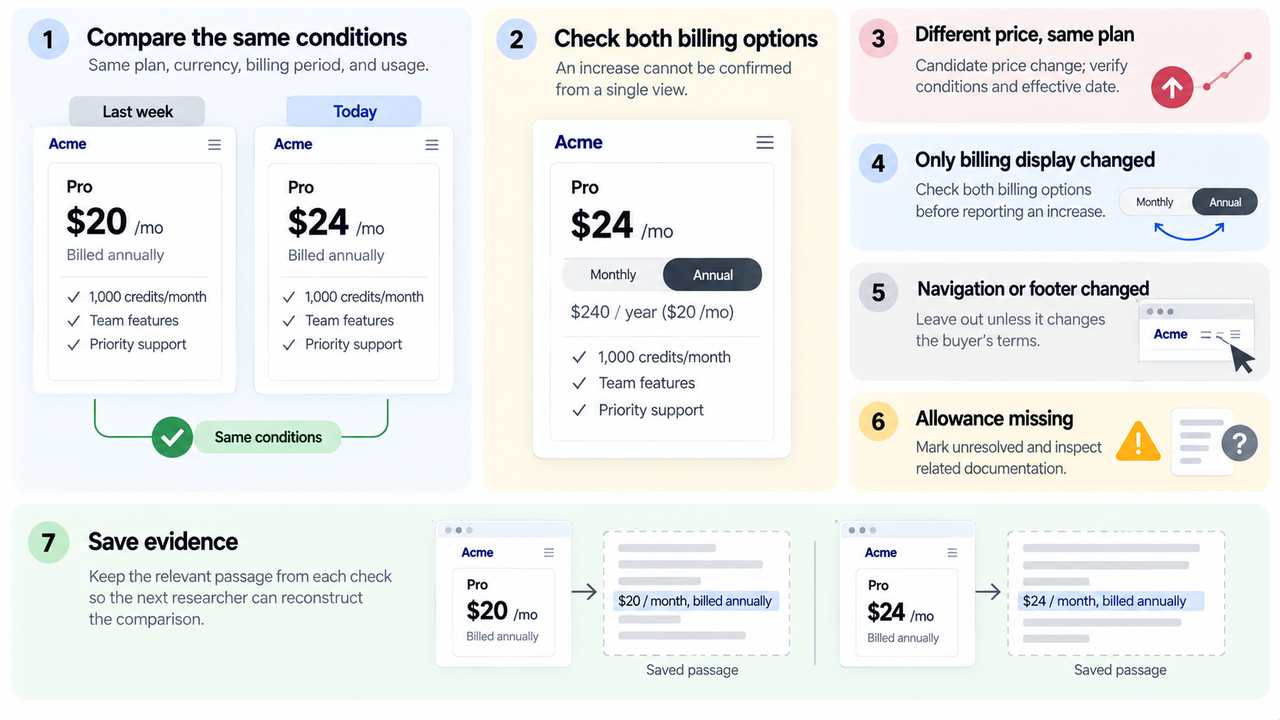
A price comparison only works when both observations describe the same plan, currency, billing period, and included usage. Save the relevant passage from each check. The next researcher should be able to see why a difference was reported without rebuilding the comparison.
| Observation | Treatment in the brief |
|---|---|
Same plan and billing period, different price | Candidate price change; verify conditions and effective date |
Annual equivalent replaced by monthly billing display | Check both billing options before reporting an increase |
Navigation, footer date, or page order changed | Leave out unless it changes the buyer’s terms |
Previously visible allowance is missing | Mark unresolved and inspect related documentation |
Suppose last week’s capture showed $20 per month, billed annually. Today’s page opens at $24 with monthly billing selected. Those figures describe different billing options; they do not yet establish a price increase. Compare both options before alerting sales.
Several findings may point to the same announcement. Merge those into one item. If a reseller article disagrees with the vendor’s current page, keep the discrepancy visible for review rather than quietly choosing a value.
As of October 22, 2026, the official Search documentation gives no fixed interval for refreshing its index. A weekly market watch workflow therefore needs fresh searches and deliberate returns to known sources. A search that finds nothing does not prove the pages stayed the same.
What Goes into the Monitoring Brief?
Sales should see the changes most likely to affect a buyer’s decision first, with an explanation of why each matters. Keep unresolved observations in their own clearly labeled section so they are not mistaken for confirmed updates.
Each item needs the earlier and current wording, capture times, and source URL. Name the affected plan or customer group. If there is no earlier capture, label it “first observed” and leave the launch date unassigned.
A competitor monitoring agent can prepare these comparisons for a researcher. Before a finding changes a battlecard or becomes a shared competitive claim, the researcher checks the original passage and its conditions.
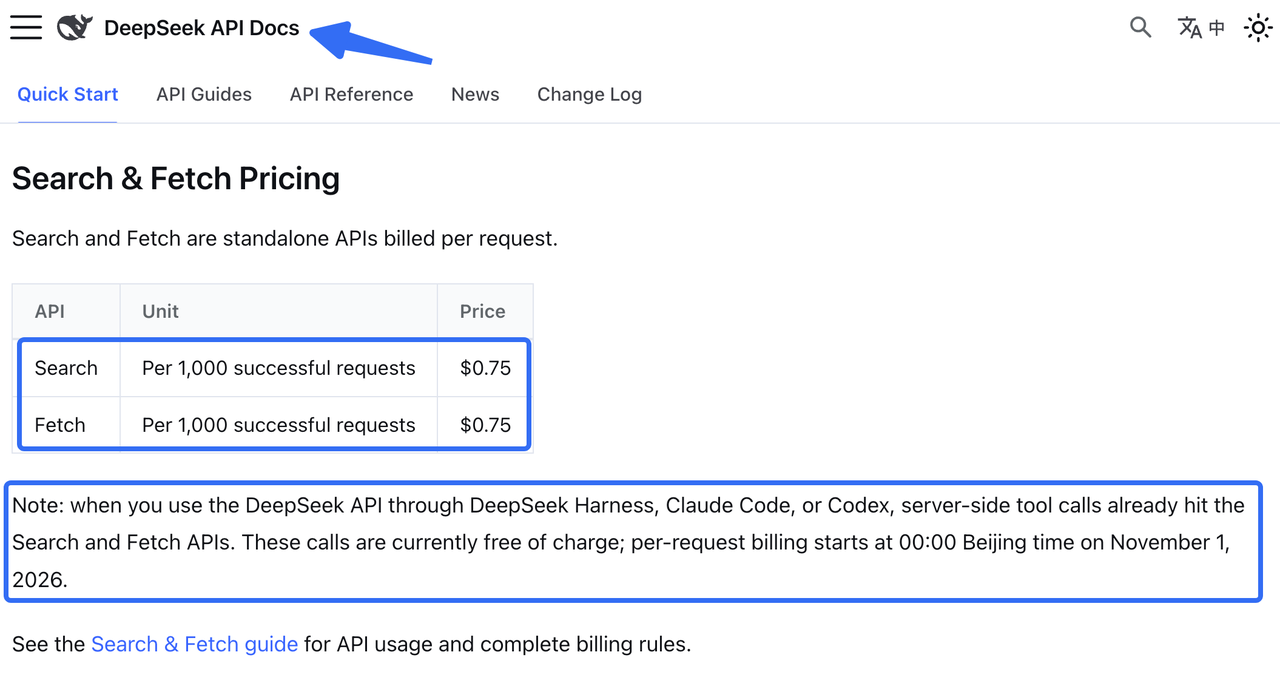
Repeated searches and page retrievals also belong in the budget. On October 22, 2026, DeepSeek’s pricing page lists Search and Fetch at $0.75 per 1,000 successful requests each. Model usage costs extra. Qualifying server-side calls through DeepSeek Harness, Claude Code, or Codex, when using the DeepSeek API, remain free until November 1, 2026, at 00:00 Beijing time. Check the route before applying that temporary allowance to the budget.
FAQ
Can DeepSeek Search revisit the same sources later?
Yes. Make another request, or use Fetch to revisit a saved URL directly. Your process needs to hold the schedule and earlier captures. Search rankings and results may change between checks, so keep the source list independently. If a revisit fails, record the failure and retain the last usable capture.
What happens when a competitor page disappears?
Treat the source as unavailable while you investigate. DeepSeek’s Search and Fetch error guidance says Fetch can return 404 for unavailable, blocked, or unextractable content. Open the page in a browser and look for a replacement URL. The failed fetch alone does not show that a product was withdrawn.
How should a team cite a changed pricing page?
Give the live URL, observation time, plan, currency, and billing period. Keep the earlier passage and its capture date internally, using brief quotations where needed. A link to today’s page cannot independently support yesterday’s price. Keep the date you observed a difference separate from any announced effective date.
Can results be limited by language or date?
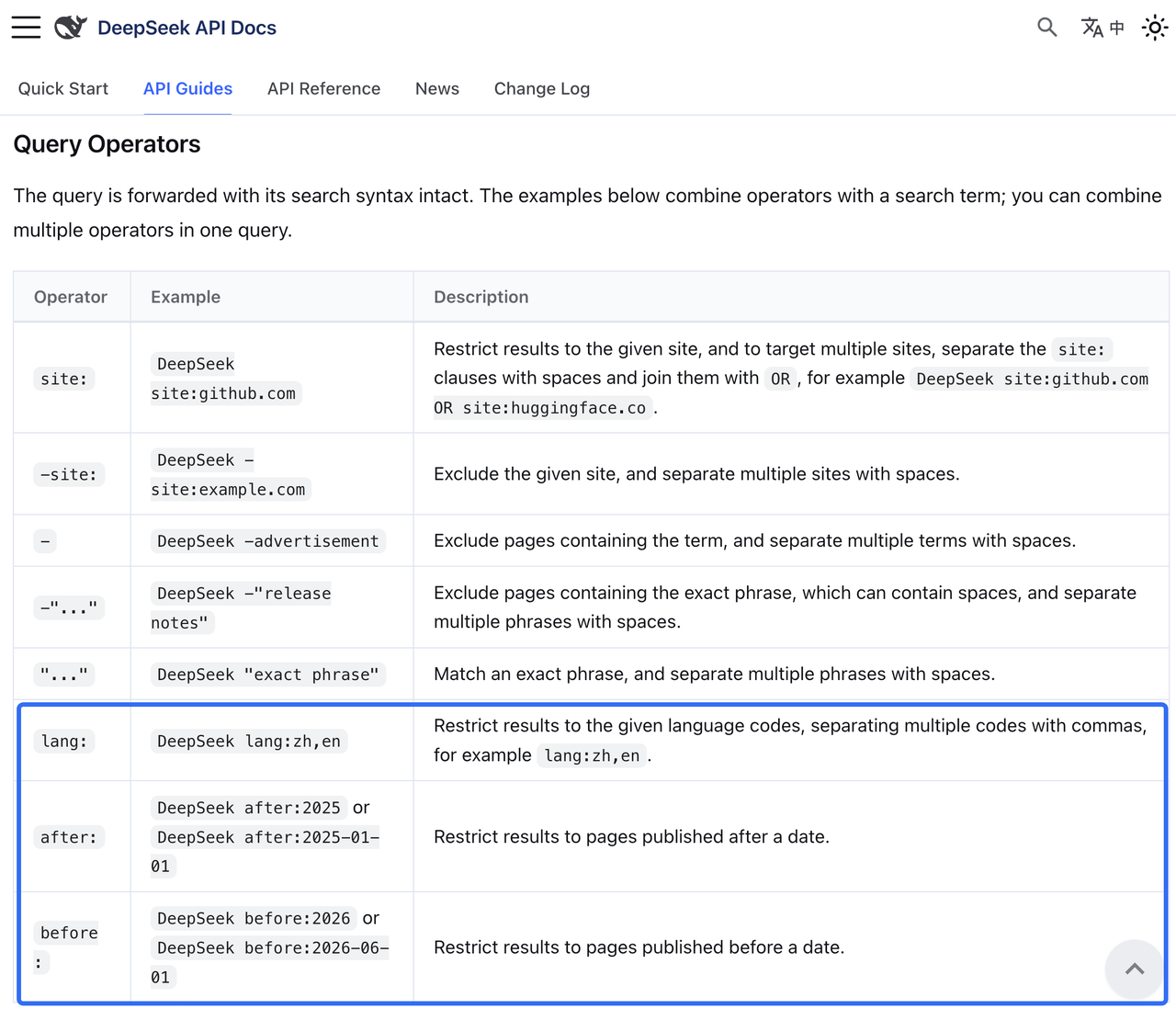
Yes. The supported query operators include lang:, after:, and before:. Date filters concern publication, so they cannot establish when a pricing page was edited. For a multilingual competitor, also inspect the relevant regional page. An English-language result does not establish that the offer is available in the United States.
Who should approve a competitor claim before sharing?
The person responsible for using the claim should approve it. A research lead can approve a factual internal update; product marketing should review wording for a battlecard or campaign. Legal or contractual comparisons need the appropriate specialist. Give that reviewer the source passage and comparison conditions, rather than only the generated summary.
Conclusion
Keep the watchlist at three until the weekly brief can explain what changed, what matters to sales, and what remains unresolved. If each review starts with someone reconstructing last week’s price or billing setting, fix those captures before adding another competitor.
Explore SpringBrand
Turn ideas into working workflows
Connect agents, APIs and tools in one workspace. Start with a task you want to get done.
Get started free
One account. 10,000+ APIs & capabilities
Give your agent APIs and plugins without separate keys or integrations for every provider.
Explore APIs
No tool expertise needed
Describe your GTM task. SpringBrand chooses the right APIs and plugins for your agent automatically.
Find tools for your task
Run tasks 24/7
Connect your agent to SpringBrand to keep tasks running automatically, day and night.
Connect your agent