Muse Wonder Tools: What Must an Agent Connect?
Written by
Alex
Springbrand Researcher

Reviewed by
Springbrand Audit Team
Editorial review team
Springbrand Audit Team supports editorial quality through source checking, clarity, and consistency across the blog.
Updated
Published
Muse Wonder Tools: map the tools a Muse Wonder agent would need for one business task, with permission checks and failure handling before deployment.
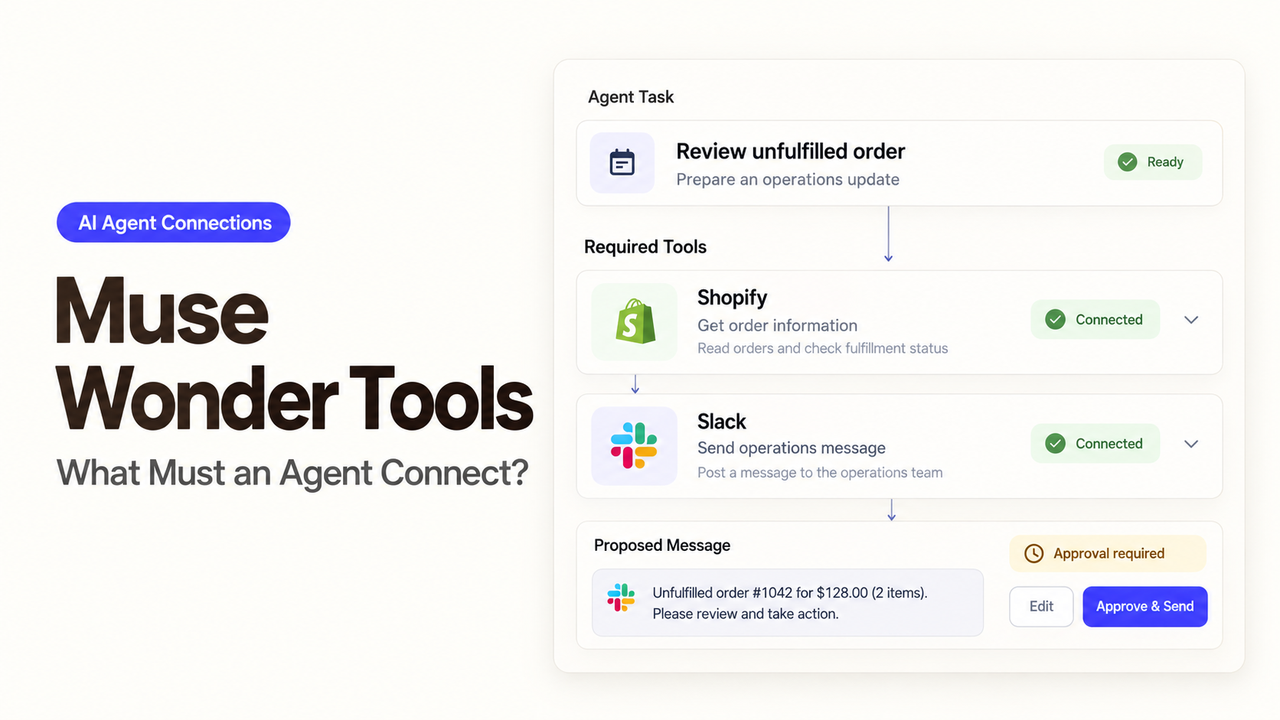
“Why is this renewal still blocked?” sounds like one question. The answer may sit in a CRM opportunity, an unpaid invoice, and a support case. Muse Wonder can help decide what to inspect, but the application must supply access to those records. Choosing Muse Wonder tools starts with knowing which part Meta provides and which connections your team must build.
Which Tools Can Muse Wonder Use?
As of October 20, 2026, Muse Wonder is available in preview through the Meta Model API. The connections depend on how you run it:
- Built-in tools:
web_searchretrieves web information.tool_searchdiscovers and loads deferred tool definitions from the inventory made available to the request. - Application functions: your code runs services such as an authorized CRM lookup and returns their results to the model.
- MCP tools through an agent environment: a compatible client connects to an MCP server and makes its tools available. A server configured elsewhere does not automatically become part of a Model API request.
Meta’s tool-calling interface separates requesting a function from executing it. Your application checks the request, runs the function, and returns the result. Web search can help with public research; a renewal query needs the company’s own business records.
Which Connections Does a Renewal Query Need?
Start with a read-only task: identify what prevents an account from reaching renewal approval and link to the supporting records. Changing the CRM stage or clearing a finance hold would require a separate action.
The following are proposed application functions, not prebuilt Muse Wonder connectors:
| Function | Useful return | When it is needed |
|---|---|---|
get_renewal_opportunity | Account ID, stage, approval status, owner, record link, update time | Establish the account and its recorded renewal status |
get_billing_status | Relevant hold state, invoice reference, record link, update time | Check a billing dependency or required finance clearance |
get_open_support_cases | Visible case IDs, statuses, relevant notes, record links | Investigate a support issue that may affect renewal |
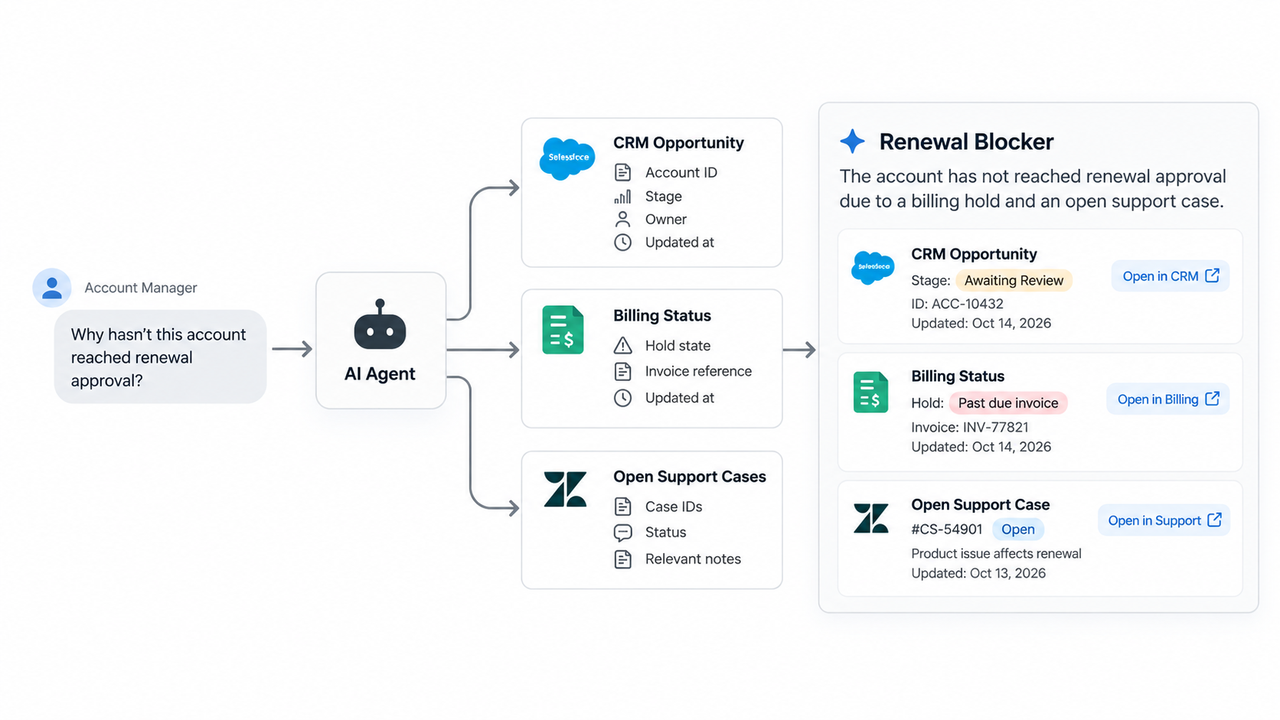
The CRM lookup comes first because a company name can match a parent, subsidiary, or old record. If the application cannot resolve one authorized account, it should request clarification before querying the other systems.
Later calls depend on the task. If renewal policy requires finance clearance every time, billing must be checked even when CRM mentions no hold. Support may be unnecessary unless the question or account record points to an unresolved issue.
If all three reads are mandatory for every query, the application can run that fixed sequence and ask Muse Wonder to summarize. Model-selected calls are more useful when the next lookup depends on what earlier records reveal.
How Should Inputs, Permissions, and Results Be Defined?
Each function needs a clear account identifier, returned fields, and failure format. The authenticated application session determines who is asking. The application checks that person’s access to the account; the model should not establish identity by supplying a different user ID.
Keep the Meta API key separate from CRM, billing, and support credentials. Expose lookup functions without update functions, and restrict the service credentials accordingly. The application must also filter returned fields: permission to inspect a case status may not include permission to read its full history.
Results should distinguish an empty answer from an unavailable source. For this example, billing could return hold, clear, or unknown, together with a record reference or an error reason. These are suggested application states. An expired credential must produce unknown, never clear.
The account ID links the records; the record URLs let the manager inspect the evidence. Update times show when each source last changed. A data owner should define what counts as stale enough to prevent a confident renewal answer.
What Should Happen When a Tool Call Fails?
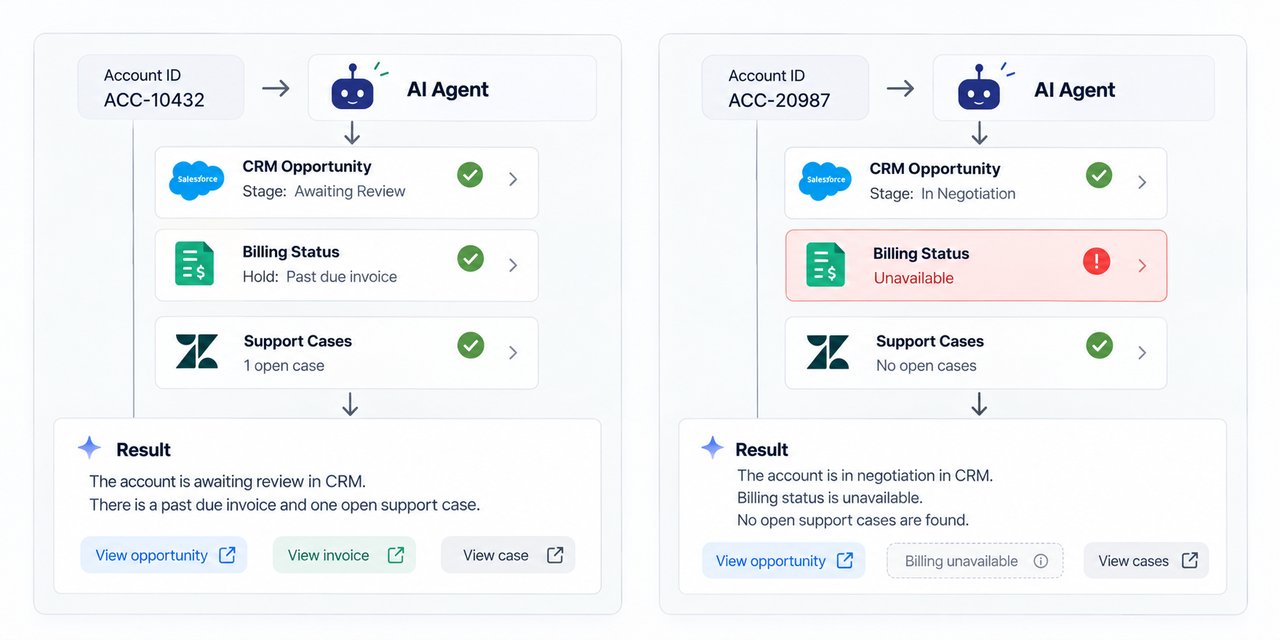
The answer should retain confirmed facts and identify what remains unchecked. Suppose the CRM reports pending manager approval, billing is unavailable, and support returns an open case without a documented renewal dependency.
A suitable example answer would be:
Manager approval is still pending in the CRM. Billing status could not be checked, so finance clearance remains unconfirmed. One support case is open, but the returned record does not establish that it blocks renewal.
In the implementation, the confirmed CRM and support statements should link to the returned records. The answer must not convert “open case” into “renewal blocker,” or missing billing data into “no billing hold.”
The application also needs to return each result to the correct model call. In the Responses API tool flow, a function_call_output refers to the originating call_id. Preserve that association when several calls are outstanding.
Transient read failures may justify a bounded retry. An expired credential needs the connection owner to restore access. Meta’s API error guidance covers failures at the model endpoint; the application must separately handle errors from CRM, billing, and support.
Before rollout, check a valid account, an ambiguous account match, and an unavailable billing source. Compare the generated answer with records the manager can open. A fluent explanation with the wrong invoice link still needs correction.
Which Muse Wonder Tools Should You Connect First?
Connect the records required to answer the renewal question, beginning with the account lookup. Add billing and support reads when the task or renewal policy requires them. Public web search will not reveal an internal approval hold, and a larger tool inventory will not fix a missing business connection.
The first useful result is an answer the manager can verify: what is pending, which records support it, and which checks remain incomplete. Once those reads work, the team can separately decide whether any write action is worth adding.
FAQ
Can Muse Wonder call several tools in one turn?
Yes. Meta supports multiple function calls in a turn, with a separate result for each call. Setting parallel_tool_calls: false limits the model to one call per turn. Independent reads may run together after account resolution; calls that depend on an earlier result should wait for it. See Meta’s parallel tool-call guidance.
Can an application force a specific CRM lookup?
Meta’s current interface supports only tool_choice: "auto"; forced or named-function choices are rejected. If a CRM lookup is mandatory, the application should perform it itself or require evidence of a successful lookup before accepting the answer. A response without a tool call should not satisfy that requirement. This limit is documented in the tool-choice guidance.
When is tool search useful?
Tool search helps when a large tool library would otherwise load into every request. Hosted search can discover deferred tools declared in the request; client-executed search can consult an inventory managed by the application. For just three renewal functions, the extra discovery step may offer little value. Discovery also leaves business authorization with the application.
Where are tool-call logs available?
The application should record connector execution: requester, account, tool, call ID, outcome, and time. Meta supports retrieving stored Responses by ID, which helps inspect the API exchange. That record does not by itself show every permission check or external service failure. Apply the team’s retention rules without copying unnecessary customer data into logs.
Can an existing MCP server be reused with Muse Wonder?
Yes, if the chosen agent environment supports that server’s transport and authentication. Muse Code’s MCP configuration supports stdio and Streamable HTTP connections. Direct Model API function calling still requires the application to execute the supplied tools. Verify the client’s integration path and exposed schemas before treating an existing server as a usable business connection.
Explore SpringBrand
Turn ideas into working workflows
Connect agents, APIs and tools in one workspace. Start with a task you want to get done.
Get started free
One account. 10,000+ APIs & capabilities
Give your agent APIs and plugins without separate keys or integrations for every provider.
Explore APIs
No tool expertise needed
Describe your GTM task. SpringBrand chooses the right APIs and plugins for your agent automatically.
Find tools for your task
Run tasks 24/7
Connect your agent to SpringBrand to keep tasks running automatically, day and night.
Connect your agent