Best Ticket Triage Tools for Support Teams in 2027
Written by
Alex
Springbrand Researcher

Reviewed by
Springbrand Audit Team
Editorial review team
Springbrand Audit Team supports editorial quality through source checking, clarity, and consistency across the blog.
Updated
Published
Compare the best ticket triage tools for support teams by classification, routing control, human override, and a practical pilot workflow.
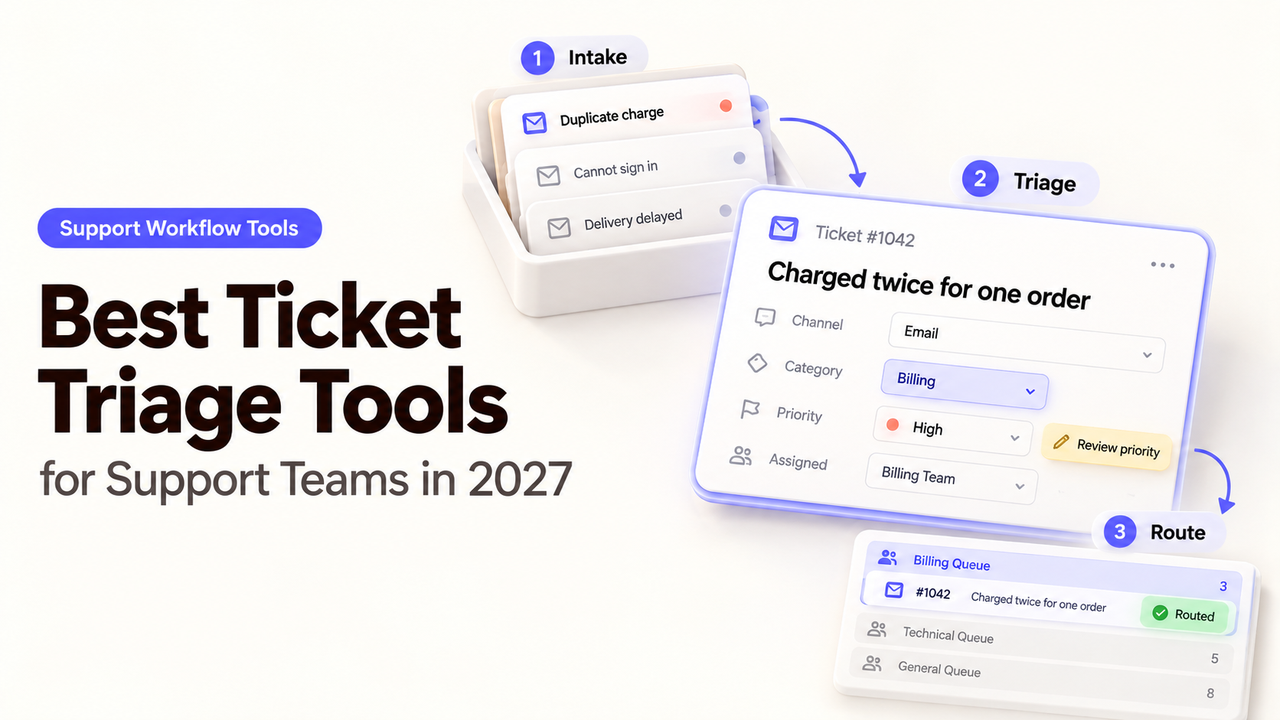
The refund request belongs with Billing. The same customer's broken login belongs with Technical Support. If both arrive in one message, which team gets the first look? That question matters more than a vendor's classification claim. The best ticket triage tools help a support lead answer it, then leave agents a way to correct the answer.
Here I compare Zendesk, Intercom, and Freshdesk on the first handoff: what each can identify, where the ticket goes, and how an agent can correct the route.
What Should Ticket Triage Decide Before an Agent Replies?
It should identify the request, choose a responsible queue, and flag cases that need a person before any automated reply. Priority and language may change that route. A label alone does not tell an agent whether to act, transfer, or ask for more information.
Set a small taxonomy before shopping: Billing, Account Access, Technical Issue, and Other may suffice. Define urgency independently of tone. A customer may write calmly about a locked production account; another may sound furious about a minor delay. Sentiment adds context, but should not replace your priority policy.
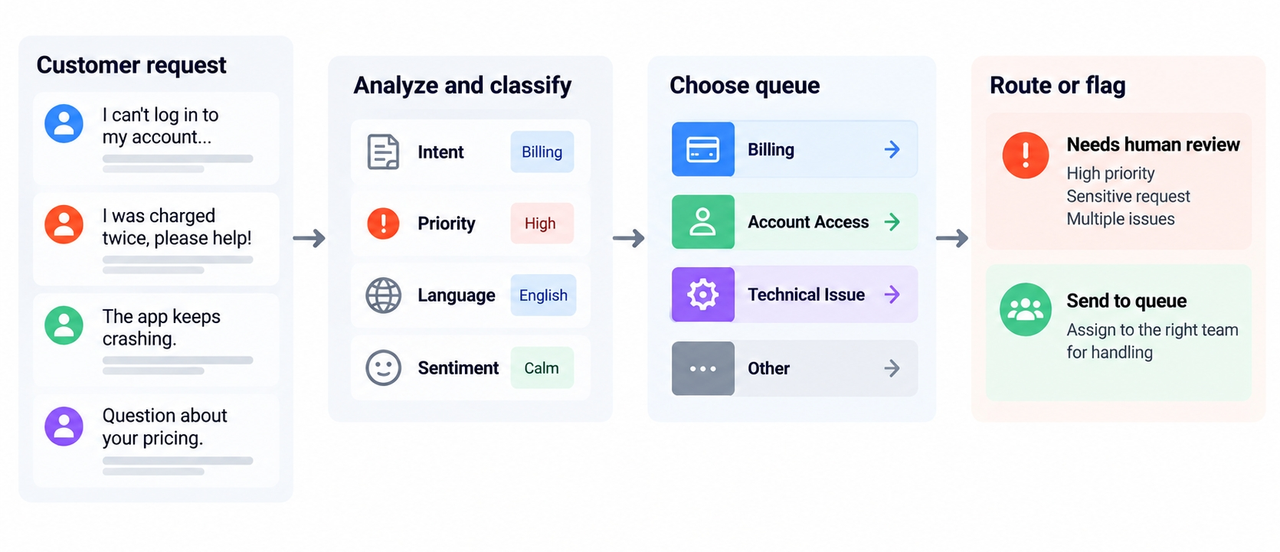
For mixed requests, name the first owner. If one message asks for a refund and reports a login failure, that agent can coordinate or create a linked follow-up. A correct label is little comfort if the second problem disappears.
How Should a Support Team Compare Triage Tools?
Use the same ticket set and intended first destination. For AI ticket triage tools, compare automated ticket classification with routing: a tool may fill a field without assigning a team. Keep customer-facing answers outside this evaluation.
Decision | What to record on each test request | Failure to catch |
Classification | Predicted issue, language, and priority where supported | Plausible label on the wrong problem |
First route | Team or unassigned review queue after all rules run | Correct label but wrong or empty inbox |
Human correction | Whether an agent can change the value and assignment | Correction is overwritten by a later rule |
Fallback | Destination for unknown, mixed, or weak classifications | Ticket waits unseen or receives a misleading reply |
Cost gate | Eligible plan, AI feature, workflow permission, and volume charges | Paying for classification without usable routing |
For support ticket routing software, the final assigned queue matters more than the predicted label. Have a supervisor sign off on each sample's destination before running it. Measure correct first-team assignment, manual transfers, and unattended exceptions. A vendor's resolution rate measures a different job.
The mechanisms below come from product documentation checked October 13, 2026. Your ticket mix determines whether they work well enough to deploy.
1. Zendesk — For Triage Inside an Existing Help Desk
Zendesk is a strong candidate when tickets, teams, and service rules already live there. Intelligent triage classifies incoming tickets by topic, sentiment, language, and configured entities. Those values can inform a view or a routing workflow. The support team still chooses which topics deserve separate queues.
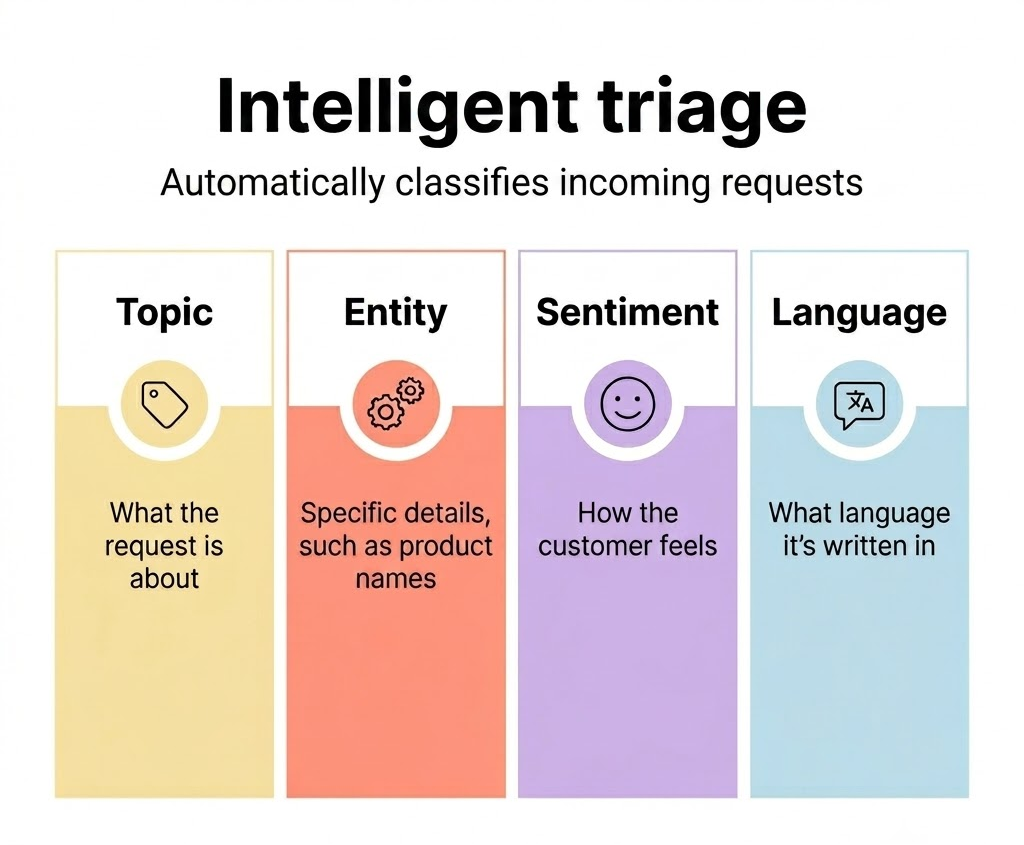
For a billing refund, inspect the predicted topic and its confidence, then the trigger that sends it to Billing. Zendesk's workflow examples connect classifications to routing and escalation. Agents can correct the topic field; the changes-to-topic report helps review corrections. Confidence is a review signal, not proof of the right destination.
Timing deserves a test. Zendesk says a trigger combining “ticket is created” with an intelligent-triage prediction may miss the prediction because it has not been added yet. Its guidance uses a later status condition. If the support lead expects immediate routing, submit new sample tickets and inspect the actual sequence before enabling the rule.
At this check, Zendesk lists classifications on Suite and Support Professional and higher, while using them in workflows requires Copilot. Confirm the intended channel and plan. Zendesk fits teams willing to maintain ticket topics and triggers inside their current desk; it offers less value if that desk is not already the team's working queue.
2. Intercom — For Conversation Classification and Routing
Intercom fits a team whose first support contact is a conversation in its Inbox. Fin Attributes can classify issue type, urgency, or sentiment; teams can preview example messages before enabling an attribute. A workflow or escalation rule can then send a conversation to a team without letting Fin answer the customer first.
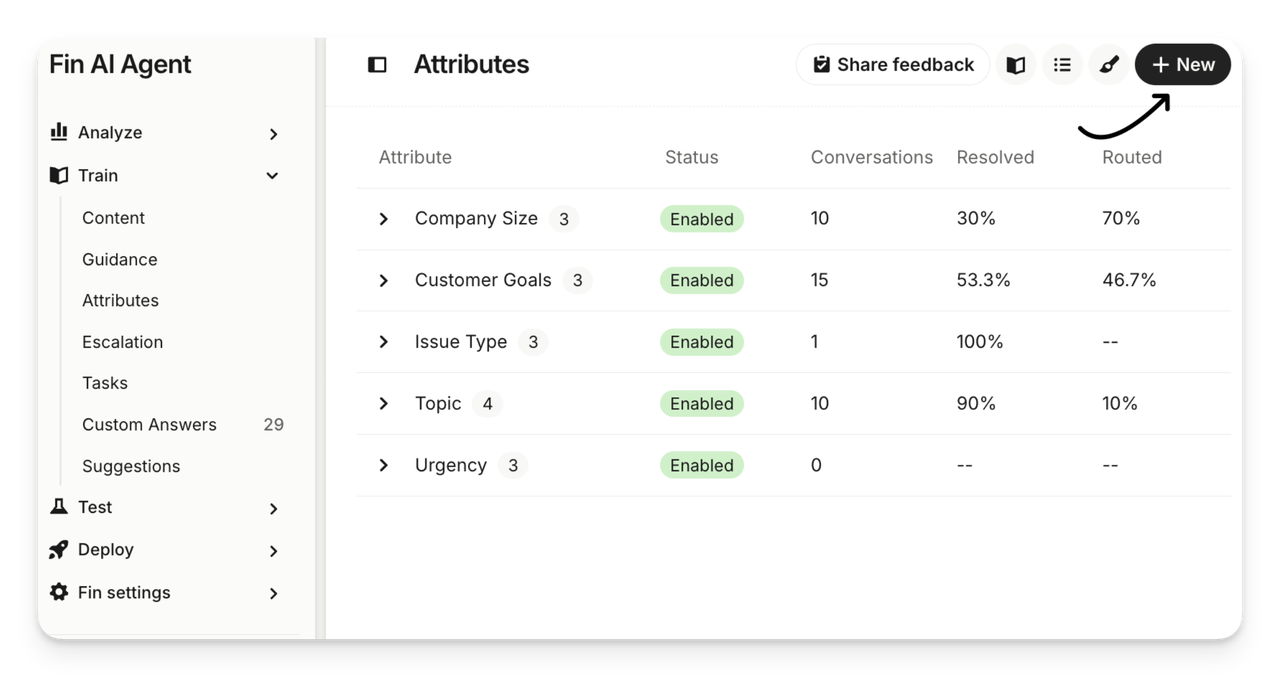
That distinction matters for this comparison. Intercom says Fin Attributes are detected automatically on conversations, not tickets. They require Fin to run in the conversation; the older standalone AI Category Detection block is no longer available for new workflows. If your intake produces Intercom tickets directly, test the separate ticket-created workflow trigger rather than assuming a conversation classification will appear there.
For an account-access request, preview the attribute, then follow a test conversation through Fin, its branch, and the inbox. Intercom warns that a value can change as the conversation develops. An immediate branch may act on an early value. Give uncertain requests an “Other” route to a staffed queue.
An agent can edit an attribute or reassign the conversation. Manual reassignment alone does not stop an active Workflow or Fin; test whether the next step sends it back, verify this behavior against the current Workflow and Fin configuration. At the October 2026 check, Fin Attributes were described as available across plans, but routing Workflows required Advanced or Expert. Confirm workflow permission and any Fin usage charges in your account.
3. Freshdesk — For Ticket Field Suggestions and Automation
Freshdesk suits a team that wants agents to see a suggested field before allowing automatic assignment. Freddy Auto Triage covers Priority, Group, and Type, plus eligible custom dropdown and nested fields. Each selected field can run in Manual mode, where an agent accepts the suggestion, or Automatic mode, where Freshdesk applies it as a ticket arrives.
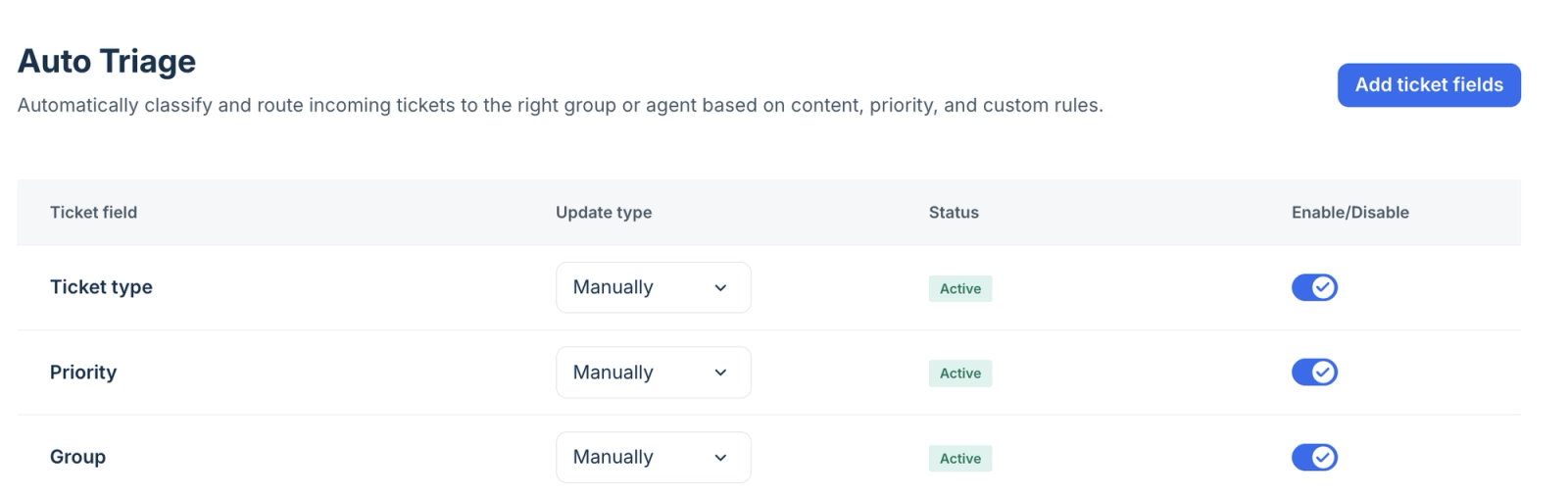
Start with Group in Manual mode and compare the suggested queue with the supervisor's answer. Then inspect what happens if an existing ticket-creation rule sets the same field. Freshdesk says automation rules take precedence over Auto Triage suggestions. A good suggestion may therefore never become the value that routes the ticket. Record the final Group and assignee, not just Freddy's prediction.
Agents can accept, ignore, or replace a suggestion. The team must decide whether corrections should change routing rules. Freshdesk's setup page names Pro or Enterprise eligibility, administrator setup, and a recommended minimum of 2,000 historical tickets for best accuracy. Check the Freddy Copilot entitlement before pricing a rollout. A new desk may need explicit rules and manual review first.
How Can You Test Routing on Realistic Tickets?
Use a small, permitted set of new test submissions that reflects the queue's awkward work, not only common clean questions. Remove personal data or use approved synthetic variants. Have a support lead set the expected first team and priority before seeing any product result.
Test message | Expected first decision | What to inspect |
“My invoice shows a duplicate charge.” | Billing, normal review | Correct queue after rules finish |
“Our production admins can't sign in.” | Account Access, urgent by policy | Priority and on-call handoff |
“Refund my order; I also can't log in.” | Designated first owner, second issue tracked | No lost issue or silent split |
Short message in a second supported language | Language-capable team or human review | Detected language and actual inbox |
“It doesn't work” with no product or account detail | General review queue | No confident but unsupported route |
Customer replies with a different issue | Reassess ownership under a stated rule | No bounce back to an earlier queue |
Capture the text, prediction, final field, first team, correction, and time to a human owner. Compare supported input channels. Zendesk's classifier, Intercom's conversation path, and Freshdesk's email or portal path are different test surfaces.
First run with routing held back where the product permits it. Intercom provides an attribute preview; Freshdesk offers Manual suggestions. For Zendesk, use controlled test tickets and inspect the trigger result. Then enable the smallest live route with a staffed fallback. Recheck every rule after a taxonomy change or a new intake channel.
When Should a Human Take Over the Queue?
When the request is ambiguous, high impact, or has no safe destination, send it to a named human queue. A person should also take over when a customer corrects the issue, an agent has already claimed ownership, or the automation produces conflicting assignments.
Make the override durable. An agent's new priority or team should survive the next trigger, message, or AI update unless a clear policy says otherwise. Review transfers from the first queue to the eventual owner each week. If the same category repeatedly needs a rescue, adjust the taxonomy or rule before increasing automation. The point is to get a customer to someone who can start work, not to make every ticket appear classified.
Conclusion
Choose the tool that matches the surface your team already works in. Zendesk can turn ticket predictions into desk rules; Intercom makes the strongest case for conversation-first handoff; Freshdesk offers a useful manual-to-automatic path for ticket fields. None earns a blanket accuracy rank from documentation. Put the same mixed, urgent, vague, and multilingual requests through each eligible setup. The winner is the one that sends them to the right first team and lets an agent keep a correction in place.
FAQ
Can classifications be previewed before live routing starts?
Sometimes. Intercom documents a Fin Attribute preview against example messages. Freshdesk can show Manual suggestions before a person applies them. For Zendesk, test newly submitted tickets and the downstream trigger in a controlled queue; don't assume a classifier preview also proves the live route. Check your plan and channel before sending production traffic.
Can agents override a ticket's assigned priority?
Yes, subject to permissions and later automations. Freshdesk agents can replace Freddy's suggested Priority. Intercom teammates with Inbox access can set conversation priority manually. Zendesk's Priority field can be edited by agents with access. Test whether a later rule resets the value; the saved priority counts.
How is a ticket with two unrelated issues handled?
There is no safe universal split. Set a policy for the first owning team, then have that team coordinate or create a linked follow-up if the help desk and process allow it. In the pilot, check that both issues remain visible to a human. A single correct category can still hide the other request.
What happens when the ticket language is uncertain?
Send it to a review queue or a multilingual agent rather than guessing from the customer's name or region. Zendesk exposes language predictions and confidence; Intercom can route conversations using configured attributes. Freshdesk's cited Auto Triage page does not establish language as a supported prediction field. Test the languages and channels you actually receive, especially short mixed-language messages.
Can old tickets be reclassified after categories change?
Do not assume the new taxonomy backfills old AI labels. Intercom's conversation topics can be applied retroactively, but that is distinct from rerunning Fin Attributes and routing workflows. Zendesk and Freshdesk describe classification of incoming tickets in the cited guides. Ask each vendor how to handle historical records, reporting continuity, and any bulk update before changing categories.
Explore SpringBrand
Turn ideas into working workflows
Connect agents, APIs and tools in one workspace. Start with a task you want to get done.
Get started free
One account. 10,000+ APIs & capabilities
Give your agent APIs and plugins without separate keys or integrations for every provider.
Explore APIs
No tool expertise needed
Describe your GTM task. SpringBrand chooses the right APIs and plugins for your agent automatically.
Find tools for your task
Run tasks 24/7
Connect your agent to SpringBrand to keep tasks running automatically, day and night.
Connect your agent