Pika ChatGPT Campaign Workflow: Plan One Brief
Written by
Alex
Springbrand Researcher

Reviewed by
Springbrand Audit Team
Editorial review team
Springbrand Audit Team supports editorial quality through source checking, clarity, and consistency across the blog.
Updated
Published
Plan a Pika ChatGPT campaign workflow from brief inputs to a reviewable creative handoff.
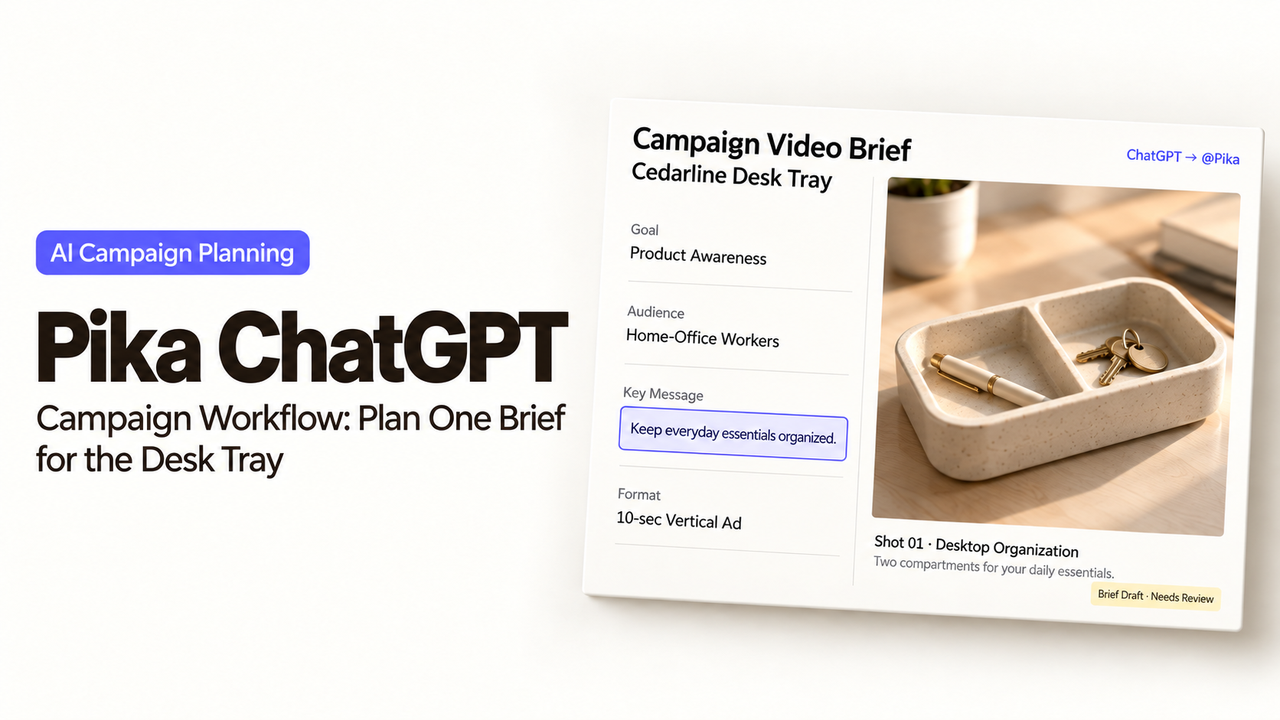
Pika puts a visual draft beside the campaign conversation in ChatGPT. A marketing lead can discuss the product, inspect a proposed clip, and direct the next edit in the same place. For a first Pika ChatGPT campaign workflow, choose one asset the team can review closely before requesting a campaign's worth of variations.
The task is a short product video for a fictional desk tray. Its two compartments should be easy to see, and its closing message should match the approved copy. The reviewer decides whether the result represents the product accurately.
What Does Pika in ChatGPT Add to a Campaign Brief?
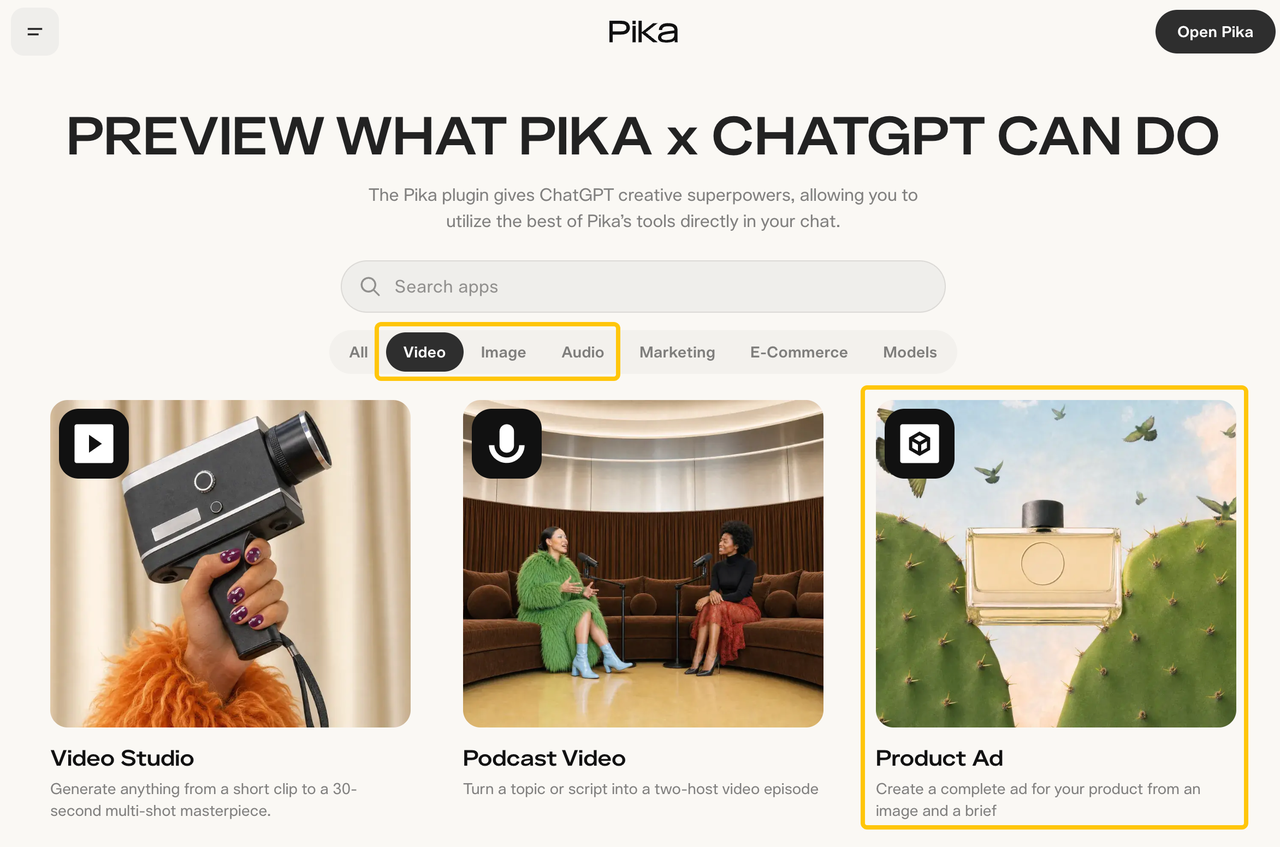
It adds media creation and editing tools to the conversation where the team develops its direction. Pika's ChatGPT plugin includes video, image, and audio apps, including Product Ad, which starts from a product image and brief. Ask to see the available apps, then choose the one that fits the requested asset.
Pika also documents an editing timeline and access to its creation library. The team can inspect timing and request changes to an existing cut. Confirm the available references, duration, framing, and cost in the selected tool before generating.
Which Inputs Belong in the Brief?
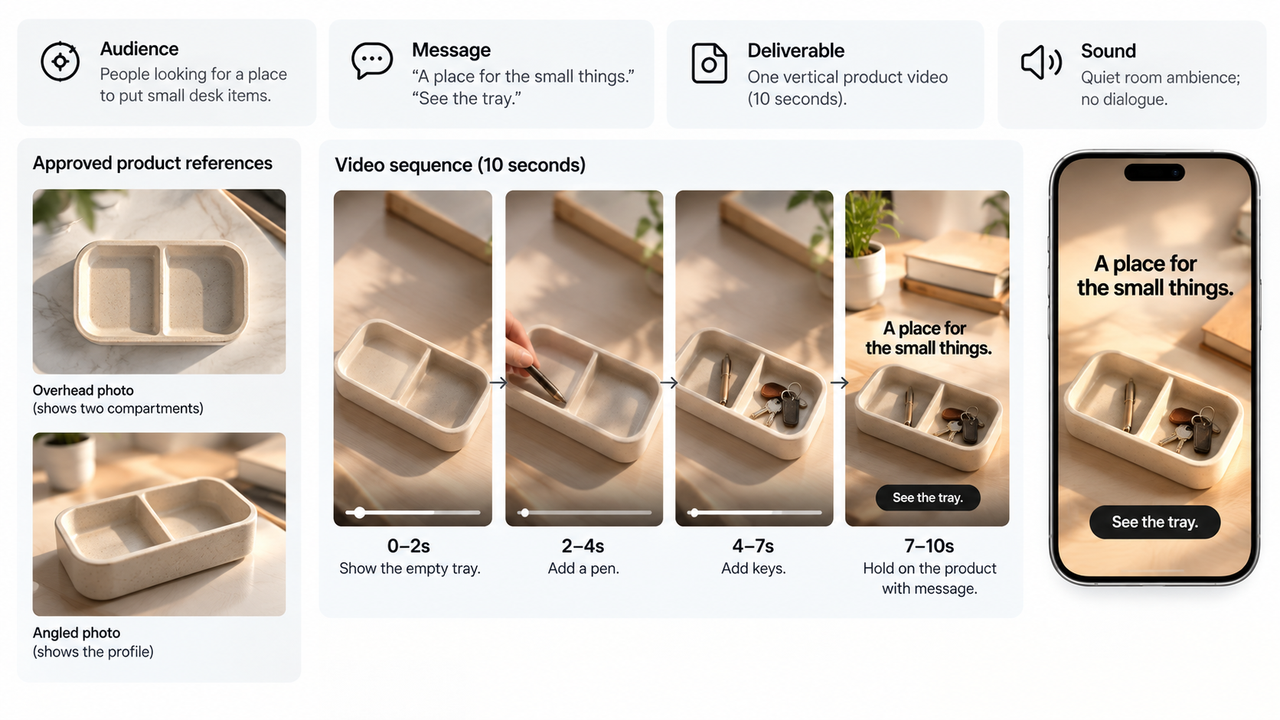
Include the approved product references, audience, message, and requested viewing sequence. Give each file a clear job. For the desk tray, the overhead photo establishes its two compartments; an angled photo shows its profile. A lighting reference may guide the setting without replacing the product shown in those photos.
Use this Pika campaign brief as an illustrative starting point:
Brief item | Direction |
Deliverable | One vertical product video, targeting ten seconds; confirm the selected app's supported settings. |
Audience and purpose | People looking for a place to put small desk items; show how the two compartments are arranged. |
References | Current overhead and angled product photos. Preserve the tray's shape, compartment count, and color. |
Sequence | Reveal the empty tray, show a pen and keys in separate compartments, then hold on the product. |
Message | “A place for the small things.” End with “See the tray.” No durability or material claims. |
Sound | Quiet room ambience; no dialogue. Review any added music separately. |
First request | Propose the sequence and tool settings, and show the estimated credit cost before generation. |
Keep outdated product photos outside the upload set. For client or unpublished material, confirm permission to send it to Pika and the selected model provider. Pika's privacy policy describes how submitted content may be processed; do not assume a ChatGPT conversation alone determines those terms.
How Does One Asset Move from Draft to Review?
Move from a confirmed sequence to one draft, then give feedback on specific moments. Read the proposed direction before approving a generation. Check whether the tool will use the intended photos and whether it has added a claim or scene the brief did not request.
In the preview, inspect the tray before judging the lighting. Do two compartments remain visible? Are the pen and keys placed plausibly? Does the camera reveal the product clearly? Watch once without sound, then with it, and read the closing copy at the intended viewing size.
If the pen appears to pass through a divider, request that correction directly: “Correct the pen placement in the middle shot. Keep the approved opening, tray color, and closing message.” Ask which action will run and review its cost before proceeding.
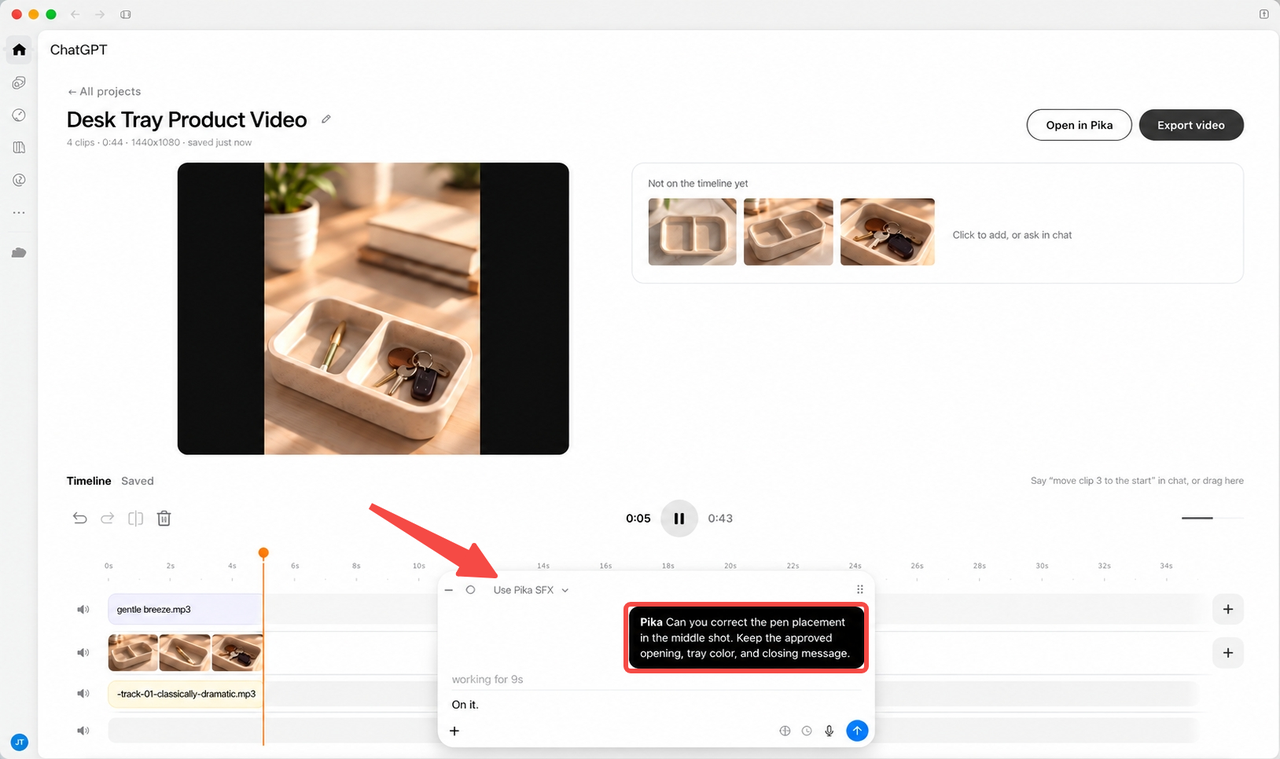
Pika's launch announcement describes timeline adjustments, individual-clip regeneration, transitions, and audio work. Choose the change that addresses the actual problem. A timing adjustment and a regenerated product scene are different requests. Inspect the replacement in the full cut, including the parts you asked to keep.
Where Does the Creative Handoff Stop?
It stops with a selected asset and a clear account of the work still needed before publication. The marketing lead approves the product representation and message. The person preparing the placement checks the downloaded file, crop, sound, and destination.
Pika can save creations to its library, but a library item is not a complete delivery package for another editor. Send the approved file with its brief revision, source references, and any required artwork. If an editable project or separate audio tracks are essential, establish that format before promising the handoff; an in-chat timeline does not confirm a transferable project format.
The product-page destination and publishing approval remain campaign decisions. Record which file was approved, then check the uploaded preview before release. A later crop or copy edit can change what the reviewer saw.
FAQ
Does Pika need a separate account in ChatGPT?
Yes. Pika instructs users to sign in to an existing Pika account or create one, then authorize the plugin. Installing alone does not start generation. OpenAI's plugin guidance also distinguishes installation from connecting an external service. Use the Pika account holding the intended library and credits, and check availability in your ChatGPT workspace.
Can a team reuse the same brief for another campaign?
Yes, as a template. Replace the product references, offer, audience, channel, and copy, then approve the revised brief. Keep useful production instructions, such as reference roles and review order. An earlier approval does not cover a new product version or a different advertising use.
How are Pika credits consumed during revisions?
Generation uses Pika credits. Its Help Center says cost depends on the app, model, and settings. Public guidance gives no universal revision fee. Check the estimate for the particular regeneration or additional media request; do not assume every conversational correction is free or costs the same as the first draft.
Can a generated asset be used in a paid ad?
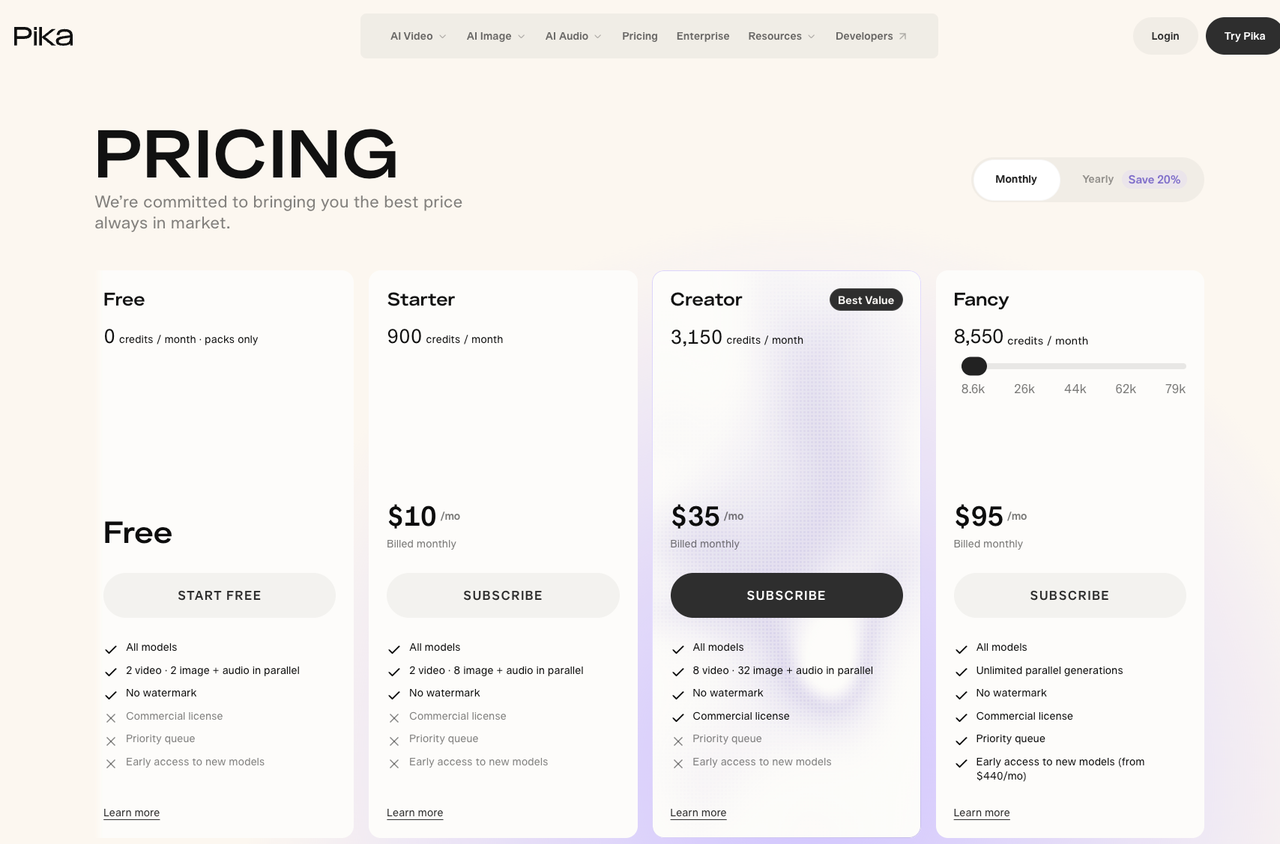
Only with the applicable commercial rights. On October 22, 2026, Pika's pricing page lists commercial licenses for Creator and Fancy, but excludes Starter; its Help Center says paid Starter includes commercial use. Resolve that discrepancy for your account before ad use. Pika's terms also require applicable model terms and input permissions. This is editorial information, not legal advice.
Can Pika attach provenance data to an exported asset?
Automatic provenance attachment is not confirmed in the public plugin documentation reviewed. If Content Credentials or C2PA data is required, ask Pika about the exact export route and inspect the downloaded file. Keep a separate record of source assets, prompts, selected model, revisions, and approval; that record does not substitute for embedded credentials.
Conclusion
The marketing lead's sign-off should identify the selected desk-tray video and any remaining publication work. Keep the brief and references with that file. The next person should be able to see what was approved and make an ordinary correction without reconstructing the campaign conversation.
Explore SpringBrand
Turn ideas into working workflows
Connect agents, APIs and tools in one workspace. Start with a task you want to get done.
Get started free
One account. 10,000+ APIs & capabilities
Give your agent APIs and plugins without separate keys or integrations for every provider.
Explore APIs
No tool expertise needed
Describe your GTM task. SpringBrand chooses the right APIs and plugins for your agent automatically.
Find tools for your task
Run tasks 24/7
Connect your agent to SpringBrand to keep tasks running automatically, day and night.
Connect your agent