Ecommerce Marketing Automation for Small Businesses
Ecommerce marketing automation connects customer journeys with repeatable operations. Learn how small businesses can choose tools, workflows, and support.
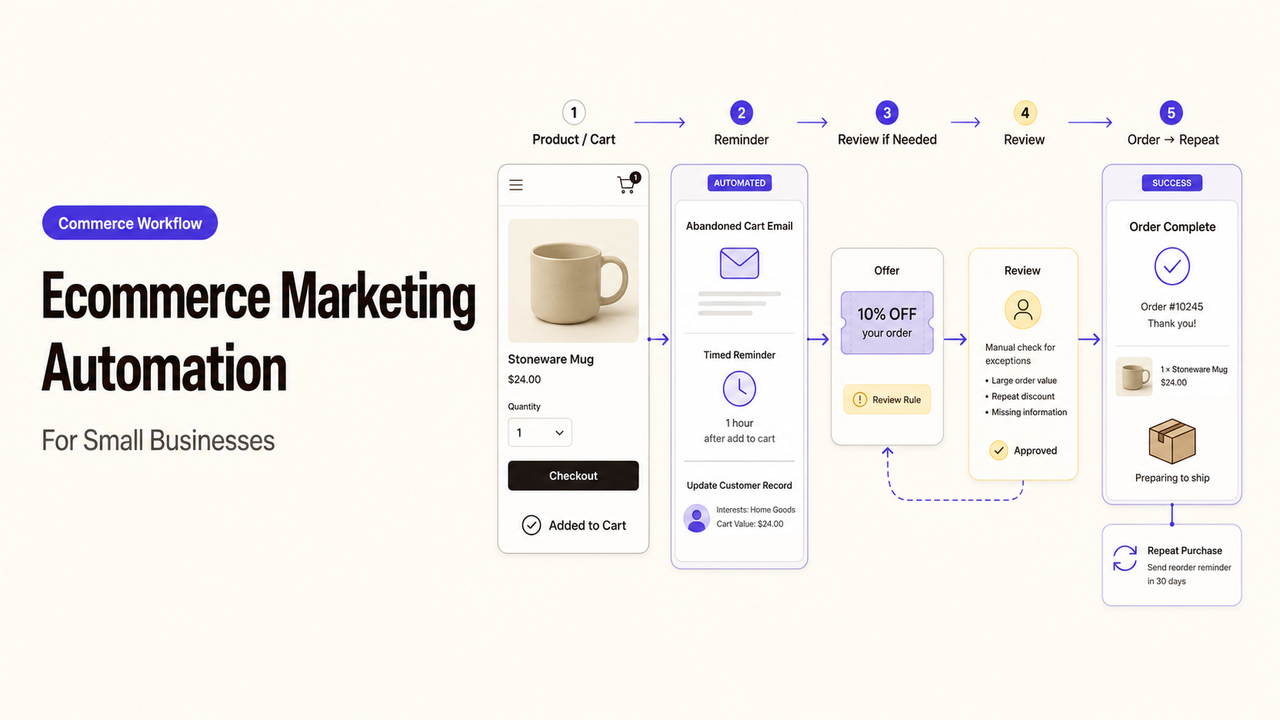
The first automation purchase should follow the most expensive gap in the customer journey. A store that needs manual approval for every high-value order has a different problem from one sending outdated post-purchase messages.
Choose the journey before comparing software or service packages. For a small store, ecommerce marketing automation is a buying decision about software, implementation, or ongoing operations.
What Ecommerce Marketing Automation Covers
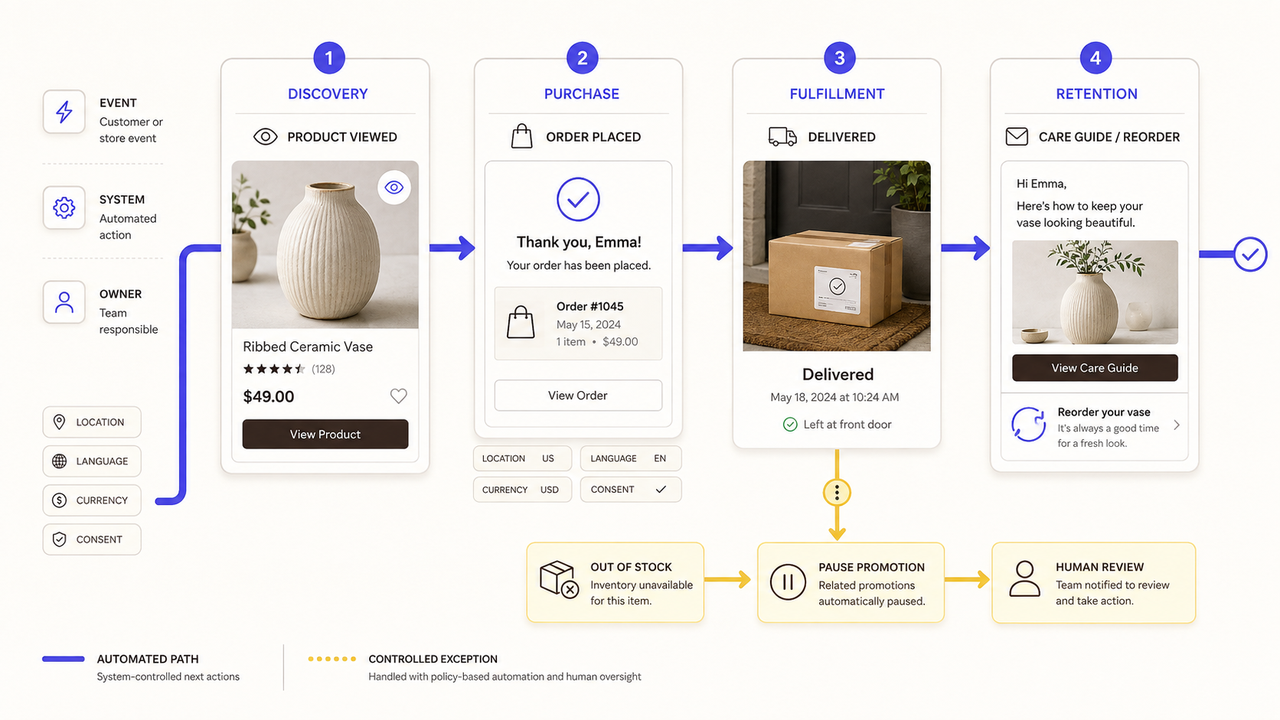
Ecommerce automation connects a customer or store event to a defined next action. A delivery event might start product-care guidance, while a stock change might pause a promotion.
The workflow may touch the storefront, customer database, inventory system, email or messaging platform, help desk, and reporting tools. It still needs a human owner. Software can pass data and apply rules, but the business decides which message is appropriate and when an exception needs review.
Search visibility is a separate problem. Use an ecommerce SEO checklist for product discovery, indexing, or category-page quality. Automation should address customer movement and repeatable operations, not substitute for an SEO audit.
Choose the Customer Journey to Improve First
Buying several ecommerce automation tools at once hides which connection fixed the problem. Start with one owned journey and a repeated manual gap.
Map Discovery, Purchase, Fulfillment, and Retention
Draw the journey with real events. Discovery may begin with a product view or signup. Purchase includes checkout and confirmation. Fulfillment covers shipment, delivery, returns, and support. Retention may include replenishment reminders or product education.
For each stage, record the event, source system, customer-facing action, internal owner, and exception. This creates an ecommerce customer journey automation map that the team can inspect before a provider configures anything.
Find the Highest-Cost Manual Gap
“Highest cost” is not only staff time. A gap may create wrong messages, delayed approvals, complaints, or inventory promises the store cannot keep.
Review recent exceptions. Look for work that repeats, follows a stable rule, and can be verified. Avoid edge cases and messages with unsettled offers, audiences, or approval policies.
Define the Data and Integrations the Workflow Needs
Automation depends on the data available when a decision is made. A polished message cannot repair a missing order status or incorrect preference.
Connect Store, Customer, Inventory, and Messaging Data
List the minimum fields needed. These may include customer ID, order status, product, fulfillment state, location, language, currency, and communication preference. Name the authoritative system for each field.
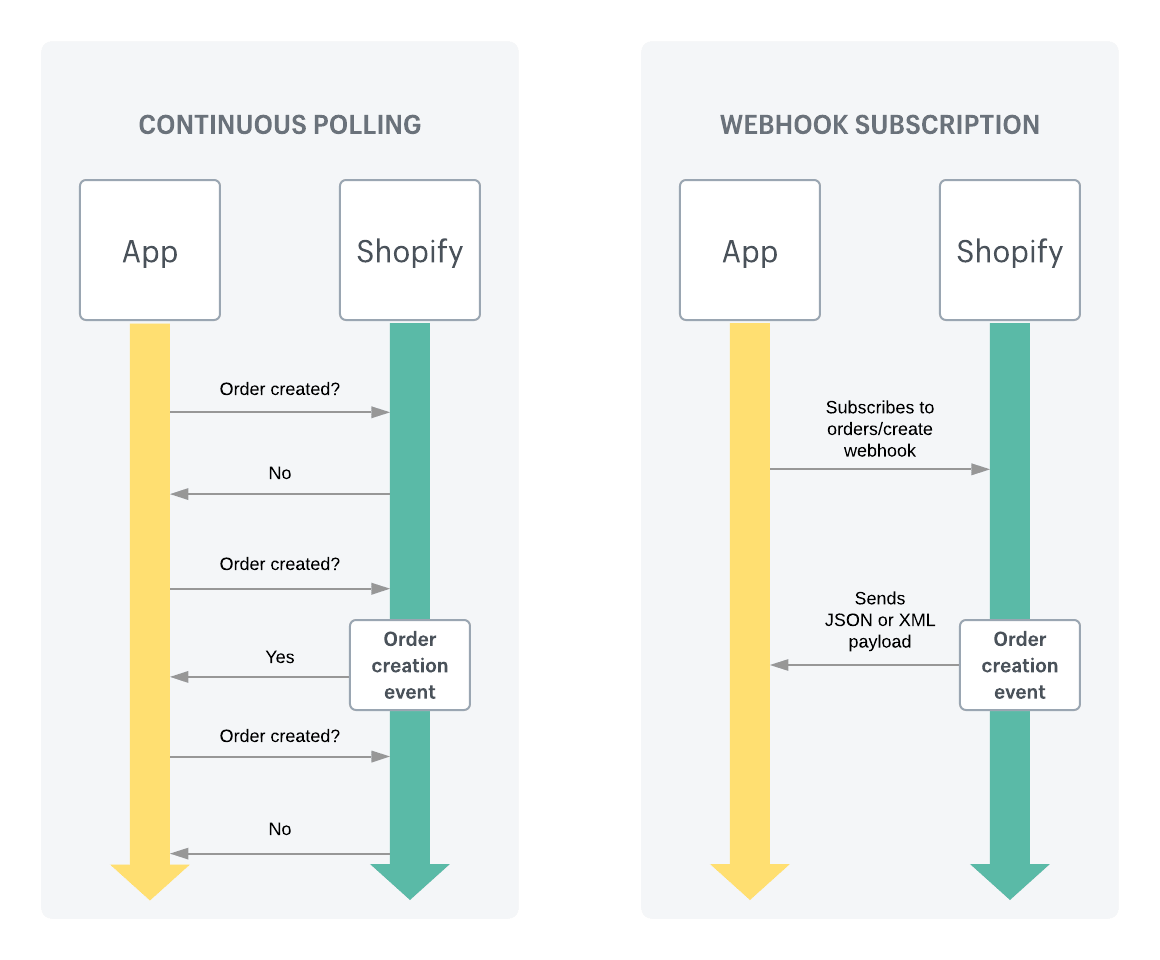
Event delivery also needs testing. Shopify explains that webhooks can notify an app about store events and trigger another action. That documentation proves an event mechanism exists on Shopify. It does not prove that a specific provider has mapped, monitored, or recovered your workflow correctly.
Keep payment data outside the marketing workflow unless required. The PCI Security Standards Council's storage guidance says cardholder data must be protected and retained only as needed. Certain sensitive authentication data cannot be stored after authorization. Ask a qualified professional which requirements apply.
Set Permissions, Consent Rules, and Failure Alerts
Give each person, provider, and system only the access needed for its task. NIST defines least privilege as restricting access to the minimum necessary. Record who can view data, edit logic, publish messages, change integrations, and export records.
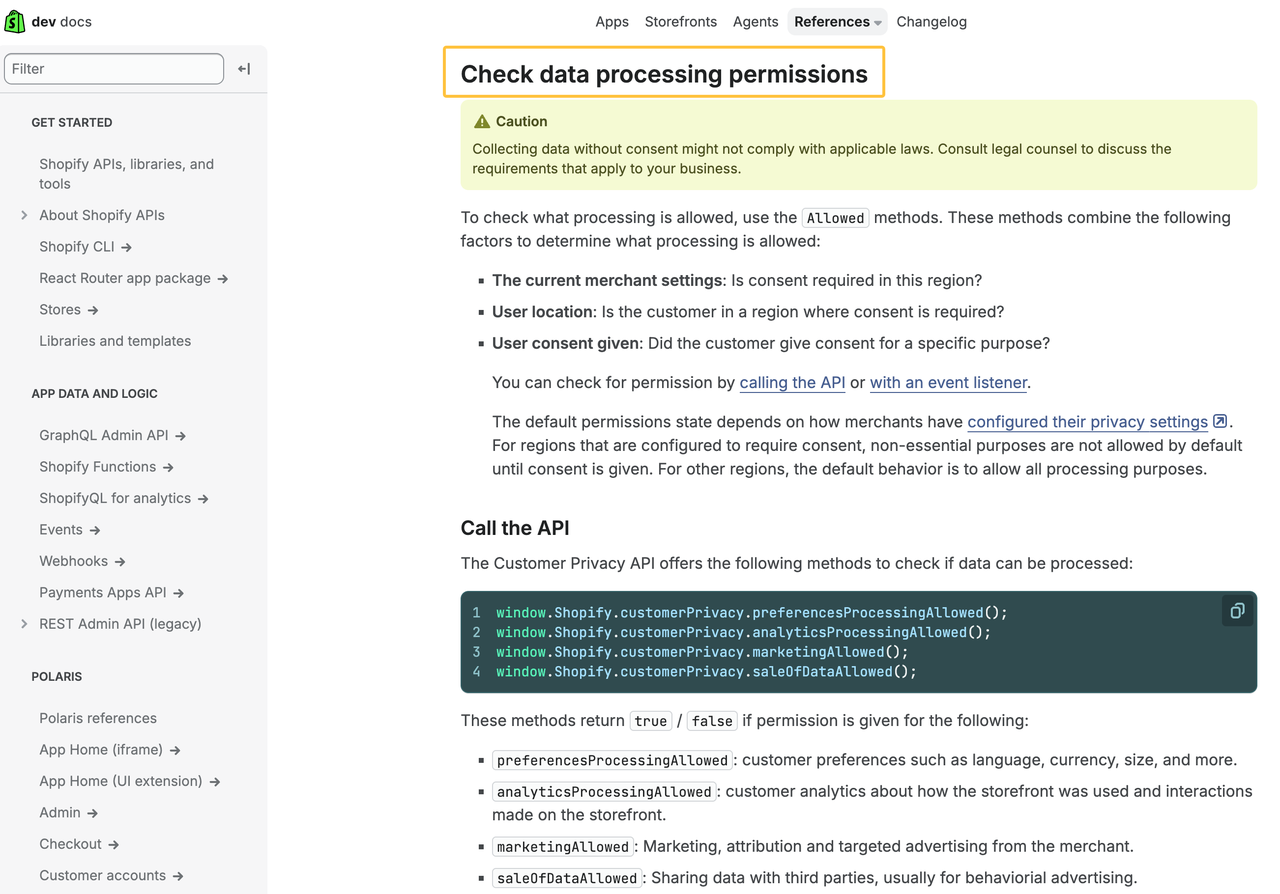
Consent can change. Shopify's Customer Privacy API can check processing permissions and publish a consent-change event on Shopify-managed surfaces. The provider must explain how that change reaches connected platforms.
For U.S. commercial email, the FTC's CAN-SPAM compliance guide covers sender information, opt-outs, and responsibility for vendors acting on a business's behalf. Other channels and regions may apply different rules. Confirm the current requirements for the store's customers with qualified counsel.
These sources were checked on August 27, 2026. They provide general boundaries, not a legal conclusion for a specific store.
Compare Software, Implementation, and Managed Support
The buying path depends on internal ownership, not feature-list length. This editorial buyer framework is not an industry standard.
Buying path | Good fit | Internal owner still required | Evidence to request |
Software-only | A stable process with a team member able to configure and monitor it | Workflow rules, access, message approval, and exceptions | Supported integrations, permissions, export options, and current terms |
One-time implementation | A defined journey with complex setup or data mapping | Business rules, testing decisions, and final acceptance | Data map, configuration record, test results, training, and handoff |
Managed support | Recurring campaigns and workflows that need continued monitoring or changes | Policy, customer promises, escalation, and provider oversight | Service calendar, response boundaries, change log, reporting, and exit plan |
Software Fits Teams With Clear Processes and Owners
Software-only can work when the team knows the trigger, audience, message, exit condition, and exception path. The tool does not settle those decisions.
Compare integrations, permissions, message limits, support, exports, and cancellation terms. Entry pricing may exclude setup, migration, content, or monitoring.
Implementation Support Fits Complex Data or Integrations
One-time ecommerce automation services can help when several systems exchange data. Define whether the provider maps fields, configures logic, writes messages, tests, trains staff, and documents recovery.
Acceptance should depend on working scenarios and usable documentation. It should not depend only on a demonstration presented by the person who built the workflow.
Managed Support Fits Ongoing Campaign and Workflow Needs
Managed support may fit frequent launches, changing segments, or limited capacity. Separate campaigns from system administration. Name who approves messages, handles complaints, and changes live logic.
Ask how changes are recorded and what happens when support ends. The store should retain accounts, data, approved assets, and usable documentation.
Evaluate Providers With a Clear Ecommerce Brief
A useful brief gives every provider the same problem to price. Otherwise, one quote may cover software setup while another includes strategy, copy, testing, and continued operations.
Describe the Business Goal, Systems, and Constraints
Name one journey and the failure it should address. List the storefront, customer platform, messaging tools, inventory source, support system, and analytics. Add languages, currencies, order types, owners, and launch constraints.
Provide sample records with sensitive fields removed where possible. Explain which systems cannot be changed and which customer actions always require a person.
Compare Scope, Ownership, Support, and Exit Terms
Require proposals to identify deliverables, exclusions, dependencies, revisions, support hours, and client work. Confirm ownership plus delivery of documentation, exports, and administrator access at exit.
Do not treat a vendor case study as a forecast. Ask which parts of the result came from workflow changes, offers, media spend, merchandising, or other work. Evidence from another store cannot guarantee the same result for yours.
Pilot One Journey Before Expanding
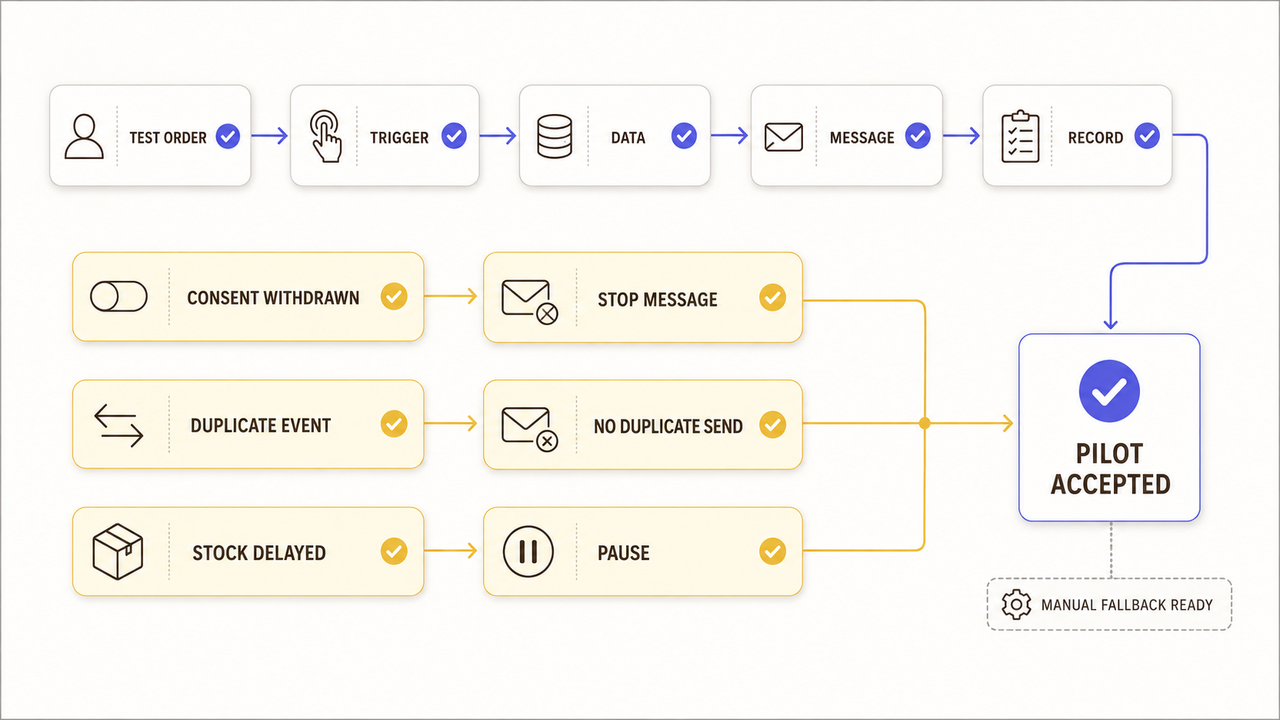
A pilot should prove the team can operate the workflow, not merely send a message. Use a limited audience, reversible setup, and available manual path.
Set Acceptance Criteria for Data and Message Quality
Define the trigger, fields, audience, message, system update, and completion record. Check links, availability, language, currency, and suppression status.
Run negative tests as well. Withdraw marketing consent and confirm that promotional messages stop. Send a duplicate event and confirm that it does not create a duplicate message. Delay an inventory update and confirm that the workflow pauses rather than promoting unavailable stock.
Review Exceptions, Customer Complaints, and Team Workload
Track missing events, incorrect fields, manual overrides, complaints, and unresolved alerts. Review whether staff can understand and resolve them without calling the original implementer for every change.
Expand only when the pilot has an owner, acceptable exception handling, and a recoverable failure path. A clean dashboard cannot replace them.
How SpringBrand Fits This Decision
When the journey and buying path are clear, turn the systems, approvals, deliverables, and exit needs into a SpringBrand service request to compare relevant independent support.
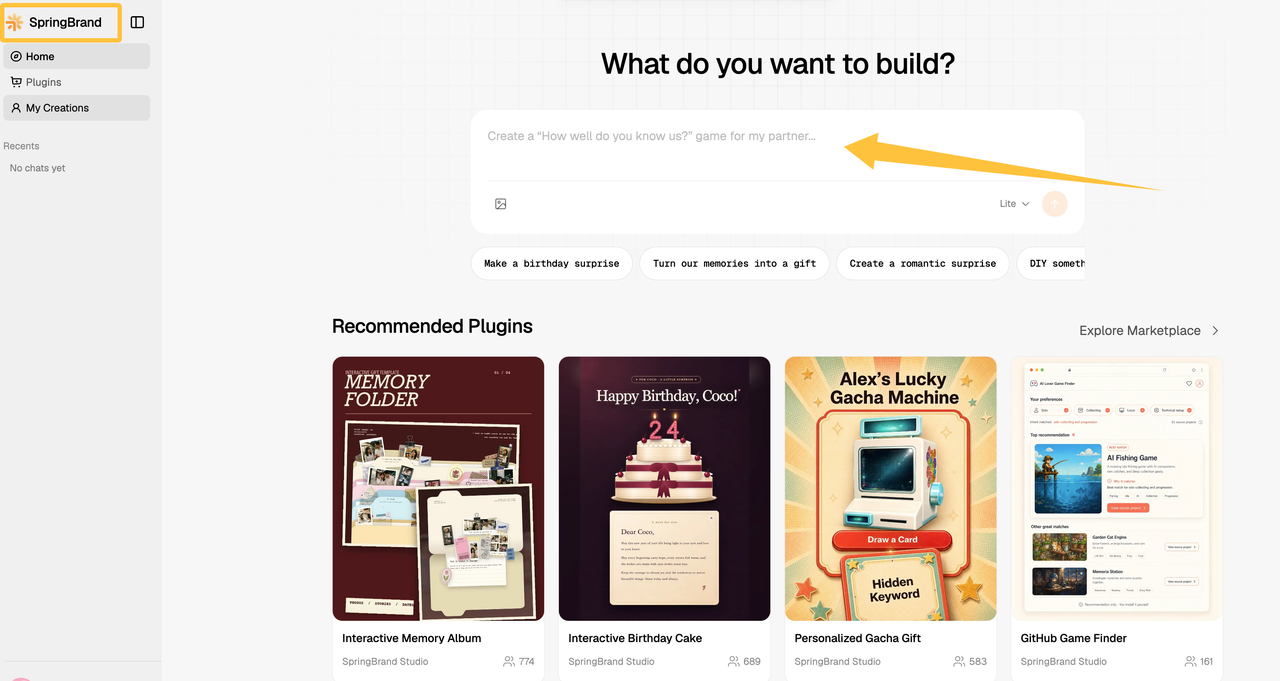
SpringBrand is a service-matching marketplace, not an ecommerce automation tool or implementation agency. The buyer still evaluates the provider, approves the scope, and accepts the work.
FAQ
Can an online store keep manual approval for high-value customers?
Yes. Set a threshold or customer rule that pauses the workflow and assigns a reviewer. Document what the reviewer checks, the response deadline, and what happens if nobody approves the action.
How should automation handle products with long consideration cycles?
Use customer behavior and stated interest carefully rather than forcing a short countdown. Space messages around useful decision support, define an exit condition, and let sales or support take over when the customer asks a specific question.
How should stores preserve automation history during a platform migration?
Export workflow definitions, message versions, audience rules, consent records, change logs, and performance records before migration. Keep a dated read-only archive and document how old identifiers map to the new platform.
Can wholesale and retail buyers share one automated journey?
They can share infrastructure, but usually need separate rules. Pricing, approval, tax, fulfillment, account roles, and communication expectations may differ. Test each buyer type independently before combining any step.
Should international stores separate automation by country or currency?
Separate rules when offers, language, currency, fulfillment, consent, or required disclosures differ. A shared base workflow can reduce maintenance, but every regional variation needs an owner and its own acceptance checks.
Conclusion
Effective marketing automation ecommerce planning starts with one customer journey and one costly manual gap. The store can then compare software, implementation, and managed support against the same operating need.
Before expanding, verify the data, permissions, messages, exceptions, ownership, and exit path. The team should explain both normal events and failures.