Marketing Automation Pricing: Software and Service Costs

Written by
Springbrand Editor Team
Editorial team
Springbrand Editor Team creates and maintains blog guides on AI tools, automation, marketing, and agent workflows.

Reviewed by
Springbrand Audit Team
Editorial review team
Springbrand Audit Team supports editorial quality through source checking, clarity, and consistency across the blog.
Updated
Published
Marketing automation pricing includes more than software fees. Compare setup, integration, content, management, and support costs before requesting quotes.
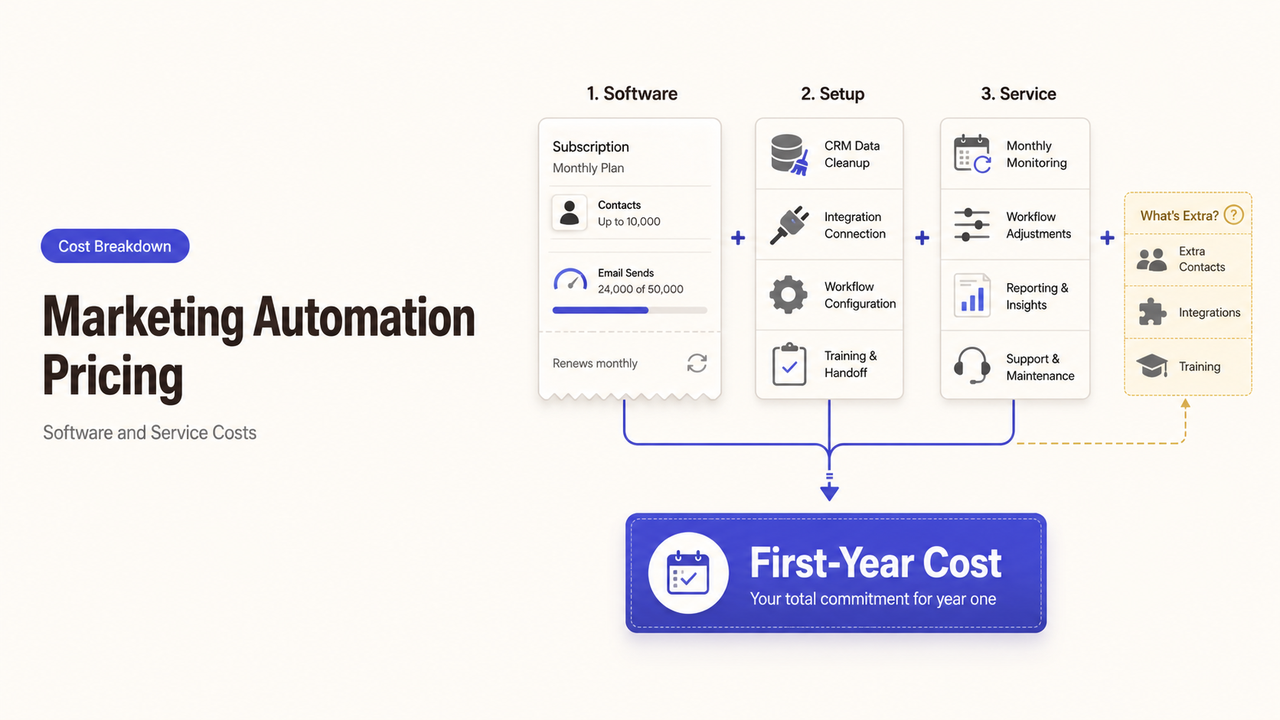
A quote can look complete with one software subscription and still omit the work needed to make the first workflow usable. CRM cleanup, integration, staff training, and monthly monitoring may sit elsewhere—or nowhere at all. Marketing automation pricing becomes comparable only when those costs appear beside the license.
This guide gives small-business owners a way to estimate the first-year commitment, compare provider assumptions, and delay work that the first workflow does not need.
What Marketing Automation Pricing Usually Includes
The total has three layers: the platform, the initial build, and ongoing operations. I checked the cited public pricing pages on August 28, 2026. I did not review private proposals or negotiated discounts.
Software and Usage Fees
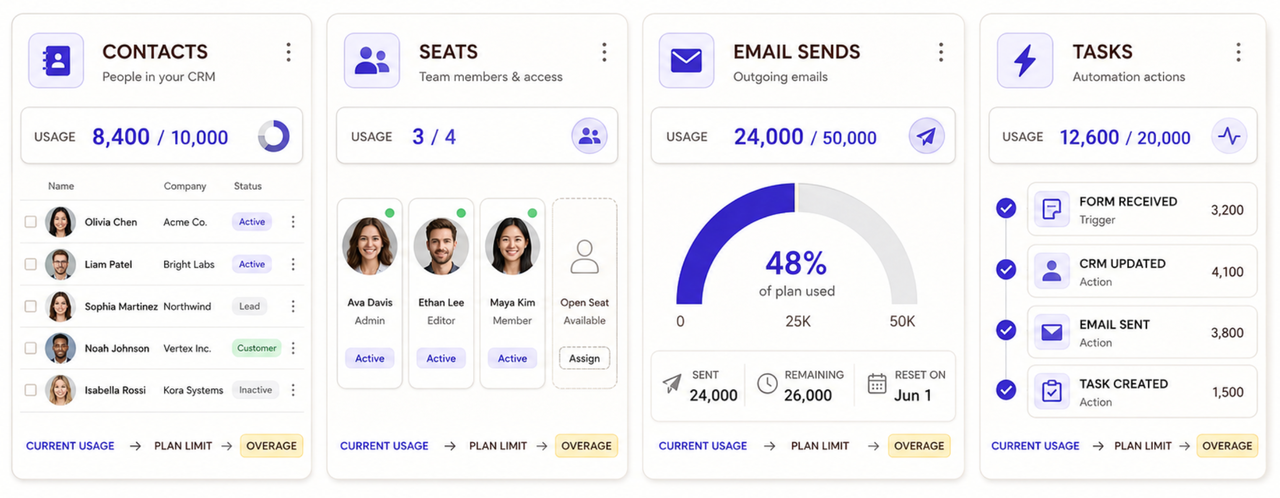
The base subscription may depend on contacts, seats, message volume, or completed tasks. Those units are not interchangeable. A contact-based plan can cost more as the database grows, even if the team sends less.
Mailchimp says its monthly bill depends on the plan and contact tier, while sending limits also vary. Its current pricing-plan explanation describes additional charges when a paid account exceeds its contact limit. That is one vendor’s design, not an industry rule.
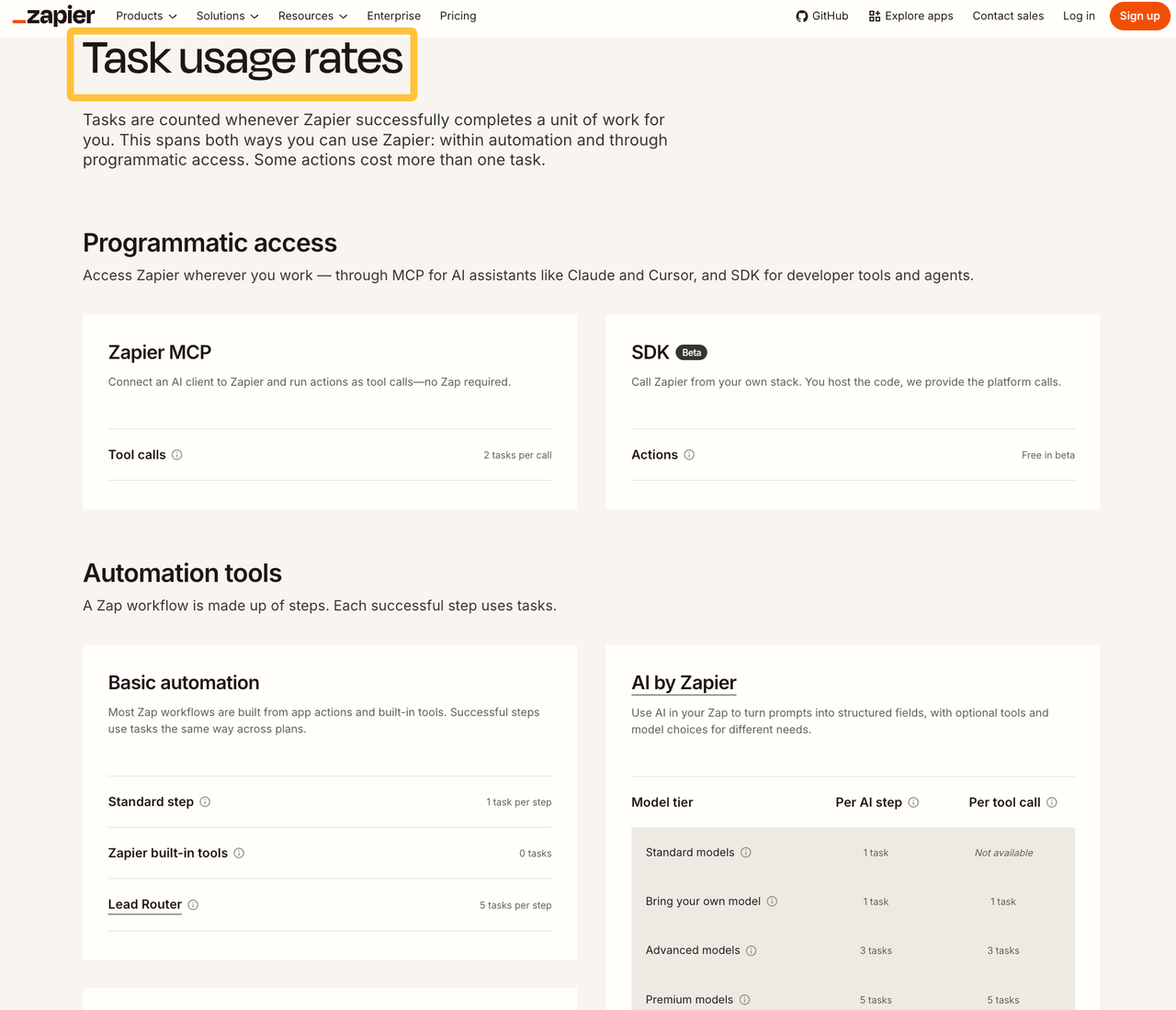
Usage can sit outside the main platform. Zapier counts successful workflow actions as tasks and applies different rates to some AI steps. Check its current task-usage definitions when one lead may trigger several actions.
Setup, Integration, and Data Preparation
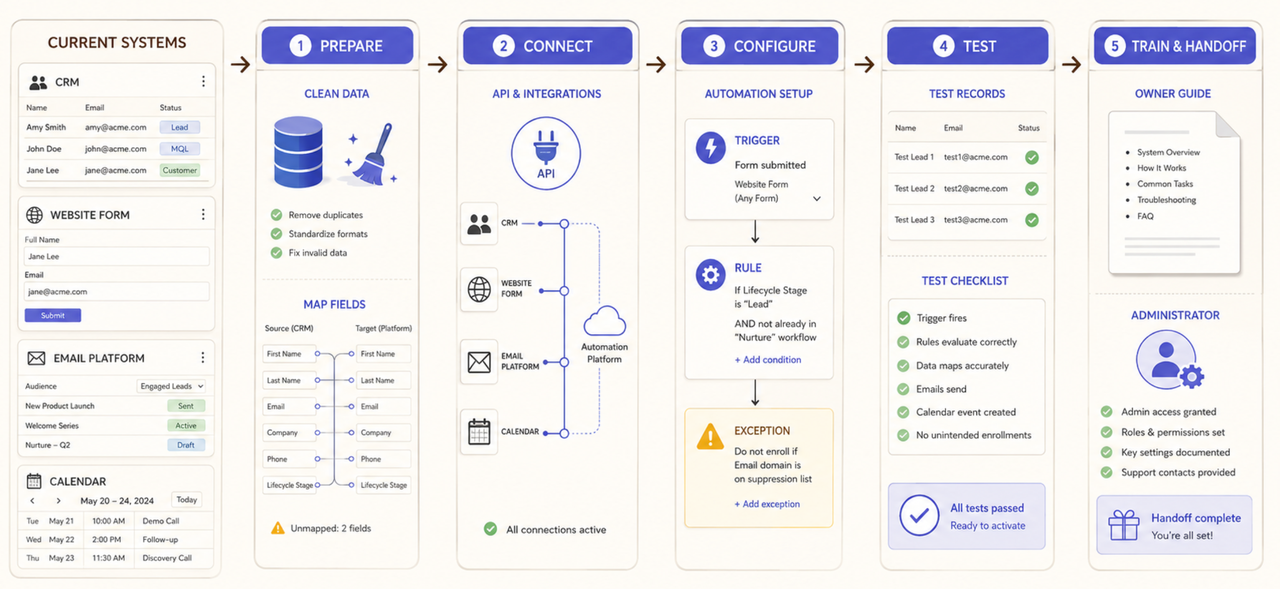
Initial work may include configuration, field mapping, data cleanup, templates, testing, and staff access. Vendors may include limited onboarding, require it, or leave implementation to a partner.
HubSpot separates its subscription from seats, marketing-contact tiers, and required onboarding for some editions. It also limits contact-tier reductions until renewal. These Marketing Hub billing conditions show why the first invoice may omit later costs.
If the team needs workflow diagnosis, governance, or lifecycle design before configuration, treat that as a separate marketing automation consulting scope. Do not hide discovery inside a vague setup fee.
Ongoing Content, Management, and Support
Software does not approve messages, investigate failed syncs, refresh segments, or decide when a workflow should pause. A person must own those tasks.
Ask whether ongoing automation service pricing covers copy changes, monitoring, troubleshooting, and reviews. If a retainer covers only campaign operations, budget separately for new integrations.
Choose the Pricing Model That Matches the Work
The right model makes the provider’s responsibility visible. A lower monthly figure is not cheaper if essential work remains unassigned.
Subscription and Usage-Based Software Costs
Subscriptions suit stable access needs. Usage pricing can fit variable activity, but the team needs alerts before crossing a paid threshold.
Annual billing may lower the displayed monthly equivalent, while monthly billing can preserve flexibility. ActiveCampaign’s current billing FAQ distinguishes the two and explains mid-cycle upgrade charges. Confirm the rule for the chosen account.
Fixed-Scope Implementation Fees
A fixed fee works when the provider can name the systems, workflows, deliverables, reviews, and acceptance tests. It becomes unreliable when the data or integration method is unknown
If the CRM contains undocumented fields or an API blocks access, the quote should explain who investigates and how added work is approved.
Retainers and Ongoing Service Fees
A retainer fits recurring campaign work, monitoring, maintenance, and reporting. It should state included activities, response times, meetings, and unused-capacity rules.
Marketing automation agency pricing may combine content, technical support, and campaign management. Ask the agency to separate them so later provider changes are easier to price.
Build a Total-Cost Estimate Before Requesting Quotes
Use a twelve-month view. This buyer worksheet is an editorial framework, not an accounting standard:
Cost line | What to record | Evidence to request |
Software | Plan, seats, contacts, messages, tasks, add-ons | Pricing page and account-specific quote |
Implementation | Discovery, configuration, integrations, testing | Deliverable list and acceptance criteria |
Migration | Data cleanup, imports, consent records, archive work | Migration plan and exception list |
Operations | Content, monitoring, reporting, support | Monthly responsibility schedule |
Internal time | Reviews, approvals, training, issue handling | Named owners and expected hours |
Exit | Exports, documentation, credential removal, transition | Handoff and termination terms |
List Required Channels, Contacts, and Integrations
Count only what the first workflow needs: contacts, message volume, users, connected systems, and expected runs. Test the estimate against quiet and peak months.
A quote should state what happens when usage exceeds the assumption. Without that rule, a low estimate can turn into an unplanned upgrade or paused workflow.
Account for Migration, Training, and Internal Time
Internal time is still a cost. Someone must prepare records, review messages, attend training, approve tests, and answer implementation questions.
Estimate those hours by role. If the owner reviews every field and email, the project has a capacity problem as well as a budget problem.
Compare Quotes on Scope, Assumptions, and Ownership
Put each proposal into the same comparison sheet. Do not compare only the total.
Separate Included Work From Optional Add-Ons
Mark every item as included, optional, client-owned, or excluded. Add-ons may include data cleanup, custom integrations, copywriting, reporting, training, and after-hours support.
Ask providers to price the same baseline scope. An optional item can remain open, but it should not disappear from the record.
Confirm Deliverables, Change Rules, and Exit Terms
The quote should name deliverables, due dates, reviews, the approval owner, and acceptance checks. It should explain how changes affect cost and timing.
Before signing, confirm account ownership, exports, documentation, templates, and credential removal. Cancellation, taxes, discounts, and data access vary. Review current terms and obtain qualified advice when contract or tax questions affect the purchase.
Decide What to Buy Now and What to Delay
The first purchase should fund one stable customer process and its controls. A full rollout adds risk before the ownership model works.
Fund the First Workflow Before a Full Rollout
Choose a workflow with a clear trigger, owner, stop condition, and purpose. Budget for setup, testing, training, and one review. Test a missing owner or duplicate contact before expanding.
Keep Optional Features Out of the Initial Scope
Delay extra channels, predictive features, dashboards, and secondary integrations unless the workflow needs them. Record when higher volume or another location would justify each addition.
This keeps the initial marketing automation implementation cost tied to a usable outcome rather than a long feature list.
How SpringBrand Fits the Service-Buying Process
SpringBrand publishes this article and operates the marketplace linked below. Its current category page does not present one universal automation package or price guarantee. It lets buyers compare independent providers by scope, timing, and budget.
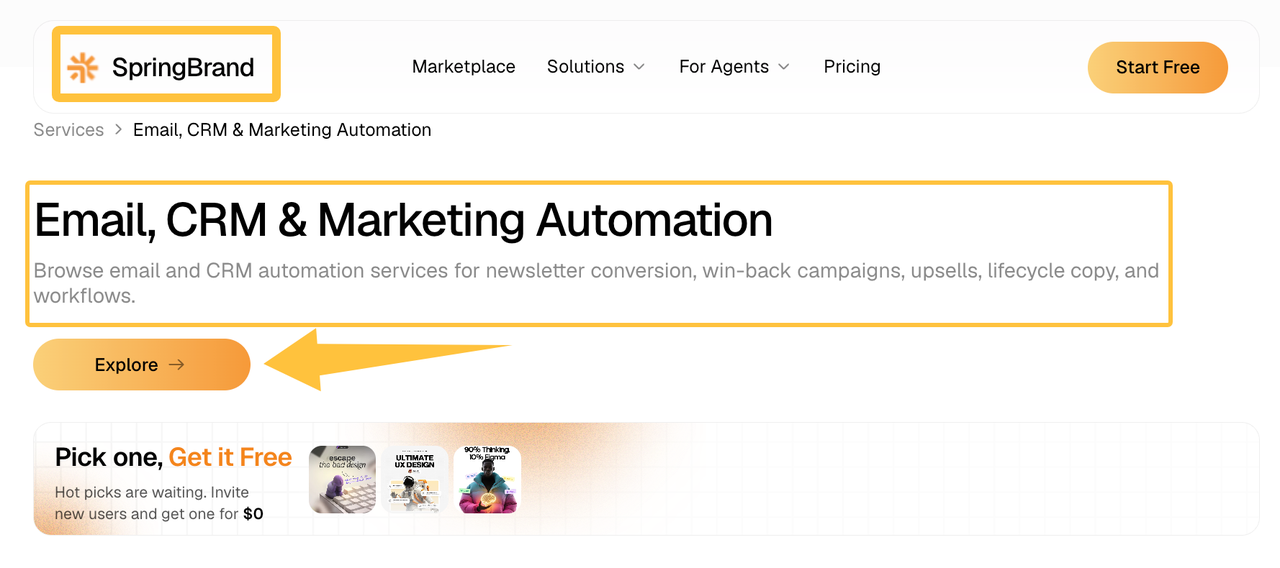
Once the first workflow and cost assumptions are clear, compare relevant email, CRM, and automation services through SpringBrand.
FAQ
Who should approve automation spending that exceeds the original budget?
Assign one budget owner before implementation. The project owner can document an increase, but the budget owner should approve it. Set a threshold that requires renewed approval.
How should teams allocate shared automation costs across departments?
Separate shared platform costs from department-specific work. Allocate the subscription by users or contacts, then assign campaign and integration costs to the requesting team. Finance should approve one consistent method.
Can seasonal businesses pause contracts without losing stored workflow data?
That depends on current pause, retention, and export rules. Before pausing, export permitted workflows, contacts, templates, consent records, and reports. Confirm what remains accessible and what must be rebuilt.
What billing records help during renewal and vendor review?
Keep invoices, usage reports, add-on charges, approved changes, support records, and the original quote. Record which workflows remain active so the owner can identify unused capacity.
Are nonprofit discounts commonly available for marketing automation services?
Some vendors offer nonprofit programs, but eligibility and covered products vary. Check the current program page and request written confirmation. Do not budget a discount before approval.
Conclusion
Useful marketing automation pricing shows the first-year commitment, not just the subscription. Approve the purchase when the team can name the workflow, usage assumptions, implementation scope, internal owner, and exit cost. Leave the rest outside the agreement until a real operating need justifies it.
Recommended Reads
Explore SpringBrand
Turn ideas into working workflows
Connect agents, APIs and tools in one workspace. Start with a task you want to get done.
Get started free
One account. 10,000+ APIs & capabilities
Give your agent APIs and plugins without separate keys or integrations for every provider.
Explore APIs
No tool expertise needed
Describe your GTM task. SpringBrand chooses the right APIs and plugins for your agent automatically.
Find tools for your task
Run tasks 24/7
Connect your agent to SpringBrand to keep tasks running automatically, day and night.
Connect your agent