Small Business Marketing Automation: A Starter Guide
Small business marketing automation starts with one measurable process. Learn what to automate, what to keep human, and when outside help makes sense.
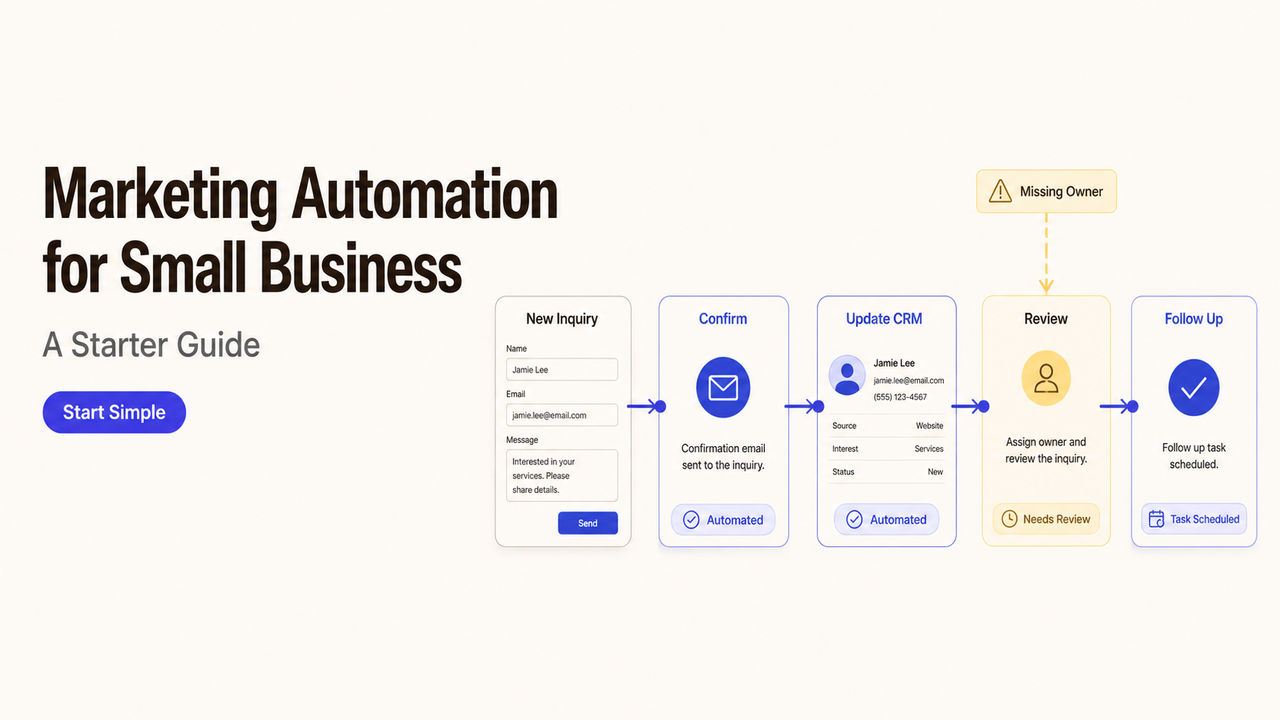
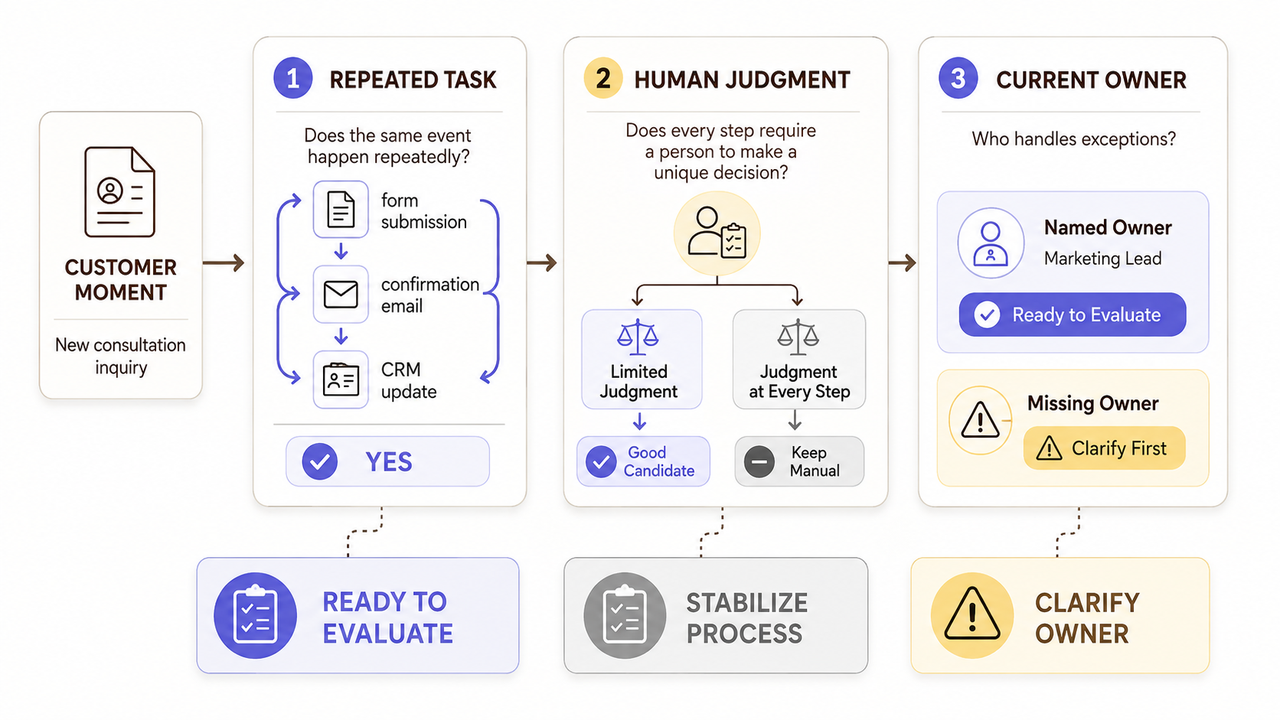
Before watching a product demo, make three columns: repeated task, human judgment, and current owner. If you cannot fill the first and third columns, the purchase is premature. If human judgment covers every step, the process is not ready to automate.
Small business marketing automation earns its place between those two limits. The buying decision is whether you need software, a defined implementation project, or ongoing operational help.
Does Your Small Business Need Marketing Automation?
Automation is useful when the team knows what should happen but cannot make it happen consistently. Look for a clear starting point, an expected response, and an exception owner.
The case for small business automation is strongest when that repeated gap affects a real customer moment.
Repeated Follow-Ups Are Becoming Unreliable
Missed follow-ups are a buying signal when they follow a pattern. New inquiries may wait in a shared inbox, or past customers may miss renewal reminders. If every message needs different judgment, improve intake before automating it.
Customer Information Is Scattered Across Too Many Places
Small teams often keep customer details across forms, inboxes, spreadsheets, and a CRM. Automation can move approved information between them. First name the source of truth; otherwise, software may spread conflicting records.
Manual Work Is Limiting Consistency or Visibility
Manual work becomes a problem when the owner cannot see whether an agreed step occurred. Even modest lead flow can justify automation when each inquiry is valuable and crosses several handoffs.
When Marketing Automation Is Not the Right First Purchase
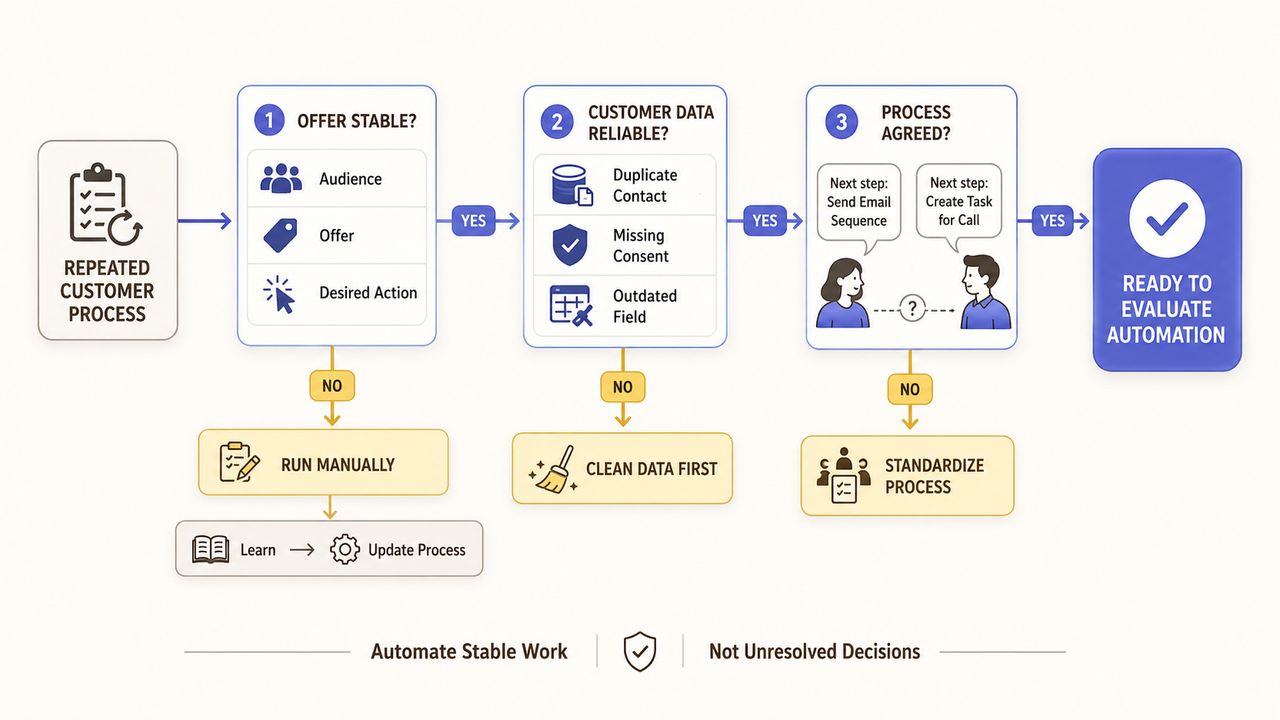
Automation does not repair a decision the business has not made. Buying too early can make an unstable process harder to change.
The Offer or Audience Is Still Changing
Wait when the business frequently changes its audience, offer, or desired action. Run short experiments manually until those decisions settle. This keeps early feedback visible and avoids building around old assumptions.
The Business Lacks Reliable Customer Data
Duplicate contacts, missing consent records, and outdated fields weaken automation. The FTC's guide to protecting personal information in a small business recommends knowing what personal data the company holds, limiting it, and protecting it. Apply those checks before a provider receives access.
The Repeated Process Is Not Yet Stable
A process is not ready when employees disagree about the correct response. Run the steps manually and record the exceptions. If exceptions dominate, stabilize the process or narrow the first use case.
Define the Problem Before Evaluating Solutions
The best starting point is one customer moment, not a software category. A narrow problem makes product demonstrations and provider proposals easier to compare.
Name the Customer Moment That Needs Support
Describe the moment in plain language, then name the next decision owner. This keeps a marketing automation strategy tied to real work. “Confirm every eligible consultation request and assign it” is more useful than “improve engagement.”
Describe the Cost of Missed or Delayed Work
Use an observable consequence instead of an unsupported revenue estimate. Record unresolved CRM tasks, duplicate entries, or customer complaints. This evidence defines the baseline; it does not guarantee a future result.
Separate Must-Have Outcomes From Optional Features
Must-have outcomes describe what the business needs to observe. A valid inquiry may need confirmation and a named owner. AI-written copy, scoring, and a new dashboard can remain optional.
Prepare a Buyer Brief for Software or Service Providers
A short buyer brief gives every seller the same facts. It also exposes missing decisions before they become change requests.
List Channels, Data Sources, and Operational Constraints
List every system involved and state who owns each account. Add limits such as a fixed CRM or restricted customer data. NIST's Small Business Cybersecurity Corner offers planning resources for assessing access and security responsibilities.

Set Required Deliverables and a Decision Deadline
Name the required deliverables, such as a configured workspace, access map, documentation, training, and handoff package. Add a decision date so vendors quote the same version of the request.
Record Legal, Privacy, and Approval Requirements
List who approves messages, which records may be shared, and how access ends. For U.S. commercial email, the FTC's CAN-SPAM compliance guide covers sender information, opt-outs, and vendor activity. Qualified reviewers should confirm other regional or industry requirements.
Use this compact brief:
Buyer brief field | What to record |
Customer moment | The event that creates the need |
Current failure | What is missed, delayed, or invisible |
Required outcome | What the team must be able to observe |
Systems and data | Current tools, record owners, and access limits |
Human owner | Who approves messages and handles exceptions |
Deliverables | What the seller must provide before acceptance |
Exclusions | Work, channels, or decisions outside the purchase |
Decision date | When the team will choose and who approves it |
Compare the Main Buying Paths
The right path depends on the team's ability to implement and maintain the process after purchase. The software label alone does not answer that question.
Software-Only Fits Teams With Internal Implementation Capacity
Choose software-only when an employee can configure it, maintain data, review messages, and document changes. Verify integrations, permissions, support, and exports on current vendor pages because demo features may require another plan or product.
Implementation Support Fits a Defined Setup Project
Implementation support fits a stable process with a clear finish line. The provider may configure the system, migrate approved data, document the setup, and train the owner. Accept the project against deliverables and tests, not a revenue promise.
When the team is ready to design triggers, handoffs, and measurement, use the separate marketing automation workflow guide for the implementation stage.
Ongoing Services Fit Teams Needing Continued Operations
Ongoing marketing automation services may fit when no employee can maintain campaigns and monitor failures. Define the provider's checks, reporting schedule, and decision limits. Require current documentation, business-owned accounts where practical, and a usable exit process.
Shortlist Providers With Evidence-Based Questions
A useful shortlist compares responsibility as well as capability. Ask every seller to answer the same questions against the buyer brief.
An automation consultant, software seller, and managed-service provider may describe similar outcomes while accepting very different responsibilities.
Ask for Relevant Experience and Scope Assumptions
Request examples involving a similar customer moment or tool environment. They show relevant work, not a guaranteed result. Also ask the seller to list assumptions about data, access, review time, integrations, and approvals.
Confirm Deliverables, Support, and Exit Conditions
Confirm deliverables, revision limits, support, account ownership, and handoff. Then ask what happens if a message contains outdated information. A useful answer names who pauses the process, corrects records, and documents the incident.
How SpringBrand Fits This Purchase Decision
SpringBrand lists packaged services from independent providers; it is not the software vendor or implementation team.
If the buying need is clear but the support model is not, compare third-party email and CRM automation services against your brief.
FAQ
Can a business automate marketing without replacing its current tools?
Often, if the current tools support the needed connection or data exchange. Verify compatibility before buying. Without a direct connection, compare manual imports, an integration platform, and a limited tool change.
Who should own automation when the company has no marketer?
Assign the founder, sales lead, or operations manager closest to the customer process. The owner need not configure everything, but must approve messages, decide exceptions, and manage outside support.
How often should a small team review automated customer messages?
Set the schedule around how often offers, prices, staff, or policies change. Review sooner after a complaint, data change, or platform update. Give each message an owner and review date.
What happens when an automation sends the wrong information?
Pause the process and preserve the message, recipient list, source data, and recent changes. An owner should approve any correction. Fix the source before restarting, then record the decision.
Can automation pause during seasonal or unusual business periods?
Yes, if the product supports a controlled pause. Document affected messages, contacts already in progress, and the restart owner. Test the pause before a busy season so queued messages do not surprise customers.
Conclusion
Small business marketing automation is ready for purchase when one repeated customer moment has a named owner, reliable data, a required outcome, and clear exceptions. If those conditions are still open, improve the process before buying the system.
The final approval should stay with the person who will own the customer experience after the vendor leaves.