Content Marketing Automation for Small Teams
Content marketing automation can remove routine handoffs without replacing judgment. Learn which tasks to automate and when outside support helps.
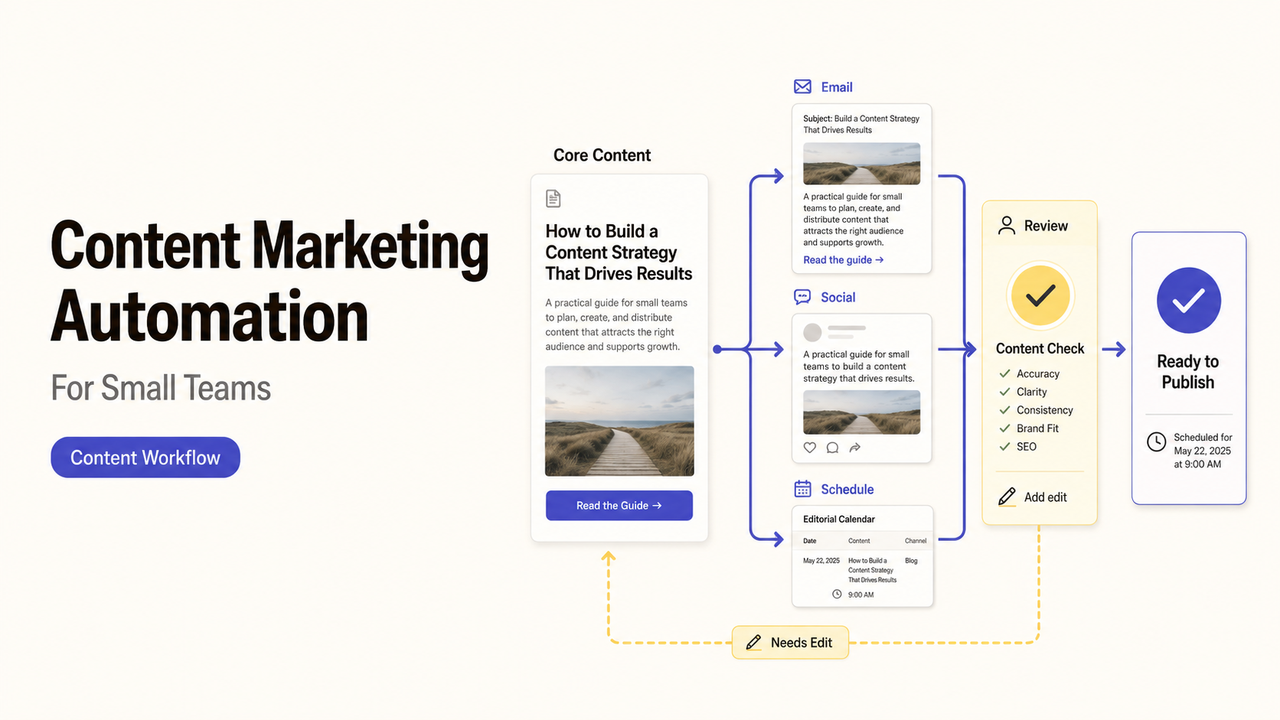
Many content delays happen after the draft exists. A subject expert has not checked the claim, an approved image sits in another folder, or the publish date has no owner. Content marketing automation is useful when it moves those routine handoffs without pretending to make the editorial decision.
The goal is a visible content marketing workflow with a state, next owner, and review evidence for every asset.
What Content Marketing Automation Can and Cannot Do
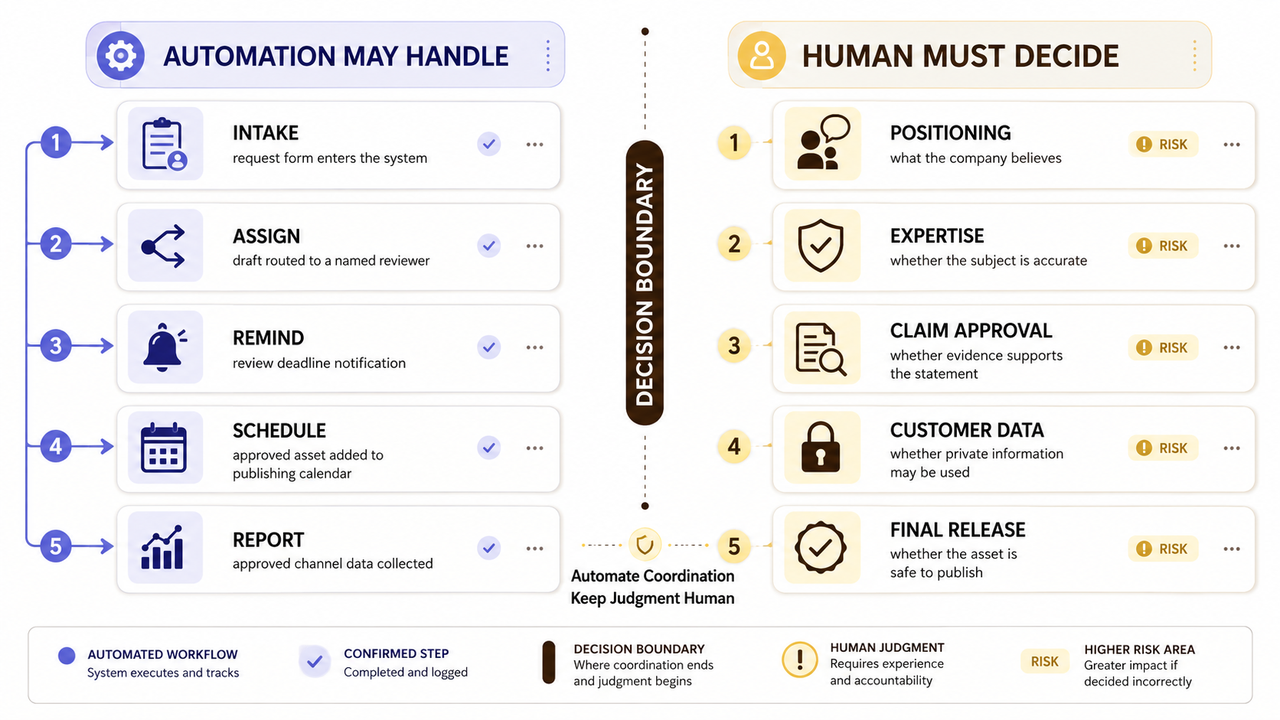
Automation can collect requests, create records, assign work, send reminders, schedule approved assets, and copy reporting data. These tasks follow known rules and produce records a team can inspect.
It should not choose the company's position, invent expertise, approve a factual claim, or decide whether customer information belongs in public content. Those decisions need context and accountability. A faster publishing queue is not useful when it moves weak work faster.
Treat the technology as a coordinator. People still own the message, evidence, exceptions, and final release.
Map the Content Workflow Before Choosing Technology
Follow one asset from request to publication. Record each state, owner, and required input. The map reveals repetitive work and unresolved decisions.
If the team still needs a sustainable content direction, the content marketing guide for startups covers audience, goals, and operating cadence. This article assumes those strategic choices already exist.
Identify Repeatable Inputs, Approvals, and Hand-Offs
Start with the information every request needs. That may include audience, channel, purpose, due date, source material, reviewer, and final approver. Mark which fields are required before work can begin.
Then name the states the asset may enter, such as requested, drafting, expert review, approved, scheduled, published, or paused. An automated content workflow works best when each state has one clear meaning.
Find Routine Delays That Need No Creative Judgment
Look for waiting that does not improve the content. A completed draft may sit because nobody assigned a reviewer. An approved post may miss its date because the scheduling field stayed blank.
Those gaps are better automation candidates than decisions about argument, tone, or evidence. The rule should be easy to explain without asking software to interpret an editor's intent.
Choose Content Tasks to Automate
Rank tasks by frequency, predictability, and consequence. Start with a reversible task, and keep high-risk publishing decisions outside the first automated path.
Use Automation for Intake, Routing, Scheduling, and Reporting
Routine content operations automation may create a record from a request form, route a draft to the named reviewer, or notify an owner about an overdue approval. After approval, it may schedule the asset or add its URL to a report.
The rule must still handle missing information. If a request lacks a source or approver, the safer response is to pause it and ask for the missing field.
Workflow task | Suitable automated action | Evidence to retain |
Intake | Create a record from complete fields | Original request and timestamp |
Review routing | Notify the assigned reviewer | Assignment and status history |
Scheduling | Queue an approved asset | Approval record and publish date |
Reporting | Collect agreed channel data | Source, reporting period, and URL |
Keep Positioning, Expertise, and Final Approval Human
An editor or business owner should decide what the brand believes and which claim it can support. Subject experts should review technical, product, medical, financial, or regulated statements within their competence.
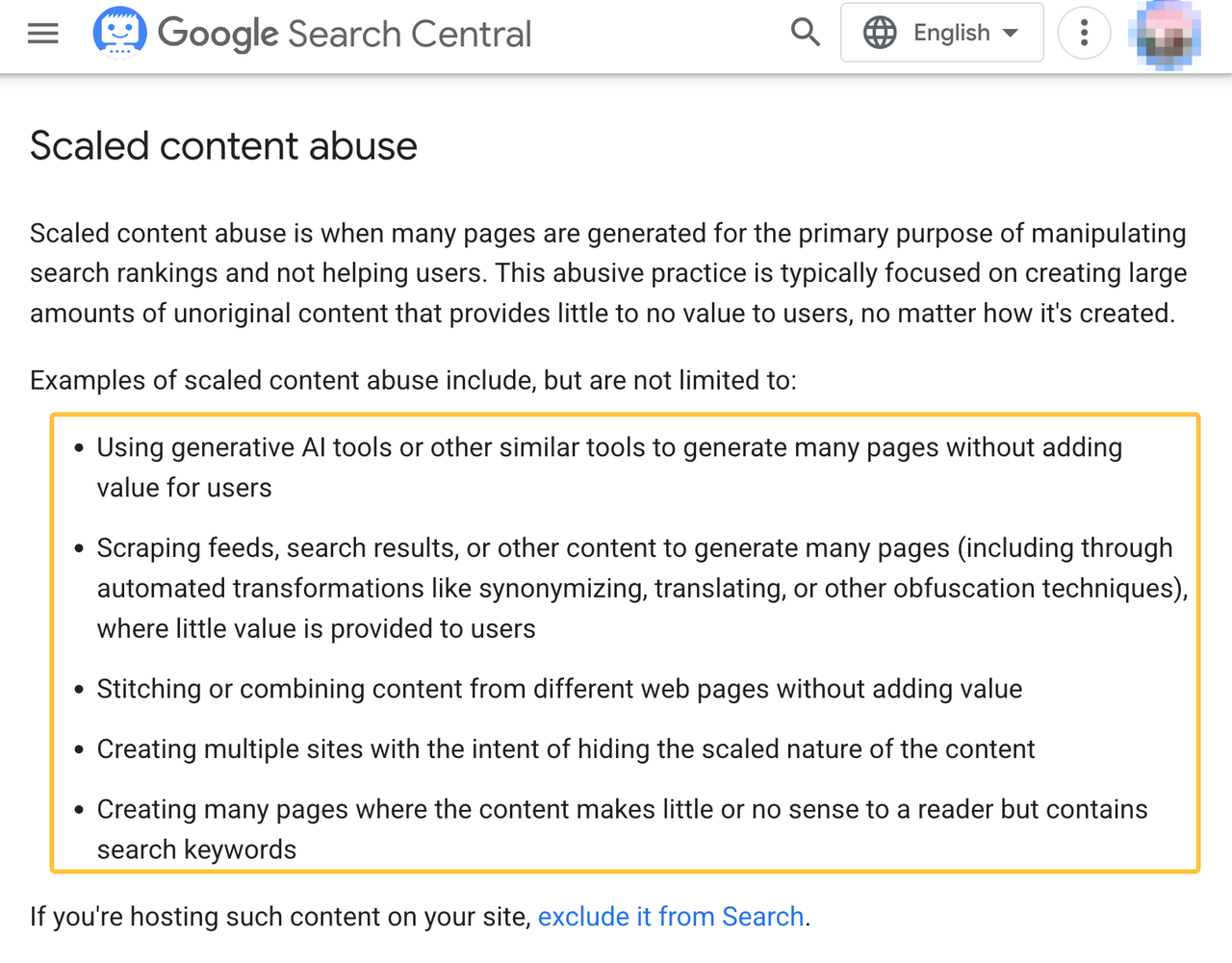
Google's policy on scaled content abuse focuses on pages created mainly to manipulate rankings rather than help users. Automation does not excuse thin, repetitive, or misleading content.
Design Quality Controls for Automated Content Work
Make quality control visible. Define what each review checks and what evidence allows the asset to advance.
Define Review Stages and Publishing Permissions
Separate editing, expert review, legal or policy review where needed, and final approval. A small team may assign several roles to one person, but the decisions should remain distinct in the record.
Limit publishing access to named users or service accounts. If an unapproved asset reaches the queue, the workflow should stop before publication and alert the owner.
Protect Factual Accuracy, Brand Voice, and Customer Data
Attach sources, data dates, approved claims, and brand guidance to the asset record. The FTC's advertising guidance for small businesses explains that objective advertising claims need a reasonable basis. Automation may route that evidence; it cannot decide whether the basis is adequate.
Keep license, consent, and attribution records with third-party text, images, audio, and customer quotes.
Customer interviews, support tickets, and CRM notes may contain personal or confidential information. The FTC recommends that businesses keep only the personal information they need and protect it. Define what an outside provider or connected tool may receive before sharing source material.
Decide Whether to Build the Workflow or Hire Support
The choice depends on workflow stability, tool count, internal capacity, and the cost of a failed handoff. Do not outsource an unresolved editorial decision and call it implementation.
DIY Fits Stable Processes and Simple Integrations
DIY can work when the stages are already documented, the tools have supported connections, and one employee can maintain the setup. The owner should understand permissions, failure alerts, and how to disable the workflow.
Check current product documentation before buying. Integration names, plan limits, data handling, and publishing permissions may change.
External Support Fits Multi-Tool Workflows and Limited Capacity
Outside content automation services may help when work crosses a project board, storage system, CMS, email platform, and reporting tool. The brief should name the required connections, approval rules, documentation, tests, and handoff.
Ask who configures each system and who supports it after delivery. Business-owned accounts and current documentation reduce dependence on the original provider.
Evaluate the Workflow With Operational Metrics
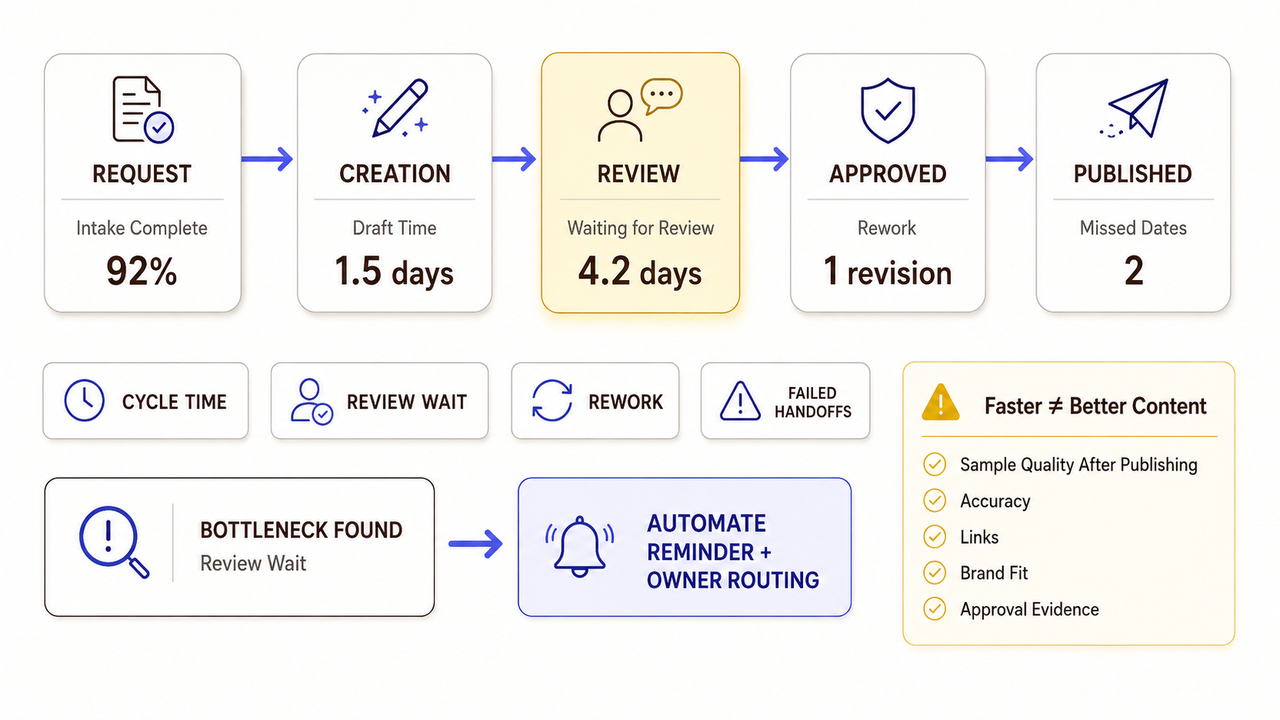
Measure whether work moves more clearly before increasing production. Compare the old and new processes without attributing every business result to automation.
Track Cycle Time, Rework, and Approval Delays
Useful operational measures include time from request to approval, time waiting for review, returned drafts, missed publish dates, and failed handoffs. Break total cycle time into stages so the team can see where work waits.
Do not treat shorter cycle time as proof of better content. It only shows that the process moved faster.
Review Quality Before Increasing Output
Sample published assets for factual accuracy, voice, working links, correct destinations, and approval evidence. Review complaints, corrections, and emergency removals as well as successful releases.
If error rates or rework rise, reduce volume and inspect the affected stage. Marketing content automation should make failures easier to find, not harder to notice.
For teams deciding how one source should branch into search, email, and social assets, the separate hub-and-spoke content workflow covers that architecture.
How SpringBrand Fits This Workflow
SpringBrand lists packaged services from independent providers; it does not produce or approve the content itself.
If the workflow map reveals a production or operations gap, compare third-party content marketing services against the required scope and handoff.

FAQ
Can automation support subject experts who dislike complex software?
Yes. Give experts one simple review surface and keep routing, reminders, and status updates behind it. The reviewer should see the current draft, supporting source, requested decision, and deadline without learning the entire system.
Can translation teams use the same content automation process?
They can share intake, assignment, and status rules, but each language needs its own terminology, reviewer, and approval evidence. Do not let one approval automatically release every locale when claims, legal wording, or audience expectations differ.
Should old content use the same workflow as new content?
Not always. Existing pages need an update path that preserves the current URL, source history, prior approvals, and performance context. New content usually begins with a blank request. Keep separate entry states, then merge the workflows where reviews genuinely match.
What records should teams keep after automated publishing changes?
Keep the approved version, approver, publication time, destination URL, source notes, workflow change, and any rollback record. Retention periods should follow the business's contracts, policies, applicable requirements, and qualified professional guidance.
Can one workflow support several brands with different approval rules?
Yes, if each asset carries a reliable brand field and the workflow routes it to the correct reviewer, voice guide, and publishing account. Test the wrong-brand path before launch; it should stop rather than borrow another brand's approval.
Conclusion
Content marketing automation is ready to expand when routine handoffs move faster without weakening factual review, brand judgment, or publishing control.
The person accountable for the final asset should also own the decision to pause the workflow when its evidence or approval path fails.