Content Creation Workflow: Brief to Approved Draft

Written by
Springbrand Editor Team
Editorial team
Springbrand Editor Team creates and maintains blog guides on AI tools, automation, marketing, and agent workflows.

Reviewed by
Springbrand Audit Team
Editorial review team
Springbrand Audit Team supports editorial quality through source checking, clarity, and consistency across the blog.
Updated
Published
A content creation workflow for small teams, covering the brief, source handling, draft ownership, review, approval, and handoff.
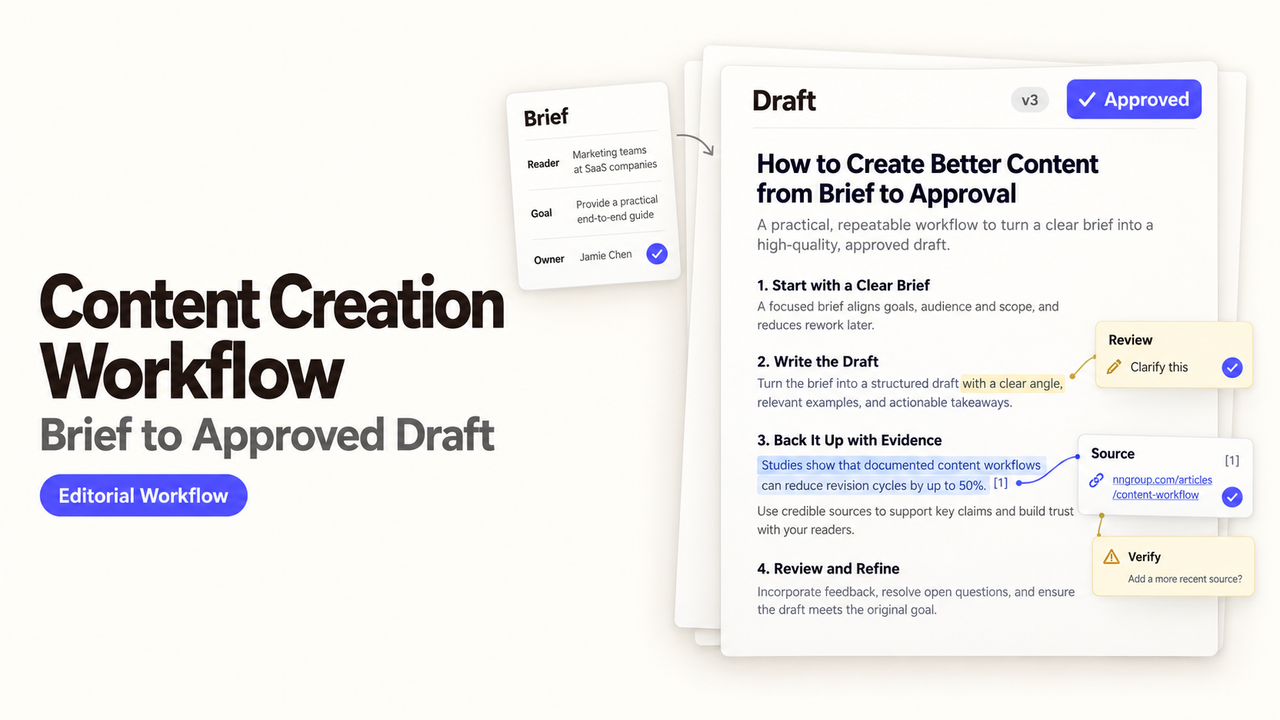
Suppose a campaign page is due Friday. Marketing wants a strong promise in the headline, the product lead wants softer language, and the writer has two source files with different numbers. Drafting faster will not settle any of that.
I’m Alex. I’d fix the brief and source pack before asking an AI creation step to write the first line.
A useful content creation workflow gives each person and tool a specific job. This guide follows one small-team example: turning a landing-page request into an approved draft through research, AI-assisted creation, marketing review, and human sign-off.
Define the Brief Before Production Starts
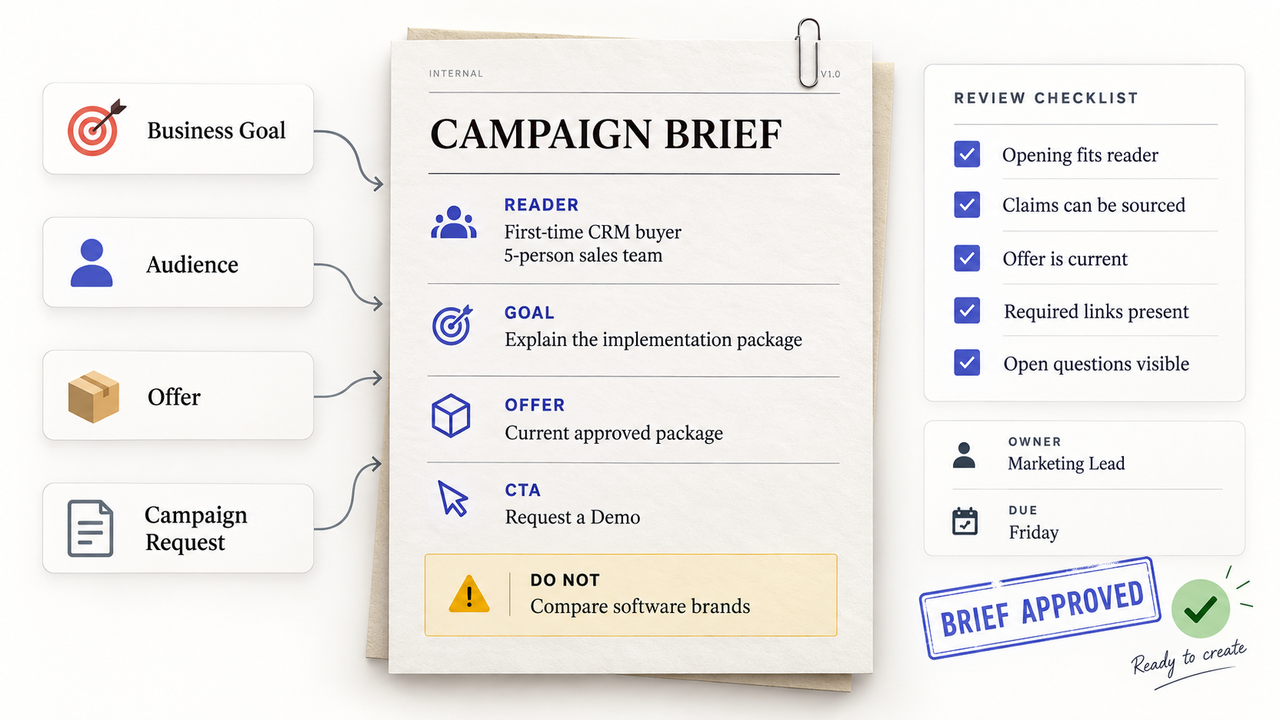
A marketing lead should be able to explain the page in a few plain sentences. Who is it for? What should that reader understand or do? Which offer can the company support today?
Set the Business Goal and Reader
Name one primary reader in a situation the team recognizes. “Small businesses” is broad. “An owner comparing a first CRM for a five-person sales team” tells the writer more about the reader’s knowledge and likely concerns.
Connect that reader to one page goal. A campaign landing page might explain an offer and lead to a demo request. It should not also serve existing customers or rank every alternative.
One boundary sentence can prevent hours of revision: “Explain why the implementation package fits a first-time CRM buyer; do not compare software brands.”
Record Deliverables and Acceptance Criteria
List what must arrive with the draft. Here, that means page copy, metadata, source links, image notes, and the intended call to action.
Then describe what approval looks like. “Make it authoritative” is too vague to review. The team can check whether:
- the opening speaks to the agreed reader;
- important product and market claims have sources;
- the offer matches the current sales material;
- required sections and links are present; and
- unanswered questions are visible.
Add the final approver and due date. Otherwise, the draft can be complete in the writer’s folder and unfinished everywhere else.
Collect Sources and Claims
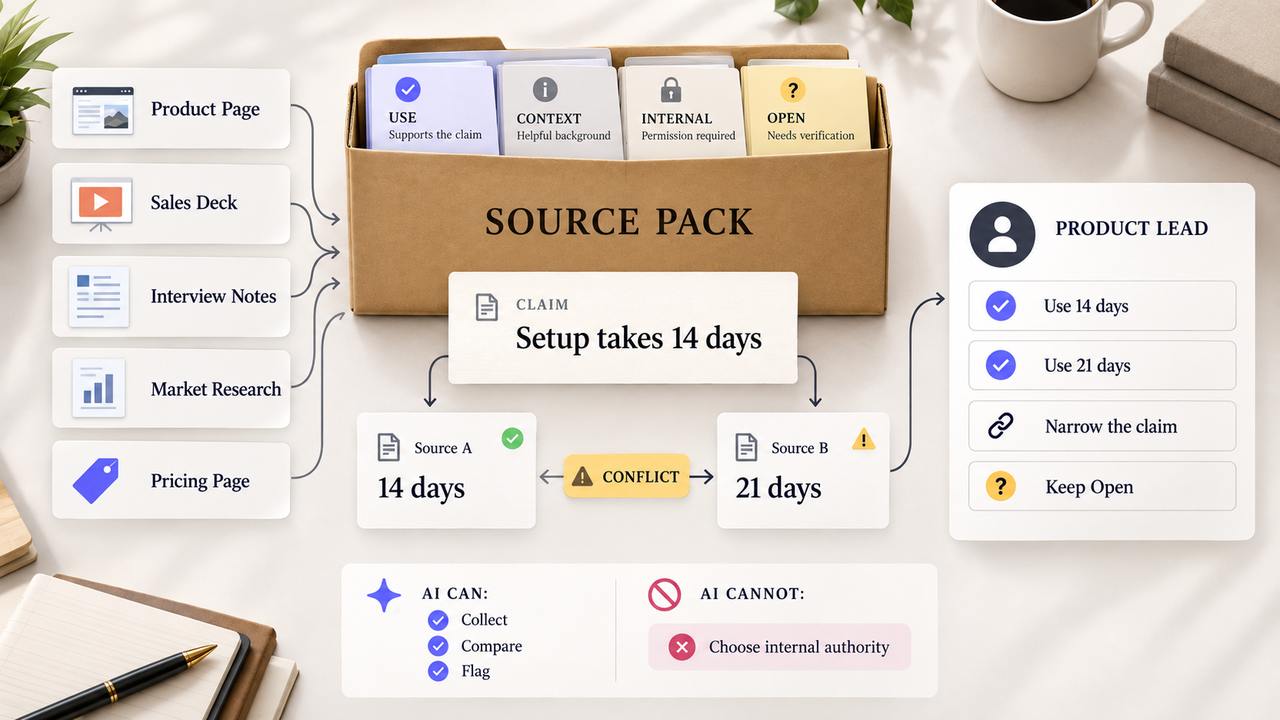
Before drafting, assemble the approved product pages, internal notes, interview material, and open questions in one source pack. The writer should not have to guess which of three sales decks is current.
Separate Evidence From Ideas
An idea suggests what the page might say. A source determines whether the draft may present it as fact.
Simple labels are enough if the team uses them consistently:
- Use: supports the proposed claim.
- Context: explains the topic but does not prove the claim.
- Internal: requires permission before publication.
- Open: still needs a reliable source or narrower wording.
Mark Facts That Need Verification
Prices, product features, policies, statistics, and quotations deserve a visible marker until someone checks them. The source list should say what each link proves, not merely store the URL.
A public pricing page may confirm today’s listed plan but say nothing about renewals. If that matters, the product or sales lead must settle it before approval.
An AI research step can collect candidate sources and flag contradictions. It should not quietly choose which internal document outranks another. Route that conflict to the person responsible for the claim.
Assign Draft Ownership
One person should maintain the working draft through final revision. That person need not make every specialist decision, but should keep reviewers from editing different copies.
Set Roles for Human and AI-Assisted Work
Here is an example content workflow management plan for the campaign landing page:
| Stage | Agent, plugin, or tool task | Human task | Output |
|---|---|---|---|
Brief intake | Organize the form response and flag missing fields | Marketing lead confirms the reader, offer, and CTA | Approved brief |
Source collection | Gather permitted public sources and approved internal files | Product lead settles conflicts and rejects weak claims | Source pack |
AI creation | Prepare an outline and first draft from the approved inputs | Writer checks every claim and rewrites unclear copy | Reviewable draft |
Marketing review | Run SEO and brand checks on the current file | Editor chooses which suggestions improve the page | Revised draft |
Approval | Route the named version to the approver | Approver accepts it or returns one clear set of changes | Approved draft package |
This is an editorial example, not a list of built-in features. The exact plugins and permissions depend on the tools the team chooses.
AI assistance still belongs to the writer listed on the assignment. Generated copy cannot approve its own sources, tone, or product promises.
Do not paste confidential client material or unpublished product details into a tool by habit. Check the tool’s current data terms, your company’s policy, and the access allowed for this project first.
Keep One Source of Truth for the Draft
Reviewers need one working file. Comments should stay there instead of arriving as rewritten email attachments or pasted Slack paragraphs.
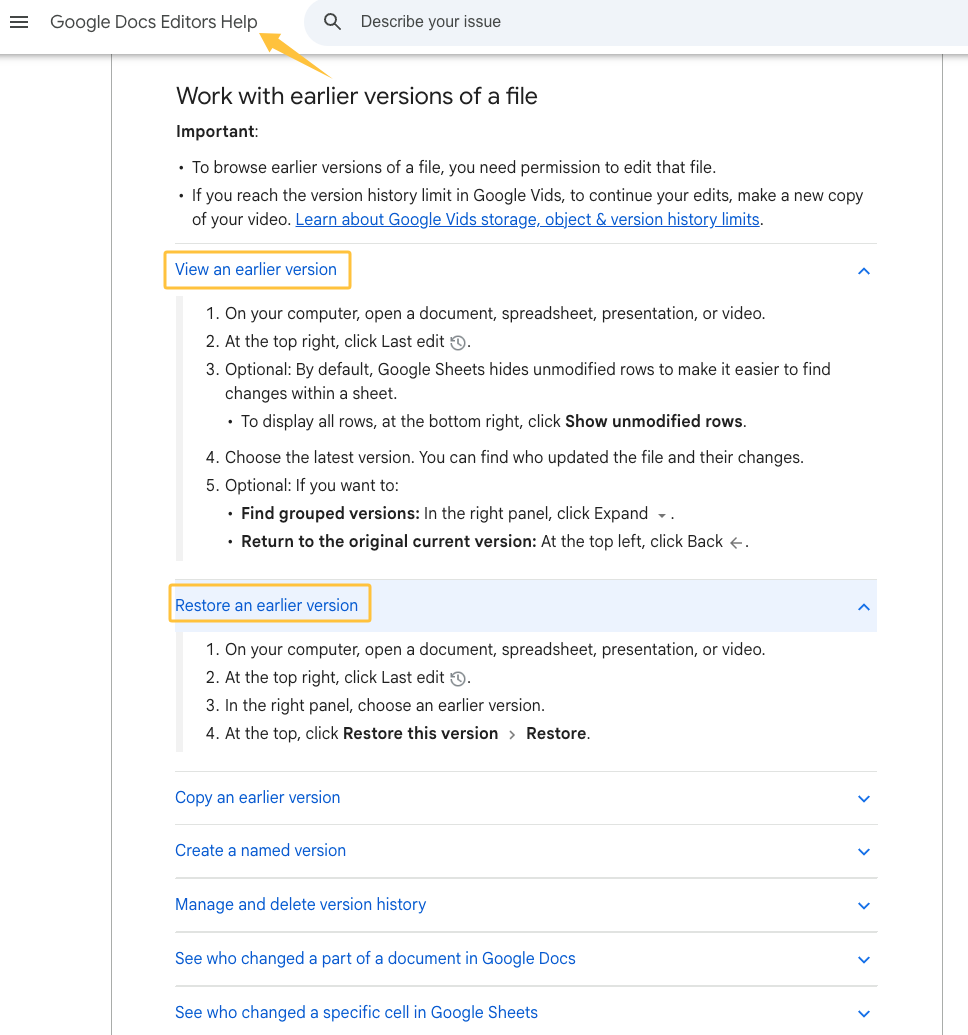
Version history helps, but it does not choose the approved copy. Google explains how editors can review earlier versions and restore one when needed. The content lead should still mark the current draft and move old exports out of the active folder.
Review and Approve the Draft
Review works better in separate passes. When everyone comments at once, the writer often receives competing rewrites instead of a decision.
Separate Accuracy, Brand, and SEO Reviews
Accuracy review checks claims against the source pack. Brand review checks product names, tone, positioning, and promises. SEO review checks the target query, title, headings, metadata, links, and whether the page answers the intended search.
These reviews can use AI or marketing plugins to surface possible issues. The reviewer still decides what changes. An SEO suggestion cannot rescue an unsupported claim, and a tone preference cannot rewrite a technical fact.
Ask for comments that identify the problem. “Too long” gives the writer little direction. “The setup example repeats the paragraph above” points to a change someone can make.
Resolve Conflicts and Record Final Approval
When comments clash, the draft owner brings the relevant reviewers together. The source decides factual questions. The brief settles scope. The brand or product lead handles promises assigned to that role.
The content approval workflow should identify the accepted file, approver, date, and any limitation that remains. A later change to a price, claim, offer, or CTA sends the draft back through the relevant review. Approval is not a permanent pass for future edits.
Package the Handoff
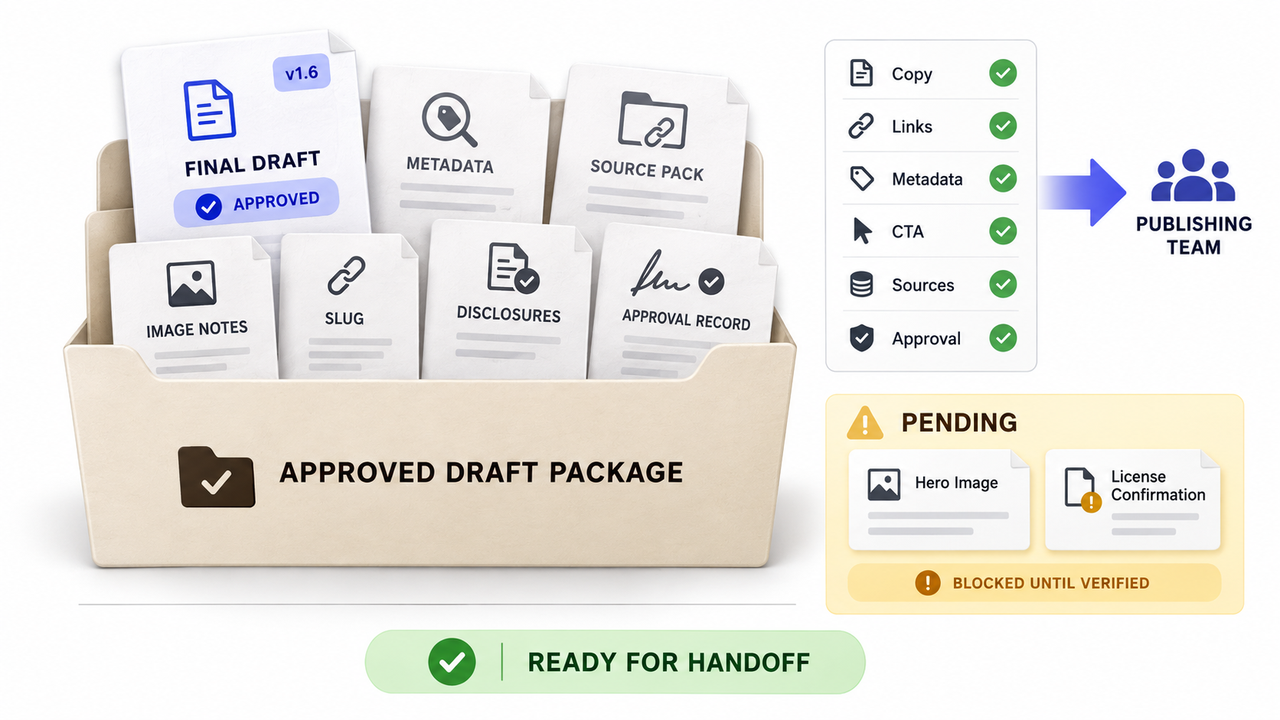
The publishing team should not have to reconstruct decisions from comments. Place the approved copy and its supporting items in one handoff folder.
Deliver Assets, Links, and Publishing Notes
Include the final draft, metadata, source pack, image instructions, destination slug, disclosures, and approval note. Call out formatting that may disappear during transfer, such as tables, captions, link anchors, or schema fields.
Keep unfinished production work separate. “Hero image pending license confirmation” tells the publisher what is blocked. An empty image box does not.
Decide When External Content Help Fits
Outside writing or editing support can help when the team has a settled brief but lacks production capacity or specialist knowledge. It cannot make an unresolved product promise safe to publish.
The same distinction applies to an AI workflow. A research plugin may collect sources. An AI creation capability may prepare copy. A marketing capability may review search or campaign requirements. The company still chooses the offer and approves the page.
SpringBrand’s homepage, checked September 13, 2026, presents agent-ready plugins for GTM tasks, including content marketing. If those capabilities match the assignment, explore a plugin combination for the draft workflow while keeping final approval with the marketing lead.
FAQ
Which file format allows comments without changing source text?
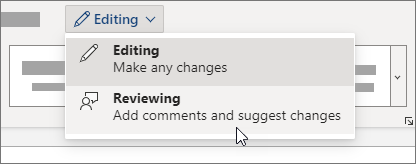
The review mode matters more than the extension. Microsoft Word supports comments and tracked changes; its review guidance explains how comments attach feedback to selected text. Test the exact desktop, web, and export path your reviewers use because DOCX behavior can vary between editors.
Can content requests enter through forms or ticketing tools?
Yes. A form or ticket can collect the reader, page goal, deliverables, deadline, requester, and source links. Incomplete requests should return to the requester before they create a writing task. Keep later decisions in the main brief so a ticket comment does not silently change the assignment.
How should translation and localization branches be managed?
Start each locale from one approved source version. Give the local draft its own terminology notes, regional sources, and reviewer. If the source changes, flag the affected branches instead of overwriting them. A translation can preserve the message while still needing different examples, links, or search phrasing.
Do document word counts include footnotes and text boxes?
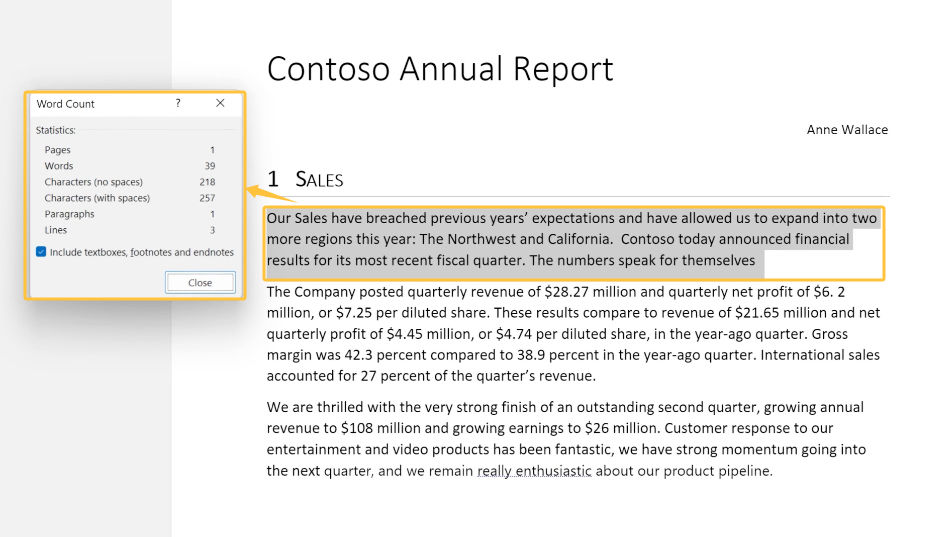
It depends on the application and settings. Microsoft’s Word Count guidance covers whole-document and selected-text counts. Agree on the delivery rule, then test footnotes, captions, tables, and text boxes in the software used for final review.
How can external contributors get limited access to source files?
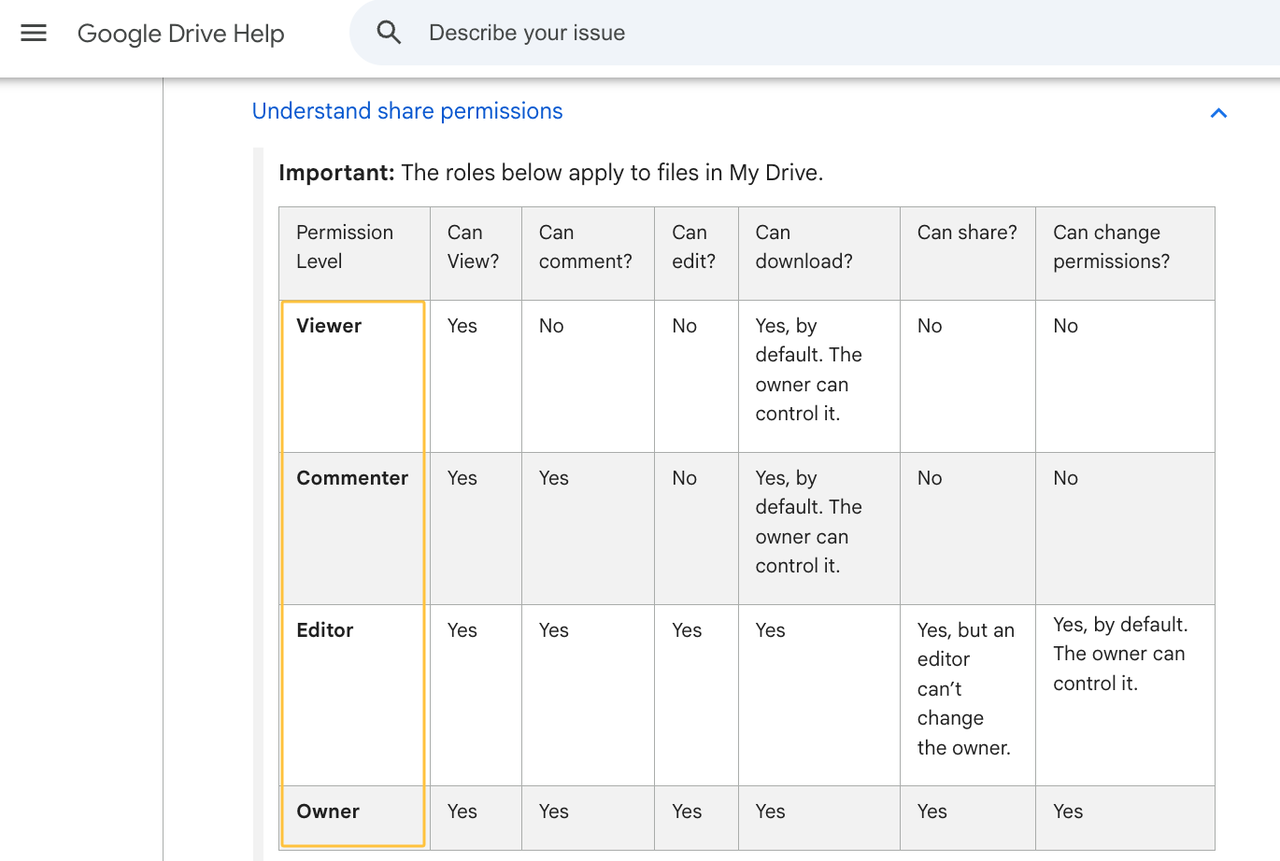
Share only the files they need and use the lowest workable permission. Google Drive distinguishes Viewer, Commenter, Editor, and Owner roles. Check inherited folder access before sharing, and remove the contributor when the handoff is complete.
Conclusion
A content creation workflow is ready when the writer can trace each important claim and the approver receives one clearly named draft.
Keep that final approval with a person. AI and marketing plugins can prepare, check, and route the work, but the named approver decides when the draft is ready to leave the editorial workflow.
Recommended Reads
Explore SpringBrand
Turn ideas into working workflows
Connect agents, APIs and tools in one workspace. Start with a task you want to get done.
Get started free
One account. 10,000+ APIs & capabilities
Give your agent APIs and plugins without separate keys or integrations for every provider.
Explore APIs
No tool expertise needed
Describe your GTM task. SpringBrand chooses the right APIs and plugins for your agent automatically.
Find tools for your task
Run tasks 24/7
Connect your agent to SpringBrand to keep tasks running automatically, day and night.
Connect your agent