What Is an AI Coding Harness in Website Development?
What is an AI coding harness in website development? Learn how it affects vendor workflows, quality checks, handoff, and proposal evaluation.
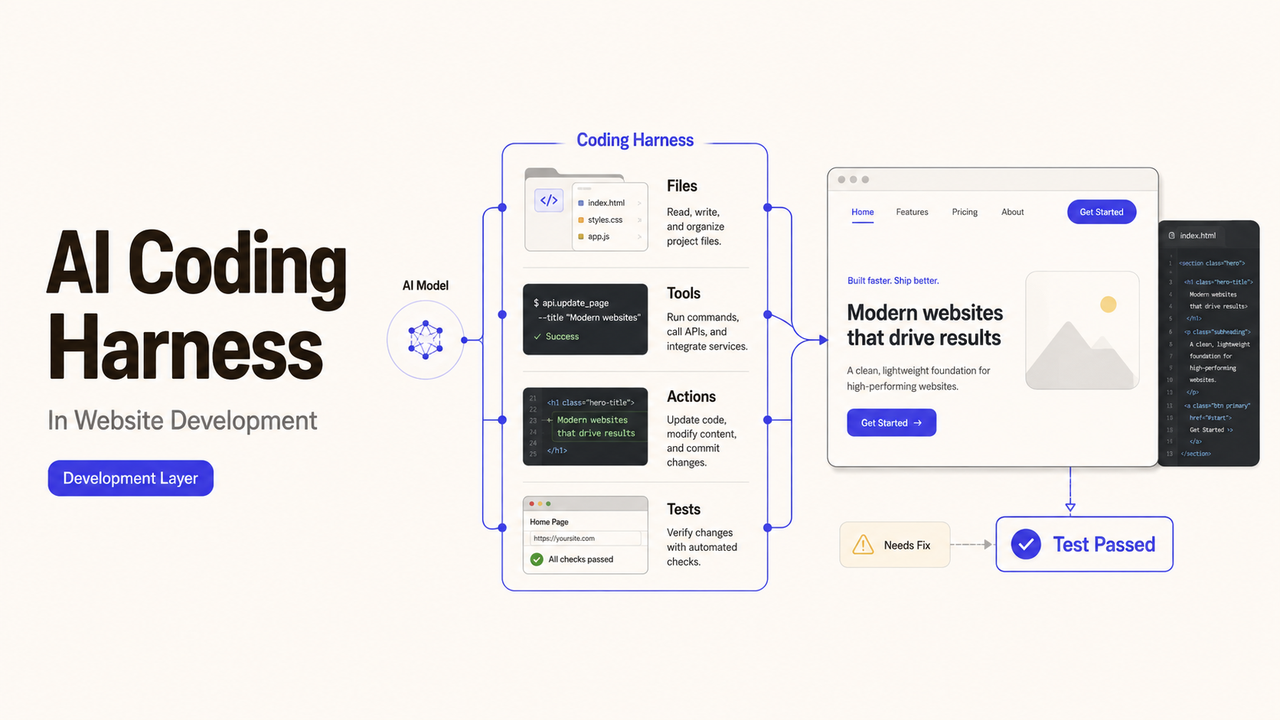
If a website proposal mentions an AI coding harness, ask for the workflow diagram before asking for a demo. The term often describes the layer that gives a coding model project files, instructions, tools, and checks. Providers may configure that layer in very different ways. For a buyer, the useful question is whether it creates an inspectable path from the website brief to reviewed code.
What Is an AI Coding Harness in Website Development?
An AI coding harness is the working environment around an AI coding model. It can supply project context, decide which tools the model may use, run commands, collect results, and return errors for another attempt. Some harnesses also record activity or package changes for review.
The term does not identify one fixed product or feature set. One provider may use a public coding agent with light configuration. Another may have a private system that connects several models, testing tools, and approval rules.
That is why the name alone says little about the finished website. Buyers need to understand how the provider uses it, what people still review, and what evidence survives the build.
Where a Website-Service Provider May Use a Harness
A harness may sit between the project brief and the developer's normal repository, testing, and review tools. It may assist with a small component or remain active throughout the build. The provider's proposal should make that boundary visible.
Turning a Website Brief Into Development Tasks
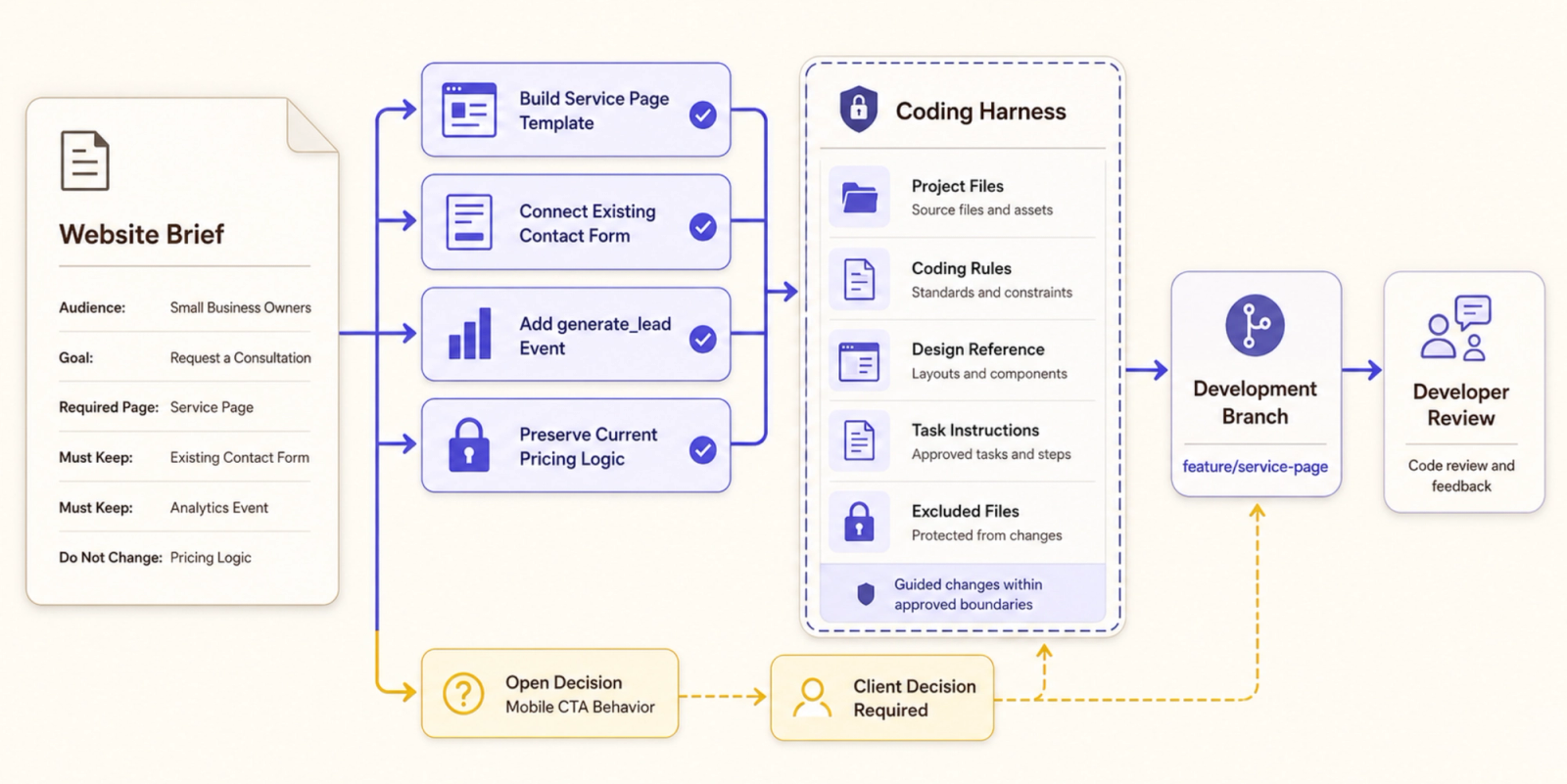
The provider first translates the approved website brief into smaller tasks. These might cover a contact form, a new page template, a tracking event, or a change to the navigation.
The harness may receive those tasks along with coding standards, file locations, design references, and exclusions. If the brief leaves a decision open, the system should not quietly turn one possible interpretation into an approved requirement.
Ask who confirms the task list before code changes begin. That person might be the project lead, developer, or client, depending on the agreement.
Using Tools and Models During the Build
During development, the harness may let a model read files, edit code, search documentation, or run selected commands. Current coding systems expose different permission controls. For example, Anthropic documents allowed and disallowed tool settings for Claude Code.
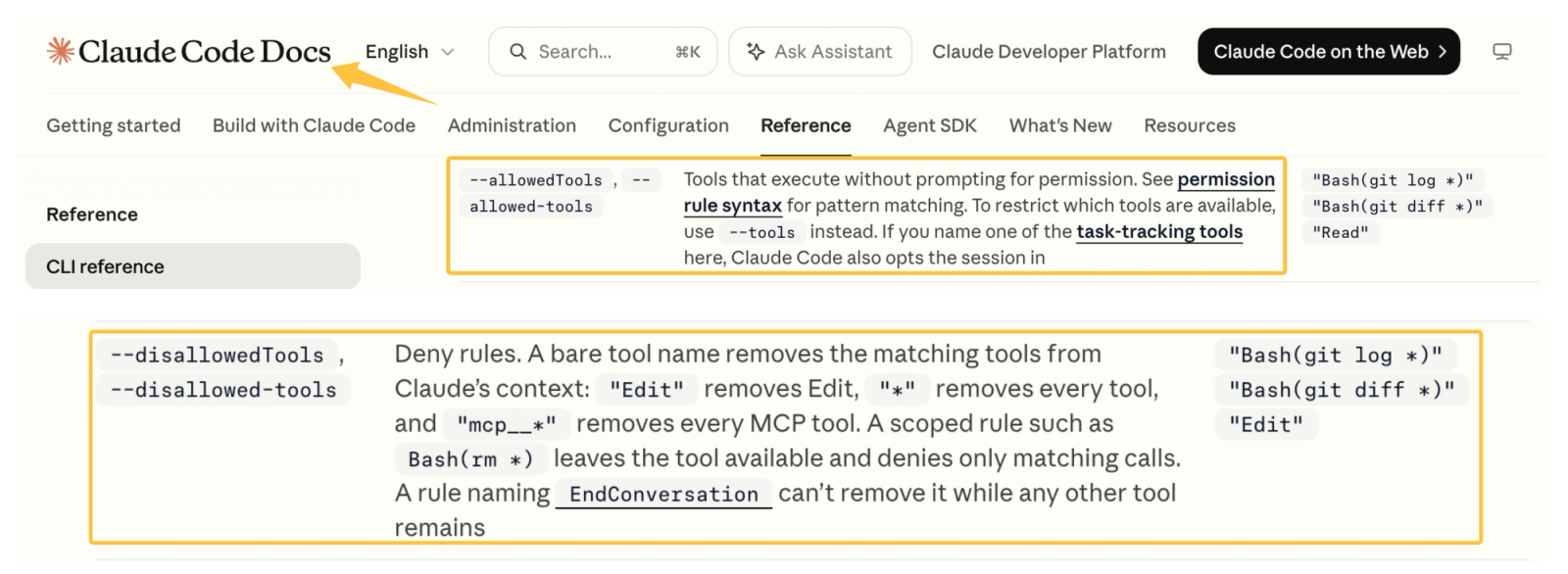
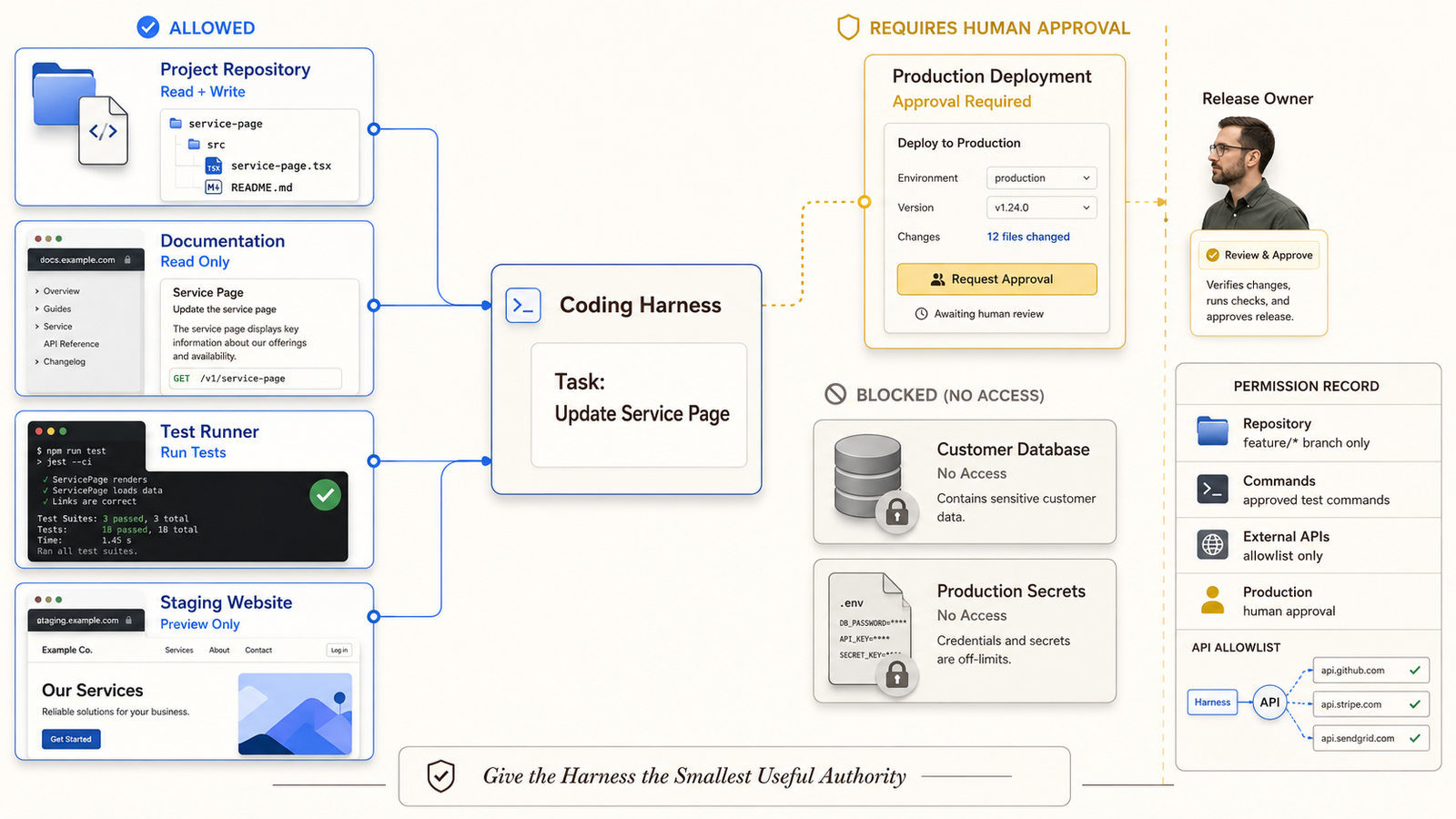
A website buyer does not need to choose those settings. The buyer should know which repositories and services the provider's system can reach. Production credentials, customer exports, payment data, and unrelated client files should not become available merely because the tool supports broad access.
OWASP's guidance on excessive agency recommends limiting tools, functions, permissions, and autonomy. That principle applies whether the provider uses a commercial harness or an internal one.
Checking Changes Before Client Review
The harness may run formatting checks, automated tests, link checks, or build commands after a change. It can then return failures for another revision. Those steps may catch routine problems before the client sees the staging site.
They do not replace human review. GitHub's documentation for third-party coding agents describes a workflow in which an agent creates a pull request and asks a person to review it. A website provider may use another system, but the proposal should still identify the reviewer and approval point.
What a Harness Changes—and Does Not Change—About the Service
A harness can change how the provider organizes context, assigns tools, records attempts, and repeats checks. It may make parts of the development process easier to inspect when the provider keeps useful logs and review records.
It does not decide whether the website brief is commercially sound. It cannot approve a brand claim, confirm that the design meets the client's intent, or accept the final website on the client's behalf.
The harness also does not prove that delivery will be faster or cheaper. Those outcomes depend on the website, the provider's process, the review burden, and the amount of rework. Ask for a scoped quote instead of accepting a general efficiency claim.
Evaluate Controls, Evidence, and Human Review
The provider should be able to explain the controls without exposing private security details. Start with the systems the harness can access and the actions it may take. Then ask who can approve a wider permission or stop a running task.
Useful evidence may include:
- the approved task and the instructions supplied to the system;
- the files changed and the person who reviewed them;
- automated checks that ran, including failed checks;
- unresolved issues that still require a client decision;
- the release and rollback record for an approved change.
NIST's Secure Software Development Framework focuses on development outcomes rather than requiring one tool. Apply the same logic here. A vendor should show how the process protects code, checks changes, and responds to problems, regardless of the harness name.
Compare Website Proposals That Use AI Coding Tools
Give each website service vendor the same brief and ask it to mark where AI-assisted work enters the project. One proposal may use a harness only for routine code changes. Another may use it for planning, development, testing, and documentation.
Compare these points side by side:
| Proposal question | What the answer should clarify |
|---|---|
What enters the harness? | Project files, instructions, data, and exclusions |
What can it change? | Repositories, branches, services, and permission limits |
Who reviews the work? | Named technical and client approval roles |
What is recorded? | Tasks, changes, tests, exceptions, and releases |
What reaches the client? | Code, documentation, reports, and handoff files |
The provider should separate included work from optional services. Hosting changes, content entry, analytics setup, security review, or ongoing maintenance may sit outside the quoted website build.
Define Deliverables and Acceptance Criteria
The contract should describe the website deliverables rather than accepting “built with an AI harness” as an output. Depending on scope, the client may expect source code, approved pages, responsive layouts, working forms, redirects, analytics events, and deployment notes.
Acceptance criteria should connect each deliverable to a check. A form can be submitted with valid and invalid data. A redirect list can be tested. The client can compare approved page content with the staging version.
Accessibility needs both tools and people. W3C recommends evaluating accessibility throughout development and notes that no automated tool can determine accessibility by itself. Put the applicable automated and manual checks into the project scope.
The final handoff should also identify the current repository, production owner, open issues, and procedure for urgent fixes. If the provider disappears, the business should not have to reconstruct the website from a demo link.
How SpringBrand Fits This Website-Service Decision
SpringBrand does not build websites or validate a provider's harness. Buyers can turn a website goal into a service brief and compare relevant third-party service scope.
FAQ
Who owns custom harness configuration after a website launches?
The contract should say whether configuration files, prompts, scripts, and workflow rules are delivered, licensed, or retained by the provider. Confirm where they are stored and what the client may modify. A qualified professional should review disputed ownership or licensing terms.
Can a client require deletion of business data from development logs?
A client can request specific deletion terms, but the provider must agree to them in the contract. Define the data, systems, backups, retention period, and proof of deletion. Applicable legal or regulatory duties may limit what can be removed.
What records should be retained if a provider changes AI tools mid-project?
Keep the change date, old and new tool names, reason for the switch, affected permissions, and any updated data terms. Retain the tests and approvals that show whether earlier work was rechecked after the change.
Should accessibility testing be repeated after AI-assisted code changes?
Repeat the tests that relate to the changed component, template, or user path. Major changes may justify a broader review. Automated scans alone are not enough for issues that require keyboard, screen-reader, content, or human judgment.
How should emergency fixes be documented after the original provider leaves?
Record the reported problem, person authorizing the fix, files changed, tests run, deployment time, and rollback option. Keep that record with the repository so the next provider can distinguish the emergency patch from the original build.
Conclusion
So, what is an AI coding harness in a website project? It is part of the provider's development environment, not the website service itself. Its value depends on the context it receives, the access it holds, the checks it runs, and the records it leaves behind.
Approve the website when the agreed pages, code, tests, documentation, and handoff are complete. The harness may support that process, but the acceptance evidence should close it.