Gumloop Alternatives for Repeatable Agent Tasks
Written by
Alex
Springbrand Researcher

Reviewed by
Springbrand Audit Team
Editorial review team
Springbrand Audit Team supports editorial quality through source checking, clarity, and consistency across the blog.
Updated
Published
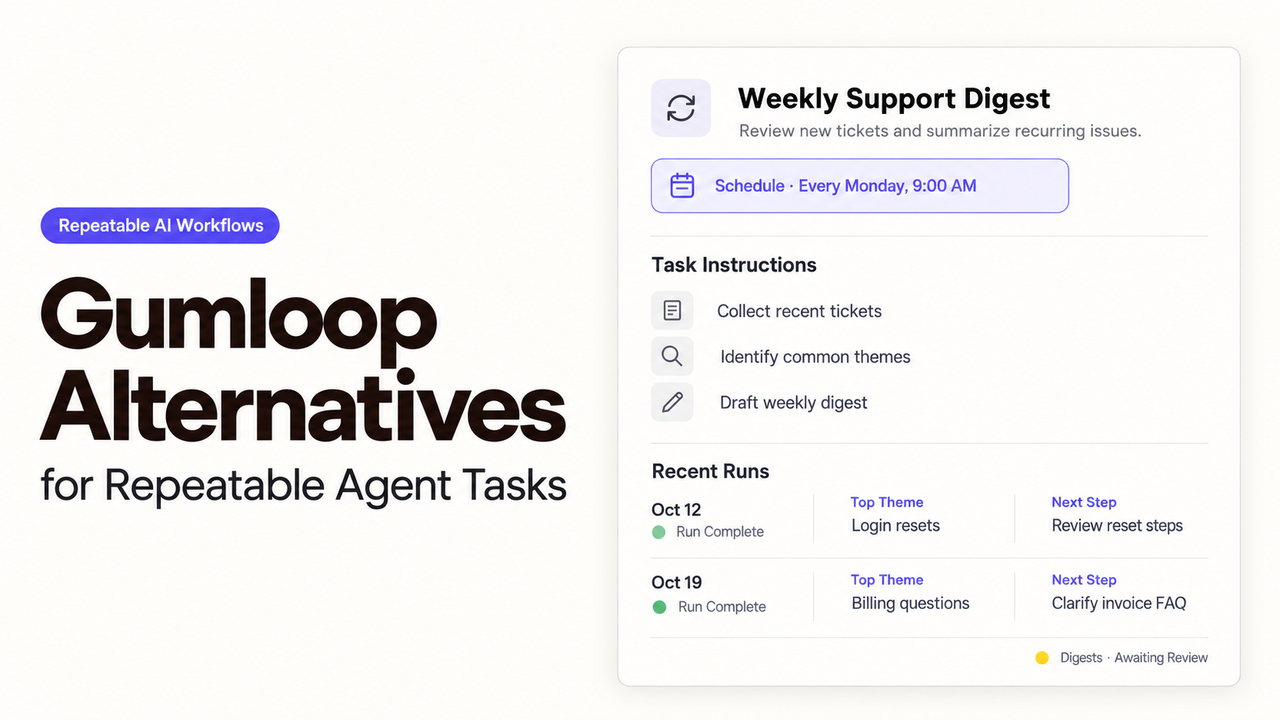
Gumloop alternatives for repeatable agent tasks. Compare workflow visibility, failure recovery, and the cost of changing builders.
Start with n8n if a technical builder will maintain the research steps and CRM rules. Relevance AI is worth considering when an agent needs to choose tools or ask for missing information. Dify fits a team that wants the recurring task packaged as an AI application.
To choose among these Gumloop alternatives, give each agent workflow builder the same company-research request and CRM update. I’d look closely at what the next operator can investigate and finish when a request stops midway. Changing platforms should reduce the need to call the original builder back in.
What Must the Existing Gumloop Flow Preserve?
The replacement needs to retain the research rules, the reviewer’s decision, and the link between approved text and the right CRM account. Recreating the old nodes is only part of that work.
Consider a weekly account-research task. A sales operator supplies company domains and CRM IDs. The flow gathers permitted public sources, drafts a short account summary, and sends it for review. Only the accepted summary should reach CRM.
Before rebuilding, collect the information the next builder will need:
| Keep from the existing task | Why the replacement needs it |
|---|---|
Company domain and CRM record ID | A company name alone may match several accounts. |
Source links, retrieval dates, and research instructions | The reviewer needs to distinguish a supported claim from an inference. |
Proposed summary and the exact approved text | A regenerated draft must not inherit an earlier approval. |
Completed writes and unresolved requests | The new flow needs to avoid repeating work already accepted. |
Trigger schedule, connection owner, and pending reviews | Both systems must agree on when the old route stops. |
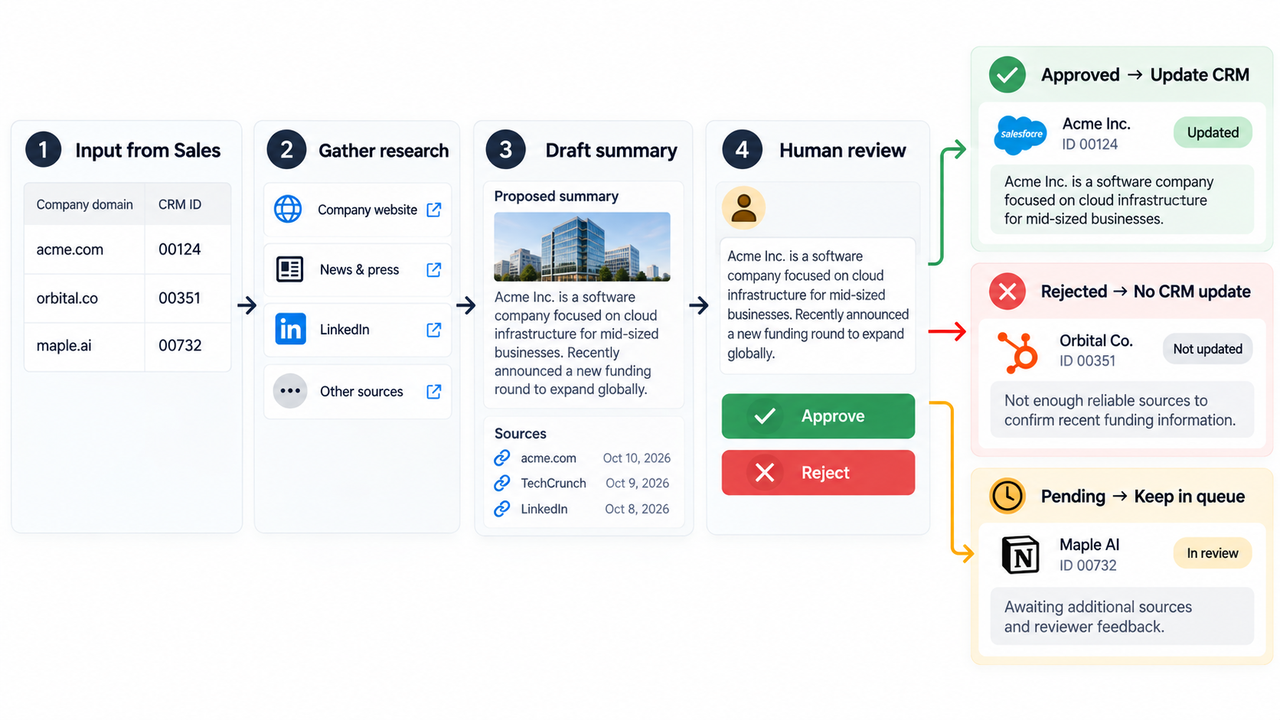
Give the next builder this sheet alongside a clean result, a rejected summary, and an unfinished CRM update. Those examples show what the replacement must carry forward. Use synthetic or approved records during the rebuild, and keep unrelated contact information out of debugging logs.
There is also a product distinction to settle before estimating the work. As of October 26, 2026, Gumloop’s pricing page labels visual workflows as Legacy, while its main offering leads with agents. Establish which experience the team uses; the migration estimate needs to reflect that starting point.
Compare Observability, Cost Units, and Portability
Open one interrupted request and follow the company through it. The operator needs to see what was retrieved, which summary the reviewer accepted, and whether the CRM write completed. A run-status badge alone cannot answer all three questions.
The platforms expose different records and charge for different units:
| Route | What to inspect | Usage to budget | Work to rebuild |
|---|---|---|---|
n8n | Executions, node data, and failed-run retries | Workflow executions, plus any model and external API charges | Mapping, credentials, review steps, and recovery logic |
Relevance AI | Agent Tasks, pending approvals, escalations, and tool errors | Actions and Vendor Credits, or direct provider bills with your own keys | Agent instructions, tools, sharing, and failure settings |
Dify | App outputs, node traces, and workflow errors | Cloud message credits and trigger allowances; provider charges with your own keys | App logic, knowledge content, tools, and the CRM connection |
n8n’s subscription meter counts workflow executions. Relevance AI separates tool runs from model and tool costs. Dify Cloud distinguishes model credits from trigger events. Compare those units against the same research workload before deciding which subscription looks cheaper.
For an initial cost per accepted account update, add the subscription, provider charges, and operator time over the same period. Divide that total by accepted updates. Track rejected research and recovery work separately within those costs so repeated paid lookups do not disappear from the estimate.
In an AI automation migration, the rebuild and the monthly running bill are separate decisions. Allow for credential setup, prompt changes, historical examples, and the period when both systems remain available. A platform’s configuration export can help with later maintenance; moving the task from Gumloop into another builder still requires rebuilding and testing.
1. n8n — Extensible Agent Workflows
n8n is a strong candidate when a technical builder wants to specify how the research and CRM steps work. Cloud and self-hosted deployments offer different arrangements for who maintains the infrastructure.
For this task, I’d keep account lookup and CRM field mapping in fixed steps, then let the model summarize the retrieved sources. An agent can choose research tools where that choice helps. The CRM destination should remain tied to the supplied account ID.
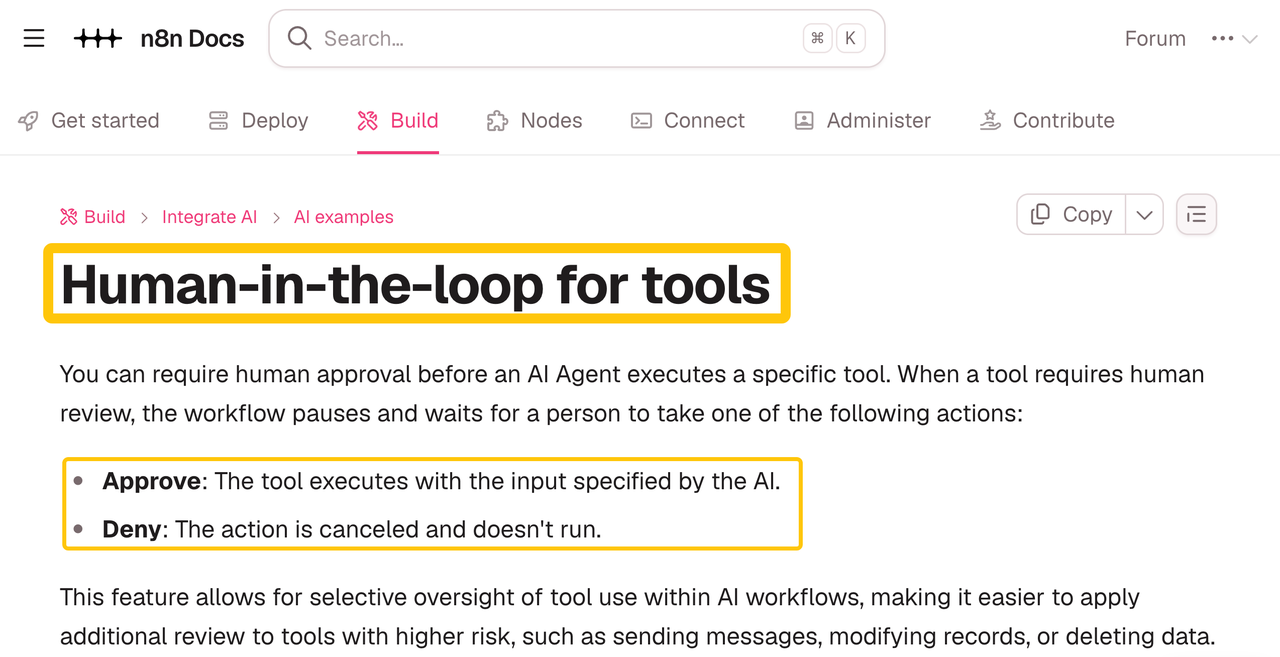
n8n’s human review for AI tools can pause a selected tool call and show its proposed parameters. Approval runs that tool; denial cancels the action. Configure the CRM tool and review message so the person sees the account and the exact text that will change.
When a run fails, n8n lets the operator retry with the original or currently saved workflow. That gives a builder a way to correct a mapping error and try the revised logic with the earlier execution data. It still matters what the retry repeats: fresh research may produce different wording, and another write may repeat an update.
Save the accepted summary before attempting the write, and check CRM before replaying a request whose result is uncertain. The builder has to arrange that behavior. Execution data helps explain what happened; it does not decide which work is safe to repeat.
n8n exports workflows as JSON. Keep the rebuilt configuration and document its credentials and external dependencies. This route makes sense when someone will continue maintaining expressions, API responses, and error branches after the migration.
2. Relevance AI — Agent Task Assembly
Relevance AI is worth a look when the research needs an agent to decide which tool to use or ask someone for missing information. Its task interface is particularly relevant to the operator handling several unfinished requests.
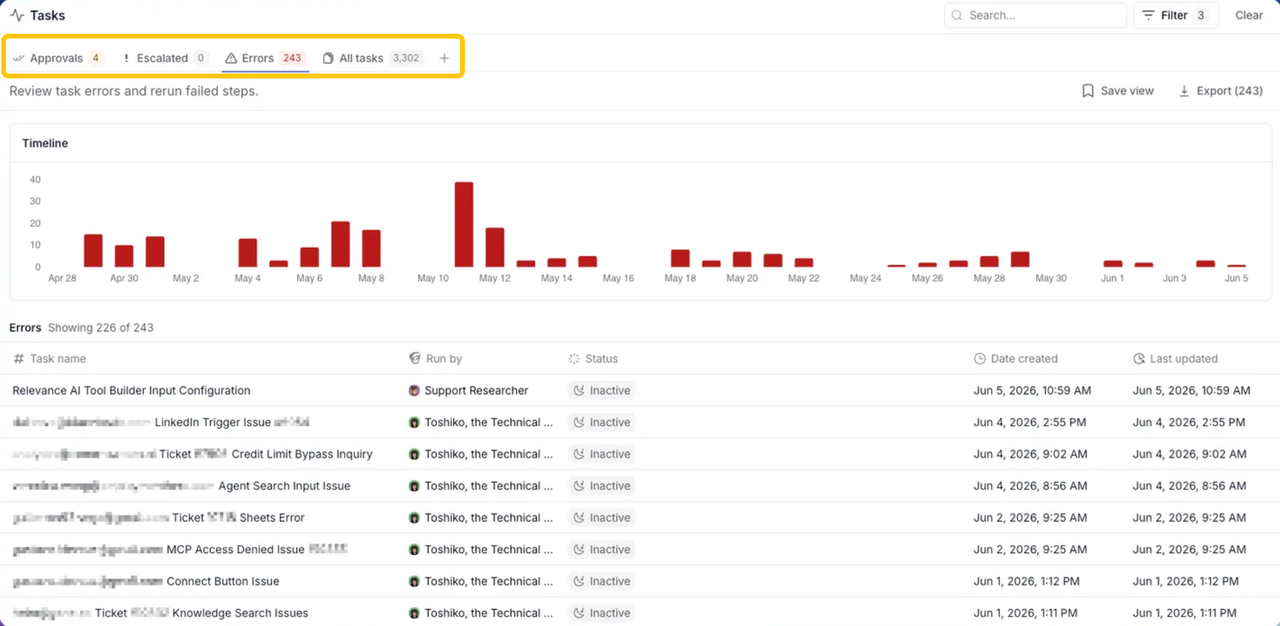
The Tasks page separates approvals, escalations, and errors. An operator can approve or reject pending actions and rerun errored Tasks from the failing step. For a sales operator, that puts the work waiting for attention in one place.
Give the research agent narrowly scoped tools and require approval for the CRM write. The builder can set retry limits and choose whether exhausted retries terminate the task or escalate it to a person. If a source is missing, that person should receive the research question along with the problem.
The cost depends on how the agent uses its tools. An Action is one Tool run, including a failed run; Vendor Credits cover model and tool costs. With your own API keys, provider charges move to your account, but Actions still count. A research task may therefore consume several Actions before anyone accepts the summary.
Keep the research question narrow enough that the operator can recognize unnecessary searching. If fixed steps already handle the useful results and the exceptions, giving an agent more discretion may add work to maintain. Relevance AI can copy agents between its projects, but the incoming Gumloop instructions and tools still need rebuilding.
3. Dify — Agent Application Workflows
Dify makes sense when several people will use the research task as an application with defined inputs and a consistent result. A Workflow app runs from input to output; Agent nodes can choose tools within that larger flow.
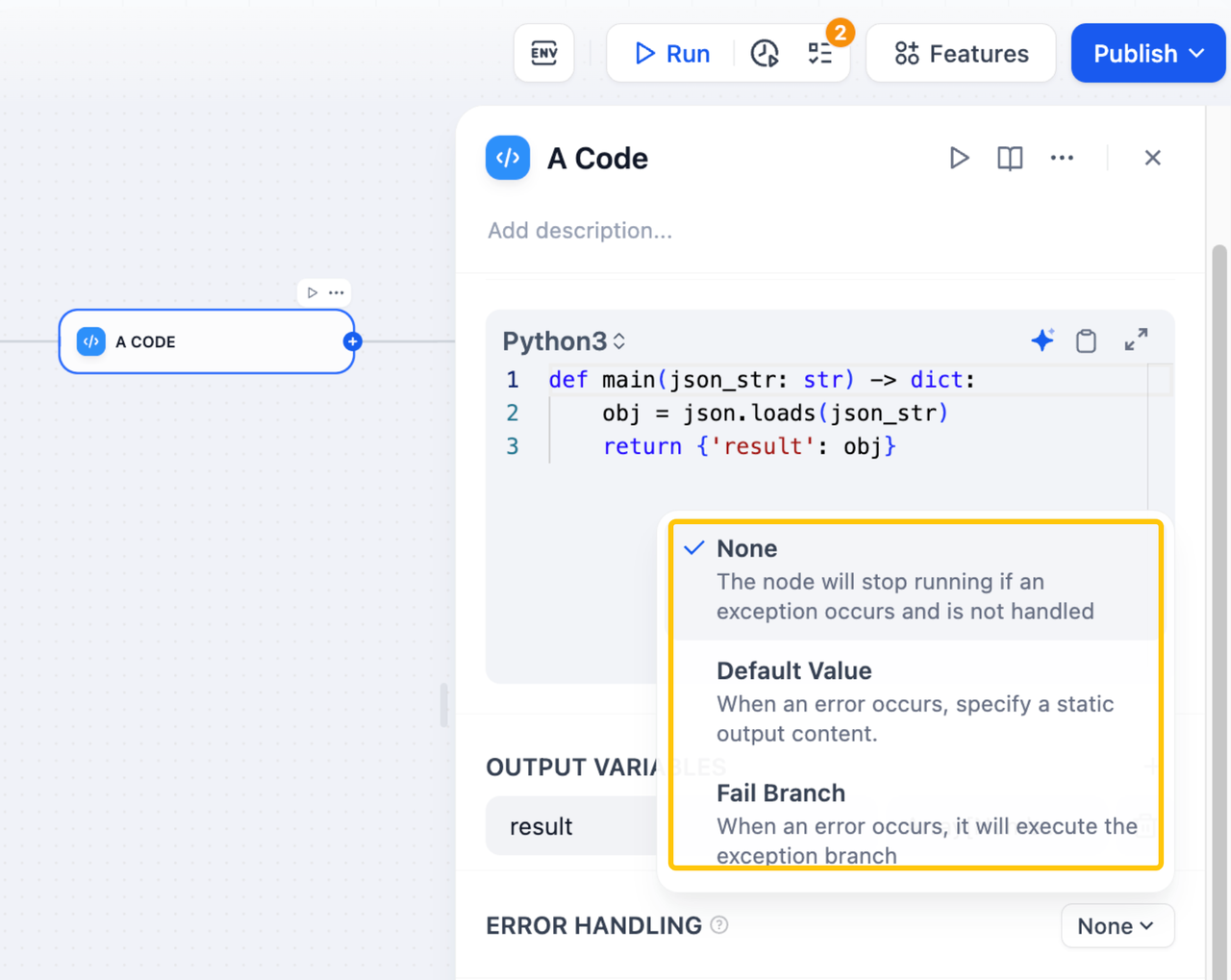
For the account summary, separate retrieval, drafting, validation, and the CRM handoff so the builder can inspect each stage. Run History includes the original inputs, outputs, and node traces. Dify’s error handling can stop a run, return a default value, or take a fail branch.
I’d use an explicit error branch for failed retrieval. A default paragraph such as “Company information unavailable” could otherwise pass to the CRM step as though it were the requested summary. Keep the account ID and error with the unfinished request so someone can resolve it.
Dify exports app configuration through its YAML-based DSL. Knowledge content, third-party API keys, and usage logs are excluded. Keep those dependencies separately if the rebuilt app may move again later.
The team will also maintain knowledge content, model-provider settings, and the connection between review and CRM. On Cloud, budget for model credits, trigger allowances, and workspace limits. Self-hosting adds infrastructure upkeep and a need to review the applicable license. Dify is worth considering when the team will reuse the research app and someone can maintain those dependencies.
Choose by the Failure the Team Must Handle
The strongest reason to switch is a recurring problem the receiving team can handle more easily in the new setup. For this research task, a source problem and a CRM write problem call for different responses.
An unsupported claim needs to return to research with its source gap visible. Relevance AI’s escalation and Task operations may suit the person managing that queue. A malformed CRM field or custom API response may favor n8n’s explicit mapping and recovery steps. Dify deserves attention when the team needs to keep a shared research app’s inputs, retrieval, and output consistent.
Use the same approved summary to examine an ambiguous CRM timeout in each candidate. The operator should check whether CRM already holds the change before retrying or reconciling the request. Otherwise, recovery may repeat a completed write or replace approved wording with fresh research.
Keep CRM writes disabled while the reviewer compares the replacement’s proposed updates with the existing process. At cutover, reconcile waiting reviews, stop the old trigger, and record which system will finish each unresolved request. Only one system should be actively writing for this task.
Can n8n require approval before publishing a workflow?
Its workflow reviews feature supports review before publishing, but does not make approval mandatory for every publication. As of October 26, 2026, it is an Enterprise Preview available from version 2.37.0. n8n advises against relying on it in production. Reviews are optional, although an open review blocks direct publication. If signoff is mandatory, publishing permissions and the team’s release process need to enforce it.
Can Relevance AI restrict one agent to a business unit’s data?
Yes, with appropriately scoped knowledge sources, tools, and credentials. Its Enterprise RBAC controls projects and individual assets, with access still rolling out. Test whether connected tools can retrieve another unit’s records. Naming the unit in an instruction does not enforce access, and sharing an asset does not establish row-level filtering in an external database.
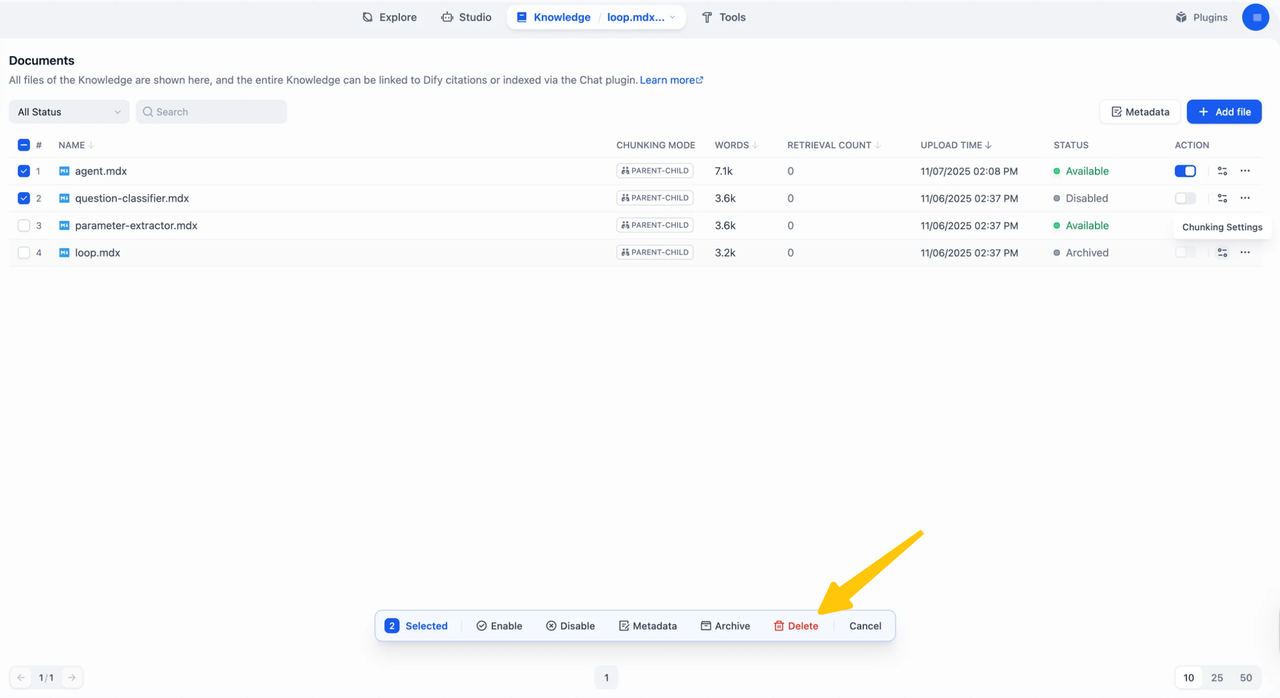
Can Dify delete knowledge files from a retired workspace?
Yes, while an authorized editor still has access. Dify can permanently delete knowledge documents; archiving instead retains them and allows restoration. Remove the documents before surrendering workspace access, then address source copies and exported files separately. Deleting a document does not establish when every backup copy expires.
Can Dify limit access to one migrated app within a shared workspace?
Basic Cloud workspace roles do not provide that separation: Editors can create, edit, and delete apps across the workspace. Published web apps are public by default. Builders with different access needs should use separate workspaces or deployments. For end users, put authentication in front of the app and verify that its API cannot bypass those checks.
Can Gumloop notify an administrator when a flow is archived?
I couldn’t confirm a built-in flow-archive notification in the public documentation. Gumloop has an organization audit-log API, but an administrator needs to confirm access and the required archive event before building an alert. For cutover, record the old flow ID, stop its triggers, and confirm that new requests reach the replacement.
Conclusion
I’d make the move when the next operator can finish an interrupted CRM update without starting the investigation again. The approved text should be there, along with a clear record of whether the write succeeded. That is a more useful reason to switch than preferring another canvas.
Explore SpringBrand
Turn ideas into working workflows
Connect agents, APIs and tools in one workspace. Start with a task you want to get done.
Get started free
One account. 10,000+ APIs & capabilities
Give your agent APIs and plugins without separate keys or integrations for every provider.
Explore APIs
No tool expertise needed
Describe your GTM task. SpringBrand chooses the right APIs and plugins for your agent automatically.
Find tools for your task
Run tasks 24/7
Connect your agent to SpringBrand to keep tasks running automatically, day and night.
Connect your agent