AI Agents for Marketing: Tasks to Start With

Written by
Springbrand Editor Team
Editorial team
Springbrand Editor Team creates and maintains blog guides on AI tools, automation, marketing, and agent workflows.

Reviewed by
Springbrand Audit Team
Editorial review team
Springbrand Audit Team supports editorial quality through source checking, clarity, and consistency across the blog.
Updated
Published
AI agents for marketing can support bounded research, drafting, and reporting tasks when small teams control access, review, and publishing.
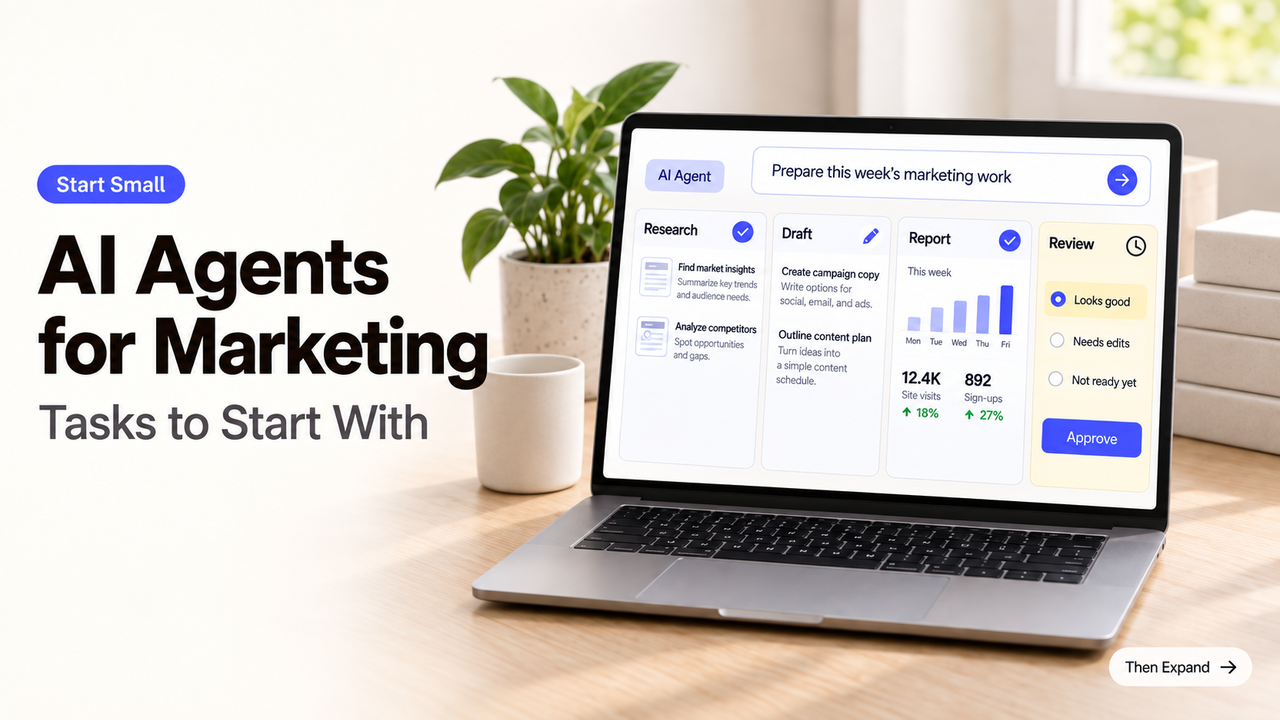
Would you let an agent publish this campaign, change its budget, or explain a weak result to your team? If the answer is no, do not start there.
The best first tasks for AI agents for marketing end in work a person can inspect and reject. Research briefs, content variations, and draft reports fit that description. Each can save routine preparation without handing the agent the final marketing decision.
Choose the First Task by Risk and Reversibility
A safe starting task has a narrow question, approved inputs, and a visible result. A marketer should be able to correct the output without repairing a live campaign or apologizing to a customer.
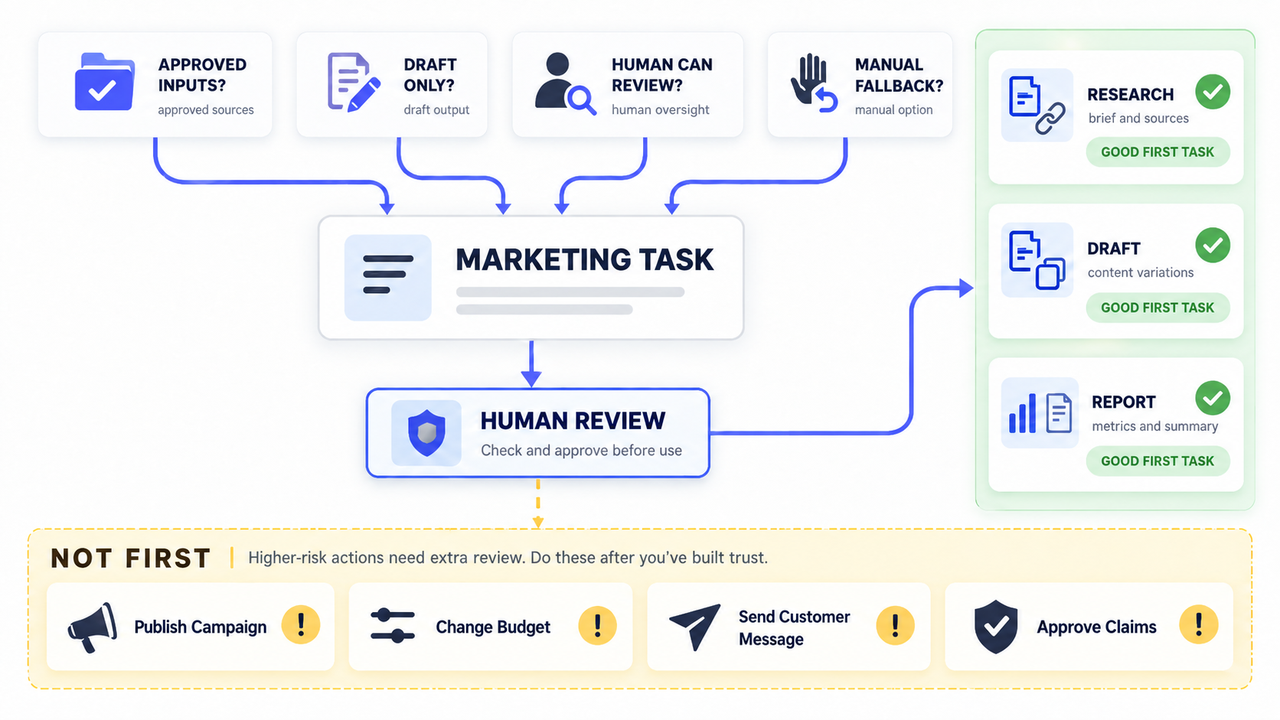
Use four questions to screen the task:
- Can the agent work from named files, accounts, or sources?
- Does its work stop as a draft?
- Can a reviewer spot a mistake before anyone outside the team sees it?
- Can the team repeat the task manually if the connection fails?
This is an editorial screening test, not a product standard. If one answer is no, narrow the assignment. “Prepare three subject-line options from the approved offer” is workable. “Run email marketing” leaves the message, audience, timing, and sending authority unresolved.
Start With a Research Brief
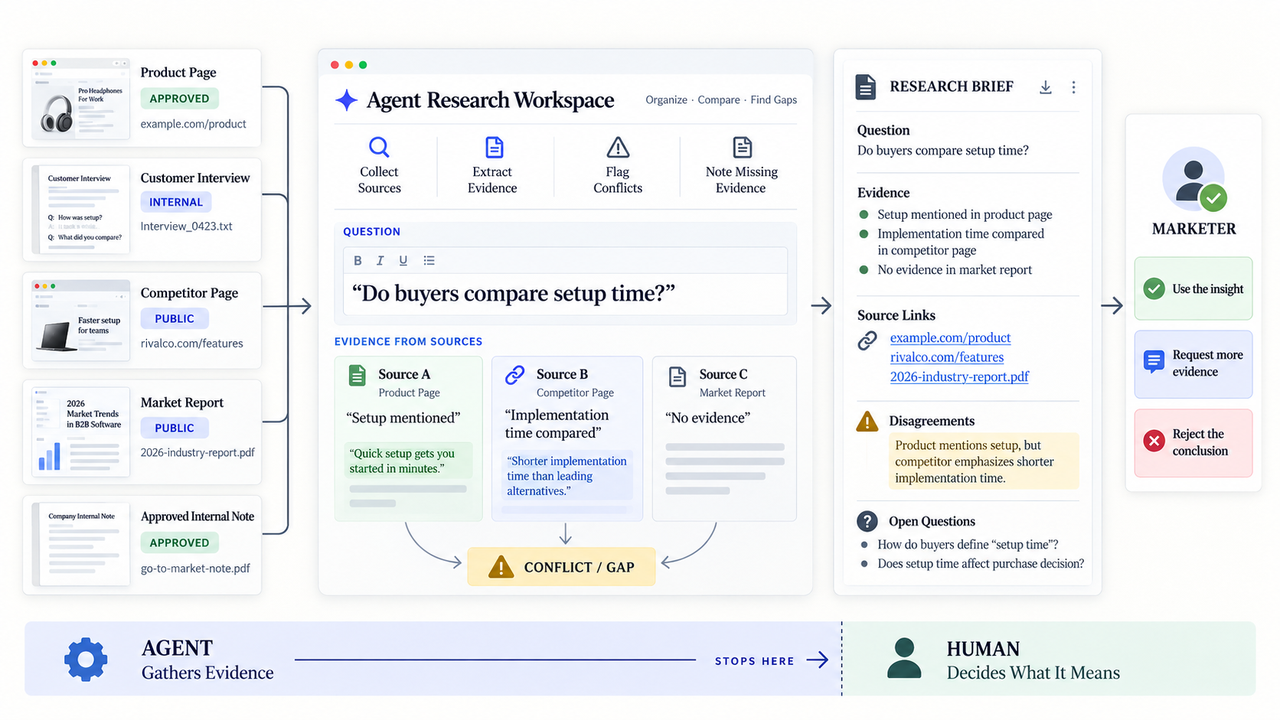
Research is a practical first use because the agent can collect material while the marketer keeps the page or campaign decision. Give it one question that leads to an action, such as whether buyers compare installation time before requesting a quote.
The result should be a short brief, not a warehouse of links. Ask what each source supports and where the sources disagree.
Gather Inputs Without Treating Summaries as Facts
Begin with sources the team already trusts. Do not let a confident summary erase the difference between a vendor claim and an independent finding.
Name the exclusions too. If the agent cannot access a required source, the brief should show the gap instead of quietly substituting something else.
Require Sources and Human Review
A source link is useful only when it survives into the final brief. The reviewer should open the sources behind the claims that will shape messaging, targeting, or spend.
The agent may report that several competitors emphasize faster setup. A marketer still decides whether that pattern matters and whether the company can make a related claim honestly.
Prepare Content Variations
Content variations work best after the main message is approved. The agent can adapt that message into email subject lines, social captions, ad text, or shorter versions for a landing page.
Keep the assignment close to the source. Supply the approved offer, audience, required facts, prohibited claims, format, and character limit. Ask the agent to mark any line that introduces a fact not found in those materials.
This is narrower than asking an agent to invent a campaign. The reviewer can judge every option against the same approved message.
Keep Brand and Accuracy Approval With a Person
The brand reviewer checks more than tone. A cheerful rewrite can still change a trial into a promise, turn “may” into “will,” or remove a condition that protects the meaning.
Someone who understands the offer should approve the final wording. For regulated, contractual, or sensitive claims, use the company’s normal specialist review. The agent should not approve text it generated or push it directly into a live channel.
Prepare Campaign Reporting
A reporting agent can gather agreed metrics, apply labels, and place the numbers in a recurring report. That is useful AI marketing automation when the source accounts and definitions are stable.
Define every metric before the first run. “Leads” might mean submitted forms in one system and qualified records in another. The report needs the source, date range, filters, and comparison period beside the number.
Let Agents Assemble Data, Not Invent Conclusions
Let the agent point out visible changes and missing data. Do not ask it to explain causation from a dashboard alone.
A drop in conversions may reflect a tracking failure, a changed offer, lower traffic, or weaker performance. The channel manager should check what changed and write the conclusion. If one source fails, the report should say “data unavailable,” not fill the space with an estimate.
Set Access, Review, and Stop Controls
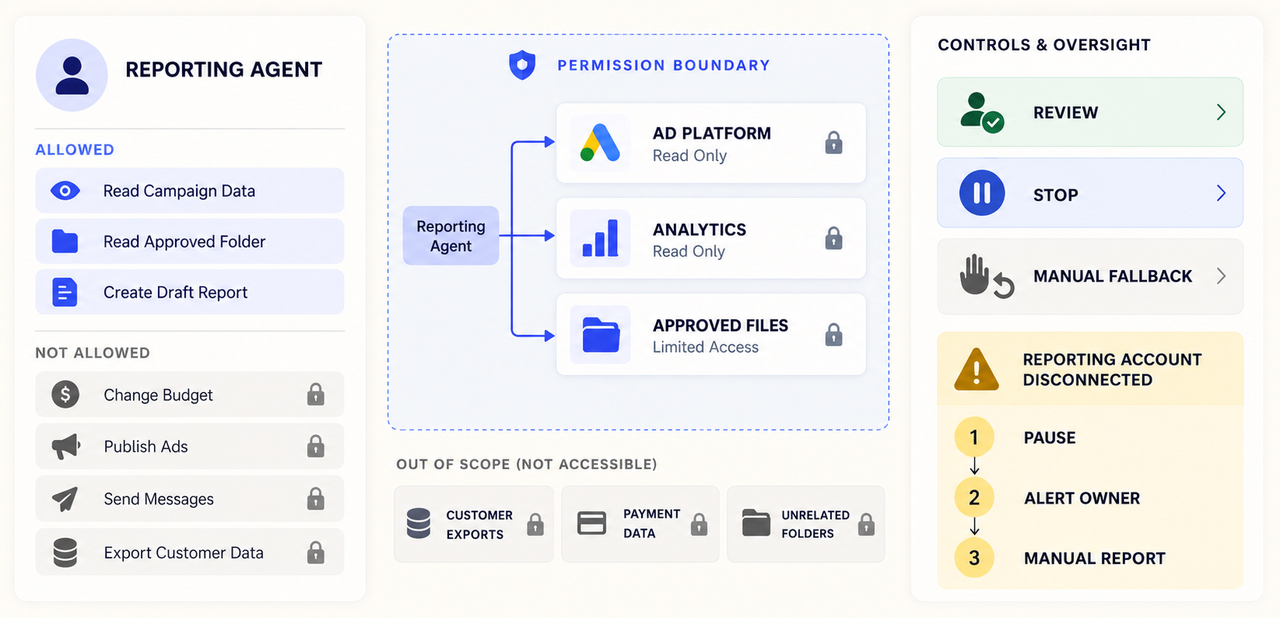
Access should match the first assignment. A research agent may need public search and an approved document folder. It does not need the email platform. A reporting agent may need read access to campaign data but no permission to edit budgets.
Write down the stop conditions before connecting accounts. Repeated source failures, missing citations, unexpected writes, or an attempt to reach an unapproved channel should pause the marketing agent workflow.
Limit Tools and Data to the Task
Use a dedicated application identity or limited integration where the platform supports it. Keep employee passwords, payment credentials, customer exports, and unrelated folders outside the configuration.
Before uploading brand files or prompts, check the vendor’s retention, training, deletion, and access terms. Share only what the task needs, and involve the appropriate reviewer when sensitive data is involved.
Review Outputs Before External Action
The first runs should stop in a private document, draft queue, or internal channel. Test one bad input on purpose: an expired offer, a missing source, or a disconnected reporting account.
The right response is visible refusal or escalation. A polished guess is a failure, even when the wording sounds plausible.
Decide When Agent Setup Needs Expert Help
An internal marketer can often manage a read-only research task. Specialist setup becomes more useful when the work crosses accounts or can change ads, records, or published content.
The setup brief should name the task, connected systems, permitted actions, review location, and shutdown method. It should also say who maintains the workflow after launch. That is more useful than asking an implementer to “add AI to marketing.”
SpringBrand’s current site presents agent-ready plugins and APIs for GTM work, including research, content, and advertising tasks. Availability and exact actions still need checking for the planned workflow.
When the first task is clearly bounded, review SpringBrand’s available marketing capabilities before deciding how to connect it.
FAQ
The product details in these answers were checked against official pages on September 13, 2026.
Which marketing platforms offer agent-specific service accounts?
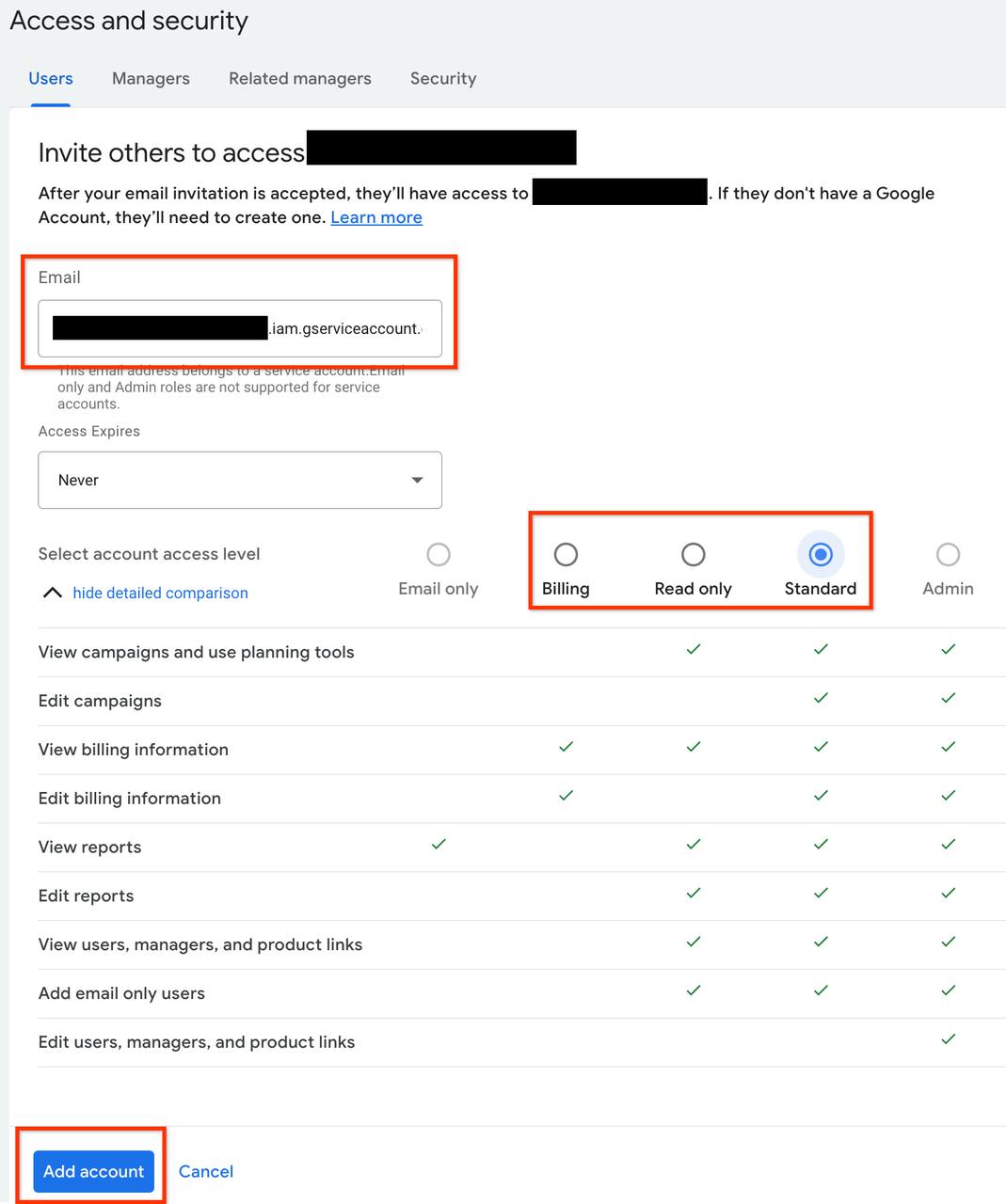
Terminology varies. Google Ads supports service accounts that belong to an application, and administrators choose their access level. Confirm the actions available at that level, store the key securely, and avoid sharing one identity across unrelated workflows.
Can agents work in an ad platform’s draft mode without publishing?
Sometimes, but “draft” can mean different things. The Google Ads API lets most mutation requests use validate_only without executing the change. A paused campaign is not the same safeguard. Verify the method and keep publishing permission outside the agent where possible.
How do vendors store uploaded brand assets and prompts?
Storage depends on the product, plan, and workspace settings. OpenAI’s API data controls list retention behavior by endpoint, but those terms do not cover other vendors or every OpenAI product. Check deletion, training use, administrator access, and subprocessors before uploading confidential assets.
Which products offer per-action spending caps?
Do not treat a campaign budget as an agent spending limit. Cloudflare documents maximum spend for planned Virtual Wallets, but its Wallets page says only handle reservations are currently available. For live use, verify transaction caps, total limits, merchant restrictions, and revocation.
Do research agents keep source links in competitor briefs?
Some products do. OpenAI documents inline URL citations for responses that use its web search tool. That does not cover every custom agent or export. Test the final format and keep each URL beside the claim it supports. Reject a brief whose sources disappear during handoff.
Conclusion
Use AI agents for marketing where the work can stop at a research brief, content option, or draft report. Those outputs give a marketer time to inspect the facts and change the direction.
Keep publishing, budget changes, sensitive claims, and campaign conclusions with people until the team can bound the action and verify what the agent used.
Recommended Reads
Explore SpringBrand
Turn ideas into working workflows
Connect agents, APIs and tools in one workspace. Start with a task you want to get done.
Get started free
One account. 10,000+ APIs & capabilities
Give your agent APIs and plugins without separate keys or integrations for every provider.
Explore APIs
No tool expertise needed
Describe your GTM task. SpringBrand chooses the right APIs and plugins for your agent automatically.
Find tools for your task
Run tasks 24/7
Connect your agent to SpringBrand to keep tasks running automatically, day and night.
Connect your agent