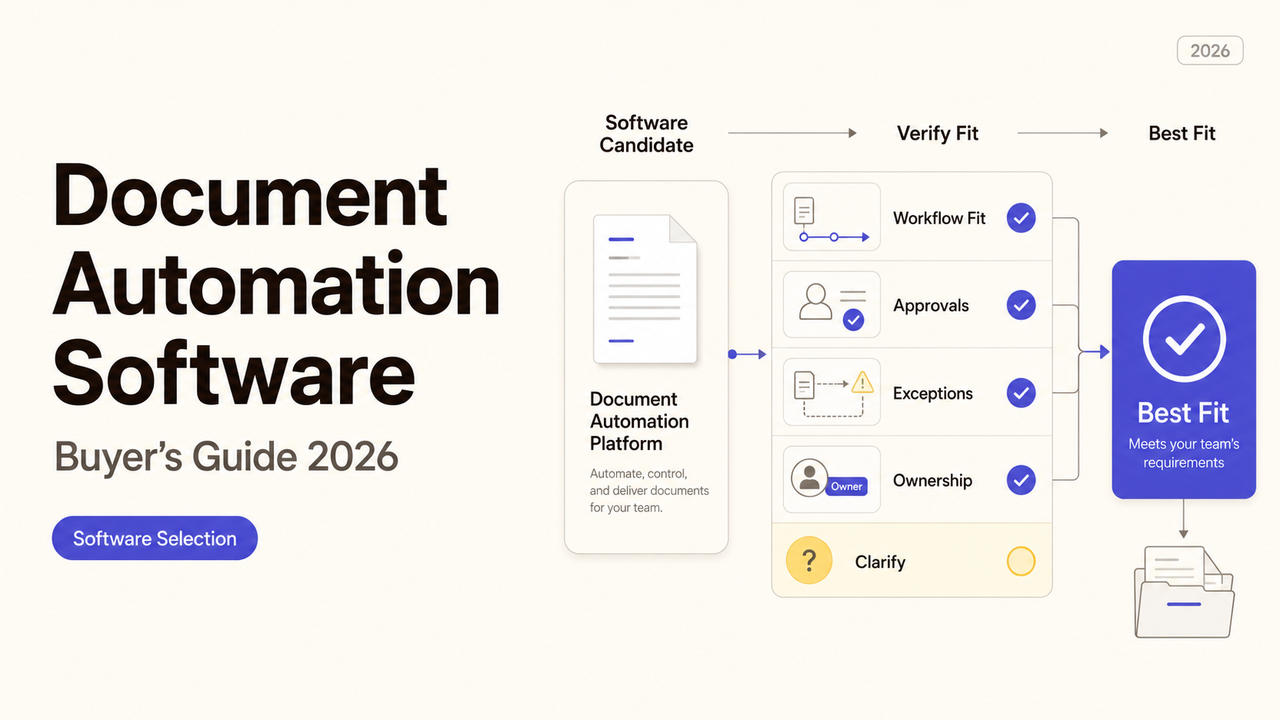
Document Automation Software Buyer’s Guide 2026
Document automation software should be compared by workflow fit, integrations, controls, implementation effort, and total cost.
Three products can all call themselves document automation software while doing very different jobs. One fills a proposal with CRM data. Another reads incoming PDFs, while a third routes a contract for approval and signature. A useful shortlist begins by deciding which of those jobs comes first. That choice gives the buyer a practical test for features, setup, security, and total cost.
Quick Verdict: Start With the Document Type
Begin with a document your team handles often enough to understand. A sales proposal, supplier agreement, invoice, intake form, or policy update can each reveal different requirements.
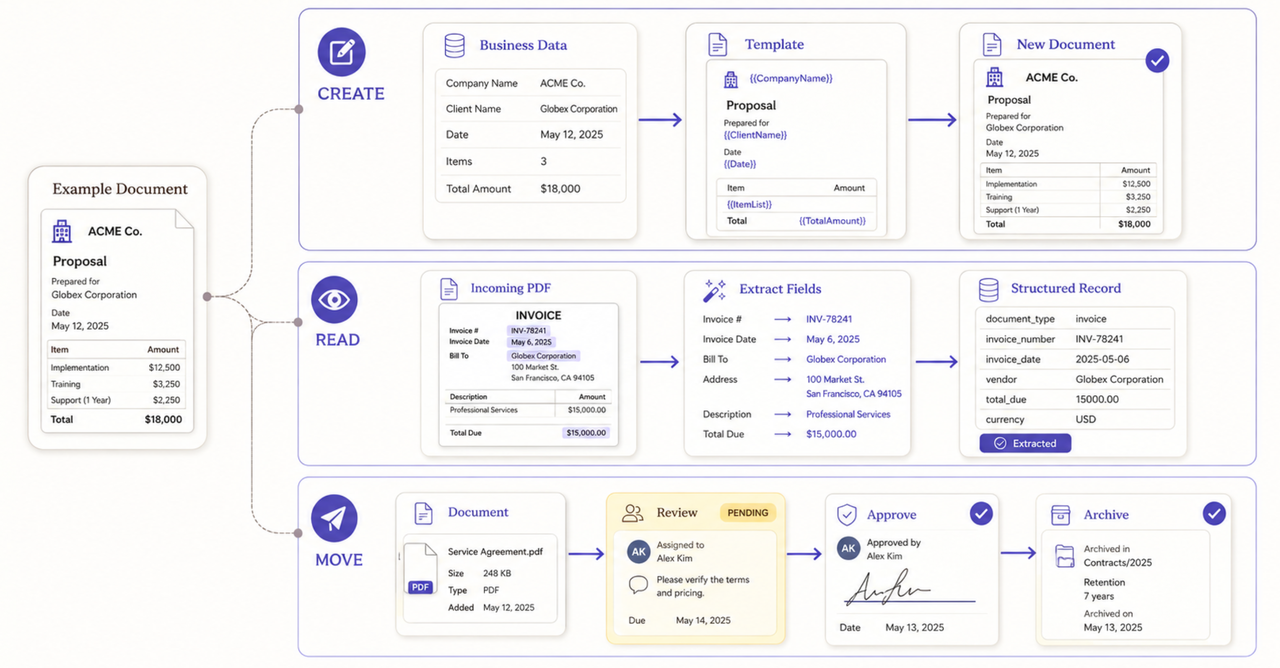
Record where the document starts, what a finished copy looks like, and who approves it. Those details matter more than the number of features on a pricing page.
The first document also determines the first software category to investigate:
| Primary job | Typical document | Capability to investigate first |
|---|---|---|
Create a new file from business data | Proposal, quote, letter, report | Document generation software |
Read or classify an incoming file | Invoice, application, order form | Document processing tools |
Move a file through decisions | Contract, policy, request | Document workflow software |
Some products cover more than one category. The buyer must still test where another tool or manual step remains.
If the current process is unclear, map it before comparing software. This buyer’s guide begins after the team has settled the owners, exceptions, and approval route.
Separate Generation, Processing, and Workflow Tools
Document generation software creates a new file from a template and structured data. A sales team might merge customer, product, and pricing fields into a proposal. An operations team might create a standard letter from an approved record.
Processing software works in the other direction. It receives an existing file and extracts or classifies information. Tests should include the layouts the business actually receives.
Workflow tools move a document between people and systems. They may request approval, collect a signature, or send the final copy to storage. The route must match the way the business makes decisions.
A broad document automation tool may combine these jobs. The vendor should show which component performs each step.
Compare the Features That Affect Daily Work
Feature pages help buyers form questions, but real documents are still needed to prove fit.
Templates, Data Merging, and Version Control
A template should protect approved wording while allowing the right fields to change. Tests should include long values, optional sections, and difficult page breaks.
The data source matters too. The team needs to know what happens when a required value is blank, incorrect, or changed later.
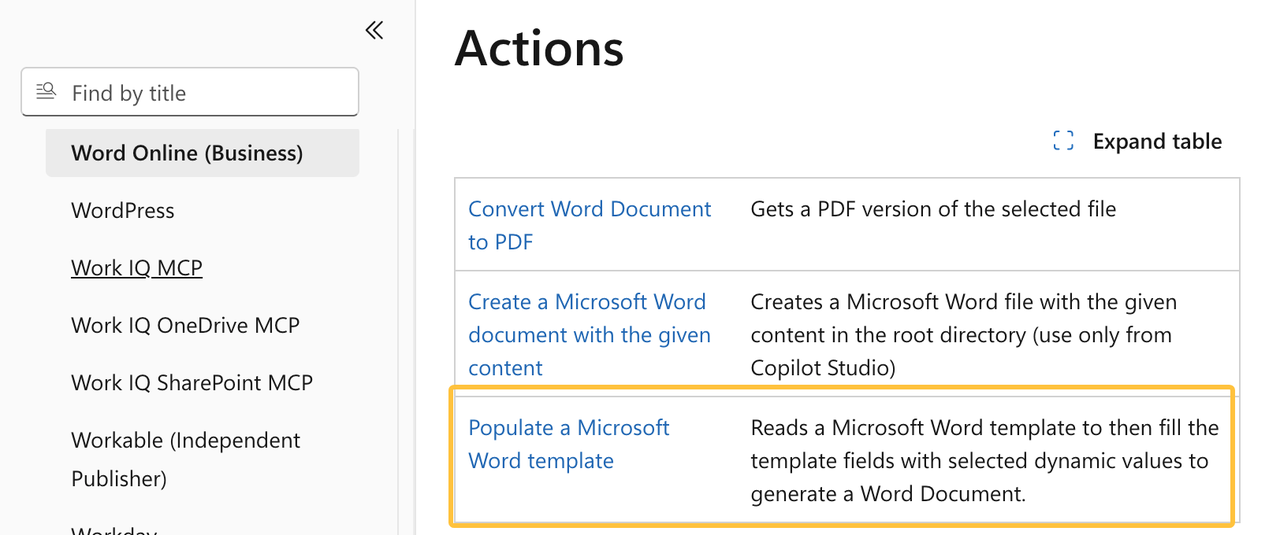
Microsoft’s current Word Online (Business) connector documents a Populate a Microsoft Word template action. It also lists supported controls and known limitations. Buyers should seek the same detail from every candidate.
Version control should show which template created a document. Look for a visible version, change history, approval date, and owner.
Approvals, Signatures, and Audit Trails
An approval and an electronic signature are not always the same event. The software should preserve their order and show who completed each step.
Adobe’s current Acrobat Sign documentation explains how an audit report can be attached to completed agreements. It also warns that email attachments can spread audit details. Buyers should test both the record and its distribution.
Signature requirements can vary by document, customer, industry, and location. The vendor can explain its product, but the business must confirm which method is acceptable. Legal or regulatory questions should go to an appropriately qualified reviewer.
Integrations, APIs, and Export Options
An integration needs more than a marketplace listing. Buyers should verify the records, events, authentication, errors, and plan restrictions it supports.
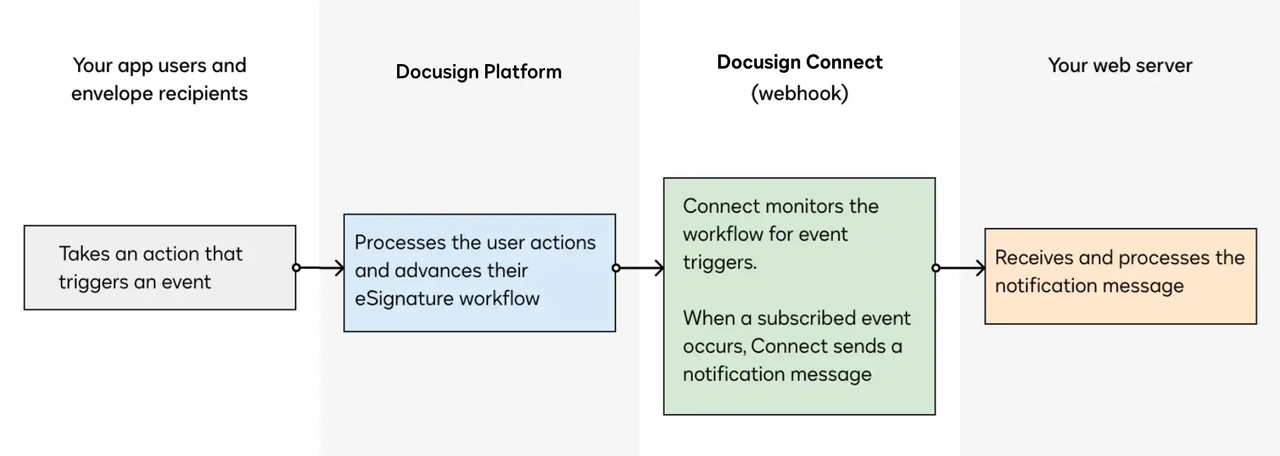
Docusign describes Connect as a webhook service for eSignature events. A provider still needs to show the events, permissions, and retry behavior used in the proposed setup.
Exports deserve equal attention. Test completed files, editable templates, audit records, field data, and document indexes outside the product.
Estimate Setup Effort and Total Cost
The subscription price is only one part of the purchase. Total cost may also include implementation, template rebuilding, data cleanup, connectors, usage charges, storage, training, support, and future changes.
A practical estimate can use this structure:
Total cost = software access + usage + implementation + migration + training + maintenance + exit work
Each provider should price the same starting document and transaction volume. The estimate should state which users need paid access and which features require another plan. It should also explain what happens when document volume, storage, or signature use increases.
Internal time belongs in the estimate. A low software fee can still create substantial work when staff must rebuild templates or correct failed files.
There is no reliable universal price for this category. Costs change with the product, region, plan, volume, integrations, support, and contract date. Use current vendor quotes and official terms instead of an undated market average.
Validate a Shortlist With Real Documents
A product demonstration should become a controlled pilot before a broad agreement. Use one normal document and one difficult example.
The pilot should show:
- how the document enters the system;
- which fields are required;
- what happens when information is missing;
- who reviews and approves the result;
- which files and records are produced;
- how an error is found and corrected.
Acceptance criteria should describe evidence. “The proposal looks right” is subjective. “The approved price, customer name, optional clause, page layout, PDF, and CRM link match the test record” gives both sides a result they can inspect.
Run the pilot with the people who will use the system. Include their normal devices and customer-facing formats.
Check Security, Access, and Vendor Support
Document systems may hold sensitive business or personal information. The shortlist should cover access, storage, retention, backup, incidents, and account recovery.
Permissions should follow job responsibilities. NIST defines role-based access control as access tied to a user’s role and permitted functions. During the pilot, confirm that a template editor, approver, temporary contractor, and administrator do not automatically receive the same access.
Outside implementation partners may need temporary access to templates and connected systems. CISA provides a small-business guide for assessing vendors and suppliers, including providers with cloud or system access. The contract and project plan should name the accounts used, the information available, and the removal date.
Support should be tested before a serious failure. Record the support channel, escalation path, and responsibilities that remain with the buyer.
Decide When Implementation Help Is Worthwhile
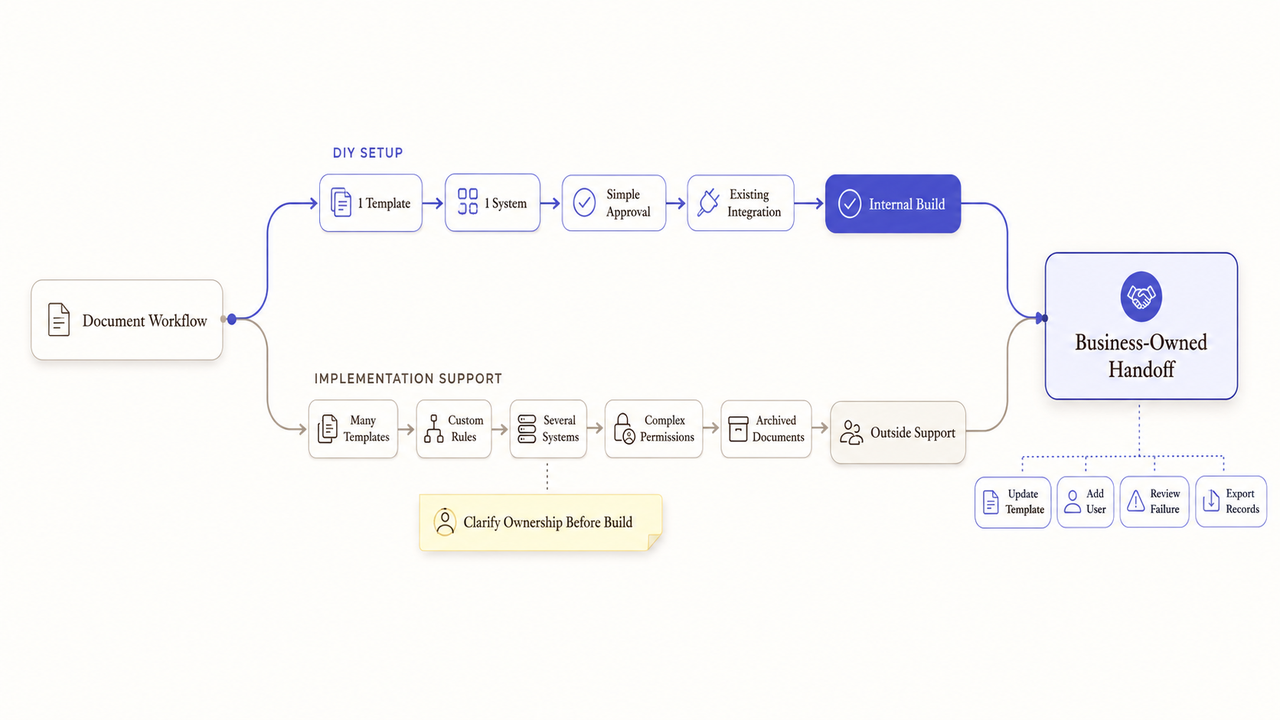
An internal team may handle setup when the first workflow uses one simple template and an existing integration. Someone inside the business still needs time to test the document, train users, and maintain the approved version.
Implementation help becomes practical with many templates, custom rules, several systems, complex permissions, or archived files. It may also help when no internal owner can document the setup.
The engagement should name what the partner will build, test, document, and hand over. It should also separate software fees from service fees. Before work begins, confirm who owns editable templates, configuration files, scripts, and training materials under the contract.
A useful handoff leaves the business able to add a user, update a template, review a failed document, and export its records. If those tasks still depend on the provider’s private account, the implementation is not ready to close.
How SpringBrand Fits This Decision
SpringBrand is not document automation software and does not implement the selected product. It can help a buyer turn the desired outcome, document examples, platform needs, and handoff requirements into a clearer service request.
Once the implementation scope is defined, describe the project and browse relevant independent services through SpringBrand. Catalog availability can change, and the buyer still approves the provider, access, terms, and final work.
FAQ
Who owns custom templates built by a software implementation partner?
Ownership depends on the contract, licenses, and any pre-existing material. Before work starts, identify the editable files, new custom work, third-party components, reuse rights, and items delivered at exit. A qualified legal professional should review unclear rights.
How should teams migrate archived documents when contracts end?
Create an inventory before the end date and test the available exports. Preserve required documents, indexes, versions, audit records, and retention labels. Confirm the new system can read them before the old account is closed.
Who should approve translated templates when terminology differs across regions?
The regional business owner should confirm meaning and workflow fit. A qualified language, legal, or compliance reviewer may also be needed when the wording affects obligations, regulated claims, or customer rights.
Can temporary contractors access the same document template library?
Only when their work requires it and the access has been approved. Give each contractor an individual account with limited permissions and an expiration date. Remove access when the assignment ends.
Who removes test data before a workspace changes ownership?
The project owner should assign that task to a named administrator or data owner. The handoff record should show what was removed, which backups remain, and who verified the new workspace before control changed.
Conclusion
The right document automation software depends on the document, not the longest feature list. Buyers need to see how one real file is created or received, reviewed, approved, exported, and maintained.
Build the shortlist around that route. Compare the same document, volume, integrations, access rules, costs, and exit requirements across every candidate. The purchase is ready when the team can explain both the daily work and the evidence it expects from the software.