Social Media Monitoring API: Choose Safe Data Inputs
Choose a social media monitoring API by checking source access, query inputs, coverage, timestamps, deletions, rate limits, and review controls.
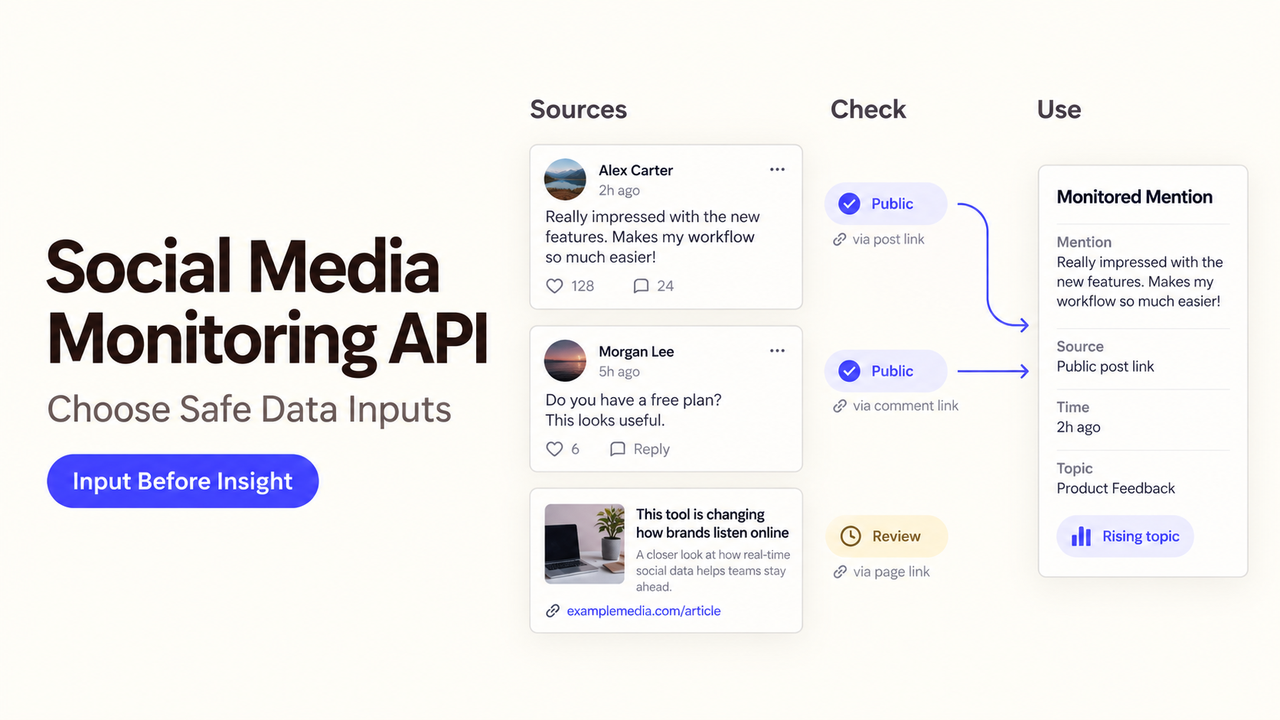
Your brand team wants an alert whenever a product complaint starts spreading. One supplier promises “Instagram coverage”; another offers searchable YouTube videos. Neither phrase tells you whether the API can retrieve the posts your team needs, when it finds them, or what happens after an author deletes one.
Choose a social media monitoring API for a specific decision, then inspect its permitted sources and returned records. This documentation-based guide was checked as of October 6, 2026.
What Task Should a Social Media Monitoring API Support?
Describe the signal and action: “Find public product complaints each morning, send likely service issues to Support, and let a reviewer dismiss false matches.” That needs searchable mentions, source links, and timestamps—not publishing access.
Keep four jobs distinct. Monitoring finds defined mentions or account activity. Listening looks for broader themes across conversations. Analytics measures performance, often for an account that authorized access. Publishing sends content outward and usually needs different permissions. An API that performs one job does not automatically perform the others.
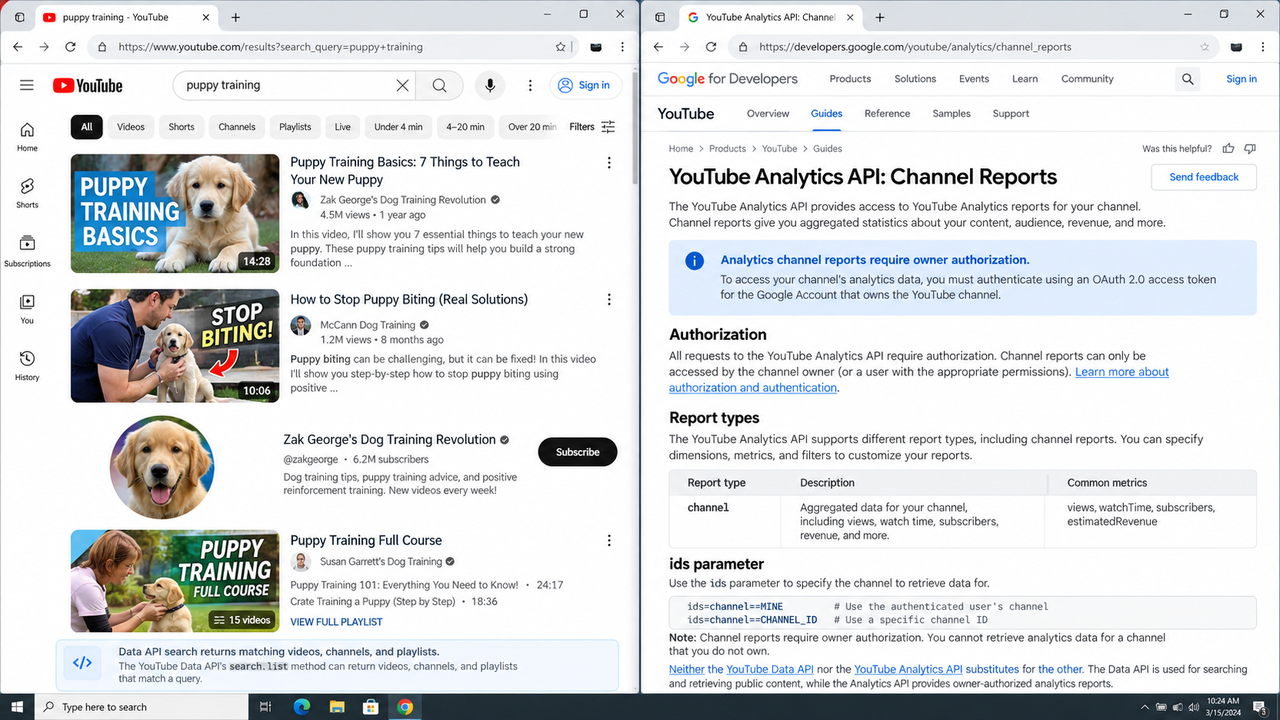
On YouTube, Data API search returns matching videos, channels, and playlists; Analytics channel reports require owner authorization. Neither endpoint substitutes for the other.
What Sources and Data Contract Are Allowed?
Ask for a sample response from the exact endpoint and account tier you would use. A product page that names six networks does not establish identical search rights, history, or fields on all six.
Queries, Accounts, and Public Content
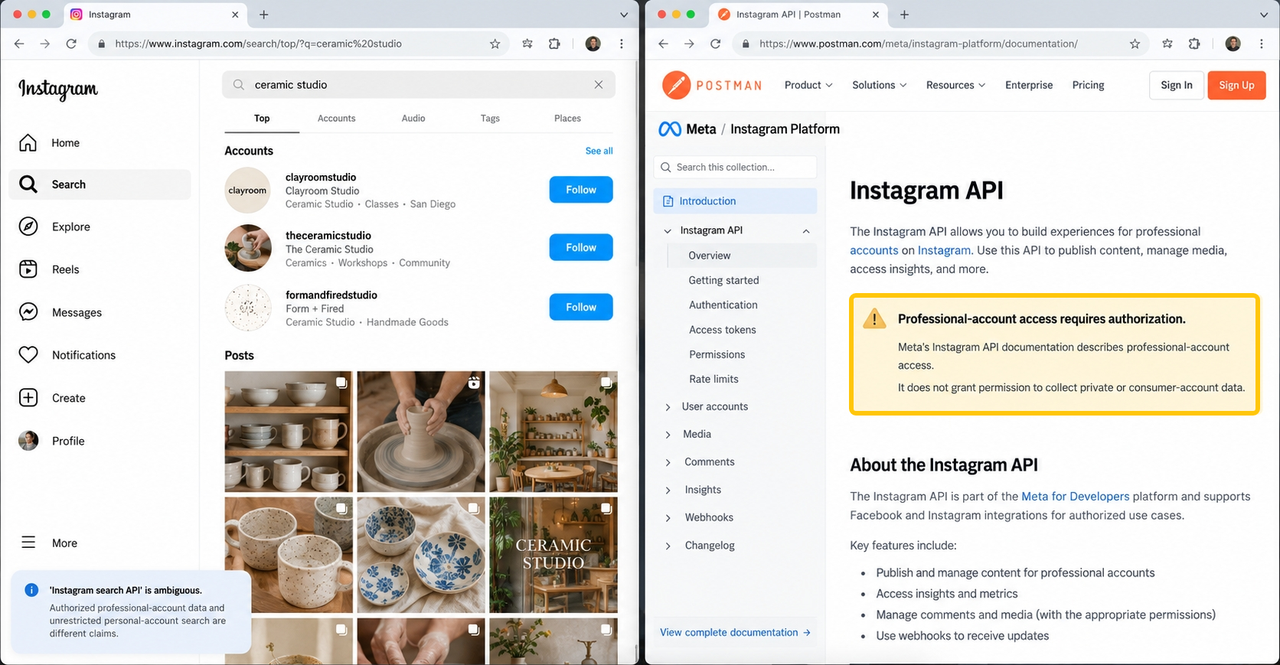
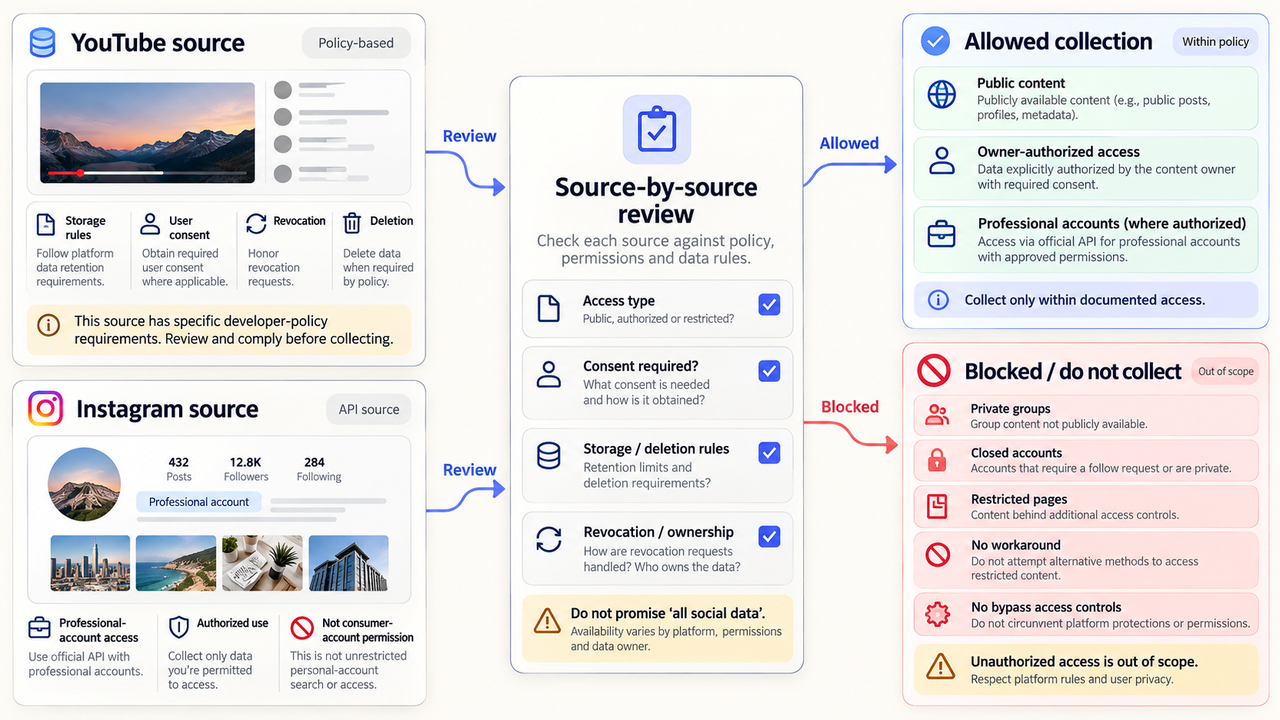
Specify keywords, hashtags, named accounts, or authorized profiles, plus relevant countries and languages. “Instagram search API” is ambiguous: authorized professional-account data and unrestricted personal-account search are different claims. Meta's Instagram API documentation describes professional-account access, not permission to collect private or consumer-account data.
For a provider API, ask which data comes from official access, licensed feeds, or another permitted source. Mention's API help says some social-source metadata needs additional configuration. “Platform supported” is not a coverage guarantee.
Returned Entities, Metrics, and Timestamps
Before comparing prices, list required fields: platform, item ID, URL, permitted author identifier, excerpt, publication time, collection time, and engagement metrics.
Keep publication time separate from collection time. A post published yesterday but first found today is not a fresh conversation. Also check whether an engagement number is a current platform metric, a provider estimate, or a value captured at a particular time.
YouTube's search response points to resources; its video lookup can return requested video parts such as snippets or statistics. A monitoring pipeline may need that second request. By contrast, Mention states that its API returns a relevant content snippet rather than the full article or post. A snippet may be enough for triage but not for a full-text analysis requirement.
Deletions, Edits, and Source Links
Require a durable source link or platform item ID, but do not assume the underlying content will remain available. Ask how the provider reports deletion, privacy changes, edited text, and withdrawn access. An unchanged cached row can mislead a reviewer after the source changes.
Show last checked and current availability separately from the original match. YouTube's developer policies distinguish authorized and non-authorized data and require refresh or deletion for many stored fields. Apply rules to the exact field and access basis; no universal retention period covers every platform.
How Should Teams Build the Monitoring Workflow?
Build the smallest path that turns one allowed source item into a reviewable alert. Keep the source record separate from your classification and from the team's response.
Poll, Deduplicate, and Normalize Records
For a daily complaint watch, save the query, poll time, pagination cursor, and response status. Deduplicate by platform item ID where available. If an aggregator adds its own ID, keep both IDs and the original URL.
Normalize only fields that truly mean the same thing. A YouTube video view and an Instagram post impression should not become one generic “reach” column without definitions. Preserve the raw permitted fields long enough to investigate mapping errors, subject to applicable storage limits.
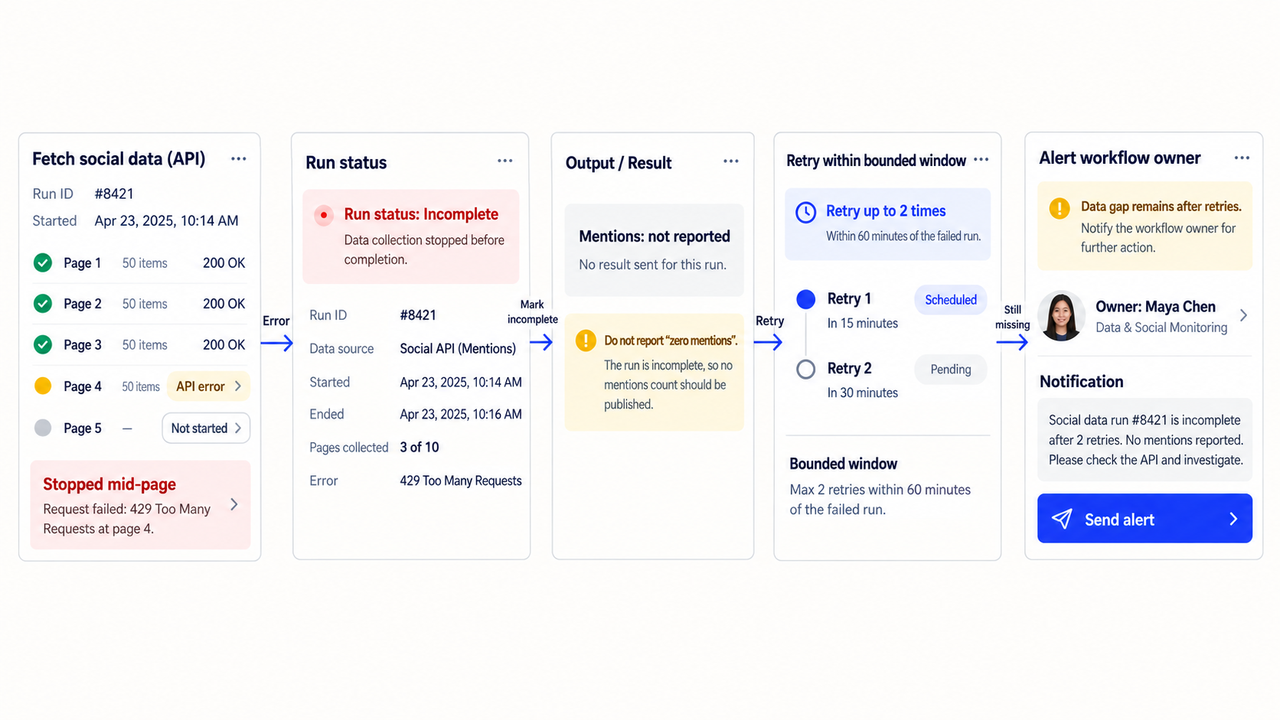
When the API returns an error or stops mid-page, mark the run incomplete. Do not report “zero mentions.” Retry within a bounded window, then alert the workflow owner if the data gap remains.
Classify Mentions and Escalate Exceptions
Start with simple exclusions for your own brand accounts, repeated promotional posts, and irrelevant uses of the product name. Then classify the remaining items as service issue, product feedback, potential risk, or uncertain. A sentiment label is a routing hint, not an objective fact about the author's intent.
Send a high-impact or uncertain item to a reviewer with the source link and reason it matched. The reviewer should be able to correct the category and choose whether to contact anyone. Monitoring data alone should not trigger a public reply, deletion request, or external message.
Store Evidence With Clear Retention Rules
Store the minimum needed to explain an alert: query version, provider, item ID, URL, timestamps, permitted excerpt, classification, and reviewer decision. Set a deletion or refresh schedule by source.
This is where the business process meets data rights. Your team may need a record that a complaint was reviewed, but it may not have permission to keep the author's full post indefinitely. Check the platform policy, provider contract, and your organization's retention schedule before production. This is operational guidance, not legal advice.
How Can Teams Test Reliability and Coverage Limits?
Use known, permitted public items across needed sources and languages. Include an ambiguous name, an edited or unavailable item, and a period with no matches. Record what arrives and when; documentation cannot establish recall.
Measure useful alerts, missed known items, duplicate alerts, delay from publication to detection, and reviewer time. Check whether a historical window includes content from before you created the query. Do not infer history from the existence of an API: Mention's current API guidance says historical data cannot be enabled through its API.
Test rate limits against your real query plan. YouTube documents search parameters and quota impact, while its error reference identifies quotaExceeded as a 403 condition. The safe response is to pause or reschedule collection, not to label a quota failure as a quiet day. Ask third-party providers for limits by endpoint, source, plan, and client account.
What Access Boundaries Must a Social Media Monitoring API Respect?
Check the official platform API and policy for each source, then the provider's contract for the feed you will actually purchase. Confirm permitted query types, account authorization, public/private boundaries, display rules, refresh and deletion duties, and whether your intended storage or AI analysis is allowed. A vendor's broad coverage statement cannot override a platform restriction.
For YouTube, the API developer policies set specific rules for storage, user consent, revocation, and deletion. Meta's Instagram API materials distinguish professional-account access. These are examples of why an “all social data” promise needs source-by-source review. Do not collect from private groups, closed accounts, or restricted pages without authorized access; do not use a workaround to bypass access controls.
Ask the provider for its current privacy terms, data-source list, subprocessors where applicable, and account-level permissions. A procurement owner should document unresolved questions before connecting a monitoring agent. This section summarizes technical checks; it is not privacy, security, or legal advice.
Conclusion
Choose a social media monitoring API that supports your exact query and review decision—not the longest list of platform logos. Test one real monitoring question, verify source-specific rights, and make missing or withdrawn data visible to reviewers.
If you already have permitted monitoring data, explore SpringBrand's current plugin marketplace for the next task; verify any connection before use.
FAQ
Do vendors offer sandboxes with synthetic social data for workflow testing?
Some may, but a sandbox is not a standard feature of social monitoring APIs. Ask whether it uses synthetic records, cached public examples, or live billable calls, and whether it can simulate deletion, rate limits, and empty results. Do not assume a trial account is an isolated test environment.
Can agencies isolate client workspaces and billing within one account?
That depends on the vendor's current account and commercial model. Request official documentation for client-level permissions, query separation, export rights, usage attribution, and billing. Mention's API guidance says quotas follow the Mention account; it does not by itself prove per-client isolation or billing.
Do vendors publish connector change logs before platform updates take effect?
Not consistently, and a published log does not guarantee advance notice. Ask for the vendor's change policy and incident channel, then subscribe to the underlying platform's official updates too. YouTube provides a Data API revision history, but a third-party connector may have a separate release schedule.
What support escalation applies when a source connector stops working?
Use the support terms in your agreement; there is no universal escalation time. Before purchase, ask who confirms a source outage, how the provider distinguishes platform restrictions from its own fault, and whether you receive a status notice. In your workflow, stop claiming complete coverage until collection resumes.
Can customers report and correct a mention attributed to the wrong social account?
They should have a correction path, but do not assume the API exposes one. Ask the provider whether corrections change the underlying record, a derived account match, or only your local classification. Keep the original item ID and reviewer correction so later runs do not repeat the error.